Get to Know Agentforce Functionality
Learning Objectives
When you complete this module, you’ll be able to:
- Describe Agentforce and AI agents.
- List three things agents need to get work done.
- Describe several types of jobs agents can perform.
What Is Agentforce?
When you were young, you and your siblings or friends probably wished for some sort of cool robot-like thing that could help with the dishes or clean your bedroom so you could do different kinds of things, like ride bikes or play video games. Now that you’re an adult and working in a business, you probably still wish for something to help with various jobs, or help your customers engage more easily with your company. Welcome to Agentforce. Agentforce puts helpful AI agents that know your business right in your everyday workflows to seamlessly handle all kinds of jobs for your employees and customers.
How does Agentforce do it? Agentforce is a proactive, conversational AI solution, made up of autonomous agents, that sits on the Salesforce Platform. What exactly is an autonomous agent? An autonomous agent is an advanced type of AI that can understand and respond to inquiries, then take action, with or without human intervention. When an agent is given an objective, they can generate tasks for themselves, anticipate next steps, change course based on user input, and initiate new tasks within the use cases and guardrails you set up. You might think of your Agentforce as trusted digital teammates.
How Agentforce Gets Work Done
Agentforce is built using smart technologies and highly customizable components. You might be thinking, smart? What makes a component smart? Well, Agentforce uses the power of artificial intelligence (AI), like machine learning (ML) and natural language processing (NLP), to make sense of your conversations, questions, or requests. Agents then process those requests by following your instructions so they can return responses that are grounded in your secure data. Many of the components in each agent can be configured to address unique needs across your organization. Let’s take a closer look.
Data
Like any employee, an agent needs to understand your company and your customers and have access to information about them. Because Agentforce is part of the Salesforce Platform, you choose the information and access controls your agents can use to securely do their jobs. Agents can use structured and unstructured data, like your knowledge articles, your CRM data, and data you connect from external sources to perform their tasks.
Reasoning
This is the brain behind every agent. The reasoning engine enables agents to process and understand human intent, and take action within the flow of a conversation to call different subagents and actions as the conversation shifts. Salesforce relies on the Atlas Reasoning Engine to do this work.
Actions
Actions are the individual tasks, like asking a user for their account number, that an agent performs when it does a job. You can customize standard actions, or create new actions that use your own business processes, like an autolaunched flow that initiates a product return, a prompt template that generates sales emails, or Apex that calls a weather app. An agent can have one or many actions depending on the jobs it’s configured to do.
Subagents
These are categories or classifications of actions that define the overall job or jobs an agent can perform. For example, a subagent called Order Management could initiate order-related actions assigned to it, like finding an order, tracking an order, or processing a return or exchange. The natural language instructions you provide in the subagent tell the agent when to initiate specific actions and act as guardrails for the agent.
Channels
You can deploy your Agentforce into the systems your employees and customers rely on for communication and work activities, such as your Salesforce org, Slack, text messages, or email. Your Agentforce can also be configured to integrate workflows or handoffs across channels.
Putting It All Together
Now that you know the technologies and components that help an agent get work done, let’s pull it all together and look at how an agent works. Here’s a scenario: When a user types a question into the agent window, the agent compares the request to the subagents that are assigned to it and selects the most relevant subagent. Based on the selected subagent, the agent initiates related actions, like identifying a customer, booking a reservation, or searching your indexed knowledge base for a solution. Your agent can also be configured to ask the customer for more information or provide an error message if it's not able to perform a task. This brings us to the next question.
What Types of Jobs Can Agentforce Perform?
Do you need an agent that can serve up help articles and installation instructions for your latest gizmo? Or maybe you need an agent to track and assign housekeeping requests at your resort? How about an agent that can summarize your top accounts for a meeting? Your Agentforce can be designed to do those things, and more, by using preconfigured agent templates, or by creating an agent from scratch..
Preconfigured Agent Templates
Agentforce comes with a library of preconfigured agent templates that already have relevant subagents and actions included, and work with specific clouds or licenses. These templates can be used as is, or customized to cover many of your business use cases.
A few of the standard agents you can configure are:
-
Agentforce Employee Agent: Customize this agent for your employees to help them search data sources, summarize accounts and opportunities, forecast revenue, and more, all in the flow of work.
-
Agentforce Sales Development Rep (SDR): Keeps leads engaged, fields questions and even objections while streamlining the tasks needed to keep reps operating at their best.
-
Slack Employee Help: Help employees get answers to questions in Slack. Search Slack channels to surface relevant information.
-
Agentforce Service Agent: Provide your customers with personalized interactions, common answers, and a support path for escalation.


Custom Agents
What if you want to create an agent to perform a job you need done, but you don’t see a preconfigured agent template that can do what you have in mind? For example, maybe you need an agent that can review new travel expenses and route them to the appropriate approvers. Well, Agentforce can help you configure a brand-new custom agent in seconds using natural language. All you need to do is describe the job you need done, and Agentforce pulls relevant subagents and actions from a library of subagents and actions already available to you.
Where Do I Interact with Agents?
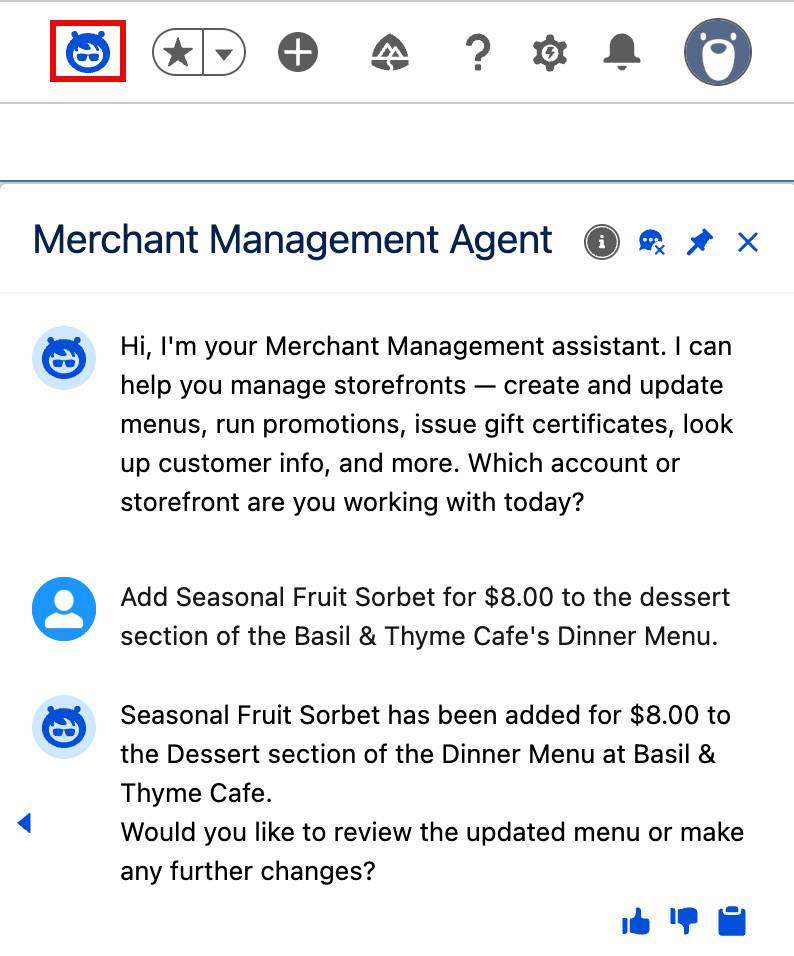
If you’re in a role that has Agentforce building permissions, like a Salesforce Administrator, you can configure agents for your company and customers to use in the places they get work done. Agentforce users can access agents right in the flow of their jobs when performing tasks like summarizing account details, approving workflows, or reviewing cases in their Salesforce org, or the Salesforce mobile app. Your Agentforce can also be deployed in Slack to help with all sorts of jobs, like assisting your IT team with help-desk tickets or helping your HR team assign and track onboarding tasks, or helping you find information you need across Slack channels.
Your customers can use agents on your website or experience sites to more easily communicate with customer support, access help documentation, or schedule appointments and services. Once your organization gets up and running with Agentforce, the sky’s the limit as to what you can configure your Agentforce to do, and the jobs each agent does dictates where users will engage with it.
Agents and Trust
Everything in Salesforce is built around our core tenet of trust. This makes it easy to build a secure Agentforce that’s integrated with the Einstein Trust Layer to mitigate generative AI risks. The Trust Layer ensures that responses your agents generate are grounded in your trusted company data. And its zero-data retention policy means that your company and customer information will never be released into the wild.
The Trust Layer detects potentially harmful LLM responses, and includes event log monitoring for transparency in each user interaction. Subagent instructions that define agent behavior also act as guardrails to prevent hallucinations and malicious attacks. The access agents have to records and fields is permissions-based and can be set for different agent types and actions.
In the Agent Preview panel, you can try out your agents with all types of input to make sure they respond as you expect. The Agentforce Testing Center adds another level of security by generating probable input to further ensure your agent is secure.
Wrap Up
You just learned that you can use Agentforce to configure a team of autonomous AI agents to help do jobs across your business. The AI technologies these agents use help them make sense of natural language inquiries to complete tasks that are grounded in your secure data and use permissions and guardrails you set. By integrating into multiple channels, your agents act as trusted digital teammates that can efficiently handle tasks with or without human intervention. We recommend that you complete the Introduction to Agentforce Builder module next to learn how agents come to life.
Resources
- Video: Introducing Agentforce
- Trailhead: Autonomous Agents
- Video: Why Agentforce Makes AI Agents Reliable for Business
- Blog Post: Inside the Brain of Agentforce: Revealing the Atlas Reasoning Engine
- Salesforce Help: Configure Your Agent
- Trailhead: Einstein Trust Layer
- Trailhead: Natural Language Processing Basics
- Trailhead: Prompt Fundamentals