Issue and Endorse Policies
Learning Objectives
After completing this unit, you’ll be able to:
- Explain how accepted quotes are issued as versioned insurance policies.
- Describe how Digital Insurance handles in-term policy changes through endorsements.
- Explain how policy actions are executed through services and surfaced to users.
- Describe how policy structure and transactions preserve history and auditability.
Move from Quote to Policy
After a customer accepts an offer, an insurer converts the priced quote into binding coverage. That step is policy issuance.
Issuance creates an insurance policy that is versioned, dated, and ready to support servicing. It defines the coverage structure, premium, and term boundaries that govern what is in force and when.
After a policy is active, change becomes part of normal operations. Customers add or remove insured assets, adjust coverage levels, correct policyholder details, and update participants. These midterm updates are handled through endorsements, which are dated policy changes that preserve a clear history of what changed and how the change affected premium and other financials.
Digital Insurance supports this continuity by treating issuance and endorsements as governed transactions against the policy record. Policy versions, effective dates, and structured service execution help ensure that updates remain auditable and financially accurate as the policy evolves.
In this unit, you learn how to issue a policy from an accepted quote and how to apply an endorsement to an active policy while preserving version history, effective dates, and financial impact.
Surface Policy Actions Through Configured Experiences
Quoting runs through shared services, and policy administration continues from that same execution model. Instead of rebuilding product and pricing logic, Digital Insurance uses policy services that take an existing quote or policy context and produce a controlled, versioned result.
Digital Insurance provides policy administration APIs and invocable actions that perform the core work of issuance and endorsements. Issue policy services consume a finalized quote context and create a structured policy record. Endorsement services start from the current policy context, generate an endorsement quote to capture the proposed change and pricing impact, then create a new policy version with recalculated premiums and a linked transaction record.
For the full set of policy APIs, read APIs and Invocable Actions in Insurance Policy Administration in Salesforce Help.
Admins decide how to assemble and expose these capabilities. Using Flow and page-level actions, they can present policy services as straightforward buttons on quote and policy records, such as Issue Policy and Endorse Policy.
For a user, the orchestration stays behind the scenes. You select an action, the platform passes the appropriate context to the relevant service, and the resulting policy records and transactions are created in a form that other teams can trust.
Check back in with Cumulus and follow along as Captive Agent Riley Zhang issues a policy after a quote is accepted, then processes a midterm change for the policyholder.
Issue a Policy
After the policyholder accepts the auto quote, Riley issues binding coverage. From the approved quote record, she selects Issue Policy, a page-level action configured by Cumulus’s Salesforce admins.

This is a single click for Riley, but a governed process runs underneath. The platform retrieves the accepted quote execution context, including product hierarchy, configured attributes, and pricing outcomes. Using that context, the system generates a structured policy hierarchy with effective start and end dates that define the policy term. Term premiums, taxes, and fees are calculated based on those dates, and a policy issuance transaction records the financial and audit impact.
For multi-root quotes, such as an auto and home bundle, issuance creates a parent policy record and individual child policies for each root product. Rules, premiums, taxes, and lifecycle transactions are captured at the child level, then rolled up to the parent policy for consolidated visibility. This supports bundled selling while preserving independent coverage logic and financial traceability for each product.

The resulting policy mirrors the quote structure, including root product, nested components, insured items, and participants, rather than collapsing it into a flat summary.
The quote is already decision complete, so issuance carries forward the evaluated structure and pricing results without reconfiguration or rerating. From this point on, the policy becomes the authoritative data source. Riley manages versions and transactions from here, returning to quotes when she needs to propose and price a change.
Endorse an Active Policy
Later in the term, the policyholder requests a change, such as adding a second vehicle.
From the active policy record, Riley selects Endorse Policy. Behind the scenes, a configured flow retrieves the current policy context and generates an endorsement quote. This quote represents the proposed change, priced and validated using the same product model and rating logic that produced the original premium.
The experience feels familiar. Riley reviews the existing policy structure, adds the new vehicle, and confirms the endorsement effective date. As she updates values, pricing recalculates automatically, showing the incremental premium impact of the endorsement.
After the policyholder accepts the updated terms, Riley completes the action. Digital Insurance uses the final endorsement context and effective date to:
- Generate a new policy version that reflects the approved change.
- Preserve the prior version and adjust effective dates to maintain continuous, nonoverlapping coverage.
- Reapply pricing logic from the endorsement date forward.
- Prorate premiums, taxes, and fees based on the timing of the change.
- Record a policy transaction linked to the policy term.
Coverage and financial impacts are captured without overwriting history. Each version remains traceable, and the chain of transactions maintains a continuous audit trail. The result is uninterrupted coverage with clear visibility into how and when the policy evolved.
Handle Out-of-Sequence Endorsements
It’s important that some changes take effect earlier than an already issued policy version. For example, the policyholder corrects a detail effective March 1, but a separate endorsement was already applied on April 15. The platform updates the March 1 point in time and ensures later versions reflect the correction.
From Riley’s perspective, the entry point stays the same. She initiates policy endorsement, reviews the endorsement quote, and confirms the effective date. When the effective date falls before an existing version, configured logic routes the request to an out-of-sequence endorsement action. The selected service recreates the policy version as of the chosen effective date, reruns pricing from that point forward, applies the change across impacted future versions, and preserves the transaction chain across the term.
Out-of-sequence endorsement requires explicit configuration. Salesforce admins build flows that identify impacted versions and route to the correct endorsement action based on the selected effective date.
For more information, check out Insurance Policy Out of Sequence Endorsement in Salesforce Help.
Map the Policy Data Model
Policy issuance and endorsement work because Digital Insurance stores policies as structured, versioned records rather than flat documents.
When Riley issues a policy or applies an endorsement, the system creates or updates a set of related records that preserve coverage structure, pricing context, and history.
This structure is how endorsements create a new version without overwriting the prior one, and what gives billing, claims, and audit teams a reliable trail of what was in force on any date.
Here are the core policy objects you work with.
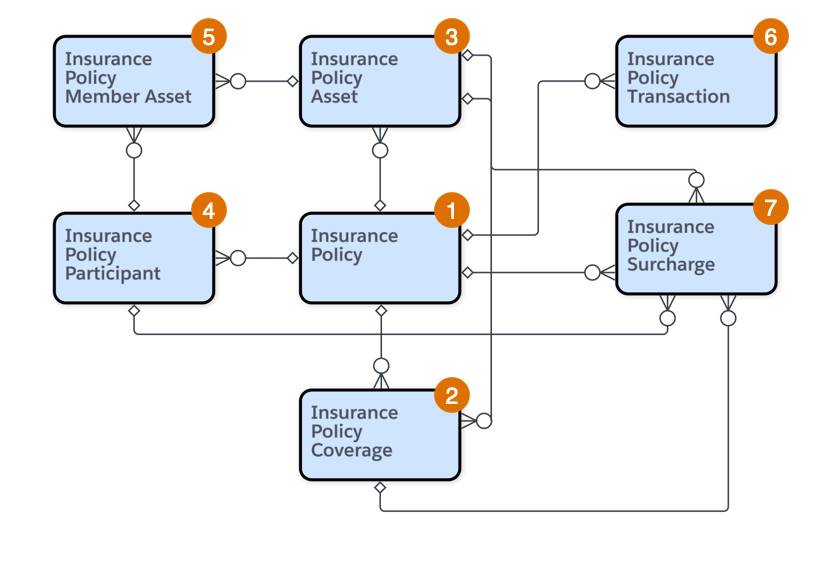
This table describes each key object.
Object |
Description |
Example |
|---|---|---|
Insurance Policy (1) |
The top-level policy record for a single term |
12-month Auto Gold policy |
Insurance Policy Coverage (2) |
Individual coverages included in the policy |
Liability, Collision, and Comprehensive |
Insurance Policy Asset (3) |
Insured items linked to coverages |
A particular vehicle |
Insurance Policy Participant (4) |
Covered individuals and their roles |
Policyholder as the primary driver |
Insurance Policy Member Asset (5) |
Association between participants and assets |
Primary driver linked to the vehicle |
Insurance Policy Transaction (6) |
Lifecycle events that change the policy |
Mid-term vehicle addition recorded as an endorsement |
Insurance Policy Surcharge (7) |
Itemized taxes and fees |
State premium tax |
Additional attribute records store configured values such as deductibles, vehicle identification numbers (VINs), driver details, and coverage limits, and related records connect policy components back to objects such as Account and Contact.
Within a single term, each lifecycle event links back to the same policy record for that term. Each endorsement creates a new effective dated version, and each transaction records the financial impact of that change. The result is a continuous, traceable history where you can answer what was covered, when it was covered, and what changed the premium.
What’s Next
In this unit, you followed an accepted quote through issuance and saw how midterm changes are handled through endorsements. Digital Insurance preserves structure, pricing logic, and history by creating versioned policy records and recording each change as a transaction.
In the next unit, you explore how policies are renewed, cancelled, and reinstated, including how Digital Insurance supports both individual actions and high-volume operations at scale.