Get to Know Enterprise Knowledge
Learning Objectives
After completing this unit, you’ll be able to:
- Define Enterprise Knowledge and describe what problem it solves.
- Identify the benefits of Enterprise Knowledge.
- Explain how Enterprise Knowledge differs from Lightning Knowledge.
- Recognize when an org needs Enterprise Knowledge versus when Lightning Knowledge alone is sufficient.
Before You Start
Before you start this badge, consider completing this recommended content: Salesforce Knowledge Basics.
What Is Enterprise Knowledge?
Let’s be honest: Your organization’s knowledge probably doesn’t live in just one place. Some of it’s in Salesforce Knowledge. Some of it’s stuck in wikis, policy docs, or support runbooks nobody remembers the login for. Enterprise Knowledge brings all of it together.
It integrates native Salesforce Knowledge articles with external knowledge ingested through Data 360, giving you one comprehensive knowledge base instead of scattered systems. Under the hood, it uses Data 360’s unified data and search infrastructure to extend what Salesforce knowledge management can already do. Instead of hunting across five systems, reps get one consistent search experience across everything—internal and external alike. Every article also renders in the same clean, consistent format, no matter where it came from.
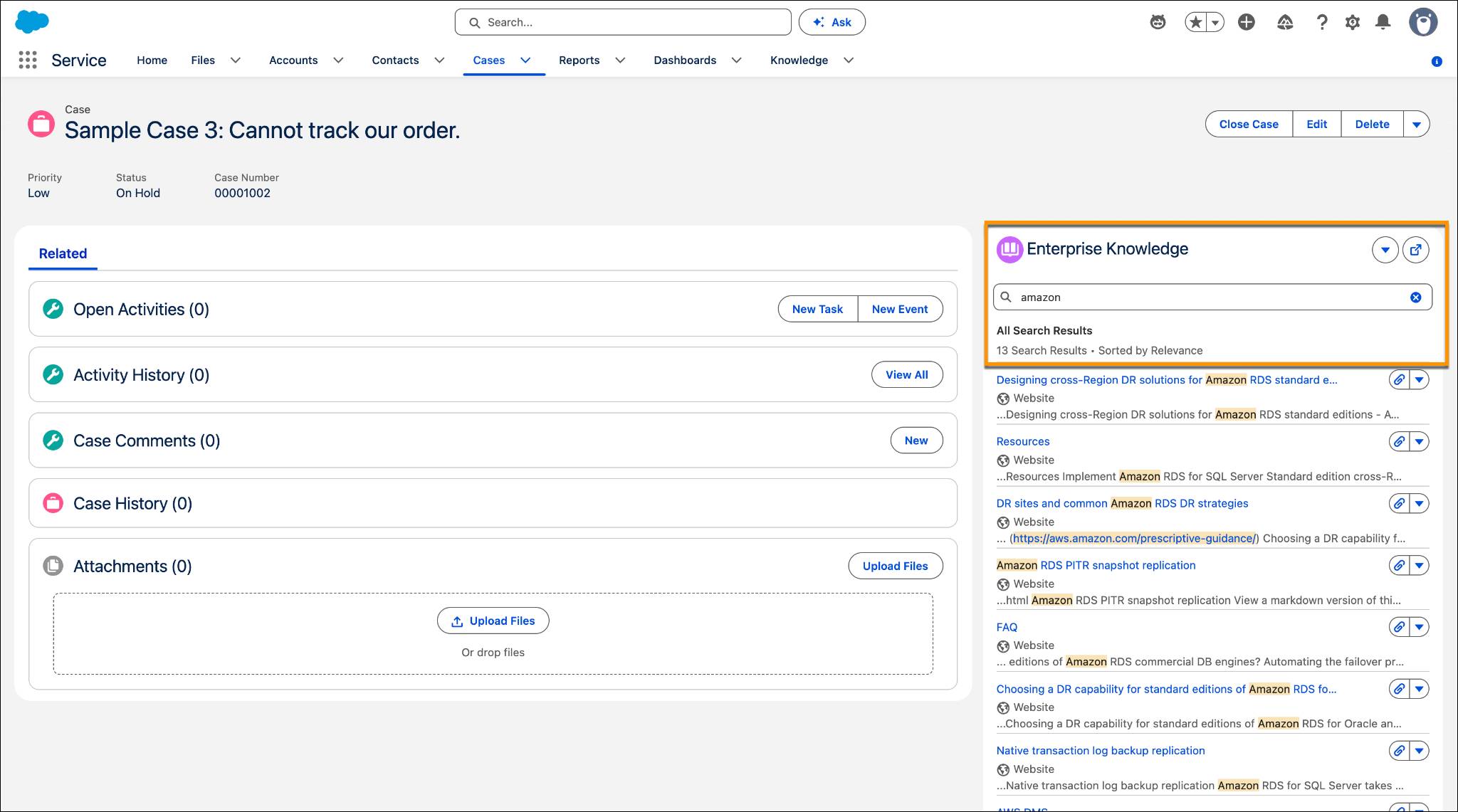

How Is Enterprise Knowledge Different from Lightning Knowledge?
If you’re used to Lightning Knowledge, you already know how to write, manage, and search articles stored directly in Salesforce. Good news: Enterprise Knowledge doesn’t replace any of that, it builds on top of it.
Your Salesforce Knowledge articles and harmonized external content stay clearly labeled but are searchable together. On case and record pages, you see two related lists side by side: Standard Knowledge Articles for native Salesforce content, and Enterprise Knowledge Articles for harmonized external content pulled in through Data 360.
Enterprise Knowledge is read-only. It brings knowledge from different systems into Salesforce for search and AI answers. Salesforce Knowledge supports the full knowledge lifecycle: create, edit, publish, and manage articles over time.
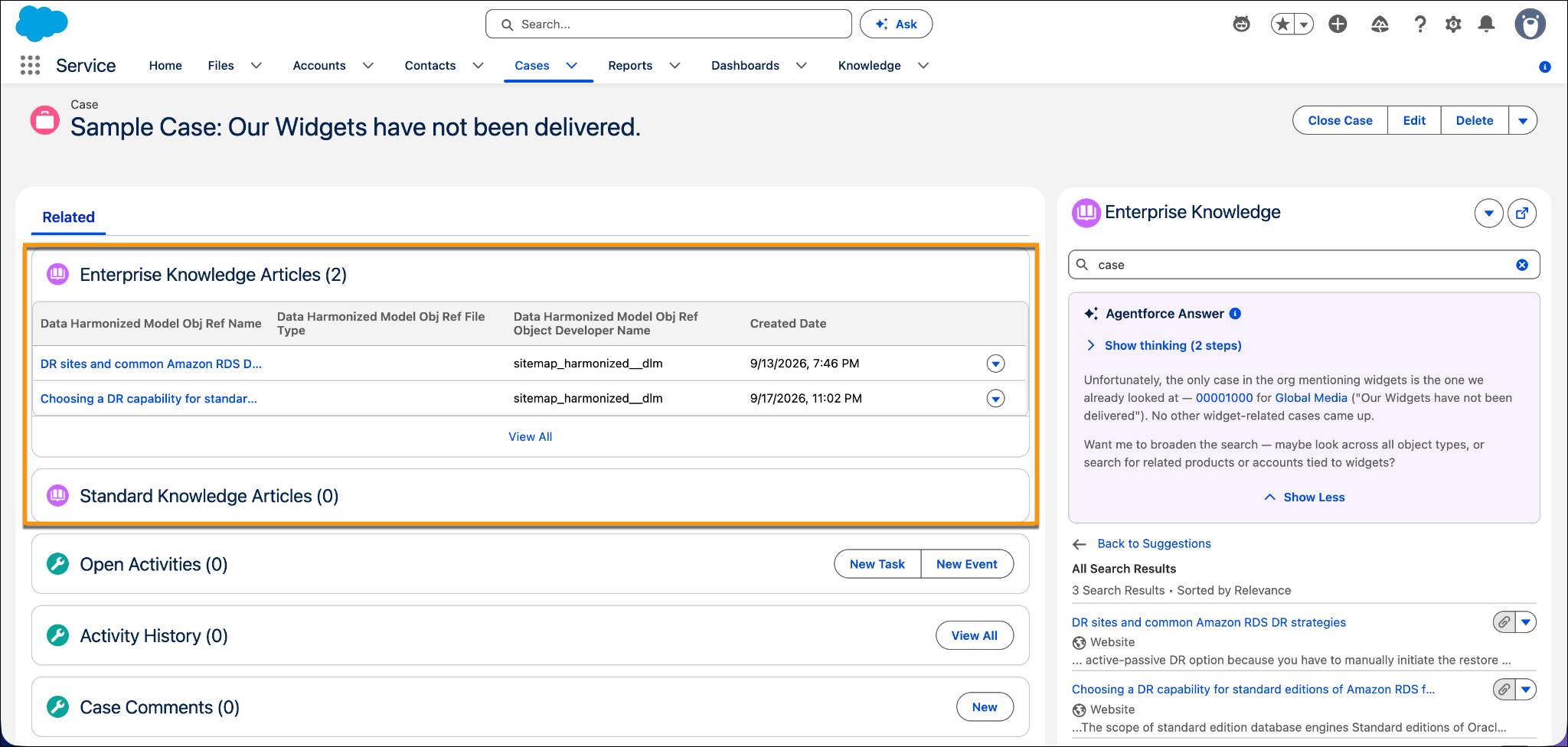
Enterprise Knowledge also brings AI into the mix. Agentforce can surface AI-generated answers pulled straight from your Enterprise Knowledge articles, right where reps are already working, so they resolve cases faster without digging through search results by hand.
You might be wondering: Does Enterprise Knowledge copy your external content into Salesforce? Nope. The source of truth remains the external system (like Google Drive or SharePoint). Data 360 stores a harmonized, indexed version of that content, to make it searchable alongside your Salesforce articles and keeps it in sync with the source. Security stays just as tight: access to external content is governed by RBAC/ABAC, Data Cloud policies, and the external system’s own governance rules, so people only see what they’re already allowed to see.
Benefits of Enterprise Knowledge
Enterprise Knowledge gives you a faster, more consistent way to find and use answers, no matter where the content originally lived. It allows you to:
-
Stop hunting across tools. Salesforce and external content come together in one place.
-
Search once, get everything. See results from every connected source together.
-
Let AI do the digging. Agentforce surfaces AI-generated answers from your knowledge articles.
-
Get smarter as you type. See matching articles and recent searches as you go.
-
Trust what you’re reading. Every article renders in the same clean format.
-
Move faster, together. Reps deliver quicker answers, and customers self-serve more effectively.
Worried about external content training some global AI model? Don’t be! That’s not how it works. Your content is only used to generate answers inside your own org, respecting the security and permissions of both Salesforce and the external source.
Does Your Org Need It?
Enterprise Knowledge might be exactly what your org needs if:
- Knowledge is scattered across systems, and reps struggle to find the right information.
- Reps waste time switching between Salesforce and other tools.
- You want customers to self-serve, but your knowledge base doesn’t cover everything.
- You want Agentforce to answer questions using knowledge both inside and outside Salesforce.
How Enterprise Knowledge Improves on Unified Knowledge
So why the switch? Unified Knowledge is a feature that brings knowledge from outside systems into Salesforce so everything can be searched and used in one place. Enterprise Knowledge isn’t just a rename of Unified Knowledge, though—it’s a real step up.
Powered by Data 360, it delivers better performance and sharper search. Every article renders consistently regardless of origin. And because it’s built on Data 360’s infrastructure, it opens the door to more innovation, including AI-generated answers right where reps work.
Wrap Up
Nice work! Now you know what Enterprise Knowledge is, how it’s different from Lightning Knowledge, and how to tell if your org’s a good fit.