Explore Course Registration
Learning Objectives
After completing this unit, you’ll be able to:
- Discuss the importance of connected and configurable registration tools.
- Describe how students use the Course Search and Registration tools to enroll in courses.
- Identify how the Course Search in Agentforce helps students discover available courses.
- Explain how registration windows help institutions manage access to enrollment periods.
Course registration is one of the most visible and time-sensitive academic operations. It not only affects a student’s schedule for the upcoming term, but also their progress toward graduation. When registration works well, students enroll in the relevant courses at the appropriate time, and staff focus on support rather than troubleshooting. But when systems are outdated or disconnected, registration becomes a major point of stress for everyone involved. Institutions need a solution that balances ease of use for students with administrative flexibility and control.
Agentforce Education provides that balance, delivering a registration experience that’s configurable for staff and intuitive for students. To manage registration, registrars set up registration windows, holds and blocks, and custom rules to help everything run smoothly. When the window opens, students browse course offerings, check availability, and register, all through a student-friendly portal.
Browse Course Offerings
It’s registration week at Astro University, and Sophia is ready to enroll in her courses for the fall semester. She’s mapped out her plan using the Degree Planner and now wants to finalize her schedule. Meanwhile, Registrar Juan is monitoring registration activity to ensure that students have access to the courses they need and that institutional policies are being implemented consistently. Follow along with Sophia as she searches and registers for her courses.
In Agentforce Education, course search and registration take place in the learner portal, giving all users a single, consistent view of available offerings. Unauthenticated visitors and faculty can search and browse courses, while current students have additional tools for planning and registration.
As Sophia browses courses, she can view course information such as description, instructors, and seat availability. This makes it easy to explore options, compare offerings, and gather the details needed to make informed academic choices.
Register with Clarity and Confidence
Course registration should feel like a natural next step in the academic journey, not a hurdle to overcome. With Agentforce Education, institutions deliver a modern registration experience that connects seamlessly with curriculum, planning, and policy implementation.
Registration can quickly become frustrating if students encounter barriers they didn’t expect such as missing prerequisites, holds on their account, or courses at capacity. Agentforce Education helps reduce these surprises by surfacing issues early in the process.
For students, the learner portal becomes a complete registration hub. They can add desired courses to their cart before the registration window, ensuring they’re ready to register as soon as access opens. As they build their cart, the system runs real-time checks for prerequisites, corequisites, capacity limits, and any custom rules. If an issue arises, such as a missing requirement or a full course, the portal provides clear messages so they can adjust their selections early.
When the registration window opens, students simply review the cart and submit it. The system attempts to enroll the learner in all selected course offerings at once. If one or more registrations fail due to eligibility issues or blocks, such as an academic hold, they receive detailed feedback so they can resolve the problem or choose alternate courses. This way, students register quickly and accurately, without needing to contact multiple departments or guess which requirements apply.
For example, Sophia tries to register for a capstone course that requires completion of four specific prerequisites. She hasn’t completed one of them, so the system notifies her before registration is submitted.
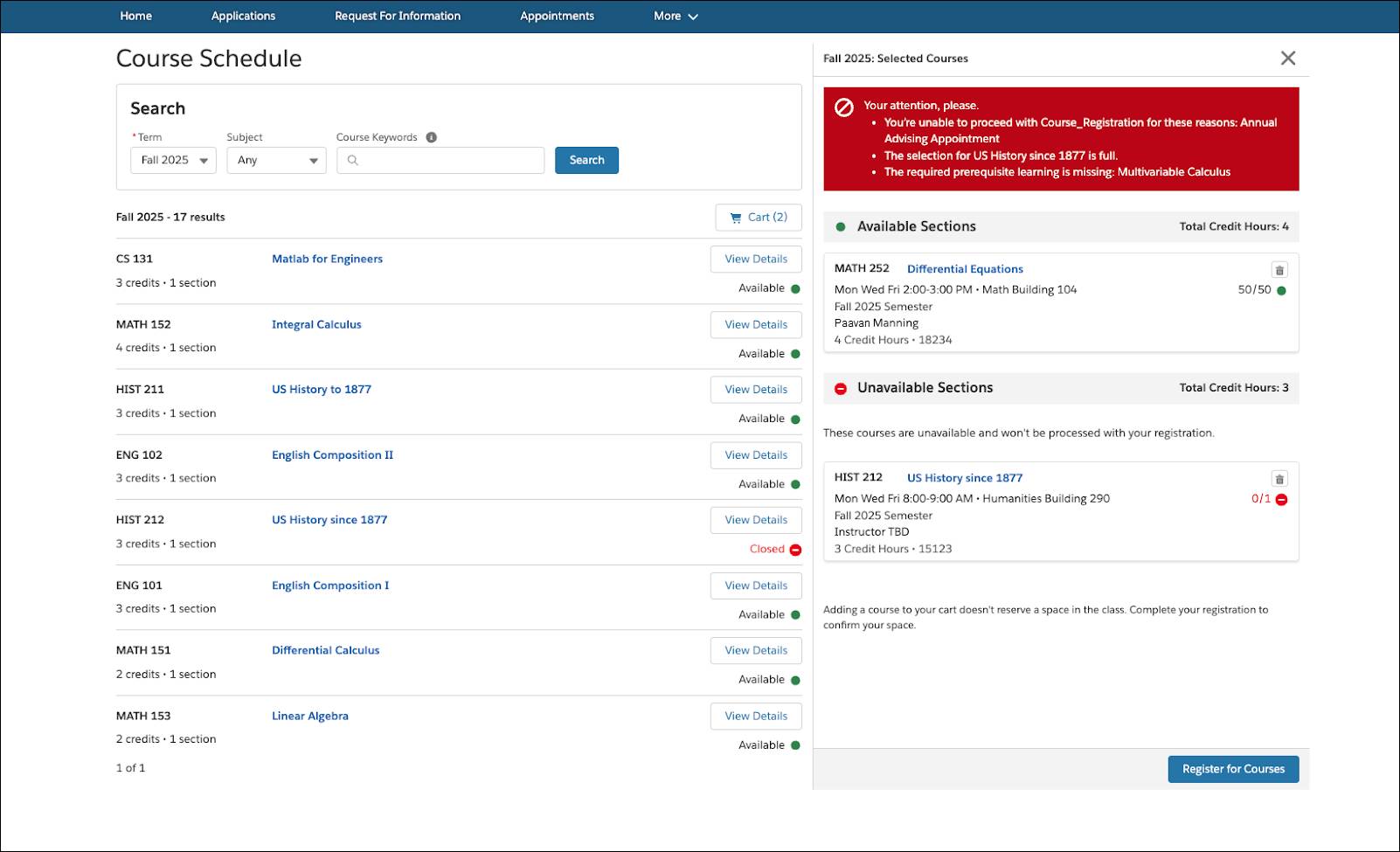
Even if Sophia does go ahead with registration, only those courses for which she’s eligible is successfully processed. She can then review her Degree Planner and make updates, or consult with an advisor.
If Sophia has an unresolved advising hold, the system sometimes prevents registration and directs her to the appropriate next step. These real-time checks save time for students and staff alike, while reinforcing institutional policies.
Discover Classes with Course Search in Agentforce
Course Search, powered by Agentforce, adds another layer of support for students navigating registration. This AI-powered assistant helps students explore courses based on their academic goals and preferences.
Using natural language prompts, students can ask the agent for help finding classes that meet certain criteria by asking questions, such as, “I’m considering a major in computer science. What should I take to get started?”
The agent pulls information from course descriptions and other data to provide tailored recommendations.
For example, Sophia asks the agent about intro science classes for non-majors.

The agent responds with a list of courses along with the course level, field of study, and academic level for each.
This self-service experience empowers students to explore new subjects, confirm course eligibility, and make informed decisions, all without waiting for advisor meetings or digging through static catalogs.
Manage Registration Access with Registration Windows
Registration windows help institutions manage who can register, when, and for what courses. Each registration window includes a start and end date, academic term, and criteria that determine which students can participate. These criteria are defined using Expression Sets, which group students based on attributes such as class year, program, or special status.
At Astro University, Juan uses these windows to prioritize access for specific groups such as seniors, international students, or athletes, ensuring they get the classes they need before general registration begins.

Agentforce Education simplifies the process for configuring registration windows. Juan and his team use out-of-the-box tools to manage tasks that previously required complex, technical support. This newfound agility helps them respond quickly to shifting priorities and deliver a smoother registration experience for students such as Sophia.
By using registration windows effectively, your institution can create a more equitable, scalable, and controlled enrollment process. As a result, students register with confidence, knowing their selections align with program requirements and institutional policies. Registrars can manage course offerings, monitor activity, and maintain control without relying on disconnected systems or manual processes. Registration is where planning meets execution, and when it runs smoothly, everyone wins.
Wrap Up
With Academic Operations, Juan can now ensure that Sophia has a clear path toward graduation, and she always knows the next steps to take on her academic journey.
In this module, you learned how Academic Operations in Agentforce Education supports every stage of the academic journey, from managing curriculum and enforcing academic policies, to helping students plan degrees and register for courses. You explored how tools such as the Degree Planner, Student Information System Policy Rules, and Course Registration work together to create a seamless experience for both students and staff.
You’re now ready to use these tools to streamline academic operations, support student success, and bring greater efficiency to your institution.