Explore the Release Process
Learning Objectives
After completing this unit, you’ll be able to:
- Explain the workflow for using Release Management.
- Describe how the Release Management Dashboard provides IT leaders with valuable release metrics.
- Summarize the steps for setting up Release Management in your org.
Release Management: A Team Effort
Planning and executing a release requires close coordination between IT staff, and making sure that all of the action items are identified and systematically completed in the correct order. It’s a bit like baking a cake. Adding the ingredients at the wrong time or skipping a critical step can lead to an inedible pastry and a lot of frustration.
Release Management helps you make sure that the result of your IT team’s release efforts is a positive one. It simplifies each step, helping each team member know exactly what needs to be done, how, and when.
In this unit, you learn the process for managing a release, the tools and objects you use, and how to organize deployment tasks for your IT personnel.
To help you understand the release management process, you follow the IT team at Orivian, a global holdings company. This team is led by a release manager who focuses on maintaining operational stability, minimizing risk, and managing the logistics of deployments.

The Release Management Process
Let’s explore each step of the Release Management process and the integrated features that set your team up for success.
The Orivian IT team is gearing up for a major release that involves several changes to an important business platform. These needed changes were identified over the past few months by employees who reported incidents and by the IT staff who manage the platform.
Release Creation and Classification
When the Orivian release manager is ready to roll out system changes, her first step is to create a release record and set its type using one of the predefined options. The most common types of releases are:
-
Major: A planned deployment for delivering significant architectural changes, core feature overhauls, or implementing updates that require careful migration
-
Minor: A smaller deployment to implement features and enhancements while maintaining backward compatibility with the current version
-
Upgrade: A comprehensive process of replacing an entire software version with a newer, more advanced iteration
-
Patch: Targeted fixes to resolve specific bugs, security vulnerabilities, or stability issues without adding features
-
Emergency: An expedited release to resolve urgent, critical issues
The Orivian team can also create their own release types to match their business processes. Optionally, they can also enter a risk level for the release.
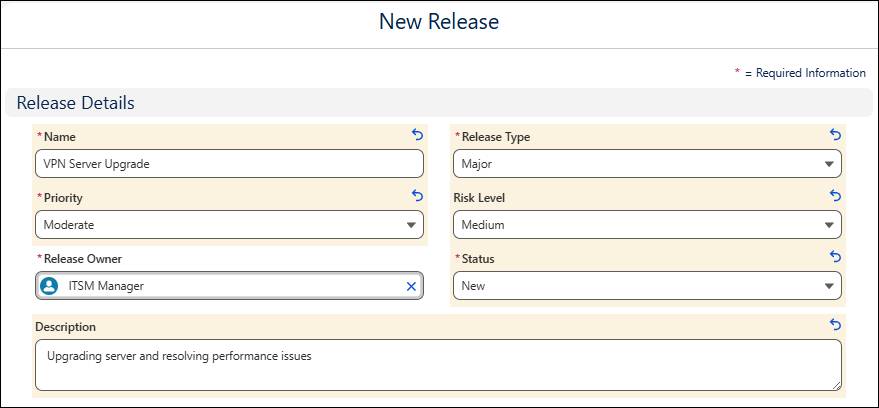
In the Release Timeline section, the release manager includes planned start and end dates to define the release window and add the release to the IT Service Calendar.

When the team begins and ends release activities, they enter the actual start and end dates and times.
To get a full view of the reasons, goals, and other considerations for the release, the release manager connects the release record to all associated records, including:
- Incidents to track the specific issues that the deployment will resolve.
- Problems to reflect the root causes of recurring issues that the release will address.
- Change requests to coordinate the deployment of approved changes and manage dependencies .
As mentioned earlier, the manager can also connect and track the individual assets and configuration items related to the release. To learn how to use a centralized database to manage your configuration items across systems, devices, and services, check out CMDB in Agentforce IT Service.
For a recurring release, the release manager can speed up her work by cloning a past release record to reuse its details.
The manager creates a new release record for a major release, enters a planned start date and end date to define the window for the release, and sets a risk level and priority. She also connects related change requests in the Associations tab.

Lastly, for high-risk or high-impact deployments, the release manager can set up approval workflows to make sure all of the work involved in the release is authorized. To learn more check out the Advanced Approvals for IT Services Help article.
Group and Task Assignment
In the release record, an assigned release owner defines the person responsible for overseeing the release. The release group is a public group that’s responsible for all of the activities and communications related to the deployment. Activities might include launching new features, bug fixes, or other types of IT changes.
The release owner can assign an action plan with a set of specific tasks for the group to follow during the release. They can set due dates and dependencies at the task level to ensure prerequisite tasks are completed in the correct order. To speed up task configuration and assignments during each release, they configure action plan templates with a set of common release tasks. To learn more about the powerful capabilities of action plans and action plan templates, visit the Action Plans article in Salesforce Help.
For example, in the release record, the Orivian release manager assigns herself as the release owner, and then selects an IT team as the release group that will complete the work. She then assigns an action plan that contains tasks for the release, including performing a validation test, coordinating with the server admin, and updating the change log.

For larger teams, the manager can divide up the work by assigning an individual team member to each task.
Scheduling and Conflict Checking
Scheduled releases automatically appear as color-coded events on the IT Service Calendar. The calendar helps the Orivian IT team visually coordinate schedules and ensure deployment falls within an acceptable window.
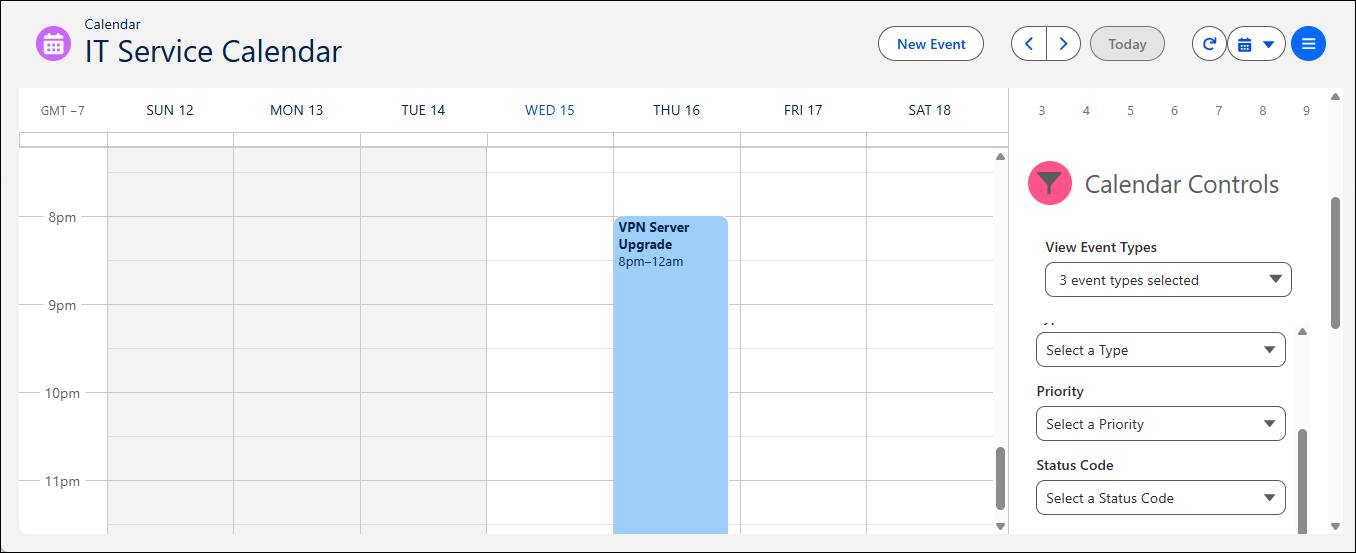
With an up-to-date calendar showing all of their release activities, the team can avoid overlaps with business moratoriums or other scheduled releases and avoid disruptions.
Using the IT Service Calendar, the Orivian release manager quickly sees that the start and end dates she selected overlap with a business-wide moratorium. So, she adjusts the dates in the release record to reschedule it within an acceptable timeframe.
Resolution
When the start date of the release arrives, the IT team reviews the related records and begins completing their assigned tasks. Once all the changes are implemented, they ensure that all of the associated tasks, incidents, problems, and change requests are fully completed or resolved. Then, they use the Deployment Date fields to indicate the date and time that the release was formally closed. A closing summary on the release record helps to capture the final outcomes and lessons learned from the deployment.

The Orivian team deploys the needed fixes to the system, and verifies that the live environment is stable and working as expected. Then, the manager closes all of the related records, enters the deployment date and time, and selects Close Release. To inform future work, she enters a closing summary that the team can reference later on.
Release Management Dashboard
The Release Management Dashboard in the Agentic IT Service Desk console helps Orivian release managers and other leaders track the health and status of deployments, identify scheduling delays, and assess risks. They can also use the dashboard to prioritize upcoming releases and take corrective action, if needed. They can also filter the dashboard by release name and customize the underlying reports to meet their organization’s requirements.

Here are the key Release Management Dashboard components that help you gain intelligent insights across several important areas.
-
Release Metrics: Monitors the risk level of current and upcoming releases, tracks how many days remain before a planned release date, and measures any deviations between planned and actual release dates.
-
Associated Records: Displays the total volume of incidents, problems, and change requests that are connected to each release.
-
Change Insights and Details: Breaks down the distribution and approval status of all associated change requests, and provides details about associated changes, such as their type, priority, assigned user, and status.
Release Management Setup
Let’s explore the steps for setting up Release Management in your org.
 and search for and select Salesforce GO in Setup.
First, turn on the Release Management feature, and assign role-based permission set groups to ensure your teams have the necessary access. Customize page layouts to include custom fields, action plans, and the Affected CIs and Impacted CIs related lists to track configuration item dependencies.
You can configure optional features like release templates, action plan templates, automated multichannel notifications, and advanced approval routing.
To learn more about setting up Release Management and other Agentforce IT Service features and components, visit the Set Up IT Service Basics help article.
Wrap It Up
The Orivian team has deployed all of the necessary changes, double-checked that each problem, incident, and underlying issue has been resolved, and closed the release. There’s just one more critical step the team needs to execute: celebrate!
You learned how Release Management helps you gather all of the requirements for a release, manage assignments, tasks, and dependencies, and avoid conflicts and disruptions. With this system in place, your IT teams can check all the boxes as they roll out the system fixes and updates that keep your organization running smoothly.