Explore the One-Program-per-Year Modeling Strategy
Learning Objectives
After completing this unit, you’ll be able to:
- Explain the one-program-per-year curriculum structure and its benefits.
- Describe how to configure learning data model components according to the one-program-per-year modeling strategy.
Choose the One-Program-per-Year Path
In the previous unit, you discovered two common strategies that are used for structuring curriculum data in Agentforce Education. Now, let’s take a closer look at the first: creating one program per year (OPY).
As mentioned earlier, this approach is often best-suited for primary education institutions, such as K–5 schools. Typically, students in these settings follow a fixed schedule, and learning requirements don’t carry over from one year to the next. For example, all grade 3 students take the same core curriculum, with some variation in electives, such as art and physical education. Some secondary schools might also use this strategy for early grade levels.
You can combine this method with other strategies. If certain subjects span multiple years or support early advancement, you might consider a hybrid approach. Agentforce Education gives you the freedom to adapt!
Let’s dig deeper into how the OPY method works.
Set Up the One-Program-per-Year Model
To model the OPY structure, you configure a set of linked Agentforce Education objects that represent your calendar, courses, programs, and student participation. This configuration generally follows the same order as the academic lifecycle, starting with timeframes, then building out curriculum and program structure, and finally course scheduling and enrollment.
Let’s walk through each piece, beginning with the academic calendar.
Academic Calendar
Your academic calendar provides the structure for course timing and grading periods. In Agentforce Education, this structure is made up of three linked objects.
-
Academic year: The full school year (for example, 2026–2027)
-
Academic term: A subdivision of the year, such as a semester or trimester
-
Academic session: A specified period within an academic term
Academic calendars vary across institutions and might include semesters, quarters, trimesters, or other time measurements. If your institution doesn’t distinguish between terms or sessions, just use the same value for both—for example, 2026 Semester 1 as both the term and session.
We recommend creating an academic session for each grading period. For instance, if grades are issued at the end of each semester, define one term and one session for each semester.
Next, let’s talk about learning courses.
Learning Courses
After your calendar is in place, define the courses your institution offers.
In Agentforce Education, a learning course represents the abstract construct of a course, defining what the class is, not when or where it happens. Each learning course is connected to one of more course offerings, which are the scheduled instances students enroll in.
Create a learning course for each subject you offer. Here are two common approaches.
-
Reusable learning course per subject: Use a single learning course for subjects such as math or English, and create separate course offerings for each grade level or year. For example, students enroll in First Grade Math Section 1 one year, Second Grade Math Section 2 the next, and each section is linked to the same overarching math learning course.
-
Separate learning course per grade: Define a unique learning course for each grade level of the subject, such as first grade math and second grade math. Then create course offerings as sections of that specific course, such as First Grade Math 2026 Section 1.
This diagram shows a first grade math learning course with one course offering for each section.

This second approach requires a bit more work upfront but can simplify downstream processes, such as scheduling.
After setting up learning courses, you define the important components of the OPY model, learning programs, and associated program plans.
Learning Programs and Learning Program Plans
Using the OPY strategy, you create a learning program for each level, such as grade 3. For each learning program, you also create an associated learning program plan that stores the set of program requirements.
When requirements change, which often happens annually, create a new program plan to capture those updates. For example, create a grade 3: 2025 learning program plan and then a grade 3: 2026 plan the following year, adjusting the requirements as necessary.

With the Program Plan Builder, you can structure and update program requirements by adding required groups, elective groups, and reusable collections. For example, create a required group for core curriculum, such as reading, math, science, and social studies, and an elective group for optional courses, such as art, music, and dance.
Because each program spans one year, you enroll students in the next program before the start of each year. That process involves course offerings and participants.
Course Offerings and Course Offering Participants
Course offerings are the individual instances of a learning course and are used to define the instructor and capacity of the offering. You can also set a course offering schedule to define the location, timing, and recurrence for your offerings. However, this recurrence is often unnecessary for self-contained classrooms, where a single faculty member teaches multiple subjects throughout the day.
Create course offerings for each scheduled instance of a learning course, such as Reading—First Grade Session 01 or Math—First Grade Session 02. You can also configure the offerings to match specific classrooms within a grade level.
A course offering participant represents a student’s enrollment in a specific course offering. You can create course offering participant records manually or use a flow or other automation to automatically create them upon course enrollment.
Each participant record links to a course offering participant result, which stores the student’s final outcome for that class. For example, kindergarten students might receive a general participation result while older students receive individual subject grades.
Whenever grades are assigned, it’s good practice to set up a course offering for the class, a course offering participant for each enrolled student, and a course offering participant result to capture the final grade.
To capture assignment-level detail, use participant activity grade records. These store granular scores, such as quizzes, tests, and homework, that roll up to the final result.
See the One-Program-per-Year Model in Action
To understand how all these objects work together within a unified curriculum structure, let’s explore how a primary school models its curriculum by using the OPY approach.
In this example, all students in grades 1–5 take the same required subjects. To keep things simple, we focus only on grade 3.
First, the registrar configures the academic calendar. Because the institution uses both academic terms and sessions, the registrar creates those records along with the academic year.
Using the Learning Wizard, the registrar creates learning course records for all required grade 3 courses, including math, science, and social studies, and electives such as art, music, and dance.
Here’s a screenshot of the Learning Wizard, which the registrar uses to create a math course.

The registrar sets the duration, duration unit, academic level, and other details about the course.
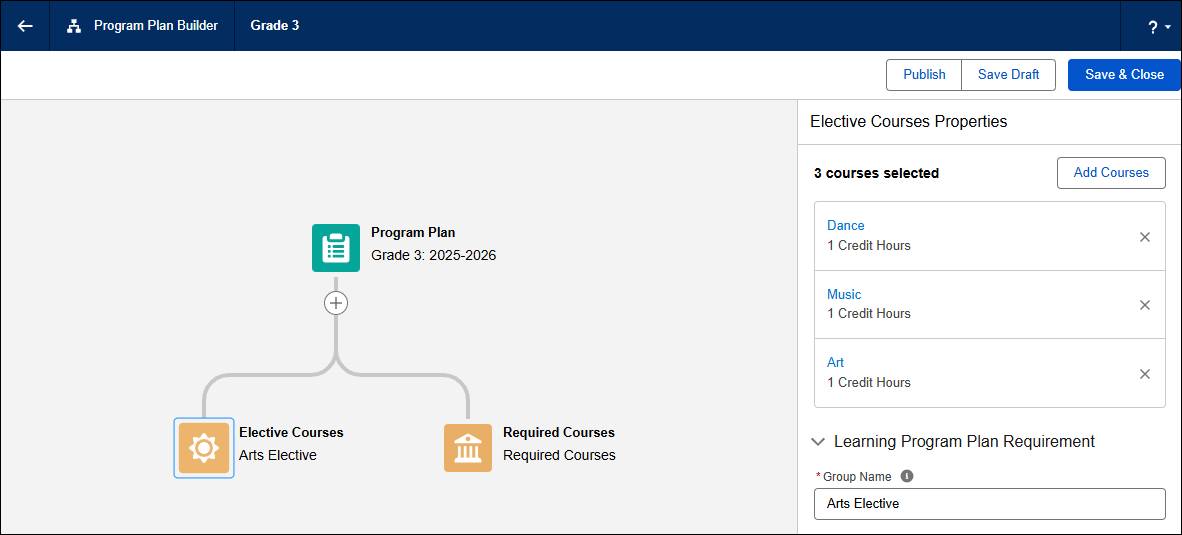
The registrar then creates one learning program for each grade level, in this case, grade 3, again using the Learning Wizard. After defining the program, the registrar uses the Program Plan Builder to create a learning program plan for the grade 3 program tied to the current academic year. This plan includes the required coursework, and also defines art, music, and dance as the possible options for an elective course.
This screenshot shows the Arts Elective Courses component in the Program Plan Builder.
Lastly, the registrar creates the course offerings for the current and upcoming semesters. At this elementary school, each grade level is divided into separate classrooms. For example, Professor A is the assigned teacher for Classroom 1, which contains 20 students, while Professor B holds his class in Classroom 2, which includes 22 students.
The registrar creates course offerings that correspond to each grade level and classroom. For a third-grade math class taught in Classroom 1, the registrar creates a course offering named Grade 3 Math C1.
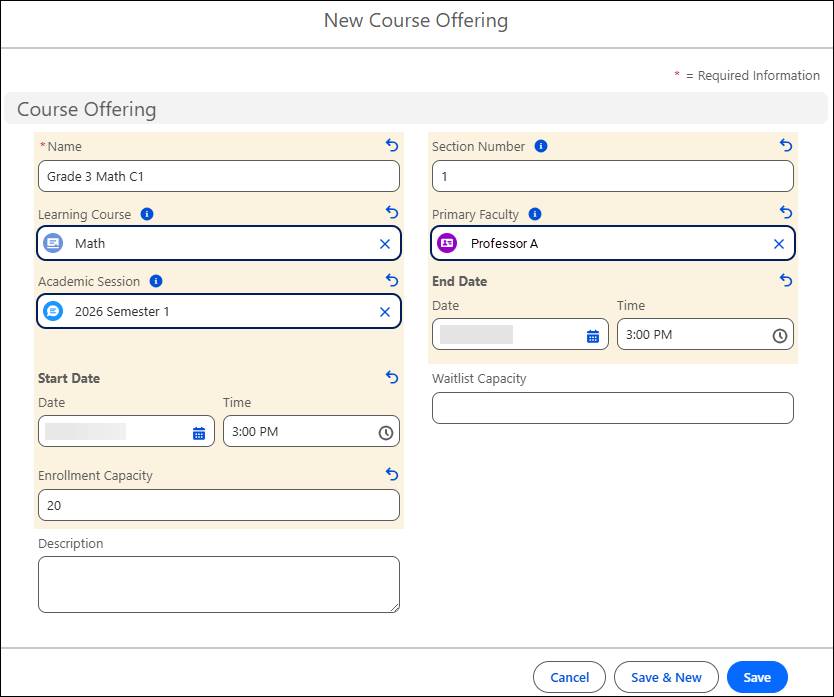
The course offering record defines the teacher and course capacity.
This diagram provides a high-level picture of the OPY curriculum framework.

This table lists the records that the registrar creates for the grade 3 program.
Object |
Records |
|---|---|
Academic Year |
2025–2026 |
Academic Term |
Semester 1 2025–2026, Semester 2 2025–2026 |
Academic Session |
Semester 1, Semester 2 |
Learning Course |
Math, Science, Social Studies, Spanish, Computer Science, Physical Education, Art, Music, Dance |
Learning Program |
Grade 3 |
Learning Program Plan |
Grade 3 2025–2026 |
Course Offering |
Grade 3 Math C1, Grade 3 Math C2, Grade 3 Math C3, Grade 3 English C1, Grade 3 English C2, Grade 3 English C3, and so on |
Course Offering Participant |
Alex is a participant in Grade 3 Math C1 and other course offerings. |
When preparing for each academic year, the registrar clones the previous program plan and updates the requirements as needed in the new plan. Students enrolled in past versions of the plan are still bound to the original requirements.
To speed up course creation by using automation, use flows, Apex, or external tools. Agentforce Education uses various APIs to manage course scheduling and academic operations. To learn more about these helpful tools, visit the links in the Resources section.
In this unit, you discovered the one-program-per-year curriculum framework that’s often best suited for primary education institutions. Next, you learn about the recommended learning architecture for secondary schools and review considerations and best practices for structuring your academic offerings.