Manage the App Lifecycle with the Command Line Interface
Learning Objectives
After completing this unit, you’ll be able to:
- Determine when and how to use Slack CLI, TypeScript, and logging tools for building and debugging Slack automations.
- Understand when and how to use datastores in automations.
Slack Command Line Interface
Slack CLI (Command Line Interface) is a set of tools critical to building Slack automations. The Slack CLI allows you to interact with these apps via the command line. Using the main slack command, you can create, manage, run, and deploy apps, as well as create triggers, and query datastores. For example, once the CLI is installed, you can authorize your Slack workspace with the slack login command. After that, you can verify that your CLI is set up by running the slack auth list command.
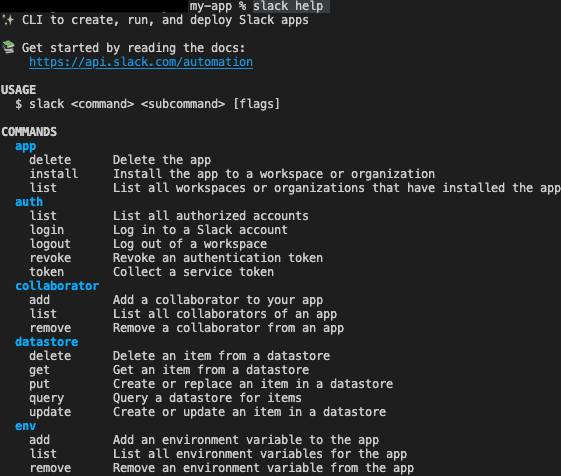
Running slack help displays the available commands in your terminal window. The CLI Quick Reference page provides the most commonly used commands you use when you develop on the Slack platform. It contains a comprehensive guide to Slack CLI commands, subcommands, and possible parameters or flags.
TypeScript SDK
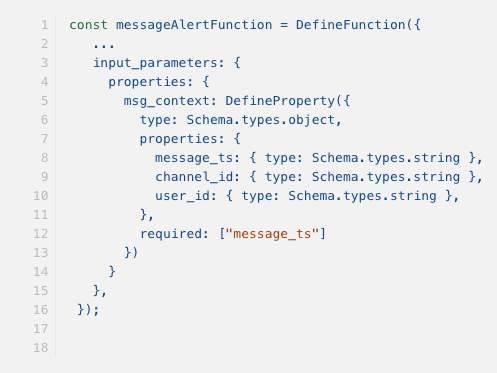
TypeScript is an open-source, object-oriented programming language. It’s a syntactic superset of JavaScript. While TypeScript shares the same base syntax as JavaScript, it also adds syntax on top of JavaScript, which allows developers to use static typing and add optional type annotations. This is different from how JavaScript uses dynamic typing, which describes how the interpreter assigns each variable a type at runtime that’s determined based on the reported variable value.
When building Slack automations, you can create files with Typescript SDK and use TypeScript-friendly type definitions. TypeScript gives you guidance on what the API methods accept in terms of arguments and options without having to navigate between documentation and the code editor. Since TypeScript builds on JavaScript, it gives you better tooling at any scale and it's designed for the development of large apps—even large-scale web apps. TypeScript is also easier to read and maintain than JavaScript. It also transpiles—compiles and transforms—into JavaScript.
Log for Automations
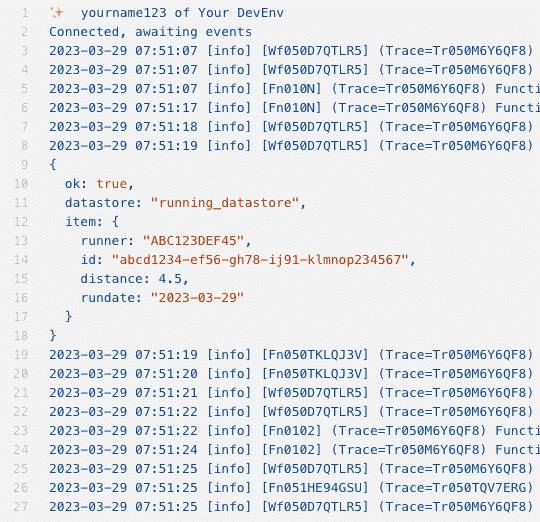
When developing your Slack automation locally, you can call the console.log function in your app code to display output in the console of the terminal window where your development server is running. As an example, you can add a console.log call to the function that logs a run and stores information into a datastore so that you can output the datastore items to verify that the right type of data is being stored.
console.log displays information that you specify for your app to emit. However, if you instead want to review the logs for your app's activity, run slack activity after you install your app. Then, select your workspace and local app environment. The output provides details such as when workflow steps and functions start and execute, external auth information, and any errors encountered in your app.
After you deploy your app, calls to console.log are captured remotely. Also, they’re only emitted via the slack activity command, along with the last seven days of app activity.
Datastores
With automations, you can use the concept of datastores as an easy way to store and retrieve data that can be used by a later step in your automation. For example, as automation steps execute, you might collect form inputs such as message, channel, and username. You can then use those details in a later step to send a message to a manager for review.
Datastores are useful when your apps need somewhere to store data, whether it's for caching or for long-term data storage purposes. They store data in a managed infrastructure in Slack, so you don't need to worry about where to host this information. They’re also backed by DynamoDB, a secure and performant NoSQL database, with a data model that uses three basic types of data units.
-
Tables: Collections of items
-
Items: Collections of attributes
-
Attributes: Fundamental data elements that uniquely identify an item among all of the other items, and can't be further broken down
To initialize datastores before using them, follow these steps.
- Define the datastore in its source file.
- Add the datastore’s property in your manifest file. Include the required datastore bot scopes, such as datastore:read, datastore:write, into the botScopes property.
After your datastore initiates, you can instantiate it locally with the slack run command, or in production with the slack deploy command. The information stored when you instantiate your datastore using slack run separates from the information stored in your datastore when using slack deploy.
Slack provides CLI custom functions and APIs. It uses the apps.datastore.* format to manage datastores in your app. These tools allow you to create, retrieve, update, delete, and query data for your automations.
To recap, ensure you can now effectively use Slack CLI commands for building automations, recognize the benefits of the TypeScript SDK, understand how to enable and interpret logging, and describe the purpose and implementation of datastores within these automation projects.
Resources
- Slack Developer Docs: Getting started with the Deno Slack SDK
- Slack Developer Docs: Authorizing the Slack CLI
- Slack Developer Docs: Developing with TypeScript
- Slack Developer Docs: Logging Function and App Behavior
- Slack Developer Docs: Slack CLI errors reference
- Slack Developer Docs: Using datastores