Integrate Third-Party Applications
Learning Objectives
After completing this unit, you’ll be able to:
- Explain why third-party integrations are essential.
- List three of the most commonly used third-party integrations.
- Explain the types of integrations that might occur.
- List three potential gaps that you need to consider.
Why a Third-Party App?
Third-party integrations are unavoidable in a Salesforce Agentforce Commerce for B2C implementation. Is that bad? No, it’s amazing! As we learned in the Customize a Agentforce Commerce Reference Architecture unit, it’s by design.
Agentforce Commerce for B2C is all about its storefront capabilities, and selling online is our specialty. Processing online taxes, credit card payments, and shipping carriers, however, are not. Third-party applications bring necessary expertise to the storefront table.
Let’s take a look at online sales tax, for example. The basic rules for collecting sales tax from online sales are these: If your business has a physical presence, or “nexus,” in a state, you must collect applicable sales tax from online customers in that state. If you don’t have a physical presence, you generally don’t have to collect sales tax for online sales.
That generates a lot of questions. What does applicable mean? Are some people exempt? What about sales tax holidays? And what does physical presence mean? A warehouse, a brick-and-mortar-store, a business office? It depends on the laws in a particular jurisdiction.
Plus, laws and sales tax rates are different in every state, and they change over time as new laws are passed. To keep up with this, you’d have to track the laws in every state—and that’s just the US. Add to that the changing laws in each country, province, and district—and that’s what you’ll be spending all your precious time on.
Phew!
Using a third-party app, created by people who focus on the subject exclusively, is a far better solution. Let’s take a look at some key third-party applications, and how to plan for them.
Which Third-Party Apps?
The planned integrations should be detailed in a summary section or the initiation part of the documentation, and made available early after the project’s discovery phase. Now is the time to revisit that list and make sure it’s complete.
The most common integrations with third-party providers include payment processors, ratings and reviews, tax processing, and email services. They are the technological areas where a third-party provider can shine.
In the Agentforce Commerce for B2C LINK program, these are some of the most-used technology partners.
- PayPal (Payment)
- Adyen Payment Services (Payment)
- CyberSource (Payment)
- Bazaarvoice (Ratings and Reviews)
- PowerReviews (Ratings and Reviews)
- Avalara (Tax)
- Experian (Address Verification)
- Tealium (Tag Management)
- Olapic (Social)
- Certona (Personalization)
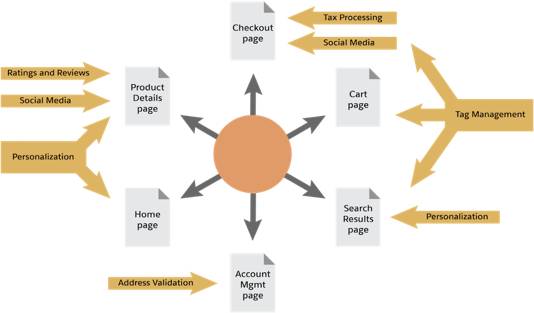
Where they fit in the application is key. Take a look at this table for some ideas.
Third-Party Application |
Storefront Page |
|---|---|
Payment |
Checkout |
Ratings and Reviews |
Product details page |
Tax |
Checkout |
Address Verification |
Account Management, Checkout, Wish List, Gift Registry |
Tag Management |
Every page. Tags, embedded on each page, capture an action or event on a website or device, such as an IP address, user profile info, and anything the user clicks or views. |
Social |
Product details page, checkout |
Personalization |
Product details page, search results page, messaging |
Planning Integrations
You’ve got your list of third-party applications to integrate, and now you need to check that all the pieces are in place. The types of tasks involved in the integrations can range from loading a cartridge to transferring data to learning to use a new browser-based application.
Here are some sample integration tasks.
Format |
Process(es) |
Application Type |
|---|---|---|
Cartridge |
Scripts and product feed replace manual tasks. |
Product recommendations |
Cartridge |
Direct integration—just load a cartridge. |
Tax, payment processor |
Controllers |
Automatically adds data at product feed. |
Tagging |
Separate UI |
Manipulate product data in a browser-based system. |
Content management |
Separate UI |
Report on order data in a browser-based system and deploy resulting marketing campaigns across email and social. |
Analytics |
Separate UI |
Create and publish content assets such as buying guides, quizzes, lookbooks, and trend pages. |
Content management |
After the integration is complete, testing begins, no matter the magnitude of the integration effort. Likewise, there will be ongoing tasks such as bug fixes and feature updates or the continual massaging of new data in a separate application. Make sure the merchant understands the impact of these tasks on their resources.
You might want to add two more columns to help you keep track during implementation.
- Responsible parties (names, addresses, and phone numbers)
- Schedule
Discovering Gaps
What kind of gaps do you need to look out for? Here are some of them.
- Will the integration tasks fit into the schedule?
- Do the tasks require client resources?
- Are some integrations dependant on others?
- Do integrations rely on a certain Agentforce Commerce for B2C release or feature?
- Are any of the prerequisites unavailable or delayed?
- Are there technical issues?
- If a vendor has issues, can other vendors step in?
Let's Wrap it Up
In this module, we learned about using a reference architecture as a code foundation and how to handle customizations. We also learned about integrating third party applications—why third-party apps are important, typical apps available, and common questions that you might need to consider. Now it’s time to test your knowledge and earn a shiny new badge.
Resources
Trailhead: Build Your Ecommerce Site with Salesforce B2C Commerce