Route Data Conditionally
Learning Objectives
After completing this unit, you'll be able to:
- Configure a router transformation to divide a single data pipeline into multiple destination streams based on business rules.
- Differentiate between the operational efficiencies of a router transformation versus multiple filter transformations.
- Safely handle unmatched records using the default output group.
Conditional Routing
Cassie's integration pipelines at AW Computing now enrich records smoothly using her modular mplt_EnrichCustomerRecord mapplet. However, the business analytics team has delivered a new conditional requirement for the downstream database landing layer.
Instead of dumping all processed customer records into a single monolithic table, the system must segment customers based on their calculated CustomerTier.
- Platinum-tier records must route to dbo.PlatinumCustomers (High Priority).
- Gold-tier records must route to dbo.GoldCustomers (Medium Priority).
- Silver-tier records must route to dbo.SilverCustomers (Standard Priority).
- All remaining tiers (Bronze, Standard, or unclassified) must route to dbo.StandardCustomers (General Population).
To split her single data pipeline into four independent destination targets without duplicating logic, Cassie uses the router transformation.
The Router Transformation
A router transformation is an active component that evaluates incoming records against one or more user-defined Boolean conditions and directs the rows to specific output groups.
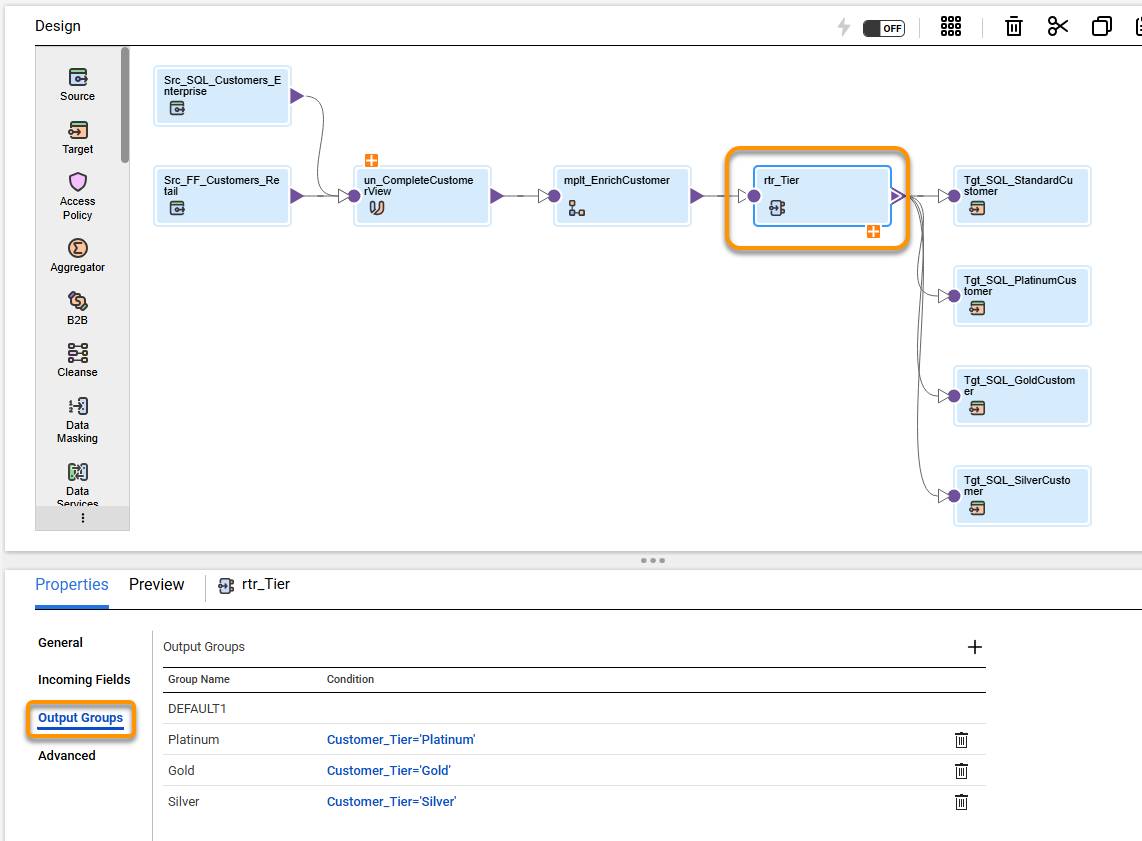
Cassie drags a router transformation onto her canvas directly following her mapplet. To establish her routing rules:
- She selects the router transformation on the canvas.
- In the Properties Panel below, Cassie selects the Output Groups tab.
- She selects the plus icon and generates three custom output groups:
- Platinum Group Condition: CustomerTier = 'Platinum'
- Gold Group Condition: CustomerTier = 'Gold'
- Silver Group Condition: CustomerTier = 'Silver'
- Platinum Group Condition: CustomerTier = 'Platinum'
- She saves her updates.
The Default Output Group
Every router transformation automatically includes a built-in default output group. Any record that fails to satisfy all of the user-defined named group conditions automatically falls through into the default group.
In Cassie's mapping, the three named groups capture Platinum, Gold, and Silver records. Every other customer—including Bronze, Standard, or any unexpected value—falls into default.
Cassie explicitly connects the output anchor of the default group to dbo.StandardCustomers.
If a default group is left unconnected on the canvas, any records falling into it are dropped without writing to a target. Connecting the default group ensures no record is silently lost.
Condition Expression Syntax
Each router output group condition is a Boolean expression written in CDI expression syntax. For Cassie's Platinum group the condition is:
- CustomerTier = 'Platinum'
For Gold:
- CustomerTier = 'Gold'
Conditions are evaluated in the order the output groups are listed. The first condition that evaluates to TRUE wins—the record routes to that group and is not tested against any remaining conditions. Group order matters if conditions can overlap.
If none of the named conditions match, the record falls through to the default group automatically.
Router Versus Filter: Choose the Right Tool
Those familiar with the filter transformation from Standard Transformations in Cloud Data Integration might ask, why not just use multiple filters instead of a router?
A filter transformation produces a single output stream—rows either pass through or are dropped. To send Platinum customers to one table and Gold customers to another using only filters, you'd need a separate filter and target for each tier, with the full dataset passing through each one independently.
A router does this in a single pass. One transformation evaluates every row once and routes it to the correct output group. It's more efficient and easier to maintain especially as the number of routing conditions grows.
Use a filter when you need to include or exclude rows from a single stream. Use a router when you need to send rows to different destinations based on what the data contains.
Validate a Router Mapping
After configuring all four output groups and connecting them to their target tables, Cassie validates the mapping. She checks that:
- Every output group has exactly one connected target.
- The condition expressions use valid syntax.
- The default group is connected.
She previews the data and can verify that data is written to each output group. She then runs the mapping against her dataset with known tier distributions and verifies the row counts in each target table match expectations before scheduling it for production.
Every incoming record is now evaluated once and routed to the correct output. Cassie saves and validates her mapping.
Router Use Cases in Data Engineering
The router transformation is useful in any pipeline where the downstream destination depends on the data itself. Cassie’s tier-based routing is a classic example of data classification—taking a single incoming stream and splitting it into four distinct targets based on a single field value.
Beyond classification, the router is useful in many real-world scenarios beyond tiering. A common example is:
-
Error handling and data cleansing: Route valid records to the main target, while directing malformed, null, or invalid rows into an error log file or exception table for review.
As you grow your CDI skills, you'll find the router transformation applies to geographic segmentation, multisystem dispatch, and much more.
Wrap It Up
Cassie’s multitarget pipeline is now complete, modular, and fully automated. By combining a reusable mapplet (mplt_EnrichCustomerRecord) with a single-pass router transformation, she built a clean, scalable pipeline that enriches and segregates AW Computing’s customer data without having to duplicate logic or waste compute resources. You can apply this exact router pattern whenever your data needs to branch into different destinations based on business rules!
AW Computing’s integration team can now drop mplt_EnrichCustomerRecord onto any mapping handling customer data—ensuring perfect consistency across every project. Downstream, she can define a Mapping Task to schedule execution, and seamlessly manage extraction, enrichment, and conditional routing, delivering fresh, pre-classified reporting data to business teams every single morning.
Speaking of tasks, Cassie has taken a look at some of the tasks available in IDMC and is keen to put some into practice. She is ready to jump into configuring synchronization, replication and data transfer tasks next.