Get Started with Custom ARC Graphs
Learning Objectives
After completing this unit, you'll be able to:
- Describe Actionable Relationship Center (ARC).
- Explain how ARC helps users understand their customers.
- Create a plan for an ARC graph.
Explore Complex Relationships
In any industry, understanding your customers fuels success. Everyone on your team wants the best client data to answer questions and uncover new opportunities.
But that data is rarely in one place. While Salesforce does provide a 360-degree view of your customer, this information is often scattered across a network of records. For example, each customer has contacts, opportunities, cases, and so on. When someone in your organization needs a customer’s full picture, they may jump between records and open multiple browser tabs to piece together information.
To eliminate that hassle, give your team a consolidated view of data across records with Actionable Relationship Center (ARC). With ARC, your users can view the relationships between records in an easy-to-navigate interactive graph.
In this badge, you explore the basics of building custom ARC graphs, and get hands-on to build your own.

Map Connections Between Records
ARC helps your team understand relationships between Salesforce records by presenting them as cards shown in an interactive graph.
As an admin, you build the data structure for these graphs with the ARC Relationship Graph Builder. With this tool, you customize relationships and graph nodes for standard and custom Salesforce objects to show your team the most relevant data.
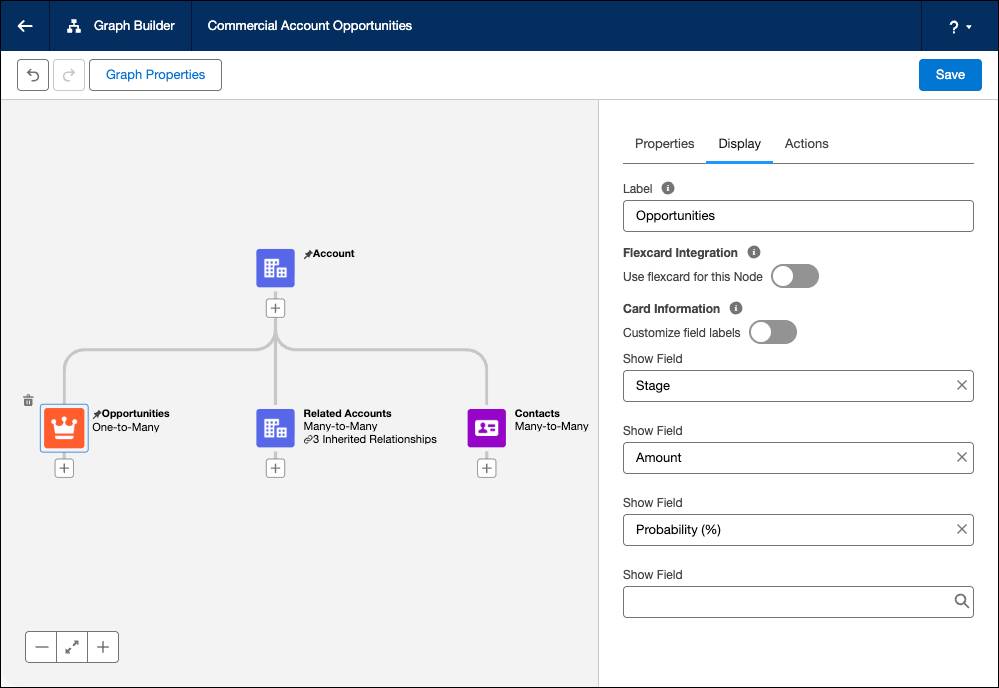
On the Display tab for each node, define the fields to show on the record cards. On the Actions tab, select the actions your users can take on those records.
Then add the ARC Relationship Graph component to a record page so your users can view, edit, delete, and create records directly from the graph. Users can see the important details in a single view and then take action.
For example, here's the ARC graph that you build later in this badge. Each card under a node shows data from a Salesforce record, based on how you configured the card in the ARC Relationship Graph Builder.
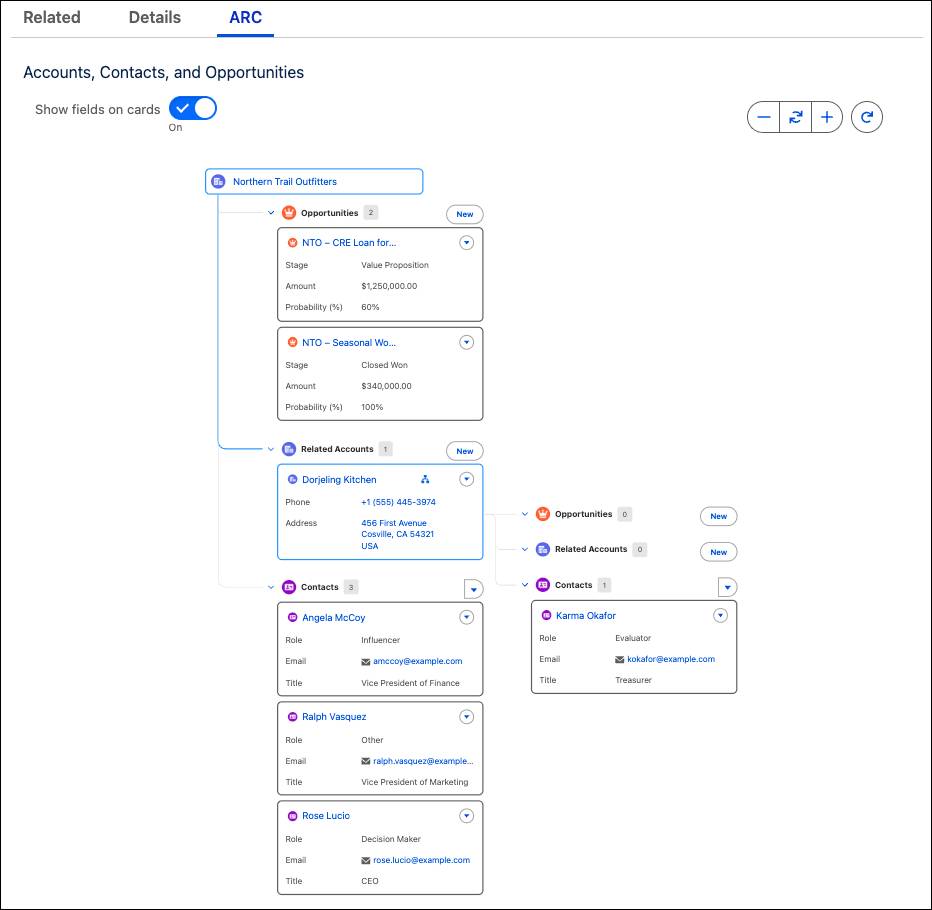
You can create multiple relationship graphs for an object and add them to record pages for users to view based on their Salesforce profile. While you follow the example of an Account root node in this badge, the root node can be any object you choose, as long as it matches the object where you want to show the graph.
Now that you know the basics of ARC, explore an example use case.
Put ARC to Work
Nora Clark (she/her) is a B2B commercial banker at Cumulus Bank, a large financial services institution. Nora's day-to-day tasks include building her book of business, nurturing client relationships, and keeping her client data accurate.
Nora is working with a new business client: Northern Trail Outfitters, an outdoor apparel and gear company. She collects copious amounts of information about the company, but sifting through it all and making connections is overwhelming.
Before Nora plans her next conversation with Northern Trail Outfitters, she wants to understand some key information quickly. What related businesses does the company work with? Who are the best points of contact? Does the company have open opportunities with the bank?
A few different Salesforce objects store this information, and navigating between records takes time. Switching between records also keeps Nora from seeing a full picture of the business.
With ARC, Nora can quickly view multiple relationships for Northern Trail Outfitters, including related accounts, contacts, and opportunities. With these insights, she's ready to deepen this relationship and recommend services.
Later in this badge, you build the graph Nora needs. But, first, you need a plan.
Create an ARC Relationship Graph Plan
An ARC graph is most helpful when it shows the most essential client data.
So first create a plan before you build a graph. The plan identifies the objects, fields, and actions the graph includes. Here’s a list of common questions that help you create a plan.
- Which objects and fields give you visibility into important details stored on related records?
- Which objects and fields help you complete a job to be done, such as connecting to key people who influence a customer?
- Which actions do your users want to take on records?
At Cumulus Bank, bankers such as Nora want to see a customer’s related accounts, contacts, and opportunities to understand each client's business needs. Cumulus tracks its business clients with accounts, so the root node for this graph is Account. The root node object always matches the object of the record page where the graph appears.
Here are some detailed answers to a few of the preceding questions to help determine the other objects, fields, and actions.
Question |
Answer |
|---|---|
Which objects and fields give you visibility into important details stored on related records? |
|
Which actions do your users want to take on records? |
|
With this information, you can sketch a plan for the graph to map the root node to child nodes. A child node is a record related to the parent node in the ARC graph, either directly or through a junction object that relates two objects.
Cumulus users want to explore a customer’s related accounts, contacts, and opportunities. So you can plan three child nodes on the graph. They are:
- Opportunities, related directly to accounts.
- Contacts, by using the Account Contact Relationship junction object.
- Related accounts, by using the Account Account Relationship junction object.
Users also want to explore the opportunities, contacts, and related accounts for each related account. So, the related account child node has child nodes of its own.
The plan is in place. Now, it’s time to build.
What's Next?
In this unit, you learned that ARC makes it possible for users to view a customer’s relationships in an easy-to-navigate interactive graph.
In the remainder of this badge, you follow the Cumulus example and build the ARC graph you planned.