Discover the Agentic Analytics Experience
Learning Objectives
After completing this unit, you’ll be able to:
- Define agentic analytics and its benefits over traditional data reporting.
- Describe a complete agentic analytics workflow from proactive alert to automated business outcome.
- Explain the role of the administrator in configuring an agentic analytics experience.
Before You Start
Before you start this badge, make sure you complete this content. The work you do here builds on the concepts and work you do in that content.
Also, consider completing the following recommended content.
The Evolution of Data Analytics: From Reporting to Action
For decades, dashboards have been the industry standard for sharing data-backed insights. While data dashboards are excellent sources for centralized visual metrics and insights, they’re fundamentally passive. Even the most polished dashboard relies on the user to find the right view, engage with interactions, and manually interpret the “why” behind the numbers.
In the era of agentic analytics powered by artificial intelligence (AI), the focus is moving from passive reporting to active intelligence. Users don’t want to hunt for insights. Instead, they want a digital partner that understands their business language and alerts them when something is wrong. Your goal as an administrator is to deploy conversational analytics across your business.
The Agentic Workflow in Action
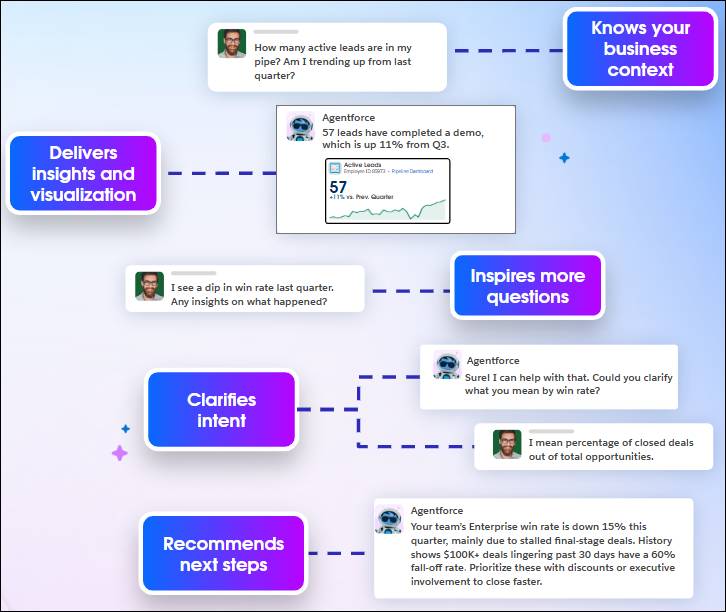
To understand how agentic analytics completely transforms a user’s daily routine, let’s look at a real-world scenario featuring David, an enterprise sales director.
Instead of starting his day by digging through static performance charts, David uses a conversational interface to check on his pipeline. He kicks off the day with a natural language question: “How many active leads are in my pipe? Am I trending up from last quarter?”
Because you, the admin, configured the underlying agentic stack to ensure it knows your business context, the agent bypasses raw database noise to deliver insights and visualization instantly: “57 leads have completed a demo, which is up 11% from Q3.” (Accompanied by an Active Leads visualization.)
The positive data inspires more questions. David spots a broader issue and digs deeper right inside the chat window: “I see a dip in win rate last quarter. Any insights on what happened?”
This moment is where your configuration backend shines. Rather than guessing or returning a generic response, the agent seamlessly clarifies intent to ensure it aligns perfectly with defined metrics before performing complex calculations: “Sure! I can help with that. Could you clarify what you mean by win rate?” David responds, “I mean percentage of closed deals out of total opportunities.”
Armed with this clear definition, the agent securely cross-references real-time sales pipelines with historical performance data. But the agent doesn’t stop at passive data delivery. Because you mapped out business preferences and custom logic, the agent recommends next steps and outlines automated operational workflows to neutralize the risk: “Your team’s Enterprise win rate is down 15% this quarter, mainly due to stalled final-stage deals. History shows $100K+ deals lingering past 30 days have a 60% fall-off rate. Prioritize these with discounts or executive involvement to close faster.”
As an admin, you have the power to make this ideal agentic analytics experience a reality where conversational data tracking turns into proactive, automated business outcomes.
The Agentic Analytics Platform
To build the agentic analytics platform, you connect a four-layered stack. You set up the first three layers to unlock the final layer, an environment where users can take actions directly in their flow of work.
-
The grounding layer (Data 360): Unifies separate data sources to build a trusted data foundation.
-
The logic layer (Tableau Semantics): Defines key business metrics and translates human terminology so the agent understands your business context.
-
The visualization layer (Tableau Next): Empowers users to build, scale, and interact with data dashboards using intuitive drag-and-drop and conversational tools.
-
The action layer (Salesforce actions and flows): Uses the previous three layers to let users execute tasks and trigger workflows directly in their flow of work.
Get Ready to Build
The journey from passive dashboards to active, automated intelligence relies entirely on the clarity and strength of this four-layered stack. With a firm data foundation, a precise semantic translation layer, a properly configured user interface, and a seamless action layer to trigger workflows, the agent can safely deliver the accurate, proactive insights that busy professionals like David depend on.
As an admin, you’re the architect of this entire experience. In the upcoming units, you explore the setup process from the ground up. By carefully configuring each layer of the agentic analytics framework, you provide your organization with a secure, highly trusted partner capable of turning raw data into immediate business value.