Get Started with React Using Salesforce Multi-Framework
Learning Objectives
After completing this unit, you’ll be able to:
- Identify the ideal use cases for a React app on the Salesforce Platform.
- Explain how Salesforce Multi-Framework runs React apps on the Salesforce Platform.
- Distinguish internal React apps from external React apps.
- Summarize the built-in security and governance model for React apps on the Salesforce Platform.
Before You Start
Before you start this badge, make sure you complete this content. The work you do here builds on the concepts and work you do in that content.
Also, consider completing this recommended content.
-
Agentforce Vibes Basics
-
Quick Start: Troubleshoot Code with Agentforce Vibes
-
Agentforce Vibes Licensing, AI Models, and Consumption Monitoring
How Salesforce Multi-Framework Runs React Apps
React is one of the most popular open-source JavaScript frameworks for building modern web user interfaces. Traditionally, if you wanted a React app to use Salesforce data, you hosted the app somewhere else and connected it to your org through custom APIs. You had to build and maintain an integration layer, handle authentication, and enforce security all by yourself.
Salesforce Multi-Framework removes these barriers. It’s a framework-agnostic runtime on the Salesforce Platform that lets you build native Salesforce apps with frontend frameworks like React. You can bring your existing React apps and run them natively on the platform. From there, your app interacts with Salesforce data using GraphQL and Salesforce Data SDK. Salesforce is both the host and the data source, so you get modern frontend development together with enterprise-grade platform capabilities, such as authentication, security, and governance.
So when is a React app the right tool? React shines when you’re building experiences like these.
- A standalone, full-page app, such as an internal operations console or a customer-facing portal with its own branding and navigation.
- A UI that’s shared across Salesforce and non-Salesforce surfaces, such as a design system or components reused on another website.
- A data-rich experience that benefits from the broader React ecosystem, such as a third-party charting, mapping, or scheduling library.
- A workflow your team can build faster by drawing on existing React skills and code.
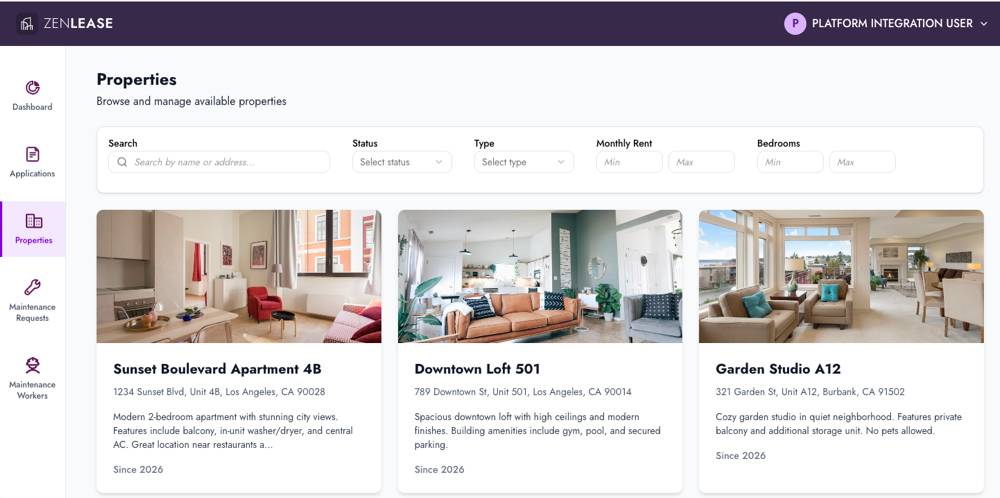
For example, here’s a page of the Property Management App, a sample React app included with Agentforce Vibes.
Store Your App as UI Bundle Metadata
When you build a React app for the Salesforce Platform, your app becomes a piece of Salesforce metadata called a UI bundle. A UI bundle is a self-contained unit that holds your app’s source, configuration, and routing rules.
Because UIBundle is a metadata type, it behaves like other Salesforce metadata that you already work with.
-
Stored and versioned on the platform: Your app’s files are stored in Salesforce, and each UI bundle has a version. You manage the publication lifecycle on the platform rather than on an external web server.
-
Managed with Salesforce DX: A React app is part of a Salesforce DX project. You use familiar Salesforce DX workflows, CLI commands, and project structures to manage the app alongside your other metadata, such as custom objects and Apex classes.
-
Deployed as metadata: You deploy a UI bundle to an org the same way you deploy any other source, and you can include it in your deployment pipeline.
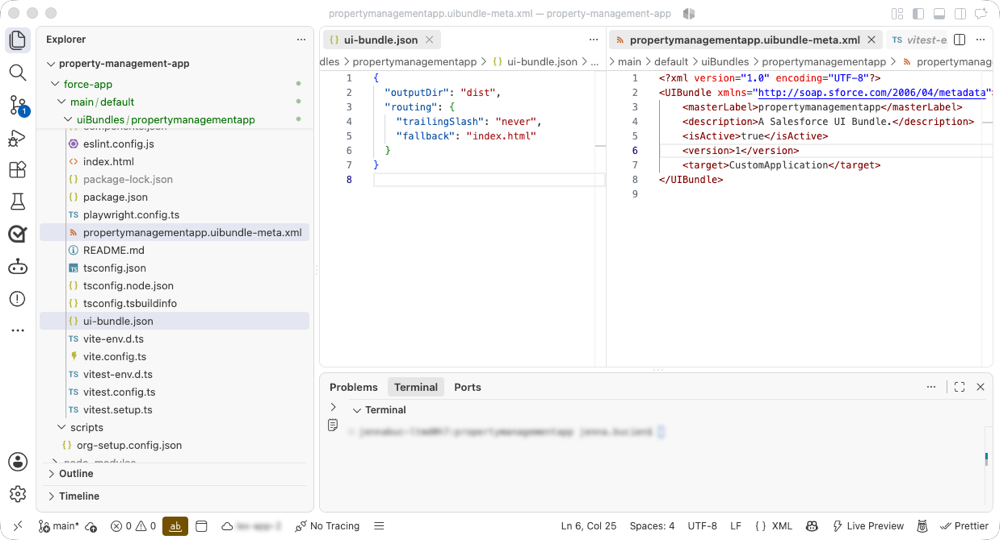
Your app’s files live in the Salesforce DX project under the force-app/main/default/uiBundles/ directory. Inside this directory is a familiar React project structure, plus two important configuration files.
-
ui-bundle.json: This file defines build and routing settings, such as the output directory and how the platform resolves client-side routes.
-
<appName>.uibundle-meta.xml: This file defines the metadata, including whether the bundle is active and where the app surfaces.
Here’s a Salesforce DX project named property-management-app, which includes the ui-bundle.json and propertymanagementapp.uibundle-meta.xml files in the editor window.
Internal Versus External React Apps
With Salesforce Multi-Framework, you can build two kinds of React apps, based on the app’s audience.
-
Internal apps: Build these for employees who sign in with their Salesforce credentials. After you deploy an internal app, users open it from the Salesforce App Launcher on desktop or in the Salesforce mobile app. Permission sets or user profiles control app access, just like Lightning apps. Internal apps are a good fit for productivity tools, dashboards, and admin consoles.
-
External apps: Build these for people outside of your Salesforce org, such as customers and partners. External apps are surfaced through an Experience Cloud site, so visitors don’t need to be logged in to Salesforce. To build an external app, your org needs Digital Experiences enabled and the right user licenses—Customer Community or Customer Community Plus for B2C portal users, and Partner Community and Channel Account for B2B users.

Built-In Platform Security and Governance
Unlike standalone AI coding tools that require your code and metadata to leave your Salesforce environment to reach an external model, Agentforce Vibes operates entirely within the Salesforce Trust Boundary. Your proprietary schema, business logic, and source code never cross an external network.
When a React app running on the Salesforce Platform reads or writes record data, those requests flow through the Salesforce User Interface API. User Interface API automatically enforces your org’s security model, including:
-
Object-level security (OLS) controls which objects a user can access.
-
Field-level security (FLS) controls which fields a user can view and edit.
-
Sharing rules control which records a user can access.
-
Validation rules run when a user creates or updates a record.
These rules apply automatically based on the running user’s permissions. If a user lacks access to a field, the platform doesn’t silently pretend the field doesn’t exist. Instead, the response includes the data that the user can review, along with an error entry explaining the restricted field. A later unit covers how to handle those responses.
Now that you know the advantages of building React apps with Salesforce Multi-Framework, you’re ready to explore how to accelerate your React development using Agentforce Vibes.