Manage a Knowledge Graph
Learning Objectives
After completing this unit, you’ll be able to:
- Monitor graph health using the knowledge graph quality scorecard.
- Identify potential knowledge graph issues using AI-generated recommended actions.
- Explain the benefit of connecting a knowledge graph to external AI agents using Tableau Model Context Protocol (MCP).
- Describe how to keep a knowledge graph current as business needs change.
Explore Why Knowledge Graphs Need Ongoing Care
Linda has connected Cloud Kicks’s data and given her agents the context to interpret it. But her job isn’t complete. As teams add fields, rename tables, and retire old sources, the data evolves. If the knowledge graph doesn’t keep up, agents can return answers that were correct last month but are wrong today.
Monitor Knowledge Graph Health
To ensure her AI agents stay accurate, Linda monitors the health of her knowledge graphs on the Tableau Knowledge home page.
Metrics
She reviews high-level stats to gauge the overall state of her knowledge graph:
- The percentage of items that have the minimum business context an AI agent needs to answer questions about them.
- The total number of nodes and relationships in the knowledge graph.
- The number of active issues.

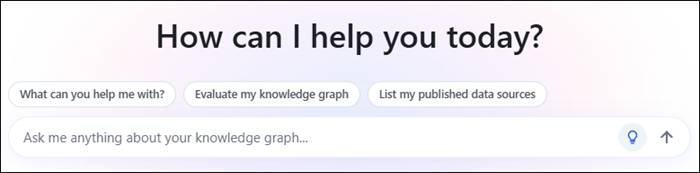
Linda keeps the number of issues low to ensure accurate AI responses. She selects Chat in the navigation menu on the Tableau Knowledge home page to open Tableau Agent for Knowledge and get help with these issues. For example, she enters prompts like “Which assets in my graph are missing owners?” or “Which uncertified data sources are queried most often?” to quickly pinpoint where to focus her updates.
Quality Scorecard
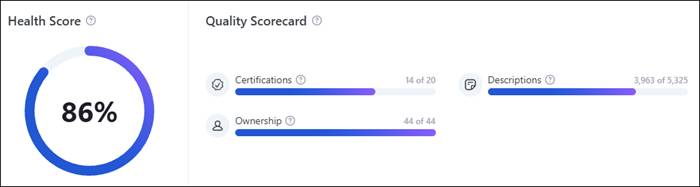
Linda also monitors the quality scorecard, which generates a health score percentage based on several key areas, including:
-
Certification: The percentage of certified data sources.
-
Ownership: The percentage of assets that have an assigned owner.
-
Descriptions: The percentage of nodes that include descriptions so agents understand what they are for.
Higher quality scores help Cloud Kicks’s AI agents answer questions more accurately. Certified data sources are vetted, which signals to agents that the data is reliable. Assigned owners give Linda a subject matter expert to contact when she needs to confirm business logic or refresh stale data. Clear descriptions provide the business context agents need to interpret fields accurately and distinguish between similarly named data.
Review AI-Recommended Actions
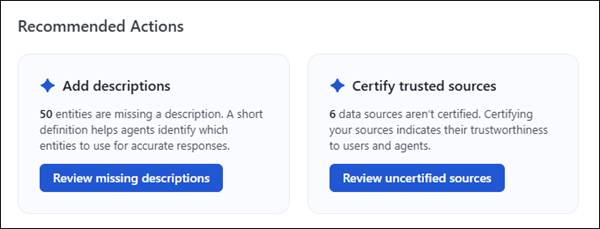
Linda uses the Recommended Actions section of the home page to spot issues and keep her knowledge graph healthy. Tableau Agent for Knowledge generates these suggestions, which point to assets that are disconnected, missing descriptions or owners, or lacking business context.
For example, Linda notices a recommended action for the Monthly Sales data source. Agents query it often, but it has no description. Without one, agents can’t tell whether the source includes global sales or just domestic regions. Linda selects the recommended action and Tableau Agent for Knowledge drafts a suggested description from the data fields. She reviews and approves it, and her graph’s health score improves. Now agents have the context they need.
Update Graph Assets and Business Preferences
Health scores and recommended actions are only part of Linda’s graph maintenance routine. She also updates the graph as Cloud Kicks evolves. When teams launch new initiatives or retire outdated reports, Linda adds newly published data sources and workbooks to her graph and removes old ones. Current assets help keep AI agents from giving answers based on outdated data.
Linda also revisits her business preferences whenever company rules or terminology shift. For example, if Cloud Kicks changes how it calculates net revenue, she edits the business preference so connected agents use the updated definition.
Connect to External Agents
Cloud Kicks uses multiple internal and external AI agents. To give the agents access to her business context, Linda connects her knowledge graph to the Tableau Model Context Protocol (MCP) server. MCP is an open standard that lets AI tools securely connect to and query company data.
With the MCP server connected, Tableau Agent for Knowledge and external agents use the same knowledge graph. Employees get more consistent, accurate answers no matter which AI tool they use. For more information, check out Connect your knowledge graph to Tableau Model Context Protocol (MCP).

Conclusion
Linda used Tableau Knowledge to give Cloud Kicks’s AI agents trusted business context so the agents can give accurate answers.
Now it’s your turn. Think about the data your company’s AI agents rely on today. Which data sources would you connect first, and what business context would your agents need to answer questions correctly? To get started with Tableau Knowledge, see the Tableau Help article, Get Started with Tableau Knowledge.