View Data Detect Policy Scan Results
Learning Objectives
After completing this unit, you’ll be able to:
- Access the scan results dashboard using the job session link or the email notification.
- Differentiate between the Aggregate Results and the Scan Results views.
- Download or query all detected sensitive data instances for action.
Finding sensitive data is only half the battle. The real value lies in what you do with that information. Once a Data Detect scan is complete, the tool provides a comprehensive dashboard to help you analyze risks, satisfy auditors, and drive your data remediation strategy.
Accessing the Findings
When a scan finishes, Salesforce sends an automated email notification to the user who started the scan. You can jump directly to the results by clicking the link in the email or by navigating to the Data Detect Job Sessions tab within the Data Detect app.
Each session record acts as a point-in-time snapshot. By comparing different sessions, you can track whether your sensitive data footprint is shrinking or growing over time.
If Data Detect doesn't find any sensitive data, or if there was a technical error during the process, you’ll see a relevant message explaining the outcome.
The Two Lenses: Aggregate Versus Scan Results
The results dashboard offers two distinct perspectives to help you analyze your data.
Aggregate Results (The High-Level View)
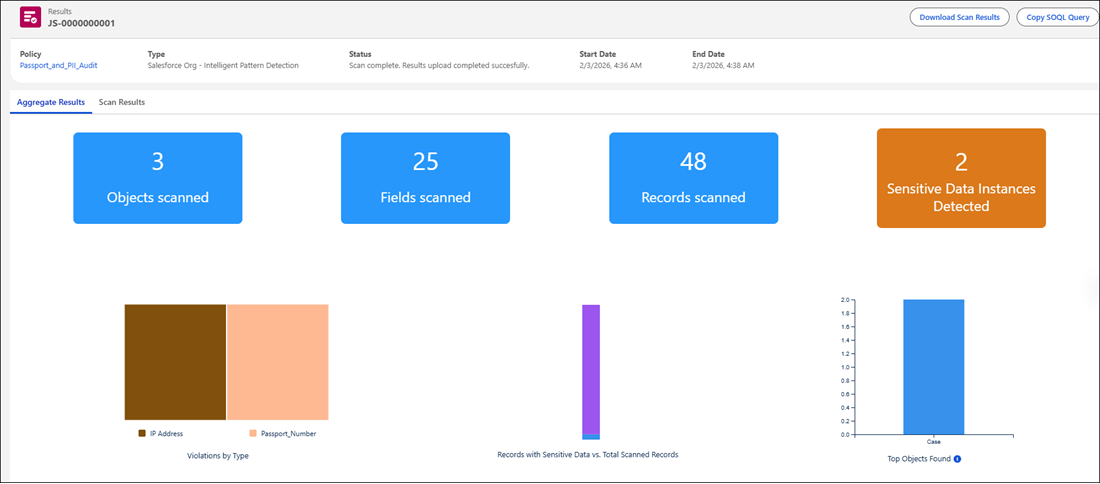
The Aggregate Results tab provides a summary of findings grouped by Object and Sensitive Data Category. This view is designed for stakeholders who want to see risk trends without looking at individual record details.
In the Zephyrus example, Calvin uses this view to show his CEO, Carolyn Baumgartner, that while most objects are secure, the Contract object has a high concentration of Passport_Number detections. This bird’s-eye view helps Carolyn prioritize which departments need updated data-entry training.
Scan Results (The Granular View)
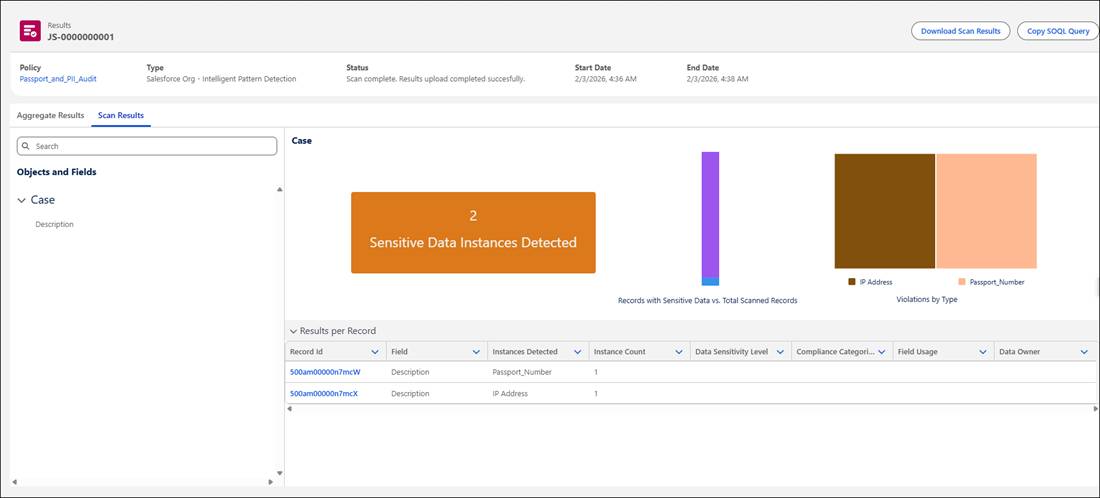
The Scan Results tab provides the who, what, and where information. It lists specific Record IDs and the exact fields where sensitive data was found.
In the Zephyrus example, Calvin shares these detailed findings with his IT director, Ernesto Rondán. Ernesto uses the specific Record IDs to target data masking or to verify that Shield Platform Encryption is active on the relevant fields.
Reporting and Actionable Intelligence
Data Detect is designed to work with your existing security workflow. Once you identify high-risk areas, you can take several paths.
-
Data Classification: Update the field’s metadata to reflect its sensitivity level.
-
Field Encryption: Use Salesforce Shield to encrypt the field at rest.
-
Data Masking: Use Salesforce Data Mask to scrub sensitive values in your sandboxes.
Handling Large Data Volumes
For organizations with millions of records, the dashboard provides tools to export findings for external analysis.
-
Dashboard Display: The UI displays up to 200 results per field for immediate inspection.
-
Download Scan Results: For standard audits, you can download a CSV file containing up to 10 million results.
-
Copy SOQL Query: For massive data sets exceeding 10 million results, use this option to retrieve the full list via the Developer Console or an API tool.
Sum It Up
You've learned how to secure your sensitive data footprint with Data Detect. You learned all about the tool, then got hands-on by creating a targeted policy with custom patterns. And, you learned how to read the scan results dashboard to take action on any risks. You can now help your company keep its data safe, comply with regulations, and protect important customer information. After finding sensitive data, you can use the other tools in Salesforce Shield to keep it safe and maintain customer trust.
Resources