Standardize Strategy with Templates and Governance
Learning Objectives
After completing this unit, you’ll be able to:
- Explain why reusable blueprint records are the foundation of consistent Key Account Management execution.
- Describe how Goal Definitions and Action Plan Templates standardize strategic planning.
- Explain the governance role of template versioning in auditable, repeatable deployment.
Build the Strategy Layer
In the previous unit, you learned about the connected planning model end to end. That model runs on a reusable layer that the team builds before you create a live plan. An admin defines the goals and tactical frameworks first, and account and territory teams import them later.
For example, Cumulus Pharma is preparing to launch Immunexis, a fictional new therapy for autoimmune disorders. To support the launch, Cumulus wants every team working from approved objectives, consistent tactics, and governed templates. This setup helps each plan adapt to local account context instead of starting from a blank page.
In this unit, you configure the blueprint behind Key Account Management, including reusable goals, tactical templates, governed versions, and the assignments that connect them.
Lay the Foundation for Progress Visibility
A blueprint produces no visible progress until a few one-time configurations are in place. Every organization tunes this phase to its own requirements, but the work is the same across four areas.
-
Status values: Consistent status picklist values run across the Account Plan, Account Plan Objective, and Sprint records, so completion means the same thing at every level. Assessment Task categories go on the Assessment Task object now, because templates reference them later.
-
Completion mapping: Those statuses map to completion logic in KAM Settings. The territory completion fields live here too; you set them when you build a territory plan later.
-
Trigger handlers: The progress roll-up handlers are activated, so completion recalculates automatically as work closes.
-
Offline caching: Object metadata caching covers the account and territory runtime objects, so a rep carries the full strategic playbook into the field.
Skip these steps and even a well-designed blueprint rolls up nothing. For step-by-step guidance, see the Key Account Management Prerequisites.
With the foundation set, you build the blueprint itself.
Define the Strategic Goals
The blueprint starts with Goal Definitions, the reusable objectives that anchor every account and territory plan in the organization. A goal definition is an objective strategy leadership has judged meaningful, measurable, and usable across many planning contexts. When a key account manager imports a goal into a live plan, they don't invent an objective. They put an approved one to work on a specific account, then adapt execution to the realities in front of them.
You can organize goal definitions into a hierarchy. A Top Goal captures the broadest strategic intent, and intermediate goals represent finer sub-objectives. The hierarchy is an organizing and scoping device at design time. It lets leadership structure a broad objective and decide how widely each piece applies, so teams import the goals that fit a given account or territory.
To create a strategic goal, open Goal Definitions from the App Launcher and select New. Two fields shape how the goal behaves. Type sets the goal's place in the hierarchy. A Top Goal sits at the head and is what a team selects when importing, while an Intermediate Goal nests beneath its parent and imports along with it. Scope Type controls how widely the goal is available, from global down to affiliate or territory.
For the Immunexis launch, Cumulus creates the launch's anchor objective as a Top Goal at the affiliate scope. When a goal applies to a specific product, teams can filter the import list by product later.

At the head of the hierarchy, this objective becomes the entry point that a team selects during import. Cumulus adds the pharmacy and therapeutics (P&T) workstream as an intermediate goal and connects its Parent Goal to the formulary objective.
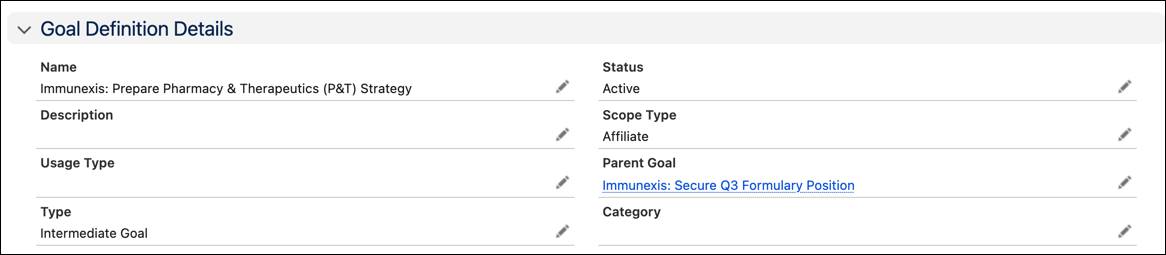
With the formulary objective and its P&T sub-objective defined, the hierarchy captures how Cumulus structures the launch. Tactical work, which comes next, turns a goal into account-level action.
Build the Tactical Framework
Goal Definitions name what the team is working toward. Action Plan Templates define how, by laying out the tactical work behind each objective.
To create an action plan template, open Action Plan Templates from the App Launcher and select New. One field carries the most weight. Target Object sets which run-time object the template deploys into: Account Plan Objective for account planning, or Goal Assignment for territory planning. These are separate templates, so an organization running both scopes configures one of each. The add-items option controls whether teams can add their own tasks during live execution.
For Cumulus, the template behind the formulary goal targets the Account Plan Objective and leaves the add-items option on, so field teams can extend the plan as work unfolds.
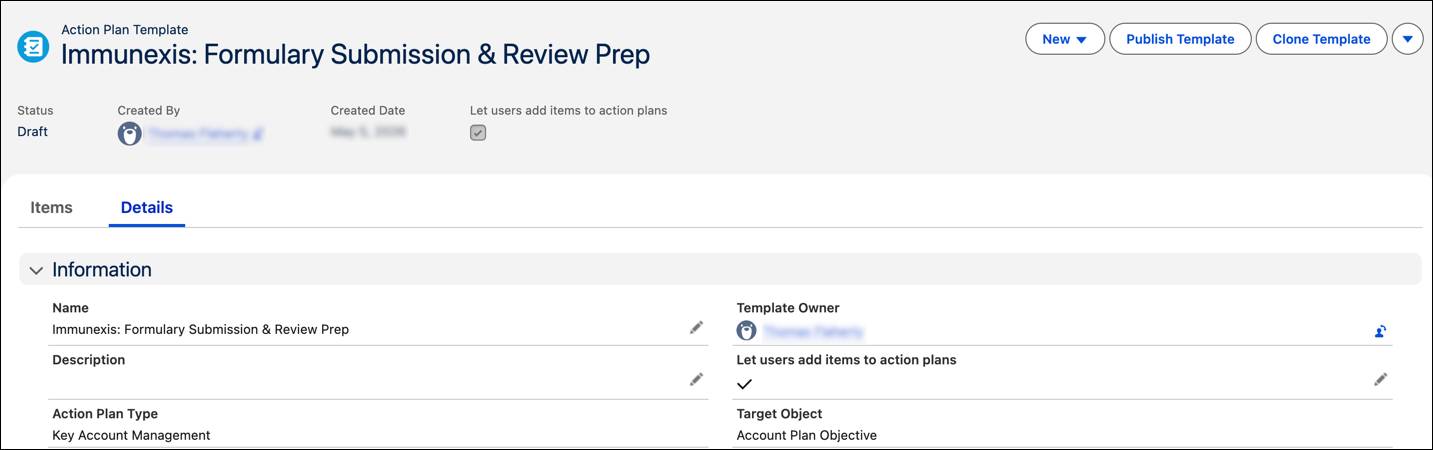
After saving the template, open the Items tab and add the Assessment Tasks that represent the work a key account manager performs against the objective. Each task is a discrete unit of work that appears inside the action plan on import. Its category classifies the type of work, drawn from the category picklist values defined on the Assessment Task object during setup.
At Cumulus, several preparatory tasks capture important steps for P&T Committee engagement.

These tasks embody best practices for account preparation. The template ensures a consistent standard of rigor, while accommodating account-specific adaptations.
Publish and Govern the Template
When the assessment tasks are ready, select Publish Template to create an Action Plan Template Version, a timestamped snapshot of the framework.
Every key account manager who imports this version works from an identical starting structure, and the version becomes an auditable artifact. When strategy evolves, an administrator clones the template, makes updates, and publishes a new version. Existing plans keep running against the version they launched with, while new imports pick up the latest.
That versioning is how the template layer scales. A framework that works for a regional launch today can be refined, republished, and redeployed across the organization tomorrow, with the historical record of each version intact.
Connect Strategy to Tactics
One step brings the blueprint together. An Action Plan Template Assignment links a Goal Definition to a published template version, creating the relationship that the import reads.
Open Action Plan Template Assignments from the App Launcher and select New.
You create that link directly on the goal. Open the Goal Definition, select its Action Plan Templates tab, and then the New Action Plan Template Assignment. Because you start from the goal definition, it's already set as the assignment's associated record, and you select the published template version to deploy with it. At Cumulus, this binds the formulary goal to its published submission-and-review template.

When a key account manager selects this goal during import, the system reads the assignment and deploys the linked action plan and its assessment tasks automatically. The assignment turns a goal into a deployment action.
What’s Next?
You've built the reusable layer of approved goals, a tactical template, a governed version, and the assignment that binds them. Now your strategy becomes deployable. A key account manager imports an approved framework in seconds and adapts it to the accounts in front of them, without rebuilding common objectives from scratch.
In the next unit, you shift from design to execution. You follow a key account manager at Cumulus as they apply this blueprint to profile stakeholders, align teams, and map tactical work into progress windows.