Manage the Claims Experience
Learning Objectives
After completing this unit, you’ll be able to:
- Describe the claims lifecycle in Digital Insurance.
- Identify how rules and coverage verification guide claim decisions.
- Explain how adjusters open coverages, manage reserves, and make payments.
- Describe how Digital Insurance supports a streamlined, rules-driven claims experience for representatives, adjusters and policyholders.
Guide Claims from First Notice to Fair Resolution
Insurance exists to offer protection when something goes wrong. The moment a customer files a claim is when that promise is tested.
For many insurers, this is also when the experience breaks down. Claims teams juggle multiple systems to verify coverage, collect documents, assign adjusters, and issue payments. Information is scattered, cycle times stretch, and policyholders are left uncertain about where things stand.
These breakdowns erode customers' trust in the insurer's reliability.
Salesforce Digital Insurance addresses this by running claims on the same foundation as product and policy work. Intake, coverage checks, routing, investigation, and payments all reference the same policy terms and structured data, so adjusters spend less time reconstructing context and more time moving the claim forward.
In this unit, you follow a complete claims journey, from first notice of loss to final payment, and see how Digital Insurance supports each stage with guided experiences, rules, and tracked financials.
Follow the Digital Insurance Claims Lifecycle
The claims process moves through several stages. At each stage, rules, automation, and shared data models help reduce delays and support accurate decisions.
Let’s break it down.
Stage |
What Happens |
Digital Insurance Capabilities |
|---|---|---|
Claim Modeling |
You define how claims are structured and governed. |
Use product specifications to model damages and injuries, scopes to track deductibles, and rules to drive workflows and approvals. |
First Notice of Loss (FNOL) |
A policyholder or representative reports the incident and submits documentation. |
Deliver guided digital flows that collect all required details and supporting media upfront. |
Coverage Verification |
The system checks whether the loss is covered under the active policy. |
Automatically validate coverage based on structured product and policy data. |
Segmentation and Assignment |
The claim is categorized and routed to the appropriate handler. |
Apply rules to triage, prioritize, and assign claims based on severity and complexity. |
Adjuster Review and Investigation |
The adjuster gathers information, sets reserves, and investigates. |
Manage participants, documents, reserves, and workflows from a single workspace. |
Payment and Resolution |
Payments are calculated, issued, and communicated. |
Apply deductibles and limits, trigger payments, and maintain financial traceability. |
Closure |
The claim is finalized and recorded. |
Ensure all activity is complete and preserve full history for compliance and reporting. |
Each phase of the claims lifecycle builds on a clear data model, shared business rules, and structured workflows. Together, they give adjusters the clarity they need and policyholders the confidence they expect.
Let’s explore how this comes together for a single auto claim.
Model the Claim
In Digital Insurance, claims start with design. Before an adjuster can work efficiently, the insurer needs a consistent structure for capturing loss details, linking to the correct policy coverages, enforcing deductibles and limits, and guiding stage movement with rules.
At Cumulus, product admin Justus sets up a claims catalog and category, then models an auto claim root product. That root product is structured to capture two repeatable types of claim items, damaged property and involved injury. Each area is driven by claim product classifications and the attributes assigned to them so that adjusters capture the correct details every time.
To ensure financial enforcement later, Justus also configures product attribute scopes and maps them to the relevant attributes. This is how the platform can apply policy term concepts such as deductibles and limits when payments are calculated.
Finally, Justus defines claim workflow rules that control stage transitions and can trigger actions as conditions evaluate to true or false.
In parallel, the system admin configures the claims app experience, including record page components for participants and financials and a guided FNOL flow for the portal. Together, this setup ensures claims arrive in a structured, enforceable format rather than loose notes that require rework.
Capture the FNOL
FNOL is the entry point for a claim. The goal is to capture enough information to create a usable claim record and validate it against the policy, without forcing customers or agents to repeat the same story across channels.
After an incident, a policyholder starts the FNOL flow in the Cumulus portal. The flow guides the policyholder through incident details and involved parties and collects supporting evidence, such as photos.
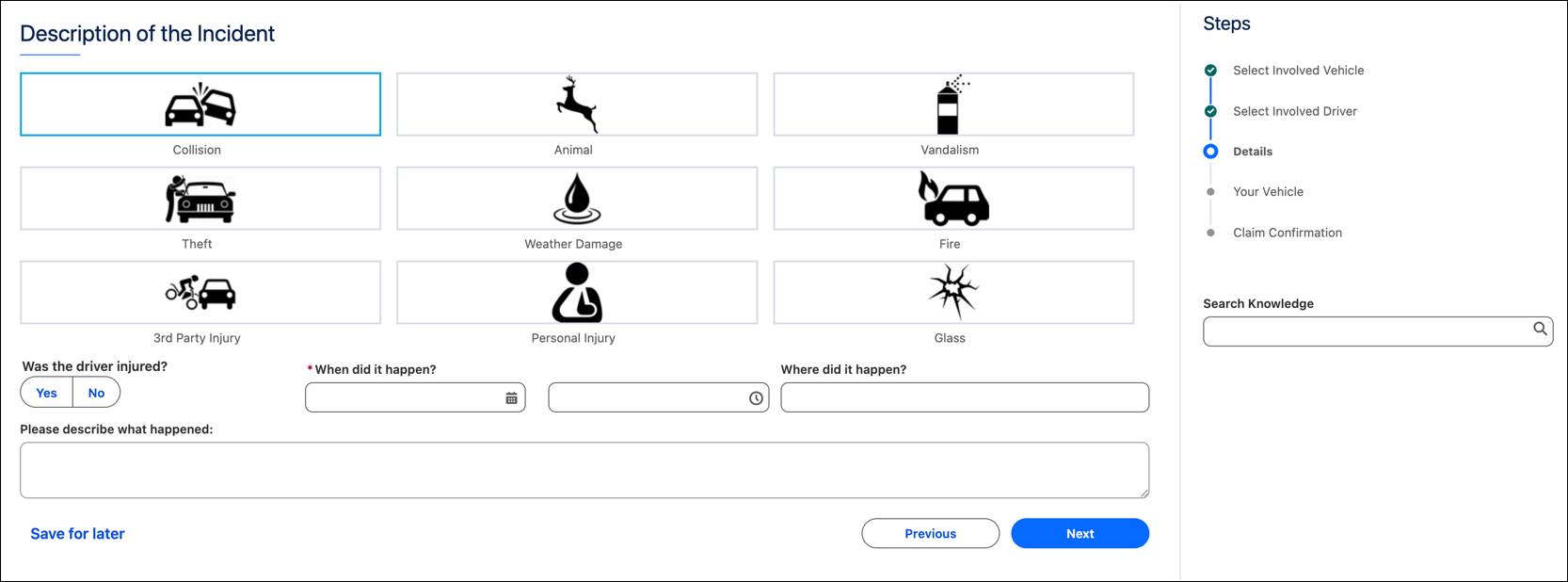
As the flow progresses, coverage verification runs in the background to confirm that the loss date is within the policy term and that the selected coverages apply to the insured item. When the policyholder submits the FNOL, services write a structured claim hierarchy, including participants and claim items, using the claim context and product configuration to persist the data consistently.
Based on intake details and workflow rules, the platform can also open the relevant claim coverages automatically. This ties the claim to the correct policy version and policy coverages from the start, which enables clean limit tracking and deductible consumption later.
If the policyholder begins online and then calls for help, a claims representative can continue from the same guided process, using what has already been captured rather than starting over.
Route and Assign the Claim
Digital Insurance initiates claim handling as soon as a claim is created. Segmentation and assignment rules reduce manual triage and ensure that claims move to the correct team with consistent treatment.
At Cumulus, workflow rules evaluate the policyholder’s claim details and classify it as a standard auto collision. The platform assigns the claim to the adjuster Ava Garcia on the auto team. More complex claims can be routed to specialist queues, held for supervisor review, or guided into a different stage based on severity or other indicators.
Review the Claim in One Workspace
After intake and assignment, the adjuster turns a reported incident into a complete, structured claim file. That includes confirming parties, reviewing policy coverage linkage, and establishing the insurer’s financial exposure.
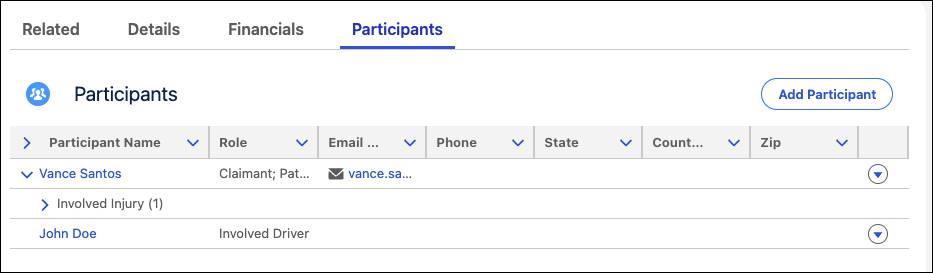
From the claim record, Ava works in a single workspace. On the Participants tab, she confirms the policyholder and adds the other driver as an involved party. She then captures vehicle damage by using the configured claim item structure. The next day, when the policyholder reports a minor injury, Ava tracks it by using the same structure and attributes defined during claim product setup.
On the Financials tab, Ava reviews the claim coverages opened for the claim, including relevant limits and deductibles. She sets initial reserves to reflect expected repair costs and related expenses.
As the investigation progresses, Ava logs activities, uploads estimates, and tracks correspondence. Everything stays attached to the same claim record, supporting payments and audit needs later. If any details were missed during FNOL, Ava can enrich the claim by using the internal UI, which updates the same claim services behind the scenes.
Apply Terms and Issue Payment
At payment time, the adjuster translates the loss into a settlement. This is where policy terms become financial decisions, including which coverages apply, how deductibles reduce payout, and how each payment consumes available limits.
After the repair shop sends the final estimate, Ava reviews the loss items on the Financials tab, including repairs, towing, and rental coverage. She triggers a calculation that applies the deductible and evaluates the payment against coverage limits. Because the claim is linked to the policy coverages, the platform can enforce these terms consistently by using the scopes and definitions configured during claim setup.
Ava approves the payment. The system records the transaction, updates reserves, and tracks deductible consumption for the applicable coverage. The policyholder receives a portal notification with a clear breakdown of what was paid, how the deductible was applied, and what happens next.
Finalize and Close the Claim
Closing a claim confirms that the work is complete. Payments are issued, reserves and financials are reconciled, and no open tasks or followups remain. It also locks in a clean history that supports audit, reporting, and process analysis.
At Cumulus, when the adjuster confirms that all payments have been processed and no further activity is expected, she moves the claim to Closed. A workflow check validates that required steps are complete and that financial items are reconciled before the claim can close.
The platform preserves the full claim record from FNOL through final payment so that Cumulus can review outcomes later, including cycle time, approval patterns, and payment trends across similar claims. For the claimant, clear status updates and explanations reduce uncertainty after a stressful incident and help the experience feel controlled and fair.
Wrap Up
Nice work! Across this badge, you followed one operational thread from product setup to claim closure.
You learned how to model products as reusable structures and then govern them with rules, pricing logic, and surcharges. You explored how those definitions drive real-time quoting and issuance and then continue as policies change through endorsements, renewals, and cancellations. You learned how the same platform scales to group benefits with class-based quoting, contracting, and enrollment. Finally, you explored how claims use structured policy terms and financial tracking to support consistent intake, investigation, payment, and closure.
Together, these capabilities reduce rework, keep decisions explainable, and help teams operate from a shared source of truth.
Explore the Resources section to learn how to set up and extend Digital Insurance.