Get Started with CMDB
Learning Objectives
After completing this unit, you’ll be able to:
- Explain the primary purpose of a configuration management database (CMDB) in Agentforce IT Service.
- Describe how the CMDB supercharges other service management processes.
- Distinguish between tracking an IT asset and managing a configuration item (CI).
Before You Start
Before you start this badge, consider completing this recommended content.
The ITIL Playbook and the CMDB
If you’ve been in the information technology service management (ITSM) space for any length of time, or earned other Agentforce IT Service badges on Trailhead, then you know that the Information Technology Infrastructure Library (ITIL) is the most widely used framework that brings ITSM to life. ITIL is a collection of best practices that help IT teams deliver reliable services that align with their business needs.
ITIL defines the configuration management database (CMDB) as a data model that maps the relationships, dependencies, and interconnections between various IT components. The CMDB acts as a single source of truth for IT assets. An IT asset is simply any component—like a physical laptop, a virtual server, or a software application—that provides value to your organization and helps you deliver a service.
The primary goal of the CMDB is to provide visibility into the IT environment, enabling IT teams to understand the impact of changes, identify the root cause of incidents, and manage service assets effectively.
The IT Challenge: A Lack of Context
All too often, operations teams manage incidents, problems, and changes as isolated events, while infrastructure teams manage a vast landscape of assets (servers, applications, databases) with complex, often undocumented, relationships. This disconnect creates critical inefficiencies.
-
Slow resolution: When a service fails, support teams have no immediate way to see the underlying components that support it, leading to guesswork and lengthy troubleshooting cycles.
-
High risk/no reward: Changes are planned without a full understanding of their potential negative downstream impact which leads to unforeseen outages that impact critical business functions.
-
Reactive operations: Teams are stuck in a cycle of firefighting, unable to proactively identify and address the root causes of recurring issues.
CMDB Is More Than Just a Database
Think of the CMDB as the foundational infrastructure of your entire ITSM operation. To see where it fits in, let’s look at the big picture.
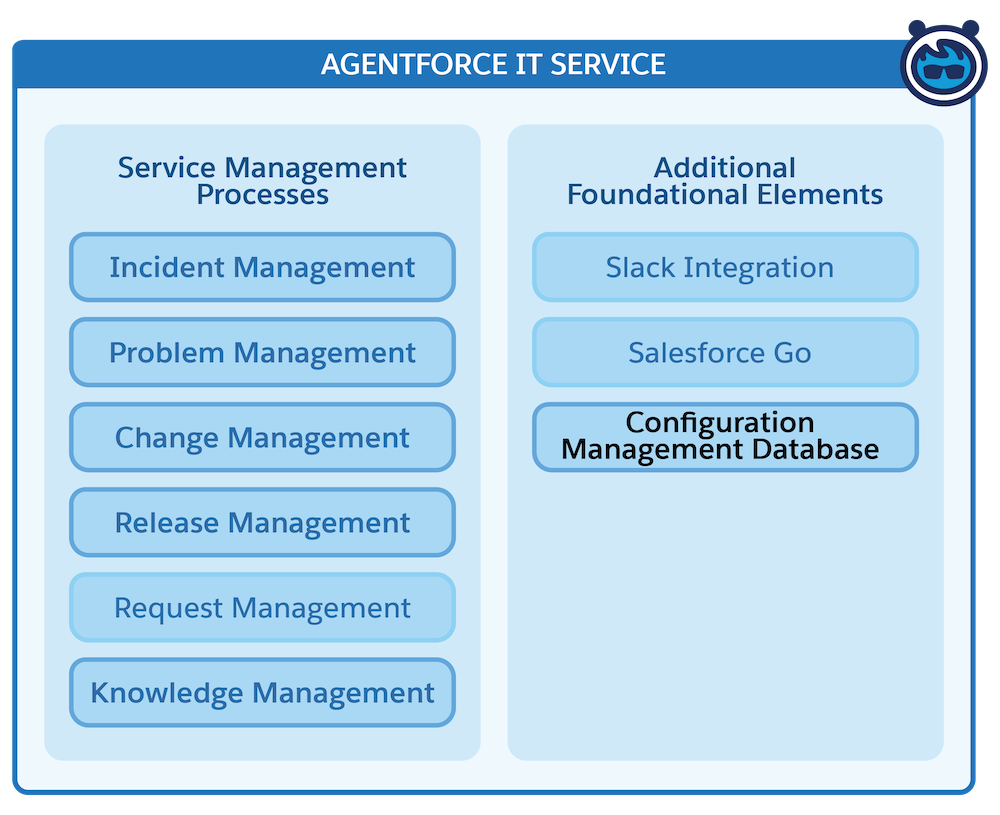
The CMDB interacts heavily with almost every other part of Agentforce IT Service, acting as the intelligent core that powers your day-to-day work. Here’s a quick recap of the core service management processes and exactly how the CMDB supercharges them.
Process Name |
Description |
CMDB in Action |
|---|---|---|
Incident management |
Restores normal service as quickly as possible when disruptions occur. |
When an employee logs a ticket, your support reps instantly see the specific broken asset and the downstream services suffering because of it. |
Problem management |
Identifies and resolves the root causes of recurring incidents to prevent future disruptions. |
You use the CMDB’s visual service graph to trace multiple related incidents back to a single failing server or database. |
Change and release management |
Controls, plans, and deploys changes to minimize risk and service disruption. |
Before pushing a major update, you use the CMDB to calculate risk and visualize the downstream impact so you do not accidentally take down a critical business service. |
Knowledge management and AI |
Captures and shares solutions for self-service and faster issue resolution. |
The data stored in your CMDB provides the essential context that Agentforce and AI use to automatically propose fixes and draft resolution summaries. |
The Building Blocks of CMDB
CMDB in Agentforce IT Service has two key parts.
-
Database (the foundation): This is the structured repository itself. It is where your IT related data lives, organized logically with specific attributes and visual relationship maps.
-
Discovery (the ingestion engine): Discovery is the automated engine that ventures out into your corporate networks, on-premise data centers, and public cloud infrastructure to find hardware and software information. It continuously returns this data to keep your CMDB up to date, making manual spreadsheets a thing of the past.
When you do the math, the formula is simple: ½ Database + ½ Discovery = 1 turbocharged, CMDB-enabled ITSM solution!
Let's explore each part and see how they fit together.
Key CMDB Terms to Know
Before you wade deeper into the technical waters, let’s define a few foundational terms you’ll encounter in this badge. More terms are introduced later, but these are the focus for now.
-
Configuration item (CI): A CI is any component that needs to be managed to deliver an IT service. A CI can be a physical device like a laptop or router, a virtual machine in the cloud, or a software application like a webserver or password manager.
-
Asset versus configuration item (CI): While you might hear these terms used interchangeably, there is an important distinction in the IT world. An asset is typically tracked for financial and lifecycle reasons. For example, “We bought 50 laptops on Tuesday for $1,200 each.” A configuration item (CI) is tracked for operational reasons. When that laptop is logged as a CI, you track its operating system, its IP address, location, and—most importantly—how it connects and relates to the rest of your network.
With the big picture in mind, let's dive into the details. In the next unit, you roll up your sleeves and explore exactly how this data is organized, structured, and mapped within the database half of the equation.