Learn About Recommender Types, Strategies, Rules, and Anchors
Learning Objectives
After completing this unit, you’ll be able to:
- Identify the five types of Einstein Product Recommenders and match them to appropriate storefront pages.
- Configure recommender strategies, including primary and secondary options, to generate recommendation lists.
- Define the rules actions show, hide, promote, and demote.
- Explain how anchor fields link the source object (product, category) to the recommended product for different recommender types and strategies.
Match Recommendations to the Shopper Journey
In Salesforce B2C Commerce, Einstein Product Recommenders offer various types of recommendations to enhance the shopping experience by providing personalized product suggestions. These recommendation types are designed to cater to different stages of the shopper’s journey and various business goals.
Here are the recommender types that you can use.
-
Product to Product: Recommends similar or related affinity products.
-
Products in All categories: Recommends products from all categories.
-
Products in a Category: Recommends products in the same category.
-
Recently Viewed: Recommends recently viewed products.
-
Complete the Set: Recommends complementary products for product sets.
Here’s how each recommender type works and the types of pages they’re best suited for.
Product to Product
The Product to Product recommender generates recommendations in two ways.
- Analyzing a product's similarity to other products
- Analyzing the view or purchase behavior of other customers
The recommender renders recommendations on these pages.
- Product details
- Cart
- Mini-cart
- Checkout
On the product details page, for example, you can recommend products that are similar to the product that the shopper is viewing.
Products in a Category
The Product in a Category recommender generates recommendations for products that are in the same category. This recommender is typically on a category page. For example, you can have categories Luxury, Athletic, Outdoor, and Fashion. If a shopper frequently views luxury footwear, Einstein Product Recommendations can recommend products in the same category (Luxury) from different areas of the site, such as clothing or accessories.
Products in All Categories
To generate recommendations across all categories, you can place this recommender type on these pages.
- Home
- My Account
- My Recommendations
Recently Viewed
The Recently Viewed recommender generates recommendations simply by including products that the shopper recently viewed. You can place this recommender type on any page. For example, place it on the search results page, where it can help you lower the cart abandonment rate.
Complete the Set
For this type, Einstein Product Recommendations reviews shopper storefront activities to understand the types of products most often purchased together, and then applies intelligence around product categories to create a set or a look. You can preview the recommendations, and if necessary, enable or disable them by category. Einstein Product Recommendations automatically creates sets of products without extra feeds or integrations.
Fine-Tune Recommendations with Strategies
Strategies represent different approaches, or algorithms, for generating recommendation lists. For each recommender, you can configure up to three strategies. This table shows what each strategy does for Einstein Product Recommendation results.
Strategy |
Einstein Product Recommendations Analyzes... |
|---|---|
Customer recently viewed items |
The items the shopper recently viewed. |
Customers who bought also bought |
The purchasing behavior of other shoppers who bought the same product. |
Customers who viewed also viewed |
The viewing behavior of other shoppers who viewed the same product. |
Customers who viewed ultimately bought |
The purchasing behavior of other shoppers who viewed the same product. |
Product Affinity Algorithm |
The product's similarity to other products. |
Real-Time Personalized Recommendations |
The shopper’s current and past viewing and purchasing behavior. |
Recent Most-Viewed Products |
The products recently viewed by other shoppers. |
Recent Top-Selling Products |
The products that are top sellers and recently purchased by other shoppers. This strategy has a selectable timespan, offering three options: Real Time, 7, or 30 days. |
Complete the Set |
The shopper’s past and current product choices, combined with other products that they most often purchase with those products. |
This table shows how you can match the type of storefront page to a recommender type when considering available strategies.
For this page... |
Use this recommender type |
With these strategies |
|---|---|---|
|
|
|
|
|
|
The footer is also a great placement, though it’s not a page. |
|
|
|
|
|
Strategy order is important. Einstein Product Recommendations uses the strategy at the top of the list first, and then the second strategy, and so on. Consider configuring a primary and a secondary strategy. Einstein Product Recommendations uses the secondary strategy as a backup in case the primary strategy returns insufficient results.
For your primary and secondary strategies, we recommend that you use one that applies to all shoppers and another that’s based on an individual's history. This approach provides personalized experiences for both existing and new shoppers.
Here are some great choices.
For this recommender type... |
Use this primary strategy |
Use this secondary strategy |
|---|---|---|
Product to Product |
Customers who viewed also viewed |
Product Affinity Algorithm |
Products in a Category |
Real-Time Personalized Recommendations |
Recent Top-Selling Products |
Products in All Categories |
Real-Time Personalized Recommendations |
Recent Top-Selling Products |
Recently Viewed |
Customer recently viewed items |
|
Complete the Set |
Complete the Set |

Rules
Rules make it possible for you to manipulate the list of recommended product IDs before passing the list to the storefront at run time.
It's common for configured recommenders not to use rules. If you choose not to use rules, the recommender sends each product ID to the storefront in the exact order in which the assigned strategies returned them.
You can create and apply up to 30 rules for any given recommender. Each rule specifies an action, a field, and one or more field values (or attributes).
When an Einstein Product Recommender applies a rule, it checks each product in the list of IDs returned by the assigned strategy, and compares the product's field value to the values specified in the rule. If a product's field value matches the value (or one of the values) specified in the rule, the recommender applies the rule. For example, you can create a rule that tells Einstein Product Recommendations to put products of the same brand as the shopper’s viewed product at the top of the recommended list. If there are no other products of that brand in the list, it shows products of other brands. To learn more about rule fields and values, see Agentforce Commerce Recommender Rules.
Rule Actions
Here are the rule actions that you can use.
Rule Action |
B2C Commerce... |
|---|---|
Show |
Shows items that match the specified field values and hides items that don’t. |
Hide |
Hides items that match the specified field values. |
Promote |
Moves matching items to the beginning of the product ID list. |
Demote |
Moves matching items to the end of the product ID list (or removes the item from the list if there are too many product IDs). |
When you configure rules, make sure that they don’t conflict. For example, don’t configure a recommender to simultaneously show and hide the same product, or promote and demote the same product. If there are conflicts, you can review the rules and adjust them.
Anchors
The anchor field points from the source object to the target object. The source object, for example, is a particular category, product, or product set that Einstein Product Recommendations uses in its calculation. The target object is a recommended product. Not surprisingly, the anchors are product-id, category-id, or none (no anchor).
This illustration shows how the anchor fields and their respective strategies map products, product sets, and categories to a recommended product.
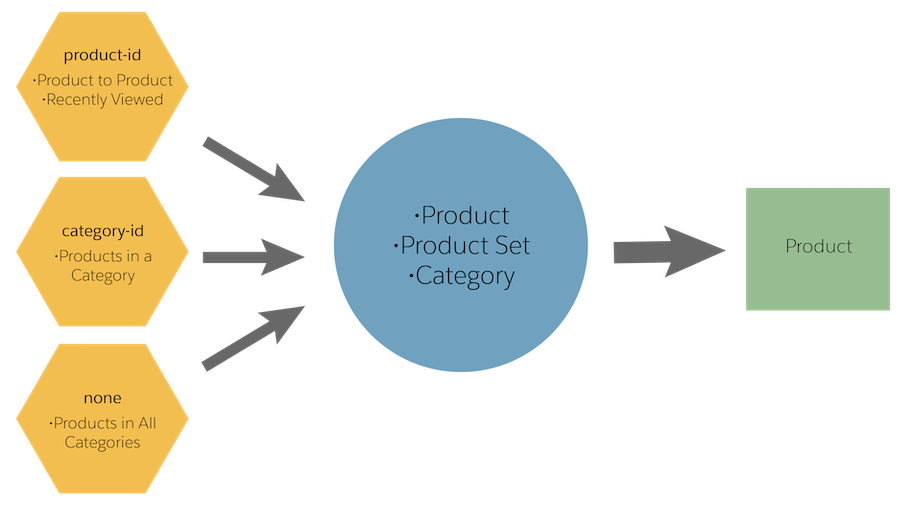
Make sure that the recommender type always matches the anchor, as follows.
-
Product to Product: product-id
-
Products in a Category: category-id
-
Products in All Categories: none
-
Recently Viewed: none
-
Complete the Set: product-id
For each type of strategy, Einstein Product Recommendations uses an anchor to know which products to show. Here’s how the strategies play out.
Strategy |
Anchor |
Results |
|---|---|---|
Customers who viewed also viewed |
product-id |
View-to-view correlation |
Customers who viewed ultimately bought |
product-id |
View-to-buy correlation |
Customers who bought also bought |
product-id |
Buy-to-buy correlation |
Recent Top-Selling Products |
category-id |
|
Recent Top-Selling Products |
None |
|
Recent Most-Viewed Products |
category-id |
Most viewed products within a specified category. The maximum number of recent most-viewed products is 10. |
Recent Most-Viewed Products |
none |
Most viewed products from all categories. The maximum number of recent most-viewed products is 10. |
Product Affinity Algorithm |
product-id |
Model-generated affinity recommendations based on the purchase history of the entire shopper base. |
Real-Time Personalized Recommendations |
None |
The highest ranked products for a specific shopper based on their recent browsing history. The most recent four products that the shopper is most likely to be interested in viewing next. |
For the Customers Who Viewed Ultimately Bought strategy, for example, data can show that shoppers who looked at Product X ended up buying companion products. Einstein Product Recommendations uses this correlation to create a list of recommended products for a shopper who looks at Product X.
Anchors for the Product to Product Type
All recommender rules contain an action, field, and one or more field values. The Product to Product recommender also has an anchor field and an anchor field value. This second set of fields and values further narrows the recommended products. When a shopper views a product, Einstein Product Recommendations checks for a field match on the product and the anchor field value defined in a rule. If they match, the recommender evaluates the rule and applies the action only to the matching recommended items. If no fields match, Einstein Product Recommendations doesn’t apply an action. When you select Any Product as the anchor field, there’s no need for an anchor value. All products are matches.
Next
In this unit, you learned about the product recommender types, strategies, rules, and anchors and the role each plays in configuring a product recommender. Next, learn the steps to configure a product recommender.