Identify Your First Business Process
Learning Objectives
After completing this unit, you’ll be able to:
- Identify when a business process is a good first candidate for conversion to an automated process in Agentforce Operations.
- Distinguish which types of tasks are suited for AI agents versus human assignees.
- Trace the end-to-end steps to turn a business process into a digital workflow.

Where Do You Start?
Now that you understand the roles, the components, and how they connect in Agentforce Operations, the next step is to identify the right initial process. After you select a process, think through which parts of that process belong to a person and which are a natural fit for an AI agent.
In this unit, you work through both of those decisions. Then, you follow one company as they transform a manual hiring process into an automated workflow from start to finish. Start with processes that are repeated frequently, costly, error prone, require sign-off by external people, and have some details mapped out or are easy to document. Pick one mature process that you’re familiar with. That way you can learn Agentforce Operations without also having to adjust the process.
Good candidates for automation are processes done frequently that also need to happen in a standardized fashion. Something you do once, that changes every single time, and requires specific human context is a poor candidate for automation. For example, onboarding a single, unique vendor for a project that never repeats isn’t worth the time and effort to automate. The setup time might outweigh the efficiency gains if the process only runs once.
Humans and AI Agents: Who Does What?
When you have identified a process, consider which tasks need a human in the loop and which ones can rely on an AI agent to complete them. There are several AI agents to choose from and each one has a purpose designed to align with a specific output and required source data. Refer to the AI Agents Catalog for Agentforce Operations for an updated list of agents and what they can do.
If a task is repetitive with defined rules and a consistent output, it’s a strong candidate for an AI agent. If it requires judgment, relationships, or contextual knowledge, keep a human in the loop. For example, routing an incoming request to the right team based on issue type is repetitive and rules-driven and ideal for an AI agent. Reviewing a contract for unusual clauses requires judgment and context, so that’s something a human should own.
How AW Computing Uses Agentforce Operations
Let’s walk through an example hiring process. Yours may be more or less complex than the one in this example.
AW Computing is a typical company with a hiring process they’ve been perfecting for years. Candidates submit their resumes in a variety of ways: through LinkedIn, as an employee referral, on the company’s website, and even by mail. All of the resumes are routed to the central recruiting team and put in a queue. Recruiters then review the resumes assigned to them. If the candidate is a fit for an open position, the recruiter schedules a phone screen and assigns an assessment related to the position. The assessment could be a presentation, a mock first call, an engineering test on HackerRank, or even a writing test.
Successful candidates are then passed to the hiring manager who schedules a second interview. If the interview goes well, the candidate meets with the team. At every phase of the interview process, interviewers submit their interview feedback to the recruiter. When the interviewing is complete and the hiring manager decides on a candidate, the recruiter makes an offer. After the candidate accepts the offer, the recruiter starts a standard background check. If the candidate passes, the candidate moves on to the onboarding phase, which is a new process specific to the team they’re on.
Because it’s a process that connects multiple departments, systems, and people inside and outside of the company, sometimes communication breaks down and the process doesn’t run smoothly. Decision makers go on vacation and don’t assign a delegate, so email gets buried. Each person involved thinks that someone else is going to do the follow-up. AW Computing needed a better way, and fortunately, the company recently purchased Agentforce Operations.
Since the process was loosely documented, they were able to use that as the framework for the planning and design phase. They looked at each task and asked: Is this rules-based with a clear output, or does it need human judgment?
For example, the initial resume screening step, which involves checking whether a candidate meets minimum qualifications, was a clear AI agent candidate. But deciding whether to advance someone to a second interview or make an offer definitely needed a human.
Fortunately, Tonya Jones, the AW Computing admin, had prepared their Agentforce Operations workspace so it was ready to help the team transform to a digital process. What was next for the team?
-
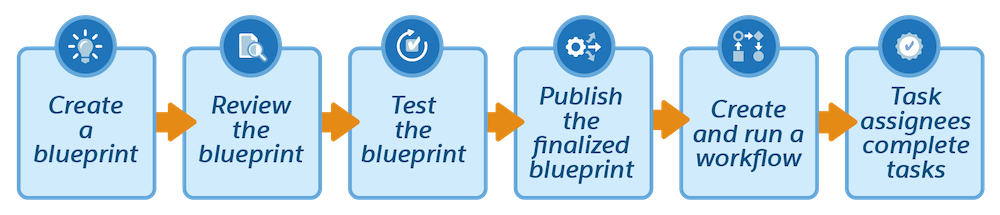
Create a blueprint: The team can use AI to create the blueprint from their loosely documented process and the work they did to decide who is doing what.
-
Review the blueprint: It’s important that they verify that AI interpreted the process correctly. Then, they decide which tasks to assign to AI agents versus people and add or change any stages, tasks, assignments, or dependencies that are missing.
-
Test the blueprint: The team creates a test workflow from the draft blueprint using sample candidate data to verify it runs as expected. If anything needs adjustment, they revise the blueprint and test again before publishing.
-
Publish the finalized blueprint: Publishing makes the blueprint available for anyone to create workflows from. If you don’t publish, only you and users you’ve given access can create a workflow from it. And you can’t clone a blueprint until it’s published.
-
Create and run a workflow: Now they create a workflow from the published blueprint to start the process digitally.
-
Task assignees complete tasks: Internal and external task assignees are notified of tasks to complete. They can complete them by email, web form, or in-app from Tasks.
AW Computing is a few months into the new automated process and is amazed at how streamlined the hiring process has become. Even the candidates remark at how simple and efficient the process is. Now AW is ready to tackle its next digital process transformation!
Summary
In this unit, you learned how to identify a good first process to automate. Focus on one that’s mature, well-understood, and involves multiple people or external parties. You learned how to decide which tasks belong to a human and which are suited for an AI agent. Rules-based tasks with consistent outputs are good AI agent candidates, while tasks that require judgment or context stay with a person. And you followed AW Computing through the complete end-to-end journey, from building and testing a blueprint to running a workflow and completing tasks.
You learned the essentials of Agentforce Operations: what it is, how its components work together, and how to choose a good first process to automate. Use the Agentforce Operations Learning Map to find the right Help content for your role, or go straight to Agentforce Operations Help to explore documentation by topic.