Align Products and Guide Territory Focus
Learning Objectives
After completing this unit, you’ll be able to:
- Explain how product and guidance availability manage field access by territory.
- Distinguish Product Territory Availability from Product Territory Detailed Availability.
- Describe when to use Product Alignment Jobs and what they resolve.
- Explain how territory product priorities affect field visits.
Define Field Availability
Across the last two units, you discovered how to build a product catalog and authored its guidance. The hierarchy defines each product and links the physical items that support it. Product guidance holds the approved messages and objectives that a representative uses to discuss them. The model is complete, and it's universal. Every product and message sits in one place, meant for no team in particular.
The field works differently. Few life sciences companies put the whole portfolio in front of every team. What a team carries depends on where the strategy stands: which teams a launch reaches first, how far a rollout has expanded, which language fits a given audience, and what local rules allow. If you leave the catalog flat, it can't express any of that.
In this unit, you make those decisions. You align products and their guidance to territories, let the system resolve who sees what, and set the order that the products appear in, so each team opens a short, ranked list built for its work.
Align Products to Territories
Alignment maps each product to the territories that carry it. In Agentforce Life Sciences, a territory represents more than geography. It can stand for a region, a specialty team, a role-based coverage model, or a mix of those. Products align to territories rather than individual users, so access follows the coverage model instead of the person.
Cumulus Pharma organizes territories by both region and function. Its hierarchy runs from a West region, down to a San Francisco district, and from there to the individual field teams. Those teams map to commercial roles such as specialty sales, field reimbursement, and market access. The Immunexis launch belongs to one of them, the San Francisco North specialty team. That team drives early field execution and its territory is where the launch begins.
Where you attach a product in the territory hierarchy decides how far its access reaches. Align a product to a parent territory, and the child territories inherit it, which suits a product meant for a whole region. Align it directly to a single team, and only that team sees it, which suits a targeted launch. If a child territory sits out a product it would otherwise inherit, exclude that territory. Those are the three alignment types the system stores: include a territory, include a territory and its subordinates, or exclude a territory.
For the launch, Cumulus keeps the alignment tight. On the Product Alignment page, select Immunexis in the product tree, then select the San Francisco North specialty team in the territory tree.
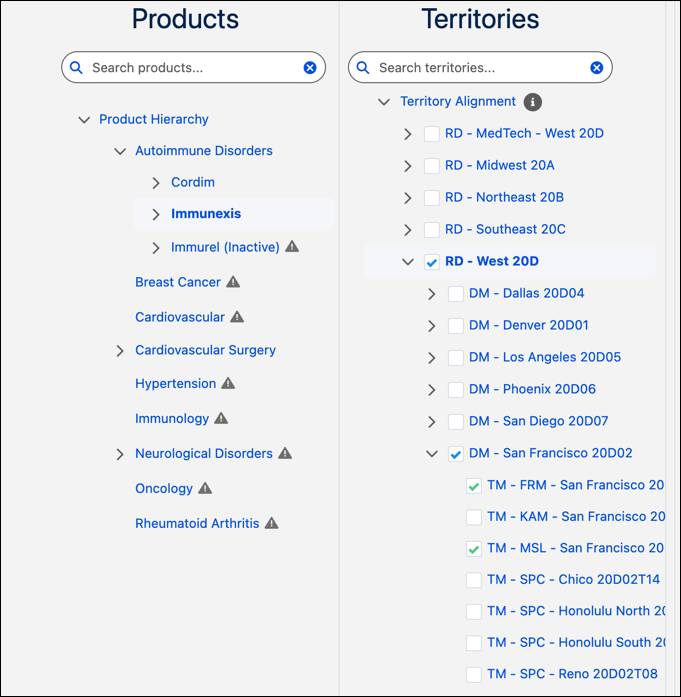
The product tree shows where Immunexis sits in the portfolio. The territory tree shows the region, district, and team levels where you set access. Choosing the specialty team here makes the product available in that context alone. Behind the workspace, the system translates that choice into the records the field workflows actually read.
Explore Availability Resolution
An alignment is a rule, and a rule can be indirect. Include a district, and every team under it inherits the product. Exclude one of those teams, and it drops back out. Before the field can act on any of this, the platform has to turn those rules into a plain answer for each territory on its own. Two objects divide that work: Product Territory Availability and Product Territory Detailed Availability.
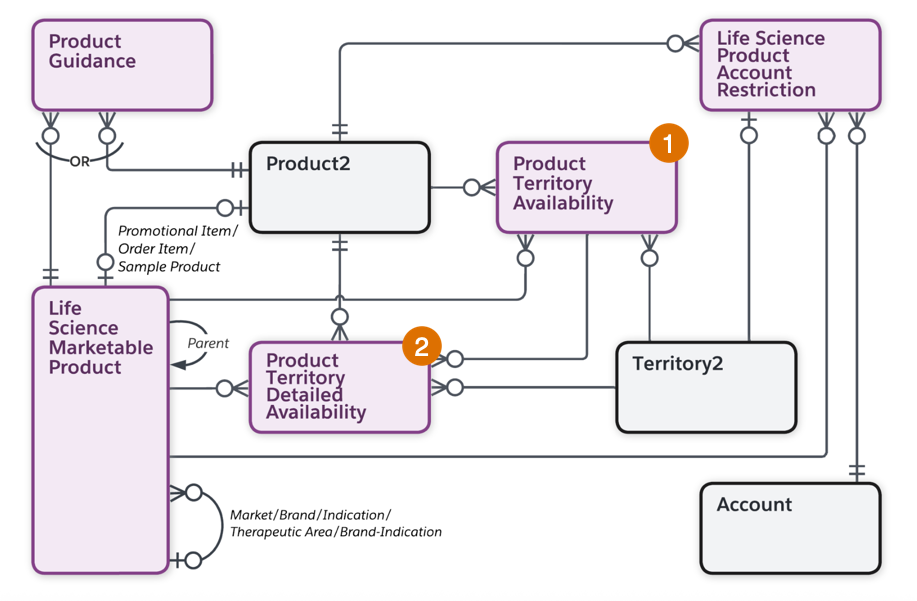
Product Territory Availability (1) holds the rules you set. Each record ties a product to a territory and states how the two relate: included, included for the territory and its subordinates, or excluded.
Product Territory Detailed Availability (2) holds the worked-out answer. The platform reads the rules, follows inheritance down the territory hierarchy, drops anything excluded, and writes one record for each territory that ends up with access. A single territory and subordinates rule on a district can produce a record here for every team beneath it. Field workflows read this layer, so when a representative opens a visit, the platform looks up their territory and finds a settled answer instead of retracing the rules each time.
You don't build the detailed records by hand. The platform does, and the timing depends on how the alignment arrives.
- Align a product on the Product Alignment page, and the detailed records are built as you go, with no separate step.
- Load alignments in bulk, and the flow changes. Organizations often prepare alignments in an outside system and import many Product Territory Availability records at once. Those records arrive in Draft status, not yet in effect. The Publish Draft Product Territory Alignments job activates them and builds the detailed records for every affected territory. Run it whenever alignment data arrives in bulk.
For more details about alignment bulk jobs, check out Create Product Territory Alignments in Bulk in Salesforce Help.
Align Guidance to Territories
Aligning a product opens access to the product itself. The guidance attached to it aligns as a separate step, and that separation is deliberate. Two territories carry the same brand yet lead with different messages. A specialty team sometimes opens with clinical efficacy while a market-access team opens with patient access support.
Guidance access runs on sharing, which the Admin Console manages for you. When you align a message or objective to a territory, the platform shares those Product Guidance records with the users in that territory. Align the product first, then align the messages and objectives each territory carries.
For Immunexis, Cumulus aligns the launch messages and objectives to the San Francisco North specialty team. The product already sits in the catalog and the guidance already exists, so alignment only decides which team receives which language.
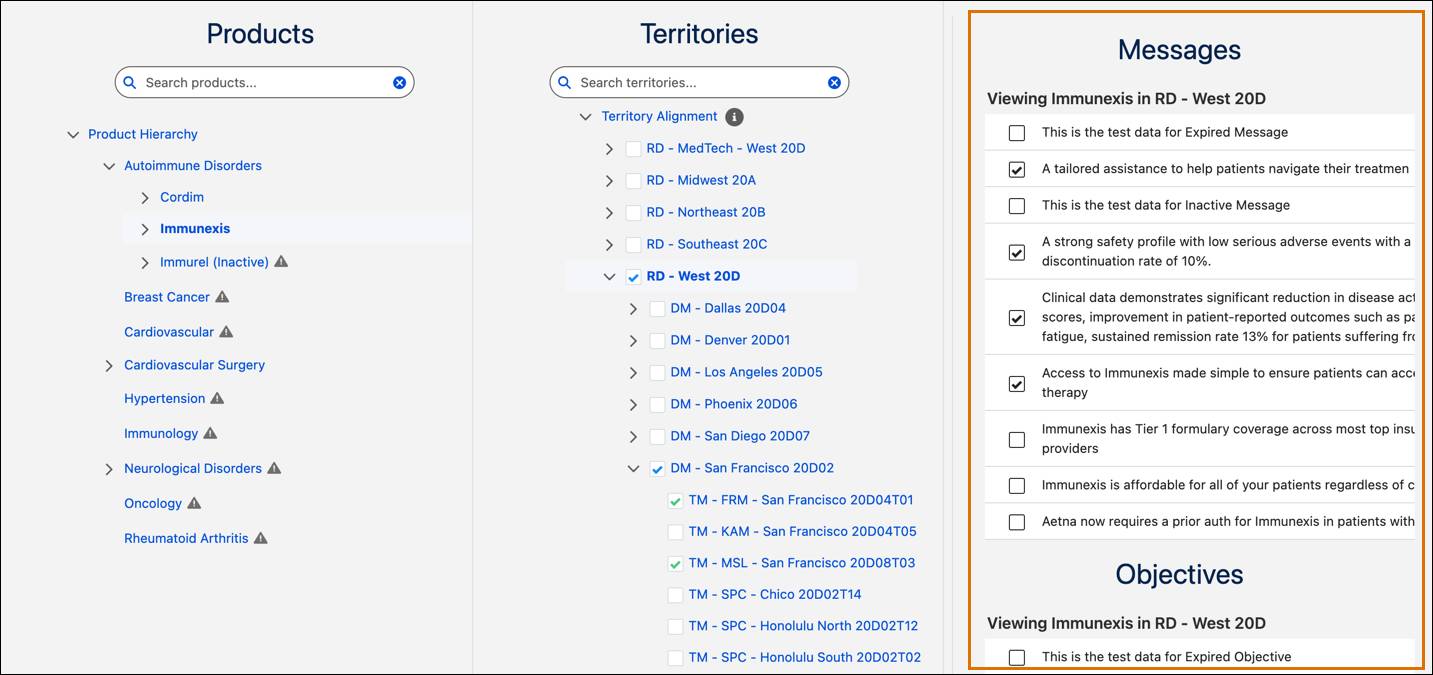
Guidance follows the territory hierarchy the same way products do. Share a message with a parent territory, and child territories inherit it. Adjust or remove it for a child that needs a different approach. The result is precise. Cumulus keeps one product available across several teams while giving each the guidance that fits its role.
Set Product Priorities by Territory
Availability decides whether a team sees a product. Priority decides the order the products appear in. A specialty team can carry dozens of available products, and during a visit, the launch product sits at the top, not buried in the middle of a list.
You set Priority per territory on the Territory Products page, and it applies to the selected territory alone, not its parents or children. The order controls how products appear when a representative details them in a visit.
Cumulus wants Immunexis leading the list for San Francisco North. In Territory Products, select the San Francisco North specialty team, then move Immunexis to the top of the priority order.

Set a numeric order, and products follow it. Leave it unset, and they fall back to alphabetical order, which rarely matches the launch plan. Setting priority gives you a deliberate sequence that puts the launch focus first.
Confirm the Field Experience
Every setting in this unit converges in the field. A field representative covering San Francisco North opens a visit for an account with no restrictions in place.
The product section shows Immunexis. It holds the top territory priority, so it appears first. Its approved launch message is already attached, and the representative can add the objective for the next visit. The full corporate catalog never loads. This way, field representatives work from a short list built for their territory.
Each layer played its part. The catalog defined the product. Guidance supplied the approved message and objective. Alignment made them available to the territory. Priority placed the product where the field representative could act on it first.
What’s Next?
In this unit, you learned how to turn a built catalog into governed field access. You also explored how to align products and guidance to territories and discovered how Product Territory Availability records the rule while Product Territory Detailed Availability resolves it. Finally, you learned that when the alignment job publishes bulk imports, you set territory priorities that order the visit.
Territory controls set access at the team level, but account-specific exceptions still occur. A product can be relevant for a territory and still be off-limits at an individual facility. In the next unit, you apply account-level restrictions that block a product at a site without disturbing the broader territory setup.