Get to Know the Headless Experience Layer
Learning Objectives
After completing this unit, you’ll be able to:
- Explain what the Headless Experience Layer (HXL) is and its role in Headless 360.
- Describe how HXL decouples business logic from user interface.
- List the surfaces where HXL widgets can render natively.
What Is the Headless Experience Layer?
Imagine you’re a developer at a retail company, and your manager asks you to build a customer support widget that shows order status. You build it for Slackbot, Slack’s built-in AI agent, and it looks fantastic. Then marketing wants it in ChatGPT. Then the operations team needs it in Claude’s desktop app. Before you know it, you’ve built the same widget three times—each with slightly different code, different bugs to fix, and different features that drift out of sync.
Sound familiar? There's a better way.
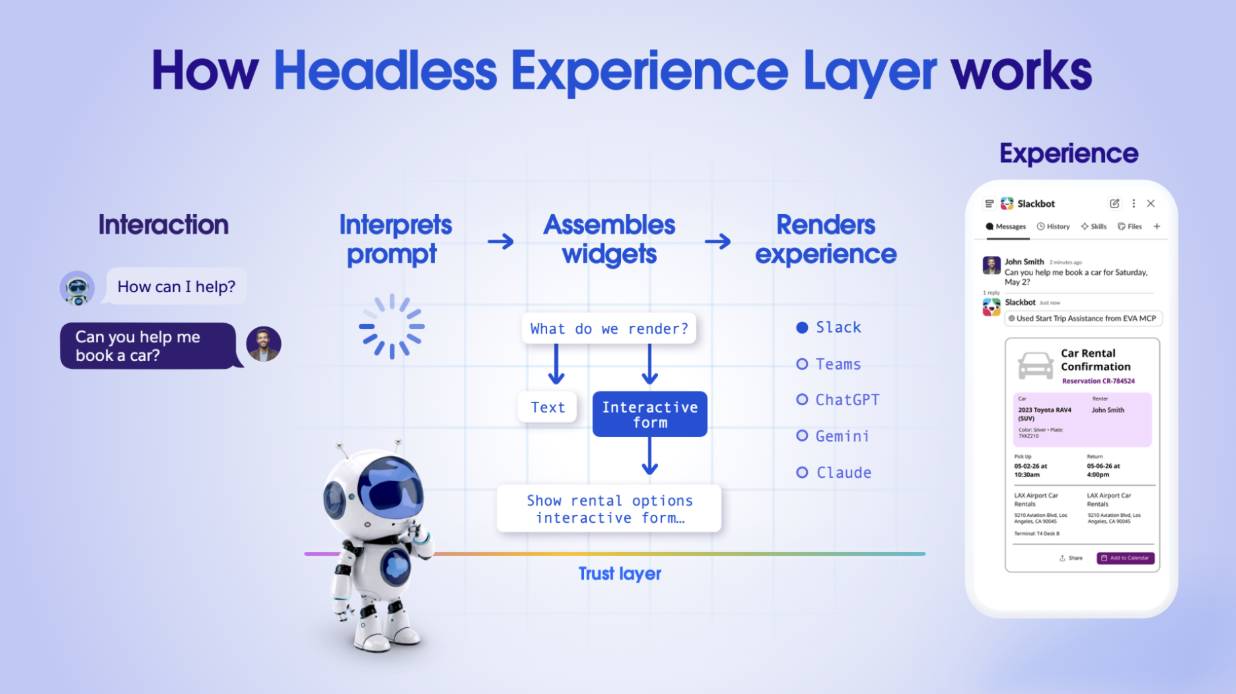
The Headless Experience Layer (HXL) is the Salesforce solution to this build-it-everywhere problem. HXL is a unified experience engine that acts as the brain for your AI agent interfaces. It separates your core business logic, data, and permissions from the presentation layer, or how things look on screen. Think of it as an orchestration platform: You define your business rules and UI structure once, and HXL translates them into native payloads for any agentic channel you want to support. Build once, deploy everywhere—for real this time.
HXL and Salesforce Headless 360
Salesforce Headless 360 is a framework that exposes the entire Salesforce Customer 360 platform—including data, business logic, workflows, and Agentforce AI agents—as APIs, Model Context Protocol (MCP) tools, and CLI commands. It eliminates the need for users or AI agents to open a browser and navigate the traditional Salesforce user interface.
HXL is a key pillar of the Headless 360 vision. While Headless 360 provides the overall framework for building omnichannel experiences, HXL specifically handles the “How do I show this same UI everywhere?” challenge. It’s the translation layer that makes Headless 360 practical: It lets you focus on defining great experiences once while HXL handles the complexity of rendering them natively across every surface.
The HXL Implementation Workflow
Here's the high-level HXL implementation workflow.
- Define your data model using a custom Lightning type (CLT). The CLT describes what data your widget will display such as product information, customer details, inventory levels, or whatever your use case requires.
- Compose your UI by building a widget, which consists of components like buttons, tables, and text fields, to create a rich visual experience.
- Wire the widget and CLT together and deploy to your org.
- Create an invocable action that retrieves data from your Salesforce org, such as from a custom object. This is where your business logic lives. For example, create an Apex class with an invocable method that runs a SOQL query that returns data from your custom object.
- The next step depends on where you want to use the widget.
- To use the widget in an Agentforce agent, create an Apex action from the invocable action and specify the widget as its output, rather than the default output presentation.
- To use it in a channel that supports MCP (Slackbot, ChatGPT, Claude), create a custom MCP server and specify the invocable action as an MCP tool. Then add the CLT as a resource.
- To use the widget in an Agentforce agent, create an Apex action from the invocable action and specify the widget as its output, rather than the default output presentation.
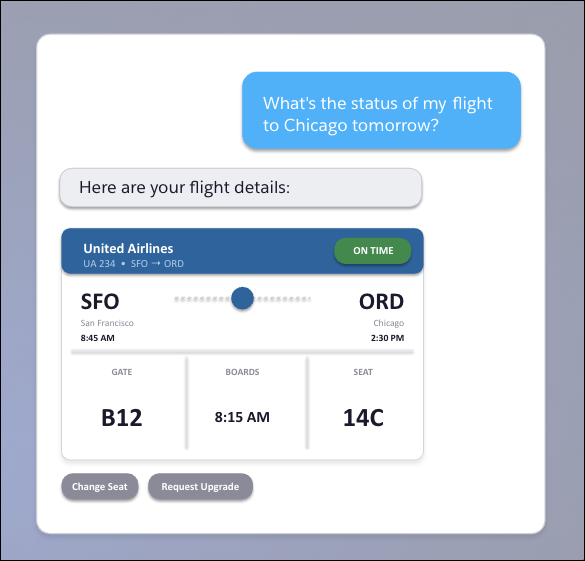
After you deploy your widget, it’s now usable as an MCP App on Slackbot, ChatGPT, and Claude, and in Agentforce on Lightning Experience. The same widget, rendered natively everywhere. For example, the following widget displays flight status information in an easy-to-read graphic; a similar graphic appears in any channel.
Currently, HXL supports these surfaces.
- Agentforce Employee Agents in Lightning Experience
- Slackbot
- ChatGPT
- Claude Desktop
When to Use HXL
HXL shines in specific scenarios. Consider using it when:
- A rich UI can do a better job of representing information than just text. For example, a widget showing a user’s flight gate, departure time, and seat assignment is more effective than a text paragraph—viewers get the information at a glance without parsing through text.
- Unlike Lightning web components (LWC), which serve a similar purpose, widgets allow you to build a UI out of accessible, themeable building block components without owning any business logic. Which means you can build widgets without touching, owning, or maintaining code.
- Building agentic experiences that need to work across multiple surfaces, including Agentforce in Lightning Experience, Slackbot, Claude Desktop, and ChatGPT. HXL ensures a consistent experience everywhere.
Now that you understand what HXL is and when to use it, next get hands-on and explore the building blocks that make it work.