Configure Token Resources
Learning Objectives
After completing this unit, you’ll be able to:
- Explain token-based selling.
- Sign up for a Developer Edition org.
- Identify business scenarios where tokenized selling optimizes usage.
- Set up usage resources.
Before You Start
Before you start this badge, make sure you complete this content. The work you do here builds on the concepts and work you do in that content.
Also, consider completing the following recommended content.

Discover Token-Based Selling
Token-based selling is a flexible consumption model where customers purchase virtual tokens in advance and redeem them across a range of products or services. Each offering has a defined token value, and customers draw from their balance as they use different resources.
Think of tokens like arcade credits. Instead of paying separately for each game, you buy a card loaded with credits. Some games cost 2 credits, others cost 5. You choose how to spend them. Token-based selling works the same way—customers get flexibility, and you get predictable revenue.
Why Choose Token-Based Selling?
Token-based selling provides several business benefits:
-
Simplicity: Customers manage one balance instead of dozens of individual resources.
-
Flexibility: Users pivot their usage as their needs change without renegotiating.
-
Predictability: You receive payment upfront, which improves cash flow.
-
Growth: When token balances run low, it’s a natural opening for an upsell.
Token-based selling works especially well for companies with diverse offerings and variable customer consumption patterns. For example, a cloud provider could price compute power, storage, AI training, and API requests in tokens. A customer who’s unsure of their exact needs can buy a token bundle and allocate it across services as requirements evolve. That's the magic of token-based selling!
Managing these flexible models manually can be a nightmare, which is where Agentforce Revenue Management comes in. It provides the foundational architecture needed to track, scale, and automate consumption models, thus giving businesses the exact tools they need to configure tokenized systems with ease.
Now it’s time to move from concept to execution. Start by setting up your own Salesforce org.
Sign Up for a Developer Edition Org with Agentforce Revenue Management
To complete this badge, you need a special Developer Edition (DE) org that contains Agentforce Revenue Management and our sample data. Get the free org and connect it to Trailhead now so you can complete the challenges in this badge. Note that this Developer Edition is designed to work with the challenges in this badge, and may not work for other badges. Always check that you’re using the Trailhead Playground or special Developer Edition org that we recommend.
- Sign up for a free Agentforce Revenue Management Developer Edition org.
- Fill out the form.
- For Email, enter an active email address.
- For Username, enter a username that looks like an email address and is unique, but it doesn’t need to be a valid email account (for example, yourname@example.com).
- For Country, select United States. Your Developer Edition org uses USD as currency, so to pass all the challenges, we select the corresponding country.
- After you fill out the form, click Sign me up. A confirmation message appears.
- When you receive the activation email (this might take a few minutes), open it and click Verify Account.
- Complete your registration by setting your password and answering the challenge question. Tip: Save your username, password, and login URL in a secure place—such as a password manager—for easy access later.
- You’re logged in to your Developer Edition Org.
Now connect your new Developer Edition org to Trailhead.
- Make sure you’re logged in to your Trailhead account.
- In the Challenge section at the bottom of this page, click the playground name and then click Connect Org.
- On the login screen, enter the username and password for the Developer Edition you just set up.
- On the Allow Access? screen, click Allow.
- On the Want to connect this org for hands-on challenges? screen, click Yes! Save it. You’re redirected back to the challenge page and ready to use your new Developer Edition to earn this badge.
A Business Scenario
At InfinitraBytes, a leading electronics product and solution provider, the sales strategy is evolving. In the past, the team sold fixed quantities—specific gigabytes of storage or defined hours of compute time. But now their customers are asking for greater flexibility and control.
Liam Hoko, the Usage Management admin at InfinitraBytes, has already rolled out several consumption-based offerings using Agentforce Revenue Management. While customers appreciate paying for what they use, the sales team continues to hear a common request: more freedom to decide how budgets are allocated across services.
To meet this demand, the product team plans to launch a token-based model. Their first offering is the AI Services Plan, an anchor product that provides access to a service called AI Agent Interactions.
Liam’s task is to set up a token resource and define rates for the AI Agent Interactions service in a specific number of tokens. He also needs to ensure that customers receive an initial grant of tokens when they purchase the AI Services Plan.
But how does Agentforce Revenue Management measure usage resources? Each usage resource requires a Unit of Measure (UoM), which defines the metric used to track consumption. Every UoM is part of a Unit of Measure Class—a broader category that represents the type of usage being measured, such as count, volume, or duration. For more details, refer to Usage Management with Agentforce Revenue Management.
Here are the specific requirements of the token-based model that Liam needs to set up.
Usage Resource |
Unit of Measure Class |
Unit of Measure |
Product Usage Grants |
Overage Allowed |
Rate |
Rate UOM |
|---|---|---|---|---|---|---|
AI Agent Interactions |
AI Interactions |
Requests |
0 |
Yes |
2 |
Credits |
AI Credits (Token Resource) |
Credit UoM Class |
Credits |
1000 |
Yes |
1 |
USD |
This model allows InfinitraBytes to eventually price various services in tokens, giving customers the flexibility they crave. In this unit, you set up these usage resources.
Set Up Usage Resources
Good news! Your Developer Edition org already includes the AI Services Plan product, along with the Unit of Measure and Unit of Measure Class records required for this badge. The AI Services Plan is an Anchor product that uses a monthly, term-based selling model with a list price of $100.
It’s time to create the token resource that powers InfinitraBytes’s new selling model.
Define a Token Resource
A token resource is a special type of usage resource where the Category is set to Token.
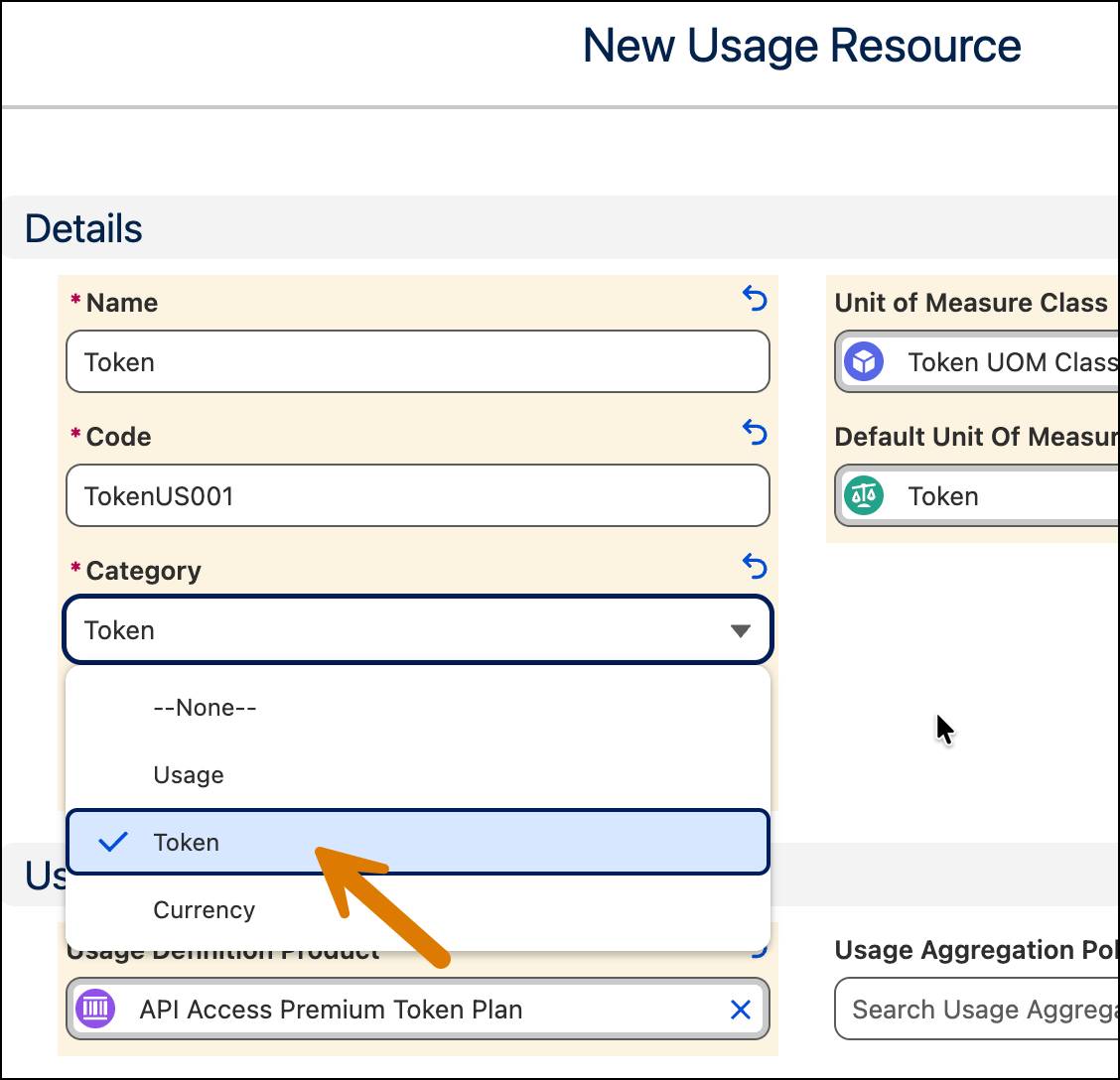
This setting tells the system that the resource acts as a virtual currency rather than a traditional consumable like Data or API call.
Remember, when creating a usage resource, set the Status to Draft and save the record. You cannot set the Status to Active during the initial creation. Return to the record later to set the Status to Active.
Follow along with Liam to set up the token resource in your Developer Edition (DE) org.
- From the App Launcher
 , find and select Usage Resources.
- Click New.
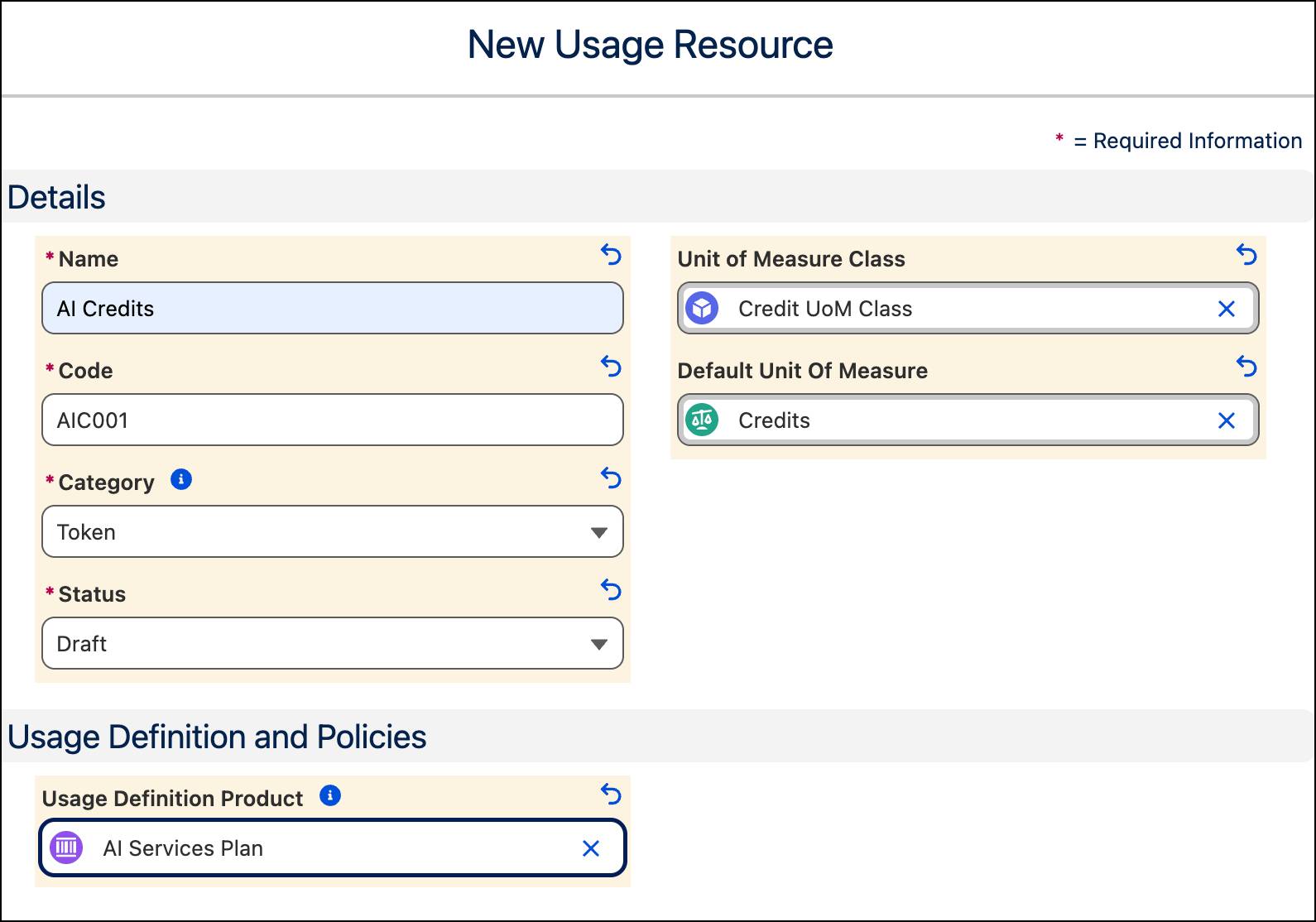
- Add these details.
- Name:
AI Credits - Code:
AIC001 - Category: Token
- Status: Draft
- Unit of Measure Class: Credit UoM Class
- Default Unit of Measure: Credits
- Usage Definition Product: AI Services Plan
- Name:
- Save your work.
You’ve successfully created the token resource.
Create a Measurable Resource
Next, create theAI Agent Interactions usage resource. Here, you set the Category to Usage implying that this is a measurable item that your customers consume when they buy the product.
- Navigate back to the Usage Resources list view page and click New.
- Add these details.
- Name:
AI Agent Interactions - Code:
AIAI002 - Category: Usage
- Status: Draft
- Unit of Measure Class: AI Interactions
- Default Unit of Measure: Requests
- Usage Definition Product: AI Services Plan
- Name:

- Save your work.
Review both your resources for accuracy and confirm the data is correct.
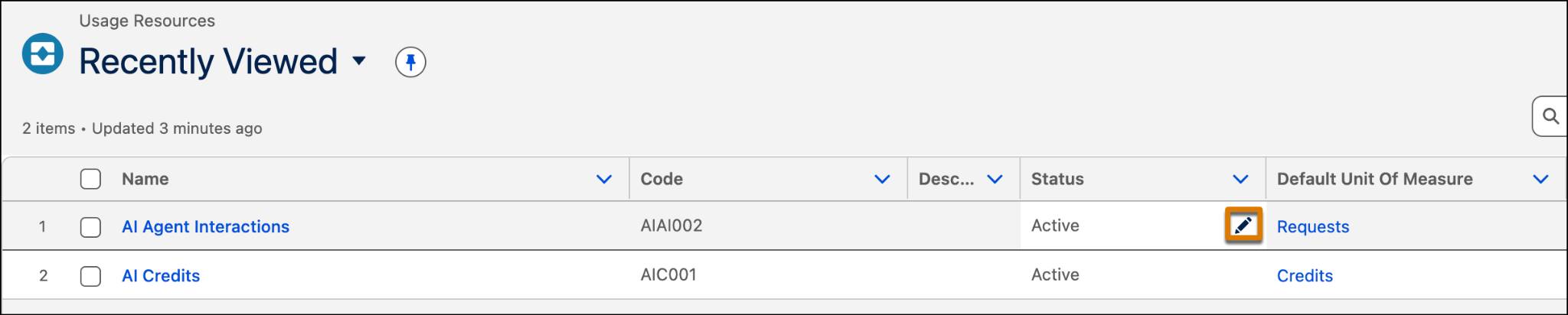
When ready, navigate to the usage resources you just created and activate them. For each resource, click  in the Status field and select Active. Make sure to save your changes.
Create Product Usage Resources
Product Usage Resources (PUR) are junction entities that connect a specific product, such as the AI Services Plan, to usage resources like AI Credits or Data. Join Liam as he creates PURs to map the AI Services Plan product to its usage resources: AI Agent Interactions and AI Credits.
Follow along in your org.
- From the App Launcher, find and select Product Usage Resources.
- Click New.
- Add these details.
- Product: AI Services Plan
- Status: Active
- Usage Resource: AI Credits
- Effective Start Date: For Date, select today’s date – 5 days and for Time select 12:00 PM. So, if today is the 25th day of the month, select the 20th.
- Product: AI Services Plan
- Click Save & New.
- Add these details for the next PUR.
- Product: AI Services Plan
- Status: Active
- Usage Resource: AI Agent Interactions
- Effective Start Date: For Date, select today’s date – 5 days, and for Time select 12:00 PM.
- Token Resource: AI Credits
- Product: AI Services Plan
- Save your work.

Make a note of the PUR name for each resource, as you use these values in the next unit.
Coming Up
You just laid the groundwork for a token-based selling model by defining the foundational resources for the AI Services Plan. In the next unit, you complete the configuration by allocating token grants and setting resource rates. Stay tuned!
To pass the challenge and move on to the next unit, click Check Challenge to Earn Points.