Respond to Network Incidents
Learning Objectives
After completing this unit, you’ll be able to:
- Identify the key functions of the NIST Cybersecurity Framework.
- Explain how incident response plans are used during an active threat.
- Describe effective communication during an incident.
An Early Morning Compromise
It’s 2:47 AM when Maya’s phone buzzes on her nightstand. The alert is short, unexpected, and serious:
[CRITICAL] Unusual outbound traffic detected - FINANCE01
This means one of the company’s most sensitive systems, a finance server named FINANCE01, just started sending encrypted traffic to an unfamiliar location. Maya doesn’t hesitate. She opens her laptop, connects securely to the company’s virtual private network (VPN) and logs into the SIEM (Security Information and Event Management), a monitoring tool that tracks security activity across the company. This anomaly was flagged precisely because the continuous ingestion of detailed logs from FINANCE01 feeds the SIEM, making immediate investigation possible.
Her teammate, Jason, is already awake and logged in to the secure incident response Slack channel.
Jason types: “SIEM flagged outbound traffic from FINANCE01 to an external IP address. Geolocation says Eastern region. Are we geo-blocking?
Maya replies: “No. We don’t geo-block outbound traffic, but FINANCE01 shouldn’t be online at all. Something’s definitely suspicious.”
Maya quickly checks the server’s configuration and scheduled tasks to rule out any legitimate reason for the outbound traffic. She confirms that there were no updates, maintenance jobs, and no business need to reach the internet. She also checks for authorized processes that could have triggered the connection, but finds nothing.
Now she’s seriously concerned.
Within minutes, Maya sends a secure update to the chief information security officer (CISO) and other executive leadership. She reports what she’s researched so far, confirms that FINANCE01 is involved, and recommends isolating the system while her team investigates.
Approval comes back almost immediately. With leadership’s signoff in place, Maya isolates the server from the network and gathers her team for an emergency meeting.
Meet the Incident Response Plan
Cybersecurity is about managing change. Any change, whether it’s a new tool, a new partner, or an unexpected outage, can create risk or opportunity. A cybersecurity framework gives an organization a clear way to think through that change and respond with intention.
The NIST Cybersecurity Framework (CSF) is one of the most widely used guides for doing this. It helps organizations connect everyday actions, like access controls, monitoring, and recovery, to business goals like speed, trust, and continuity.
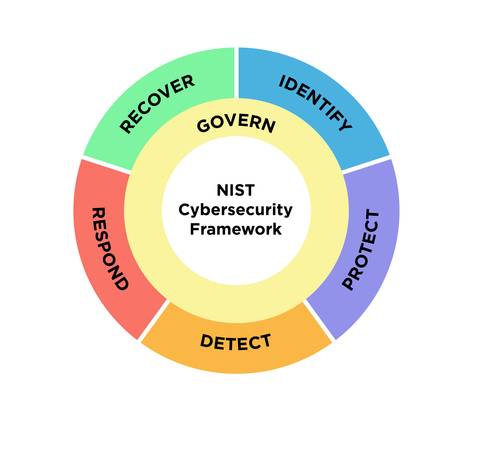
This is why Maya isn’t guessing about what steps to take. She’s following the incident response plan (IRP) her team developed and rehearsed. Their IRP is based on the NIST Cybersecurity Framework (CSF) 2.0, a six-step process used across industries to help organizations manage and respond to cyberthreats.
The IRP isn’t something the security team “owns.” It belongs to the whole organization. This table shows that perspective in practice, moving the culture from rule-checking and compliance to willing participation and resilience.
Function |
How It’s Reflected in the Incident Response Plan |
Key Contributors |
|---|---|---|
Govern |
Leaders set clear rules and connect cybersecurity to the goals of the business and apply lessons learned to improve practices. |
Executives, Board of Directors, CISO, Legal/Compliance |
Identify |
Teams map out systems, data and connections the organization depends on, and what could put those things at risk. |
Business Unit Leaders, IT Asset Owners, Risk Management, Security Architects |
Protect |
Teams put safeguards in place so the business can keep running, even if something unexpected happens. |
Security Team, IT Operations, All Employees, HR (training/awareness) |
Detect |
Security teams and employees notice and report unusual activity before it becomes a bigger issue. |
SOC Analysts, IT Monitoring Teams, Employees, Security Engineers |
Respond |
When an incident occurs, security teams and leaders act quickly and strategically to reduce harm and keep people informed. |
Incident Response Team, Communications, Legal, Leadership |
Recover |
IT and security teams restore systems, services, and trust so the organization can return to normal. |
IT Disaster Recovery, Business Continuity, Executive Leadership, Security Team |
As the lead Security Operations Center (SOC) analyst at PeakFlow Analytics, Maya ensures the IRP stays tested and ready. During an incident she sets priorities, assigns work, updates leaders and uses dashboards and playbooks to coordinate activities and ensure lessons learned.
Her team includes:
Name/Role |
Primary Responsibilities |
Primary Tools |
|---|---|---|
Jason - Tier 1 SOC Analyst |
Monitor alerts; check if they’re real; add basic details (who/what/when/where); flag urgent issues; keep status up to date; hand off cleanly to the next shift. |
Security monitoring dashboards; ticket system |
Priya - Identity and Access Management (IAM) Specialist |
Watch recent sign-ins; lock or reset risky accounts; check use of admin accounts; remove extra access people don’t need; review who has access after the incident. |
Identity system (for example, Okta); multifactor logs; privileged-access vault; access review reports; ticket system |
Alex - Systems Engineer |
Run scans; quarantine affected computers/servers; apply updates or roll back safely; record changes; restore from backup if needed; confirm systems work normally after fixes; save important logs as evidence. |
Endpoint/security agent console; vulnerability scanner; configuration tools; backup platform; system monitor; change/ticket records. |
Their job is to advance the organization’s mission by keeping critical systems reliable, available, and ready to deliver the information and outcomes the business depends on.
By 3:08 AM, the FINANCE01 server is isolated and the immediate risk is contained, but the work is far from over. Maya starts a full triage; she begins reviewing logs, checking for lateral movement, and tracing what triggered the outbound traffic. Jason builds a timeline of events using the SIEM, while Priya pulls up recent login activity and Alex scans connected systems for signs of compromise.
Execute the Plan
Before we follow the team deeper into their investigation, let’s take a step back and look at how the moves they’re making connect to the core functions of the Cybersecurity Framework.
First, the coordination between Maya and Jason reflects Govern, the first function in the CSF. PeakFlow Analytics has a leadership-approved incident response plan that clearly defines roles, responsibilities, communication channels, and escalation paths. Because the team rehearsed this exact scenario in a recent drill, they know exactly what to do.
The next function, Identify, focuses on understanding what systems are involved and how they connect. Maya reviewed the system map and confirmed that FINANCE01 is only authorized to connect internally to payroll and vendor systems. An internet connection violates its network restrictions. Jason noted a scheduled task that ran just before the alert. This information helps the team narrow the timeline and identify a likely point of compromise.
Thanks to earlier Protect measures, like segmented backups, multifactor authentication, and a communication failover plan, the team has a safety net in place. These security controls won’t prevent every incident, but they will limit the scope and speed of any damage.
Trace the Threat
Now let’s pick up where we left off, at the Detect phase, where every log, timestamp, and anomaly helps the team piece together what happened. Some of these steps also align with the Respond function, since in practice, incident analysis often overlaps with detection activities. Jason leans in toward his monitor to more closely scan lines of log activity in the SIEM.
Jason: “Found something. Two hours before the outbound traffic, a scheduled task was created using “s.lopez’s credentials.”
Maya: “That’s an employee in the finance department. What was the task instructed to do?”
Jason: “The task executed a script at 2:47 AM that opened a connection to the same external IP the SIEM flagged earlier. Because that server isn’t supposed to send anything out, the connection was enough to trigger the alert.”
Maya nods and begins scanning the email logs for s.lopez. It doesn’t take long to find a suspicious email, with a vague subject line and a shortened URL. The click record shows it was opened within minutes of delivery, so she flags it.
Priya reviews the same entry. When the link was clicked, nothing obvious happened like a popup or download prompt. Instead, it presented a blank screen. On its own that’s minor; in context, it’s a clue.
Meanwhile, Alex pulls activity logs from the FINANCE01 server. He confirms that the script launched exactly when Jason said it did, and that outbound connection originated from a temporary user folder, which is an unusual place for legitimate processes to run.
After correlating timestamps, the team maps the sequence: a phishing email arrived; minutes later the link was clicked; the click executed background code that created a scheduled task; at 2:47 AM that task launched and opened an outbound connection to an attacker-controlled server; for several minutes the server maintained that unauthorized session until Maya’s team isolated FINANCE01.
Respond to the Threat
The team has identified the likely cause of the incident, now Maya guides them through the next phase of the response. The FINANCE01 server is already isolated, but containment is just one of several response actions.
Jason scans internal logs for signs of lateral movement or any communication between FINANCE01 and other systems that might suggest the attacker was trying to spread. Nothing unusual yet, but he configures alerts to catch any delayed activity that could still be lurking.
Alex captures a full memory snapshot of the server and begins imaging the disk to preserve all the evidence. They'll need it for analysis, reporting, and maybe for legal review later on.
Priya monitors the use of s.lopez’s credentials across the network. Rather than immediately locking the account, she sets up tracking to see if it’s being used anywhere else. Once the threat is contained and the investigation is over, the account will be secured with a forced password reset and session termination. The employee will be notified of the reset and required to create a new password before regaining access.

Meanwhile, Maya updates the case timeline in the incident response tracker. Every action is logged. This documentation will form the foundation for everything that happens next.
Wrap It Up
By the end of the response phase, the team has followed a structured plan to investigate, contain, and begin securing the environment. Their actions were precise, intentional, and based on a shared understanding of the threat. In the next unit, you follow them into the recovery phase where systems are restored, final assessments are made, and the real work of learning from the incident begins.