Set Up Compliant Data Sharing
Learning Objectives
After completing this unit, you’ll be able to:
- Set org-wide sharing defaults for Compliant Data Sharing.
- Enable Compliant Data Sharing for the Financial Deal object.
- Grant profile access to the Financial Deal object.
Set Up Your Organization for Compliant Data Sharing
In the previous unit, you learned that Compliant Data Sharing can provide targeted access to only the users allowed to view or edit specific records.
Compliant Data Sharing grants access to participants beyond your org-wide sharing defaults. Participants are users granted access to a record through Compliant Data Sharing, and participant roles define the participants’ default access levels to those records. You learn more about participant and participant roles later in this badge.
In this unit, you first learn how to configure required settings for Compliant Data Sharing. Along the way, you follow the example of the Corporate Investment Banking team at Cumulus you learned about in the previous unit.
The Corporate Investment Banking team uses the Financial Deal object to track its work on the pending Northern Trail Outfitters (NTO) merger, including any material non-public information (MNPI). The Salesforce admins at Cumulus already set up Financial Deal Management, so the Financial Deal object is available.
Now learn how Cumulus’s admins set up Compliant Data Sharing to work with the object.

Set Org-Wide Sharing Defaults
Compliant Data Sharing works with supported objects with org-wide sharing defaults set to Private or Public Read-Only. If an object’s org-wide sharing default is set to Public Read/Write, everyone in the Salesforce org can already access that object’s records and Compliant Data Sharing has no effect on a participant’s access.
In the Cumulus example, the first step is to set the org-wide sharing default for the Financial Deals object.
Changing an object’s org-wide sharing defaults takes some time to implement. This process could affect other running processes and prevent some users from viewing or editing records until the change is complete.
Here’s how to change the defaults.
- From Setup, in the Quick Find box, enter
sharing, and then select Sharing Settings.
- In the Manage sharing settings for picklist, select Financial Deals.
- If Default Internal Access isn’t already set to Private or Public Read-Only, click Edit in the Organization-Wide Defaults list.
- Find the Financial Deal object, and in the corresponding picklist, select Private or Public Read-Only.
- Save your work.
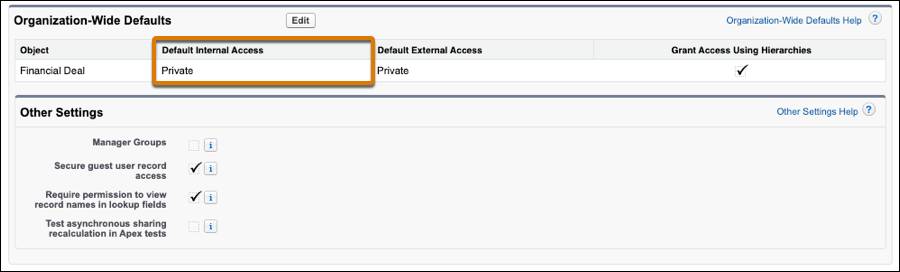
The org-wide sharing defaults for the Financial Deal object are now compatible with Compliant Data Sharing.
Enable Compliant Data Sharing for an Object
Next, enable Compliant Data Sharing for the target object. In this example, enable Compliant Data Sharing for the Financial Deal object.
- In the Quick Find box, enter
object enablementand select Object Enablement Settings.
- The page displays all the objects currently supported by Compliant Data Sharing. Turn on Compliant Data Sharing for CRM Users for the Financial Deal object.
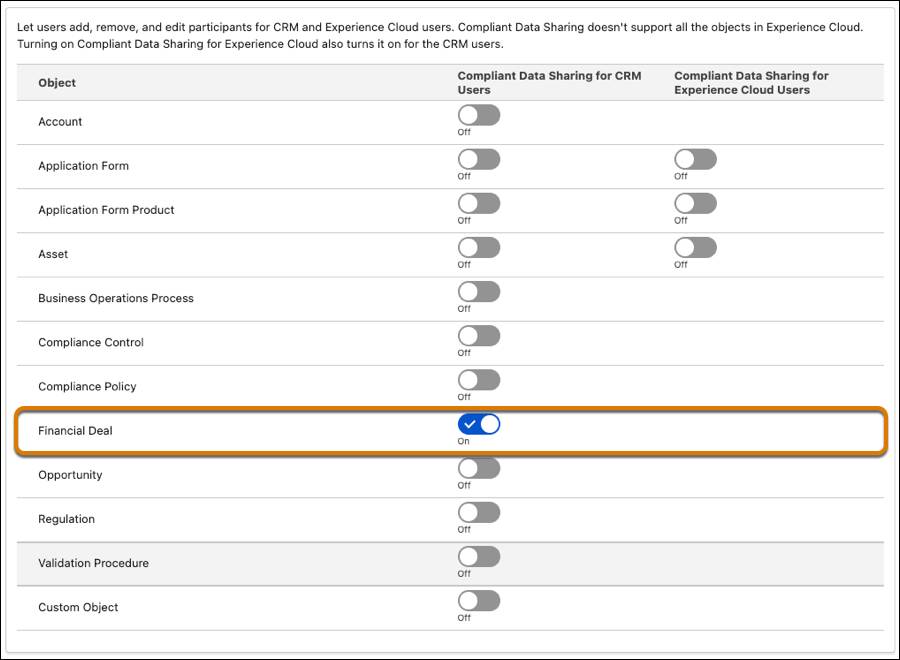
Turning on Compliant Data Sharing for an object is easy, but turning it off isn’t quite so simple. If you decide to disable Compliant Data Sharing for an supported object, you must first delete all the participant roles associated with the object.
Notice, too, that you can enable compliant data sharing with Experience Cloud users for some objects. See Set Up an Object for Public and Private Sharing in Compliant Data Sharing for details about that setting if you plan to share select records with Experience Cloud users.
Create and Assign Permissions for Compliant Data Sharing Managers and Users
With the org-wide sharing defaults set and Compliant Data Sharing turned on for the object, you create your permission sets for users.
We won’t cover that in detail now. Reference Compliant Data Sharing for Financial Services for the user permissions needed to configure and use Compliant Data Sharing.
After you set up your permission sets, assign those permission sets to the appropriate users. At Cumulus, for example, members of the Corporate Investment Banking team get permissions to use Compliant Data Sharing.
Grant Profile Access to Parent Objects
Earlier you learned that participant objects control access to other objects in Compliant Data Sharing. To do this, participant objects have a master-detail relationship with the object for which they control access. So, the access you set for a parent object is inherited by its participant record.
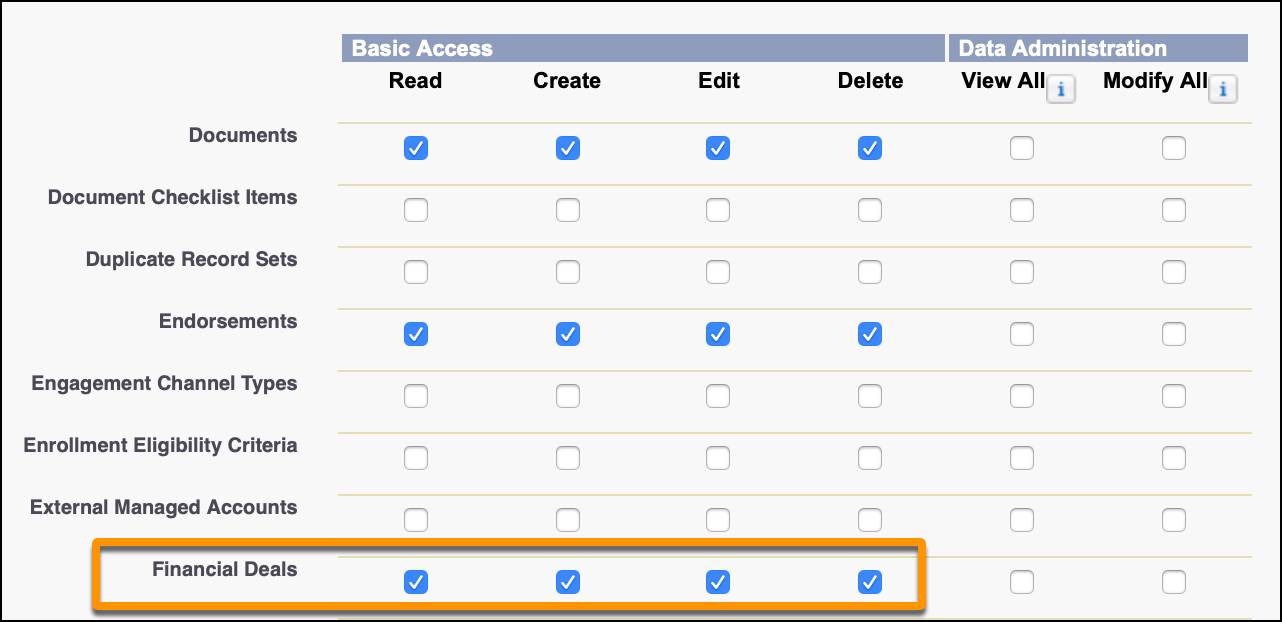
At Cumulus, this means that the Corporate Investment Banking team must have access to the Financial Deal object to manage Financial Deal Participant records. Here’s how you set those permissions on user profiles.
- From Setup, in the Quick Find box, enter
profiles, and then select Profiles.
- Click Edit next to the profile to modify.
- In the Tab Settings section, select Default On for Financial Deals. This makes the Financial Deals tab available to all users with this profile.
- In the Standard Object Permissions section, find Financial Deals and select Read, Create, Edit, and Delete.
- Save your work.
Repeat these steps for any profile that needs the same access.
Then, depending on the object, you may need to add the participants related list to your page layouts for the object. The Financial Deal Participants related list is automatically added to the Financial Deals object when Financial Deals and Compliant Data Sharing for Financial Deals are turned on.
What’s Next?
In this unit you learned how to configure Compliant Data Sharing for the Financial Deal object, including setting org-wide sharing defaults, enabling the feature, and creating and assigning permission sets.
In the next unit, you learn how to set up participant roles and participant groups to control exactly who gets access to your records.
Resources
- Salesforce Help: Set Org-Wide Sharing Defaults for Compliant Data Sharing
- Salesforce Help: Enable Compliant Data Sharing for Objects
- Salesforce Help: Manage Users in Compliant Data Sharing
- Salesforce Help: Configure Page Layouts for Compliant Data Sharing