Add Strategic Context and Control to Your Account Model
Learning Objectives
After completing this unit, you’ll be able to:
- Identify how Agentforce Life Sciences adds strategic signals and compliance controls to account data.
- Describe how these features help teams prioritize engagement, maintain data accuracy, and protect privacy.
- Explain how to connect these controls to downstream planning and orchestration activities.
From Structure to Strategy
Once you’ve established relationships between accounts, territories, and products, the next step is putting that structure to work. Commercial teams need ways to interpret records, organize large books of business, and keep provider data reliable as it changes.
This unit focuses on four capabilities that build on the account model:
-
Ratings, which express strategic signals such as importance or potential
-
Lists and Filters, which create focused sets of accounts
-
Segmentation, which gives admins reusable, rule-driven groupings
-
Data Change Requests, which safeguard data quality
Together, these capabilities turn structural data into an operational layer that supports prioritization, planning, and governance across commercial teams.
Add Strategic Meaning with Ratings
A well-modeled account structure establishes who a provider is and how they connect to products, territories, and teams. But planning also depends on how to interpret that structure. Ratings add that strategic layer by turning relationship data into consistent signals teams can use to prioritize, segment, and coordinate outreach.
A rating is applied where the context lives. This could be the account as a whole, a territory assignment, a product relationship, a practice location, or a team alignment. By storing ratings on these specific relationship objects, Agentforce Life Sciences preserves meaning without forcing one-size-fits-all labels.

Let's explore how ratings apply to some of the objects you've already learned about, including those that cover account and territory information.
Object |
Rating Context |
Example |
|---|---|---|
Account (1) |
Stores overall provider ratings that apply across products, territories, and teams. |
Dr. Morita is tagged “High Strategic Value” for the organization. |
Provider Account Territory Info (2) |
Stores territory-specific priority so a provider can rank differently by region. |
Dr. Morita is “Top Priority” in the Bay Area territory. |
Provider Account Product Info (3) |
Stores product-specific signals like potential, adoption, or advocacy. |
Immunexis is marked “High Prescribing Potential” for Dr. Morita. |
Contact Point Address (4) |
Stores site-level ratings to distinguish locations for access or focus. |
Dr. Morita’s hospital location is “High Traffic” while his clinic is “Medium.” |
Provider Account User Group Info (5) |
Stores team-specific prioritization so different groups can score differently. |
The launch team scores Dr. Morita as a “Tier 1 Target.” |
On an account record, the Ratings tab consolidates the signals teams rely on for planning—provider-level tiers and segments, plus context-specific ratings that can vary by product or other relationships. This gives users a quick, shared “read” of the account without collapsing everything into a single label.

Admins control which rating fields appear and can tailor layouts by profile so each role sees the signals that matter for their work. With ratings anchored to the right objects, Agentforce Life Sciences turns account relationships into shared, actionable insight, with planning and execution staying consistent across teams.
Organize and Act with Lists and Filters
Account structures become most useful when users can shape them into focused working sets. Territories are large, priorities shift quickly, and teams need flexible ways to zero in on the right accounts for the task at hand.
Lists and filters support two complementary approaches:
-
Dynamic filters, which automatically assemble accounts based on defined criteria
-
Static lists, including routes, which users curate manually
Together, they help reps and other commercial users focus on the accounts that matter most to their work.

Let’s go over the objects for lists and filters.
Object |
Description |
Example |
|---|---|---|
Life Sciences Account List (1) |
The parent object that represents a list. Supports both dynamic lists and static lists. |
“Bay Area Pulmonology Targets.” |
Life Sciences Account List Object (2) |
Identifies which related objects participate in a dynamic list and groups the filters and columns tied to that object. |
The list references Account, Healthcare Provider Specialty, and Contact Point Address. |
Life Sciences Account List Column (3) |
Defines which fields from a specific object appear as columns in the list. |
Columns include Name, Specialty, and City. |
Life Science Account List Filter Criteria (4) |
Stores the filtering conditions applied to the object defined by the List Object. |
“Specialty = Pulmonology” and “City = San Francisco. |
Life Science Account List Member (5) |
Represents an account added to a static list or routine. |
Dr. Morita is included as a list member. |
Users move between dynamic and static lists to plan outreach, build routines, or work from targeted account sets. Dynamic filters adjust automatically as data changes, while static lists support repeatable workflows.
Bulk actions let users update supported fields or launch visits and emails across multiple accounts, turning lists into practical tools for daily execution.
Next, let’s learn about segmentation.
Segment at Scale with Admin-Defined Logic
Lists and filters help users assemble accounts for day-to-day work, but many groupings need to be standardized across teams, reused by multiple features, or enforced through business rules. Segmentation provides this administrative layer.
A segmentation groups accounts (or account-related records) based on defined criteria and makes that grouping available for other functions such as eligibility checks or sample limit logic. Unlike personal lists, segmentations are centrally defined and governed, ensuring consistency across territories, brands, and workflows.
Segmentation is built on the Actionable List framework, which provides a flexible way to define a dataset, capture the criteria that shape it, and link it to downstream use cases.
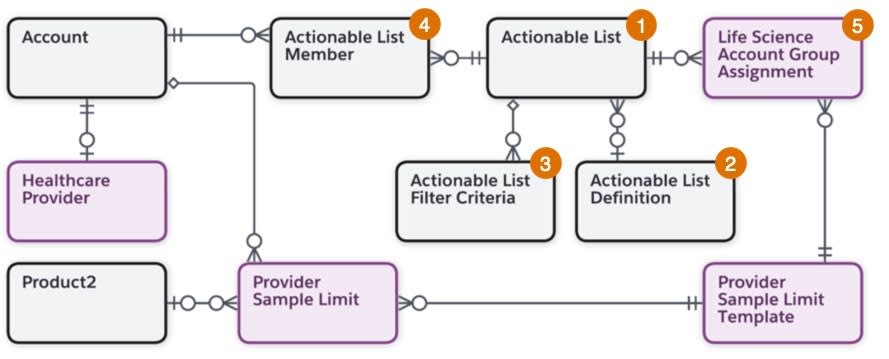
Here’s an overview of segmentation objects.
Object |
Description |
Example |
|---|---|---|
Actionable List (1) |
Represents the segmentation itself, a defined grouping of accounts or account-related entities. |
“Chronic Inflammation Specialists” segmentation used across sample limit initialization. |
Actionable List Definition (2) |
Identifies the source dataset and configuration for a segmentation. This can be created through the data processing engine or sourced from Data 360 segments. |
A Data 360 segment of pulmonologists is synced and stored as an Actionable List Definition. |
Actionable List Filter Criteria (3) |
Defines the conditions that determine which records belong to the segmentation. |
“Specialty = Pulmonology” |
Actionable List Member (4) |
Represents each individual record (often Account or Healthcare Provider) included in the segmentation after criteria are applied. |
Dr. Morita is an Actionable List Member of the “Pulmonology Specialists” segmentation. |
Life Science Account Group Assignment (5) |
A junction object that applies a segmentation to specific business rules or operational workflows. |
The “Chronic Inflammation Specialists” segmentation is assigned to a Sample Limit Template. |
Once defined, a segmentation becomes a reusable building block for rules and planning. For example, teams can use segmentations to set up sampling limits.
Centralized criteria ensure everyone operates from a consistent interpretation of which accounts meet specific strategic or regulatory conditions.
The last layer of the data model deals with data quality and change requests.
Maintain Data Quality with Data Change Requests
Provider data changes constantly, and giving everyone the ability to edit it creates risk. Data Change Requests (DCRs) provide a controlled way to keep data accurate by allowing users to submit corrections while admins decide which changes require review or validation.
DCR uses configuration objects to define which fields are governed and which profiles and record types are allowed to update them. A transaction object stores each request and its review status.

Here are the key objects of the Data Change request model.
Object |
Description |
Example |
|---|---|---|
Life Science Data Change Definition (1) |
Enables DCR for a specific object and serves as the parent for all configurations. |
Cumulus turns on DCR for Account to govern changes to provider records. |
Life Science Data Change Definition Managed Field (2) |
Defines which fields on that object are governed by DCR and how they should be handled, including whether changes apply immediately or require additional validation. |
Address fields require approval. |
Life Science Data Change Definition Persona Definition (3) |
Assigns rules to profiles, determining who can request which types of changes. |
Field reps can request address corrections; only data stewards or medical operations can request specialty or license updates. |
Life Science Data Change Definition Record Type (4) |
Allows DCR rules to vary by record type. |
Hospital HCP record types require external validation for location changes, while Independent Clinic records do not. |
Life Science Data Change Request (5) |
Stores a submitted change request, including the target record, the proposed new values, status, comments, and review outcome. |
A rep requests an address correction and adds context in the request. |
DCR preserves data quality without limiting visibility. Users surface corrections as they see them, while administrators maintain oversight. Downstream processes—segmentation, sampling, territory operations—benefit from clean, trusted records.
Build a Trusted Commercial Foundation
Across this badge, you explored how Agentforce Life Sciences establishes a structured, unified account model that supports the entire commercial lifecycle.
You learned how:
-
Accounts and Healthcare Providers form the anchor for commercial data.
-
Contact Points, Specialties, and Licenses give dimension to each provider.
-
Affiliations and Alignments tie providers to organizations, territories, and users.
-
Products and Territories extend the model into brand and regional strategy.
-
Ratings, Lists and Filters, Segmentation, and DCR add strategic insight, organization, and governance on top of that foundation.
Together, these elements help teams work from a shared, accurate view of their customers and ensure downstream execution is grounded in clean, consistent data.
For organizations like Cumulus Pharma, this means engagement with providers like Dr. Aaron Morita is guided by clear relationships, aligned teams, and defined product and territory constraints, all resolved directly from structured data.
For deeper implementation detail, explore the Resources section for setup guides, detailed object reference materials, and administrator documentation.