Discover Self-Service and AI Assistance
Learning Objectives
After completing this unit, you’ll be able to:
- Resolve IT issues using the portal's powerful AI search and Knowledge Base.
- Describe how conversational AI brings effortless IT support directly into your flow of work.
Help Yourself (So IT Doesn’t Have To)
In the previous unit, you explored your new favorite IT destination: the Employee Services Portal. But what happens when you, the employee, actually encounter a problem? When you’re in the middle of an important project and a piece of mission-critical hardware or software goes down, you don't have time to wait in a support queue. You want answers, and you want them now.
That is where Agentforce IT Service truly shines. It puts the power of resolution directly in your hands. Instead of submitting a ticket and hoping for the best, you can independently tackle everyday IT hiccups using a brilliant blend of AI-powered knowledge and conversational assistants.
Agentforce uses AI to power resolutions across the entire IT platform. In this unit, you discover two transformative ways it provides you with immediate, front-line help.
-
Smarter knowledge: Discover how the AI-generated Summary and Dynamic Q&A transform dense documentation into instant, personalized answers.
-
Conversational AI: Meet the Agentforce Employee Agent, your always-on IT assistant that lives right where you already work—whether that’s in the portal, Slack, or Microsoft Teams.
Ready to become your own IT superhero? Here are a few ways you can find instant answers using the portal's AI-enhanced knowledge articles.
Smarter Knowledge: Instant Answers, Zero Hassle
When you face an IT issue, the last thing you want to do is scroll through a 10-page technical manual. You need a quick fix! The Knowledge Base in the Employee Services Portal is designed to give you exactly what you need, without the information overload. Let's explore how AI transforms standard documentation into a personalized help center.
Knowledge AI Summary
Imagine you click on a guide for debugging VPN connection issues. Instead of forcing you to read the entire document, the portal displays a concise, AI-generated summary right at the very top.
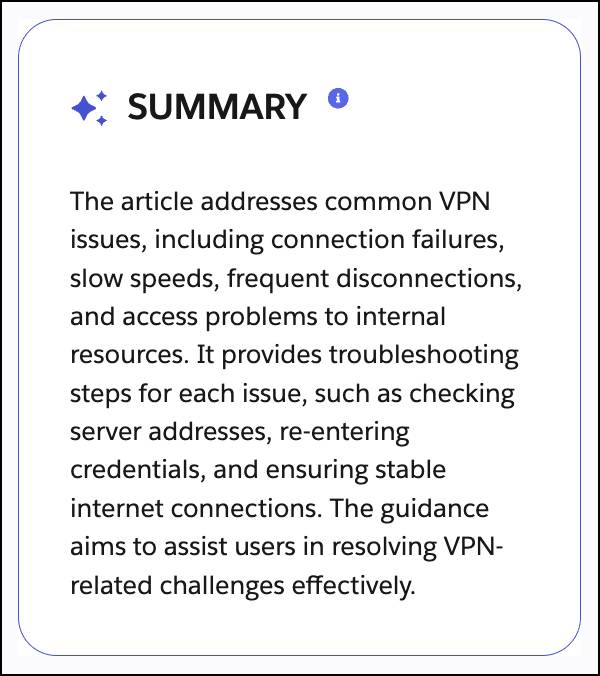
You get the core resolution steps instantly—significantly speeding up how quickly you can solve your own problem.
Dynamic Q&A
Ever dig through a massive, tedious FAQ page hoping your specific question is listed? Dynamic Q&A eliminates that hassle. The AI automatically surfaces the most commonly asked questions related to that specific article topic. It lists the absolute heart of the answer front and center, which lets you easily expand or collapse the text.
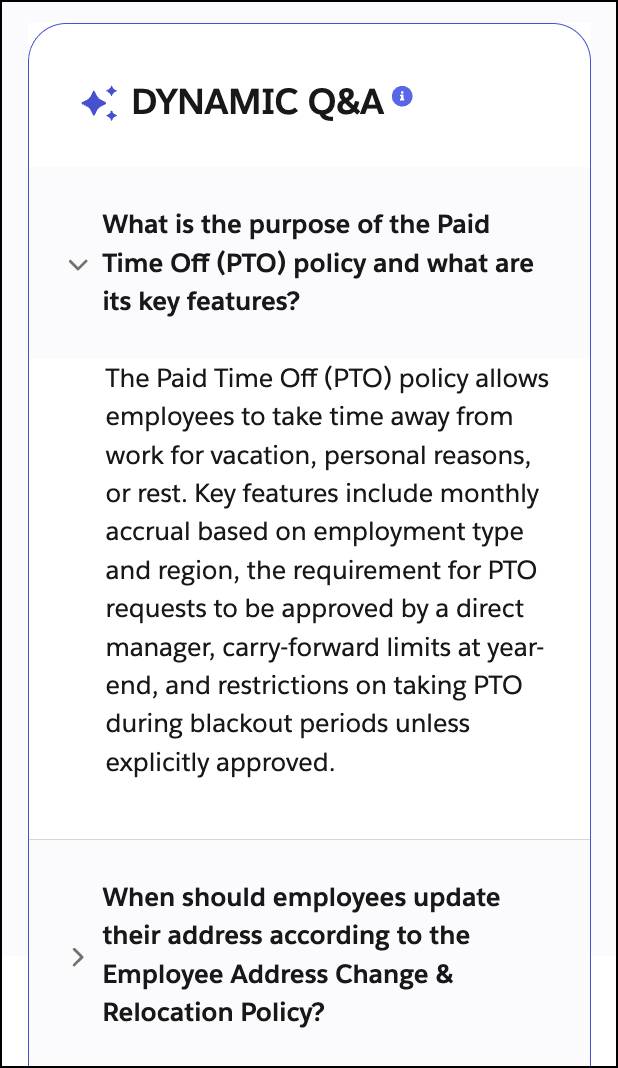
You can find the exact details you need based purely on your own relevance and interest, saving you from endless scrolling.
My Favorites
Have a few articles you reference constantly? Whether it’s the guide to reset your corporate password or the steps for reserving a conference room, you can easily bookmark these go-to resources. They’re automatically saved to the My Favorites tab on your portal homepage, giving you instant access whenever you need them again.
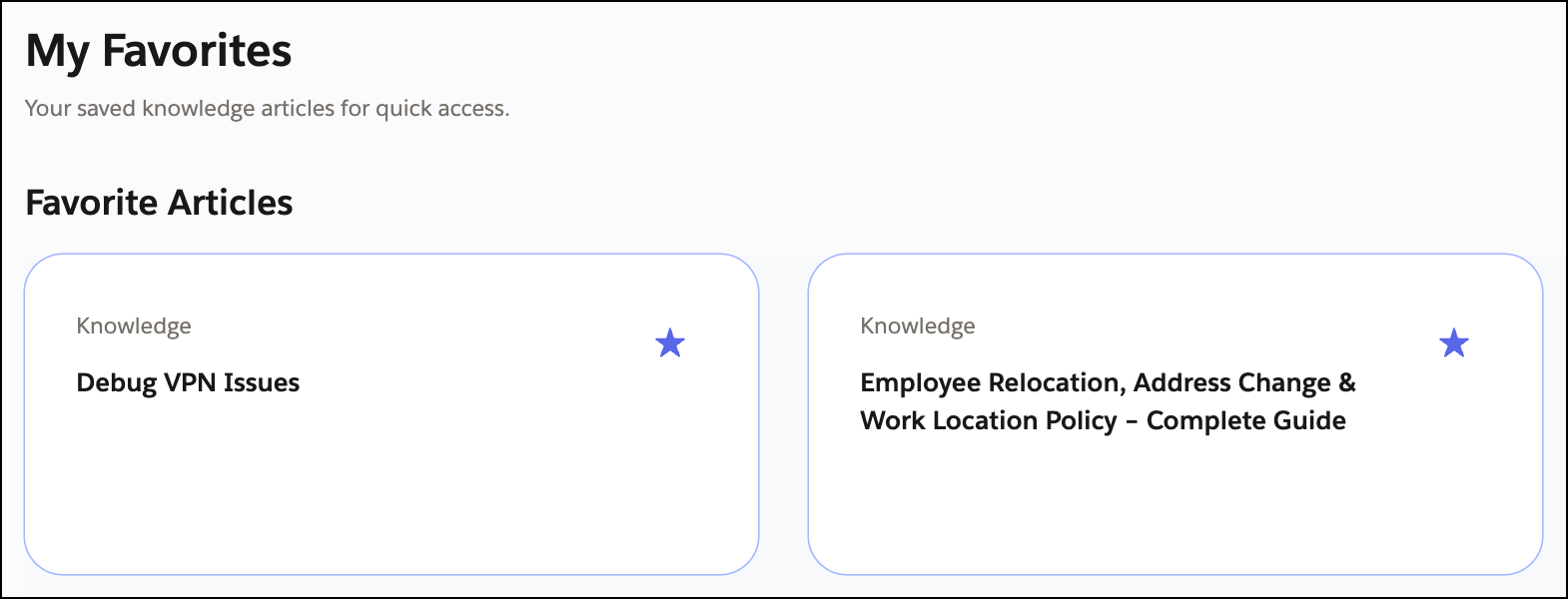
After all, a click is a terrible thing to waste.
Conversational AI: Meet You Where You Work
While the Employee Services Portal is an incredible destination, what if you don’t want to leave the app you’re already working in? Agentforce IT Service embraces a “Slack first, Teams ready” approach, bringing two-way IT support directly to you.
Meet the IT Service Employee Assistant, your always-on IT assistant. This isn’t just a search engine—it’s a two-way street where information flows back and forth. Instead of filling out forms, you can simply chat with the AI using natural language directly within the portal, Slack, or Microsoft Teams to ask for exactly what you need.
Here are a few ways you can command the agent to solve problems instantly.
Troubleshoot and Create Tickets
Imagine you’re working remotely and your VPN connection to your corporate network drops. You can chat with the IT Service Employee Assistant directly from the portal homepage and report the issue, “I am having trouble connecting to the VPN.” The agent instantly searches the knowledge base and replies with step-by-step troubleshooting instructions right in your chat window. If those steps don’t fix the issue, you don’t have to go hunt down a support form. Just type, “Create an incident.”
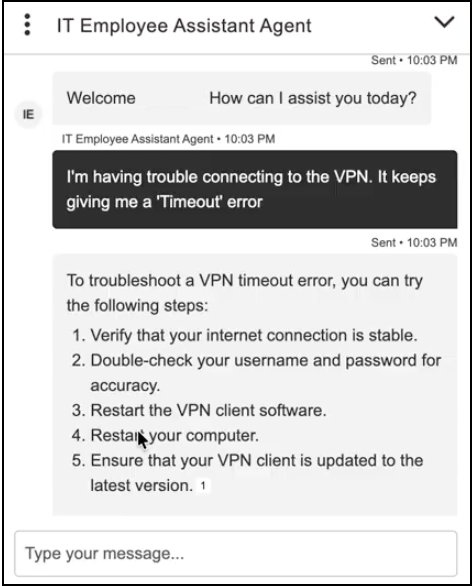
The agent automatically generates a fully populated ticket for you, saving you valuable time.
Frictionless Catalog Requests
Need a new monitor, laptop, or specialized software? Just ask! Honestly, you can ask the agent for almost anything—it can handle your IT requests effortlessly.
When you ask for an item, the agent instantly recognizes your role and specific entitlements. However, you can’t just ask for anything and automatically get it. Agentforce strictly enforces your company’s policies. If a request needs an approval, request management automatically routes it to your manager for sign-off. But for standard, preapproved items, it processes your request instantly—no complex forms required. For example, see how easy and conversational it is to ask for a new laptop—this time from within Microsoft Teams.
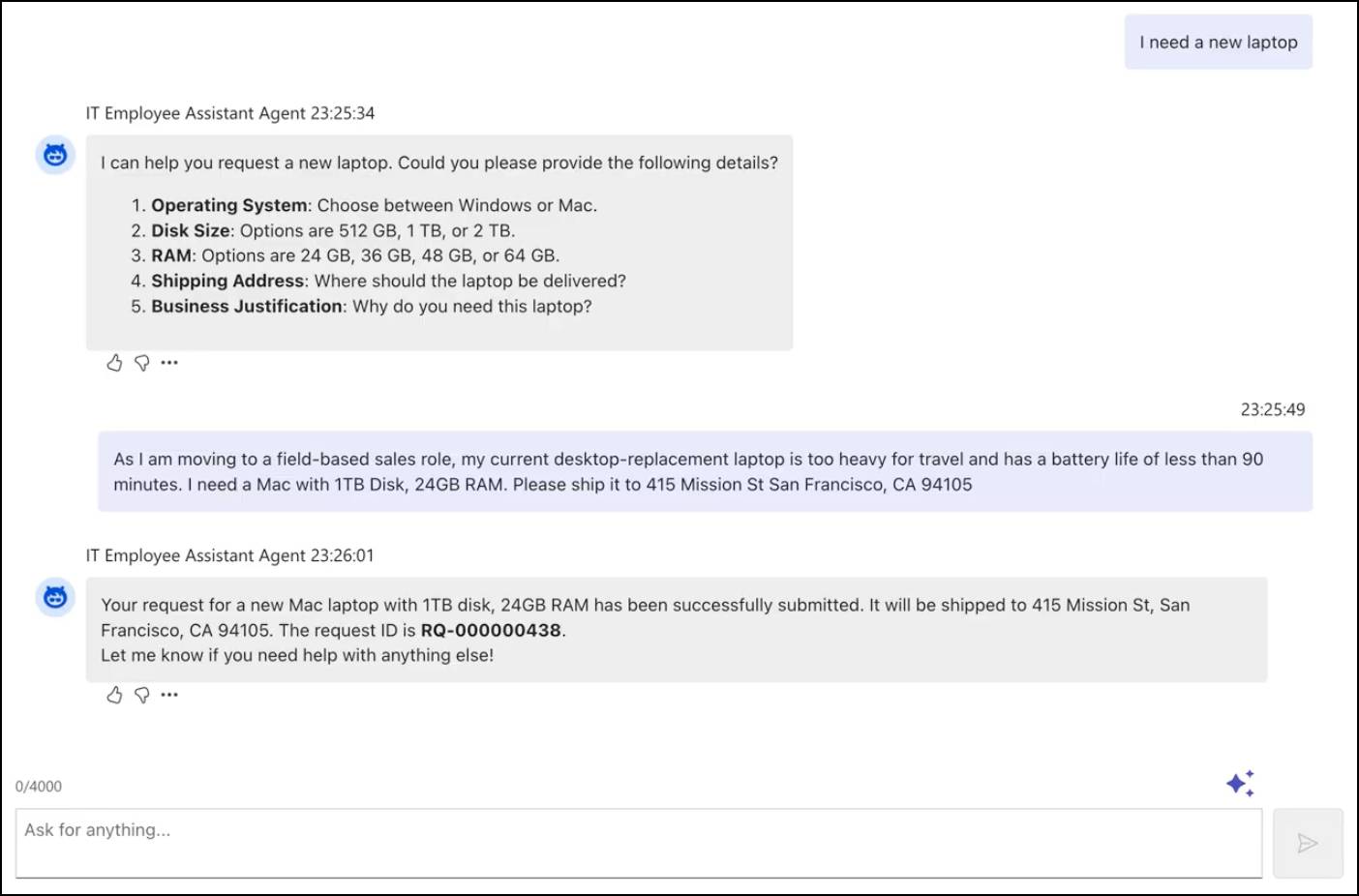
The agent knows the permitted specs and asks for details and a shipping address. The next thing you know, your laptop request is in, and you can track progress based on the newly created request ID.
Check Statuses on the Go
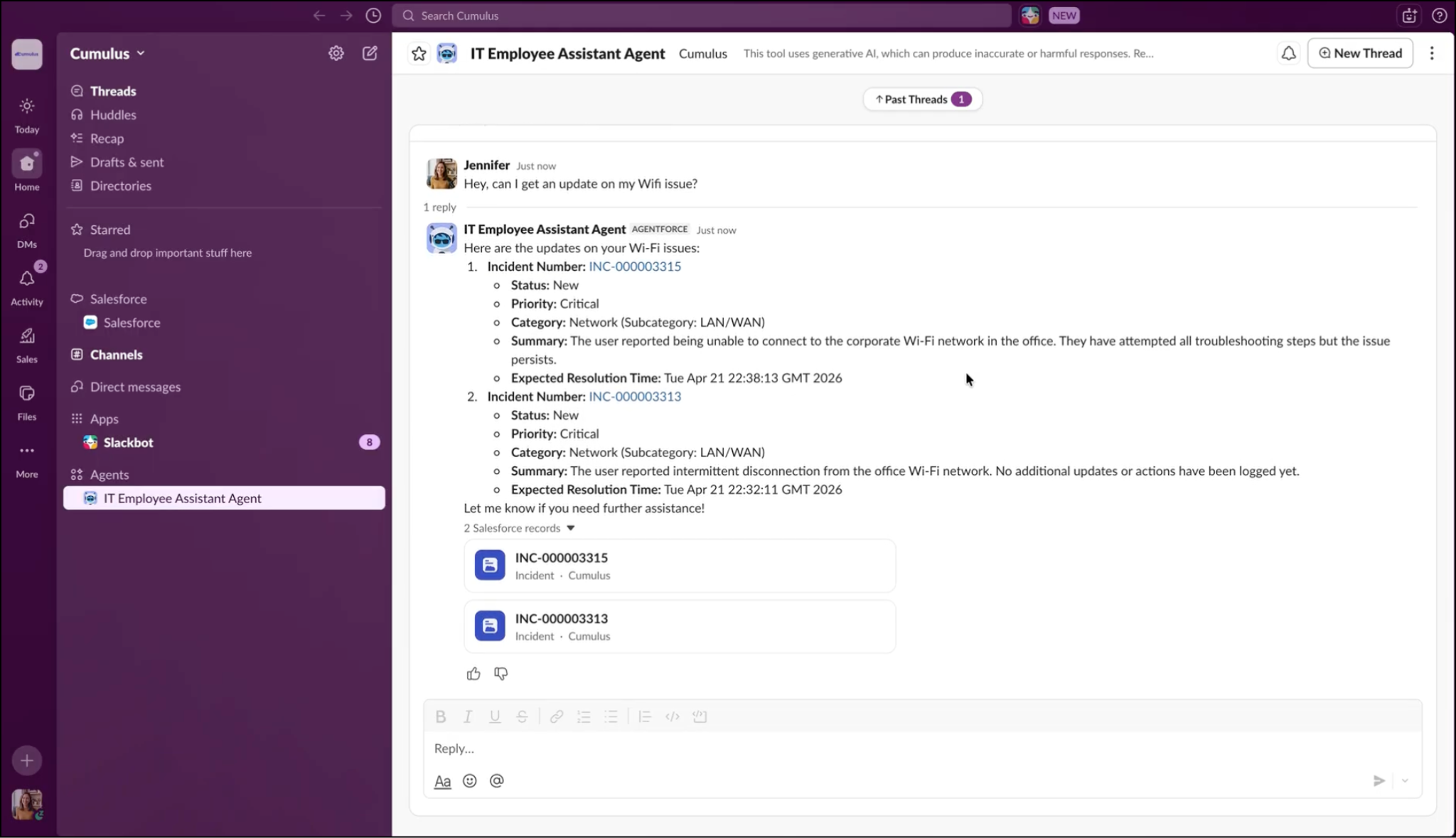
Tired of wondering if anyone is looking at your previous requests? You can ask the agent to locate your tickets by simply describing them. In this example, Jennifer, who uses Slack, asks, “Hey, can I get an update on my Wi-Fi issue?” The agent instantly pulls up any incident records related to Wi-Fi and confirms the status, priority, and the expected resolution time.
Support That Meets You Where You Are
Let’s take a step back and review what just happened. After using AI to instantly generate article summaries and dynamic Q&A, you shifted to active troubleshooting. First, you troubleshot a VPN issue directly on the portal homepage. Then, you requested a laptop from within Microsoft Teams. Finally, you checked the status of a ticket using Slack. Same agent, different workflow.
Because everyone has a different favorite tool, the IT Service Employee Assistant is designed to meet you right where you’re already working. By bringing AI support directly to your fingertips, you spend less time hunting for IT help and more time achieving your actual goals!
What’s Next?
Now you know how to use conversational AI and the Knowledge Base to troubleshoot issues on the go. But, what happens when you need to request something completely new or report a broken device? In the next unit, you explore how to navigate the Unified Catalog to request services, report issues directly from your assigned assets, and track your tickets every step of the way.