Discover the Change Management Lifecycle
Learning Objectives
After completing this unit, you’ll be able to:
- Describe the phases of the change management lifecycle.
- Explain the objects and tools that help IT teams during each change management phase.
Change Requests: From Creation to Resolution
To understand how IT teams manage system modifications using Change Management, let’s explore the full lifecycle of a change from identification to resolution. For each step, you discover the tools and features that ensure every change is carefully planned, authorized, and made without disrupting critical business processes.
The Change Management Lifecycle
In Agentforce IT Service, the lifecycle of a change request consists of seven phases.
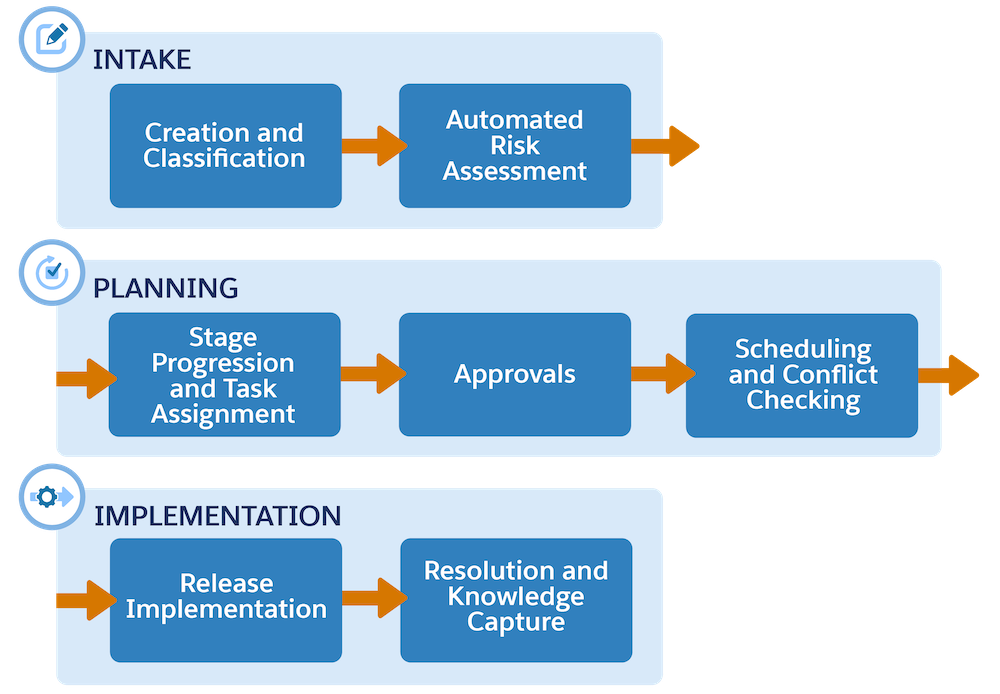
The seven phases are:
- Creation and Classification
- Automated Risk Assessment
- Stage Progression and Task Assignment
- Approvals
- Scheduling and Conflict Checking
- Release Implementation
- Resolution and Knowledge Capture
Let’s explore each of these phases in detail, and follow the IT staff at Orivian, a global holdings company, as they manage a change to one of their business platforms.
Creation and Classification
When your IT team identifies the need to modify a system, they can create a change request record either manually, or use Agentforce to directly create one from an existing incident or problem record. The change request record includes fields that capture details related to the change, including a subject, status, impact, and urgency. It also contains change readiness information, such as the business reason and justification, impact analysis, and planning details.
You can also classify the type of change request as one of three types.
-
Standard change: A low-risk, frequently repeated, and preapproved modification
-
Normal change: A nonemergency change that requires formal assessment and approvals
-
Emergency change: An urgent fix that’s required when an unexpected threat bypasses the normal lifecycle, and requires immediate attention
For Normal changes, you can use subtypes to further classify change requests as Minor, Significant, and Major, depending on their potential impact. You can also automate the prioritization of change requests by setting up a priority matrix, which uses predefined rules to calculate priority based on the impact and urgency of the request.
For example, the change manager at Orivian receives a notification of a new incident record alerting the staff that one of the company’s websites is down. In response, staff members swarm on the incident to identify the root cause of the problem. Then, the change manager creates a change request to log the change and understand the underlying risk of the proposed fix.

The change manager sets the impact level to High, and includes a preliminary estimate of the risk level. They can also associate the request with related incidents, problems, or releases, as needed.
Based on the change manager’s inputs in the Urgency and Impact fields, the system automatically sets the priority for this change request to Critical, following the priority matrix.
Automated Risk Assessment
Once the change request is created, it undergoes a risk assessment prior to implementation. The change manager or fulfiller completes a questionnaire to evaluate the impact, urgency, scheduled lead time, and other attributes related to the change.

After the assessment is complete, the system automatically generates an objective Risk Score and assigns a risk level, such as low, medium, or high to guide stakeholders.

This calculation is powered by the Business Rules Engine, which you learn about later. If you need to make changes to the risk evaluation, you can click Refresh to recalculate the risk score based on the new information.
Stage Progression and Task Assignment
After the risk is assessed, the change request moves through specific stages that you configure using Stage Management.
The defined steps for each change request vary depending on its type.
- A standard or normal change moves through stages, such as New, Scheduled, Open, Implementing, and Closed.
- An emergency change moves through a faster path, and Agentforce can generate recommendations for specific follow-up tasks based on the nature of the change. These tasks might include Submit Request for Change or Gather Initial Information.
Stage definitions appear in the change request record, and IT teams can mark each stage as complete as they move from one stage to the next.

Fulfillers can also attach action plan templates to requests to automatically assign common tasks, such as obtaining change advisory board (CAB) authorization, executing testing, or conducting a post-implementation review. Check out the Action Plans article in Salesforce Help to learn more.
For example, because the Orivian change manager classified the website fix as a standard change, it follows the standard change stages as it moves towards resolution.
Approvals
For higher risk changes, including normal and emergency changes, approval by stakeholders is required before any work begins. Agentforce IT Service notifies each involved stakeholder via email, Slack, or Microsoft Teams so they can review the risk and impact, and the proposed resolution steps.
The list of associated approval work items appear in a Lightning web component on the change request record.

Agentforce IT Service uses Advanced Approvals to manage approval workflows, and you can customize the integrated flow orchestrations to match your business processes. For example, create sequential, parallel, record-triggered, or autolaunched approvals for each of your change request types.
For example, the Orivian change manager receives a notification requesting approval for the website change, and quickly authorizes the work.
Scheduling and Conflict Checking
Once the change is approved, it needs to be carefully scheduled to avoid disrupting business operations. An assigned fulfiller adds the scheduled start and end dates to the change request record, and then uses the IT Service Calendar to visualize and manage the change in relation to other occurrences.

The calendar helps the Orivian IT team to identify any dependencies and avoid deploying changes during conflicting events, such as scheduled releases or business moratoriums. Additionally, Agentforce automatically alerts users of any conflicts on the change request record, and users can mark the conflict as either Resolved or Ignored.
Release Implementation
To help you execute fixes, Agentforce IT Service includes dedicated objects and tools for planning, testing, and deploying approved IT changes. To implement a fix, the change request is most often associated with a release record. Use Release Management to coordinate the actual building, testing, and deployment of the approved change into your live IT environment.
For example, the Orivian change manager creates a release to coordinate system changes, connects related incident, problem, and change request records, and assigns an action plan to organize tasks for the IT team at each stage.
To learn more about creating and tracking releases, visit the Release Management for IT Services Help article.
Resolution and Knowledge Capture
After the change is successfully deployed and verified, the assigned IT staff member resolves the request by entering a close code and close summary. Then, with a single click, they can use AI to automatically draft a new knowledge article based on the business justification, impact analysis, and implementation plans related to the change request. The article includes the reason why the change was implemented and key details for future reference. The system can also update existing knowledge articles to reflect the most recent change.
After the Orivian IT team completes the change, they use Agentforce to generate a knowledge article that includes a summary of the issue, its root cause, and the resolution steps that were taken.
Wrap It Up
With IT Service Management, the Orivian IT team was able to quickly identify the problem, plan and coordinate the needed change according to its risk level, and efficiently manage implementation. By following standardized workflows and approvals, they ensured the change was authorized, compliant, and didn’t conflict with other system maintenance events. Orivian users are now back to using the briefly troubled website, thanks to the IT team’s well-organized collaboration.
In this unit you learned about each phase of the change management lifecycle and how your IT team can manage changes with confidence. Next, you learn how to set up Change Management and discover the analytical tools for monitoring your IT system changes.