Explore Admin Tasks for B2C Commerce
Learning Objectives
After completing this unit, you’ll be able to:
- List three tasks that Agentforce Commerce for B2C admins perform.
- Explain the importance of assigning roles in Business Manager.
- List three Business Manager functions an admin uses to manage data and code.
- List three actions admins perform in Control Center.

Get to Know the Agentforce Commerce for B2C Admin Roles
Agentforce Commerce for B2C admins have several responsibilities, including:
- Managing roles and permissions for Business Manager users.
- Managing storefront data and code using import/export, jobs, and replication.
- Setting site or global preferences and creating custom preferences.
- Monitoring and controlling B2C Commerce instances.
- Performing standard system backups.
Business Manager is the Agentforce Commerce for B2C online tool for configuring and managing Agentforce B2C Commerce storefronts and user access to the Business Manager modules and tools. Admins use Account Manager to manage Agentforce Commerce for B2C accounts, users, and roles. You learn about Account Manager in the next unit.
Recognize Users, Roles, and Permissions
Business Manager users include developers, merchandisers, and admins. You assign these users to one or more Business Manager roles. Each role gives a set of permissions. Admins can assign predefined roles to users. Predefined roles have predefined permissions. Predefined roles protect your site’s data because only users who require data access have the required permissions.
To assign roles and permissions, an admin needs the admin role, and permissions to the user’s module and the roles and permissions module:
Task |
User's Module |
Roles and Permissions Module |
|---|---|---|
Manage roles and permissions |
✓ |
|
Assign roles to users |
✓ |
✓ |
Each new Agentforce Commerce for B2C site starts with a user account named admin. The admin user has a predefined admin role, and you can’t delete it. The admin role automatically has the permissions to administer the site. The system makes certain the admin user keeps all access permissions.
With the admin role, you can reset any user’s password except the admin user. That comes in handy. Only Agentforce Commerce for B2C Support can change the admin user password.
Manage Storefront Data and Code
As an admin, you manage data and code in Business Manager.
-
Manage site preferences: You set global and site-specific preferences that configure and customize the behavior, functionality, and appearance of a specific site.
-
Manage Einstein AI and cross-cloud settings: You configure Salesforce AI features and cross-cloud capabilities to enhance the functionality and performance of your site.
-
Manage security settings: You configure and maintain the security-related configurations that protect your Agentforce Commerce environment, data, and users.
-
Import/export: You run manual or batch processes that move storefront data in and out of the Agentforce Commerce for B2C system.
-
Jobs: You schedule processes that move and process data and code.
-
Read-only price books: You execute high-speed processes that import price books from external product information management (PIM) systems.
-
Data and code replication: You copy data and code from one instance to another.
-
Site import/export: You migrate site configuration data between instances, typically to bring a new developer sandbox instance online.
-
Catalog feeds: You process third-party files, such as for Certona.
Keep Certificates Updated
As an admin, you manage the client certificates for your site. Client systems use these certificates to make authenticated requests to the Agentforce Commerce for B2C servers when they process these following types of transactions.
- When you upload code to a staging instance using Agentforce Commerce for B2C TLS/SSL certificates.
- When you need secure third-party system interactions. The site makes secure calls over HTTPS to a web service or third-party system using TLS/SSL certificates that are stored in Business Manager.
- When you have secure interactions using a SOAP web service that encrypts or decrypts communication. Business Manager stores the certificates for easy expiration management.
As you work with Business Manager, you learn where Business Manager stores client certificates so you can track and manage them.
Implement Multi-Factor Authentication
Security threats are becoming more frequent. Protecting your customers and business is important. Here are some tips to help you set up strong security measures.
- Run health checks after every release.
- Stay up to date with required and suggested security functionality.
- Enact company-wide security standards and champion adoption.
- Protect sensitive customer data.
A working knowledge of multi-factor authentication (MFA) is an essential admin skill. MFA gives a user access only after they successfully present two or more pieces of evidence to the authentication mechanism.
MFA relies on:
- Something you know, such as login credentials
- Something you have, such as an authenticator app, a bank card, or biometrics
- Something you are, such as a fingerprint, eye iris, voice, typing speed, or a pattern in key press intervals
- Somewhere you are, such as a connection to a specific computing network or using a GPS signal to identify the location
Two-factor authentication is a type of MFA.
Agentforce Commerce for B2C provides enhanced security protection beyond a username and password. It uses MFA to increase protection against threats such as:
- Phishing attacks
- Unethical code injections
- Account takeovers
- Magecart
- Data loss
Apply Settings and Preferences Across the Agentforce Commerce for B2C Architecture
Agentforce Commerce for B2C adminsare responsible for configuring settings in the app. You can apply settings to one or more storefronts or across the entire organization. Review the Agentforce Commerce for B2C architecture to explore these storefronts and organizations.
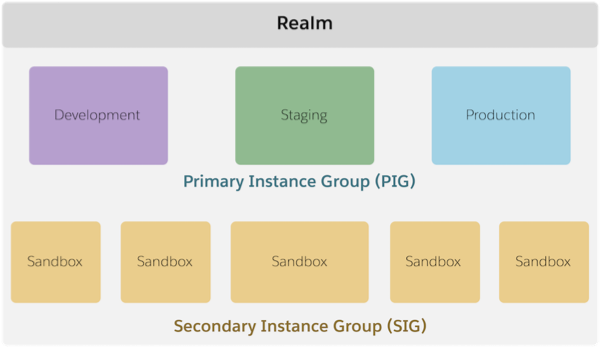
Agentforce Commerce for B2C provides the resources and processing for your ecommerce sites, called a storefront. Agentforce Commerce for B2C teams work within a realm. Typically, a company runs their storefronts on a single realm that’s just for them. (They can also have multiple realms.) A realm contains instances on which the ecommerce team develops, tests, and deploys the online storefront.
A realm includes a primary instance group (PIG) and a secondary instance group (SIG). The Agentforce Commerce for B2C PIG includes staging, development, and production instances, and each of those instances has one or more sites. An organization includes the sites on a particular instance.
Refer to Architecture of Salesforce B2C Commerce in Trailhead for more information.
Get Access to Control Center
To get started, you need login access to Control Center. Think of Control Center as your central spot for watching the status of your instances and taking care of certain tasks.
Here are some things that you can do in Control Center.
- Initialize instances.
- Start, stop, and restart instances.
- View usage data.
- View the audit log.
You also get access to Account Manager. Use Account Manager to manage user credentials for both Business Manager and Control Center.
Next Steps
In this unit, you learned about the Agentforce Commerce for B2C admin role. Key responsibilities include how to assign user roles and permissions, coordinate MFA, and configureAgentforce Commerce for B2C settings. You also learned how to control Agentforce Commerce for B2C instances within the Control Center. Next learn how to manage Agentforce Commerce for B2C users in Business Manager.
Resources
- Salesforce Help: B2C Commerce Security Guide
- Trailhead: Architecture of Salesforce B2C Commerce
- Trailhead: Salesforce B2C Commerce for Developers
- Trailhead: Salesforce B2C Commerce Storefront Security Strategies | Unit 2
- Salesforce Help: Administering Your Organization for B2C Commerce
- Salesforce Help: Control Center
- Salesforce Help: Global Preferences for B2C Commerce
- Salesforce Help: Site Preferences in B2C Commerce