Learn About Granular Replication
Learning Objectives
After this unit, you'll be able to:
- Describe the purpose of granular data replication in B2C Commerce.
- Explain how granular data replication complements existing replication processes.
- Identify the best practices for implementing focused data replication.
Define Granular Data Replication
You know that data replication in Salesforce B2C Commerce is how you securely copy selected data, metadata, and files from a staging instance to a development or production instance. Replication is a critical process that you use to make sure that your production site always has the most current information.
But not every change requires a full replication of all data. Imagine you updated a price book for a seasonal sale. Replicating every piece of data on your entire site for that one change is time-consuming and resource-intensive. That's where granular data replication comes in.
Granular replication is meant to complement and enhance your existing data replication strategy. It isn't a replacement for your larger, scheduled, full-data replications. Instead, it’s a more focused approach that you use to target specific types of data for transfer. This granular approach helps you deploy small, isolated changes—like new promotions, a single catalog update, or new content assets—more quickly and efficiently, without affecting the rest of your storefront data.
Compare Granular and Full Data Replication
Data replication operates on two levels: Global and Site-Level.
Replication Scope |
Data Included |
Example Tasks |
|---|---|---|
Global |
Configuration data that applies to your entire organization. |
Assignments, Preferences, Price Books, Custom Object Types. |
Site-Level |
Data belonging to one or more specified storefront sites. |
A/B Tests, Campaigns, Content Library, Customer Groups. |
When you run a new, full replication to a target instance for the first time, you perform a full global replication. The full replication establishes the complete configuration and data structure on the target instance.
After the initial full replication, you can choose to replicate data partially by selecting specific tasks. When you select specific replication tasks, you’re telling the system to move and overwrite only the data associated with those tasks on the target instance.
For example, if you:
- Update Catalog B and add Catalog D on your staging instance.
- Choose to replicate only the Catalogs task.
Only Catalog B is updated, and Catalog D is added on the target instance. Crucially, any other data that you didn't select—like your promotions, content slots, or customer groups—remains untouched. This targeted process is the power of granular control.
Turn on Granular Data Replication
You can turn on granular replications in your staging and production B2C Commerce instances to make small updates to existing content on an as-needed basis.
- In Business Manager, click App Launcher, and then select Administration | Site | Global Preferences | Feature Switches.
- Turn on Granular Replications Feature.
- Click Apply.

Assign Granular Data Replication Permissions
You can assign merchandisers permissions to make granular replication changes to your production instance.
- In Business Manager, click App Launcher, and then select Administration | Organization | Roles & Permissions.
- Create a Merchandiser role or edit an existing role.
- To create a role, enter an ID and description.
- Click Apply.
- To create a role, enter an ID and description.
- Select the Functional Permissions tab.
- Select Sites and then select the sites that are applicable to the role as the context.
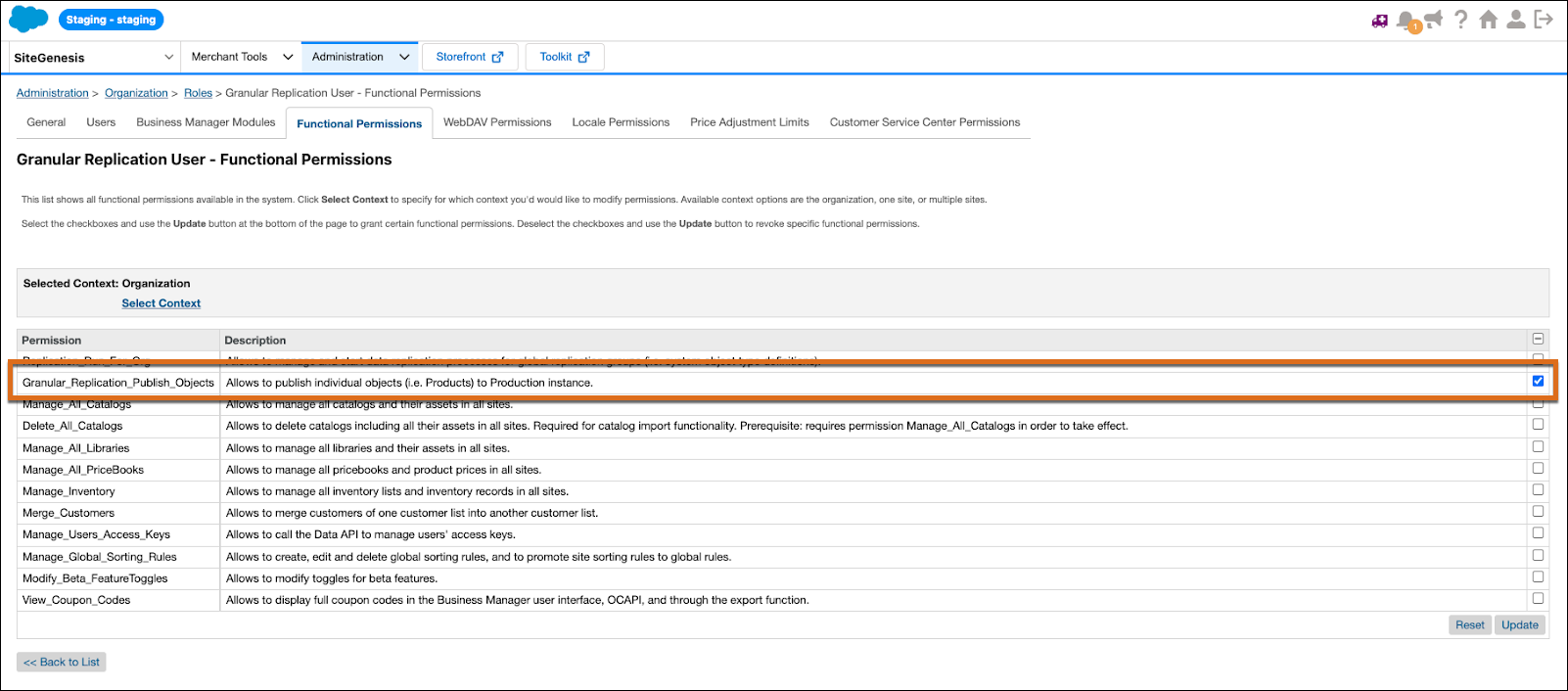
- Turn on access to the Granular_Replication_Publish_Objects permission.
- Select other merchandiser permissions as needed.
- Click Update.
Replicate Products with Granular Data Replication
You use granular replication in the Business Manager modules where you manage the data you want to replicate. For example, to replicate specific products from staging to production, you work in the Business Manager Product module. Here’s how the general process works for most granular replication needs.
- In Business Manager, click App Launcher, and then select Merchant Tools | Products and Catalogs | Products.
- Enter the product Name or ID.
- Select the product to update and update the product's attributes within the Edit Product section.
- To initiate granular replication, click Publish.
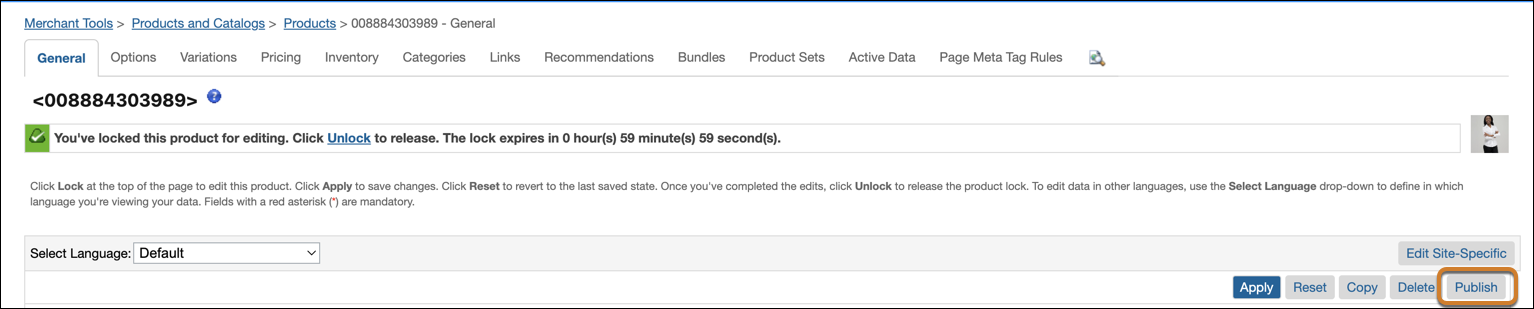
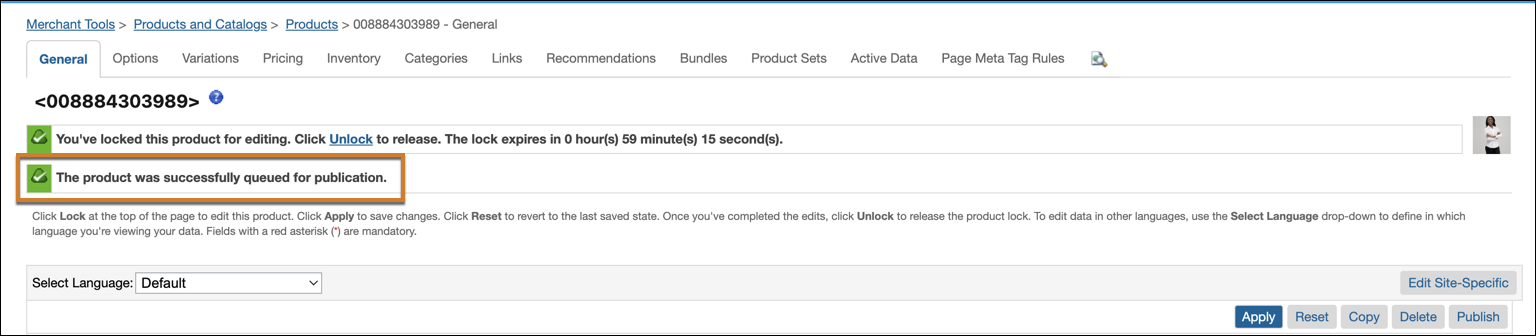
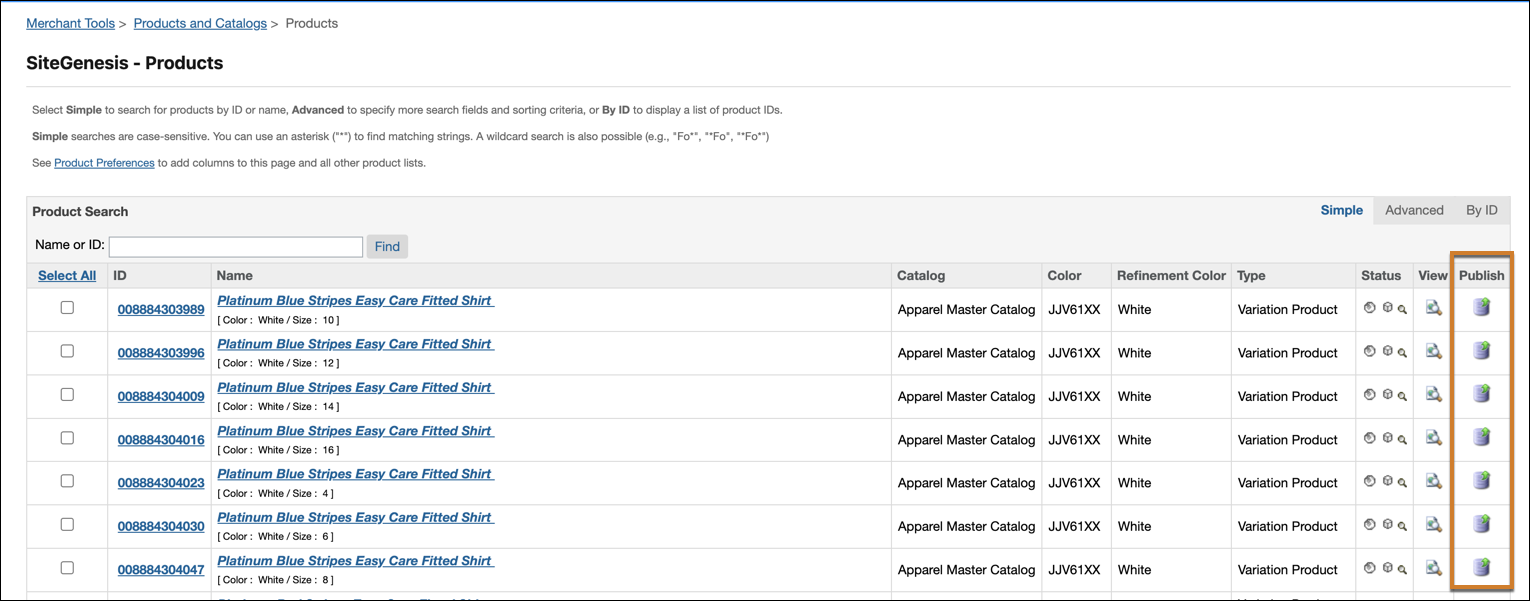
Each Business Manager module that supports granular replication varies according to the process flow for the module. Clicking Publish initiates the granular replication from staging to production.
Monitor Granular Data Replication Status
Use the Granular Replication table to review past, ongoing, and upcoming granular replication jobs.
In Business Manager, click App Launcher, and then select Administration | Replication | Granular Replication.
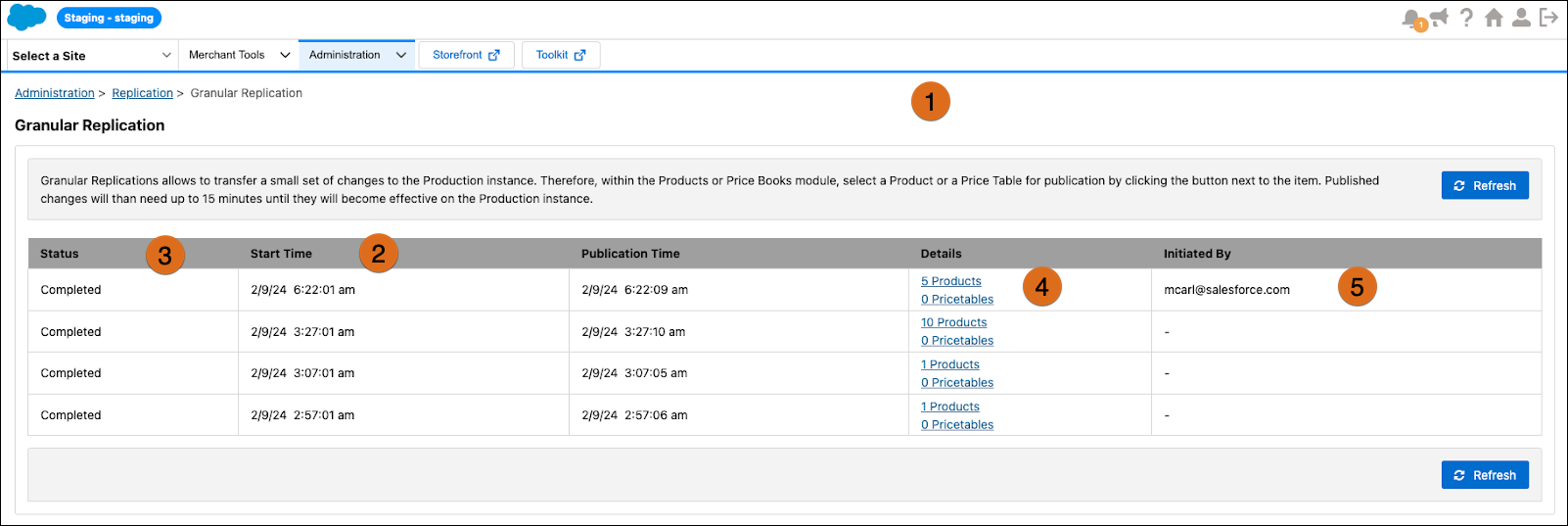
- The Granular Replications page (1) gives you full visibility into granular replication processing for the last 30 days.
- Start Time (2) refers to the granular replication process runtime.
-
Note: The duration doesn’t include cache invalidation, which can take an additional 5–10 minutes.
-
Note: The duration doesn’t include cache invalidation, which can take an additional 5–10 minutes.
- The Status field (3) is queued for an upcoming process. When a process is ongoing, the Status field is set to In Progress.
- Details (4) refers to what is being replicated.
- The Initiated By column (5) identifies the users who triggered the Granular Replication update for each product, price, or content asset within that session.
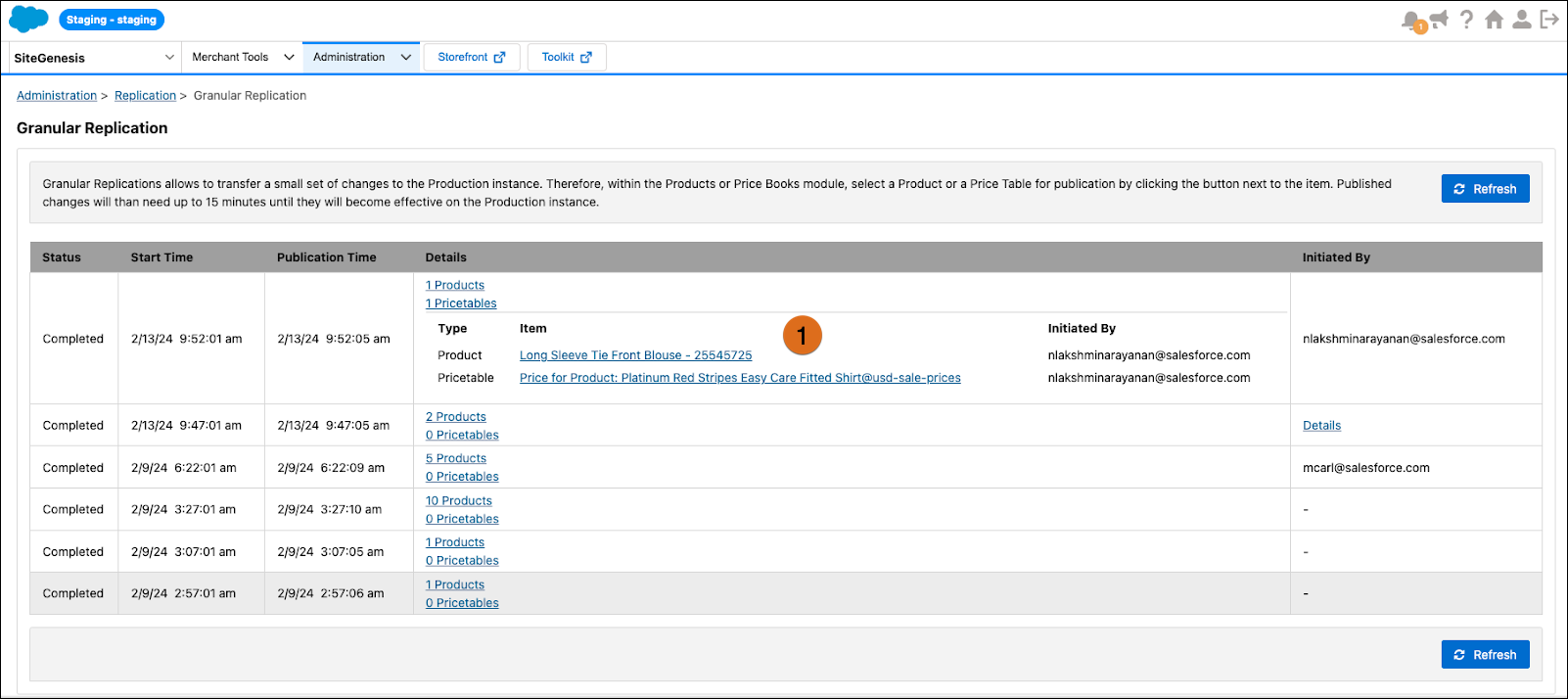
- To view the list of products, price table entries, and content assets (1) within a particular execution, click the link for the number of content asset entries in the Details column.
Next Steps
In this unit, you learned how Granular Data Replication enhances your existing B2C Commerce replication strategy by making fast, targeted updates to specific parts of your data.