Get to Know the New Service Assistant
Learning Objectives
After completing this unit, you’ll be able to:
- Understand the foundational concepts of the new Service Assistant dynamic experience.
- Explain the difference between guidance plans and dynamic plans to determine their appropriate use cases.
- Identify the key capabilities of the dynamic experience, including chat, agent actions, and cross-channel support.
From Assistive Agent to AI Agent
Service reps know the feeling: a case or messaging session comes in, and they need to manually review record details, look up customer information, and hunt down knowledge articles, all while keeping the customer engaged and moving toward resolution. It’s a lot to juggle! That’s exactly what the new Service Assistant experience is built to address.
The Service Assistant you know today generates a static checklist of steps that doesn’t update as the record updates. For more details on the original Service Assistant, check out Agentforce Service Assistant.
The new Service Assistant dynamic experience works like a true Agentforce agent for cases and messaging sessions. It reasons in real time, monitors the record as it updates, performs a fresh search of your grounding sources at every step of the plan, and proactively surfaces the right actions to service reps when they’re needed. The result is a smarter, real-time Agentforce experience for your service reps.
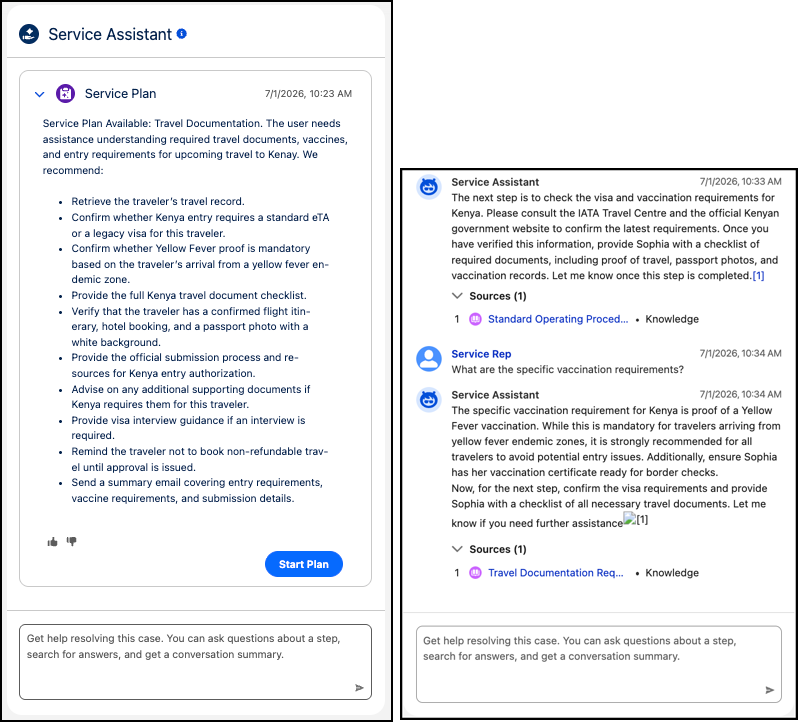
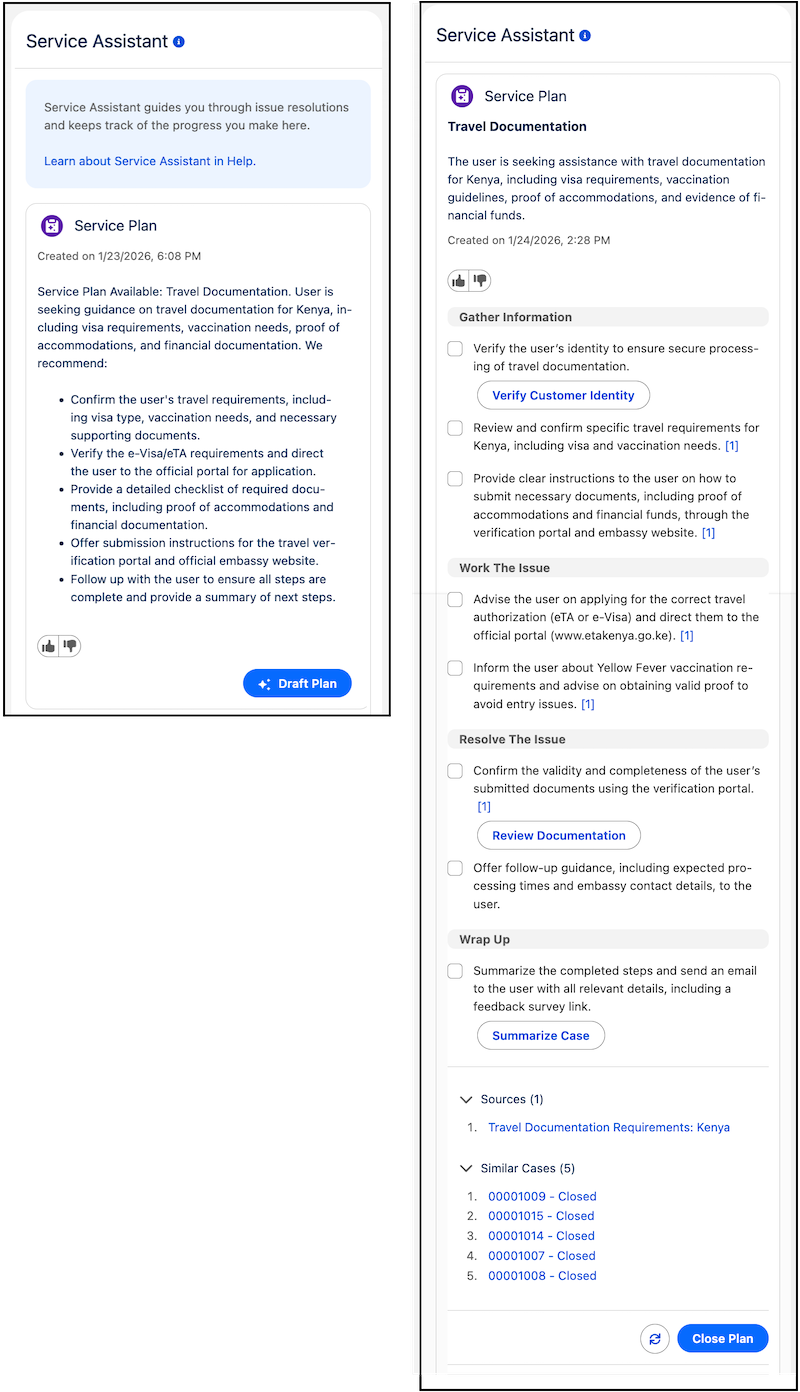
With the reimagined Service Assistant experience, you now have access to two distinct resolution plan styles: the original guidance plans and the new dynamic plans. Both of which operate within a dedicated Service Assistant. While the workspace UI is the same between the plan types, each plan type offers different approaches to help service reps resolve issues. Understanding the distinction between them helps you determine the best path for your specific business.
Guidance plans provide a static, checklist-style resolution plan that organizes steps into phases and the steps are updated only when a service rep manually redrafts the plan. Guidance plans also include quick actions that automate tasks described in the steps. Agent actions aren’t supported. Guidance plans are available for Case only.
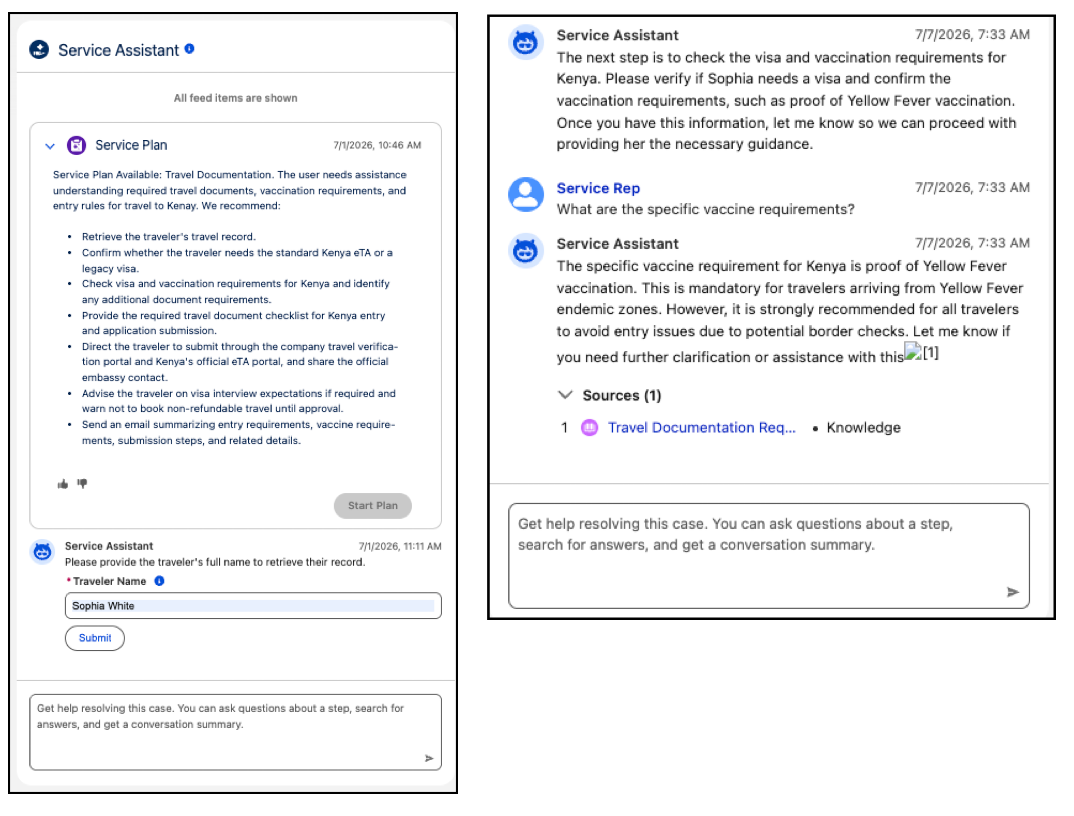
Dynamic plans are a real-time, conversational resolution workflow that guides service reps through issue resolution step-by-step and updates the plan in real-time when new information arrives. Service Assistant continuously monitors the record for updates and changes. The new dynamic experience evolves Service Assistant from a static offering into a real-time Agentforce Agent.
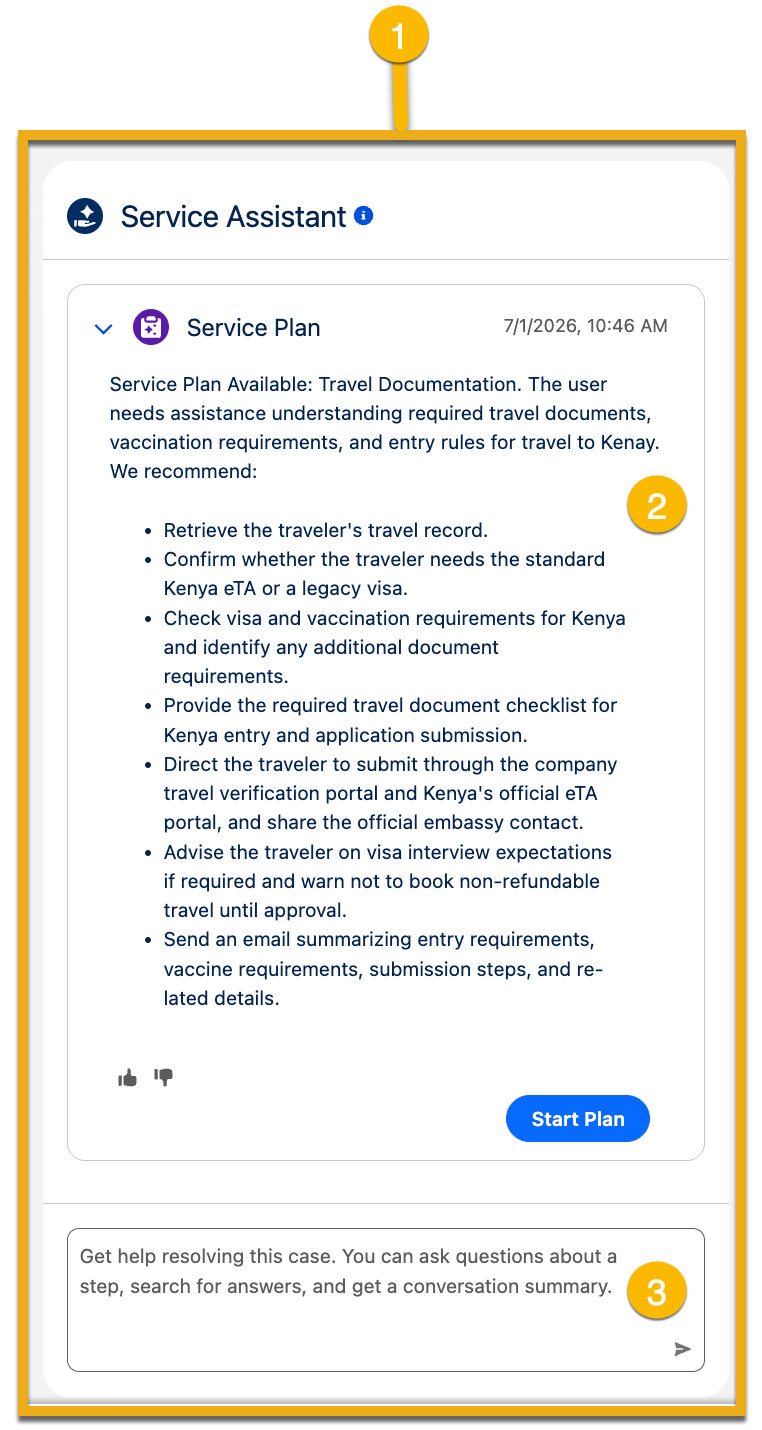
Specifically, here’s some differences you see within the new Service Assistant experience.
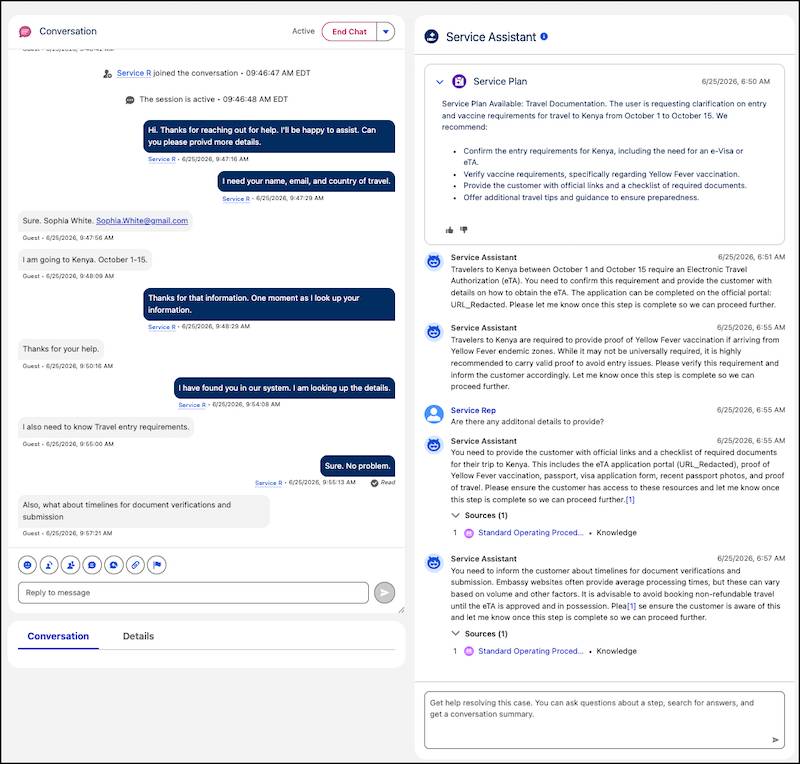
- A new, redesigned panel workspace to collaborate with Service Assistant (1).
- A new service plan card in the center of the workspace that serves as the central hub for AI-guided resolution (2).
- A two-way agent chat that provides service reps access to in-workflow research and support, like searching knowledge information or looking up contact details (3).
- Access to agent actions that surface directly in plan steps to automate tasks.
- Record data continuously monitored in real-time and instantly incorporated into the plan steps.
Get Support Across More Channels
Service Assistant is available across both Case and Messaging sessions. Whether reps are working a case or responding to a live messaging conversation, they get the same AI-powered resolution guidance.
-
Case: Service Assistant monitors case updates in real time, including incoming emails and field changes, and incorporates new information into the next conversational step.
-
Messaging: Service Assistant tracks the live messaging session and adapts plan steps as the conversation evolves. Supported channels include Enhanced Chat, Facebook, and WhatsApp.
Guidance Plan or Dynamic Plan?
Both plan types live in the sRelatedame redesigned workspace, but they work differently. Messaging sessions only support dynamic plans. For cases, you can choose between guidance plans (the default) or dynamic plans, but can’t have both at the same time.
Here’s how to decide which fits your workflow.
|
Dynamic Plan |
Guidance Plan |
|---|---|---|
What it is |
A real-time conversation that adapts step by step. |
A static checklist organized into resolution phases. |
Availability |
Case and Messaging sessions (turn on in Service Assistant setup). |
Case only (enabled by default). |
Best suited for |
Cases where the resolution path shifts as new information comes in, or where reps need real-time guidance. |
Cases with stable, predictable workflows where the steps stay consistent. |
Agent chat |
Available by default. |
Available once you turn it on in Service Assistant setup. |
Update cadence |
Automatic. Steps update when new information arrives through case emails, field changes, or messaging transcript updates. |
Manual. Reps click Redraft Plan to refresh the plan with the new case data. |
Agent action support |
Surfaced automatically in plan steps when relevant. Reps review and run them inline. |
Available through the agent chat only. Reps ask Service Assistant to launch an action. |
Same Grounding. Smarter Experience.
You don’t need to rebuild anything. Whether using a guidance plan or a dynamic plan, Service Assistant draws from the same trusted grounding you already have in place.
Service Assistant is grounded in the following sources.
-
Subagents and topics: Categorizes cases and outlines the resolution paths.
-
Instructions: Reviews your company’s specific service policies and procedures.
-
Knowledge (Agentforce Data Libraries): References articles and company documents that inform every plan step.
-
Record data: Gathers details from relevant records. For cases, this includes the Subject and Description fields and related objects, like Case Emails, Feed, and Case Comments through Service AI grounding.
-
Conversation transcripts: Analyzes the live messaging sessions.
-
Active monitoring: Tracks the active record in real time to ensure guidance remains relevant. For cases, it automatically incorporates updates like emails, field changes, and then feeds data into the plan steps.
In dynamic plans, Service Assistant uses this material more actively, performing a fresh search of every grounding source at each step.
Collaborate with Service Assistant in Chat
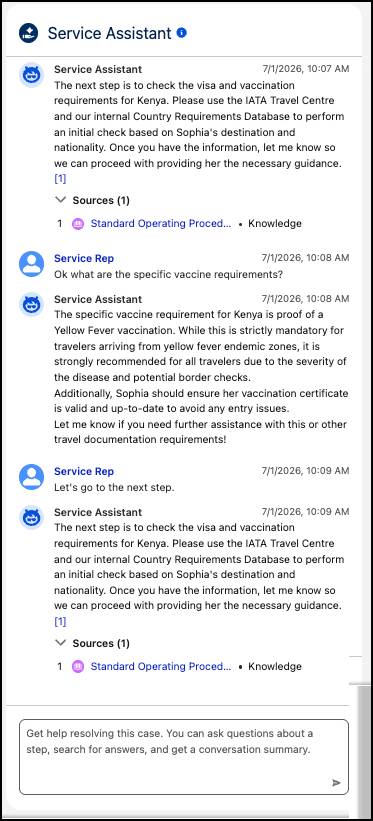
Service plans don’t always follow a straight line. In dynamic plans, when reps need to go off-script or dig deeper on a specific detail, two-way chat keeps them in flow without leaving the workspace. The chat is fully grounded in the active conversation, completed plan steps, case data, and knowledge articles, so every answer is relevant to the case at hand.
Reps can use the chat to:
- Ask follow-up questions about a step or the overall case.
- Search the knowledge base for relevant policy information.
- Ask Service Assistant to launch an action, like drafting a reply email.
- Switch topics to handle a new question, then return to the main plan.
Automate Work with Agent Actions
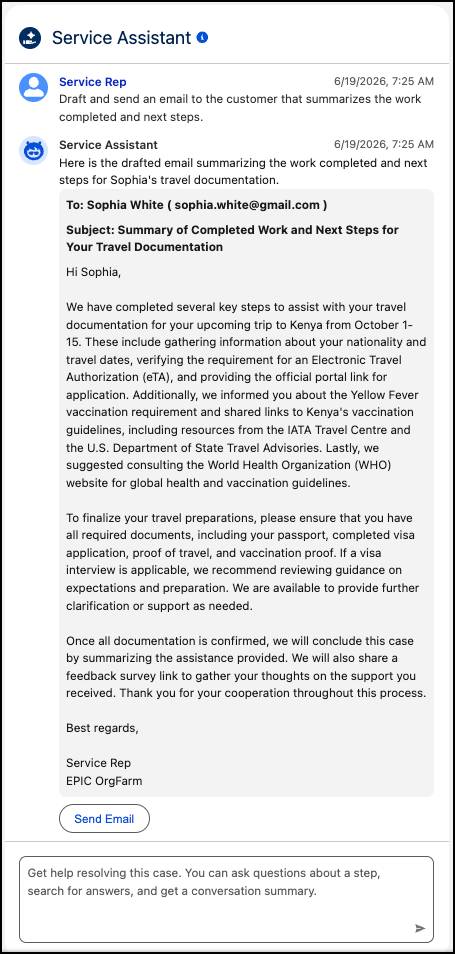
Service Assistant doesn’t just tell reps what to do—it helps them do it. In dynamic plans, Service Assistant actively evaluates each step to determine whether an available Agentforce action can complete the work.
When an Agentforce action is available, Service Assistant surfaces it for the rep to review and run, such as drafting a reply email, updating a record field, or looking up an order.
When no action is available, Service Assistant guides the rep through the manual steps needed to complete the action using your instructions and knowledge articles, or the service rep can use the chat to launch an action.
Go Further with Capabilities
Service Assistant also supports optional capabilities that extend the experience beyond service plans to provide service reps even more support and automation. Each one is activated independently of Service Assistant. For a full list of capabilities, check out Service Assistant Capabilities.
Case Catch-Up and Insights
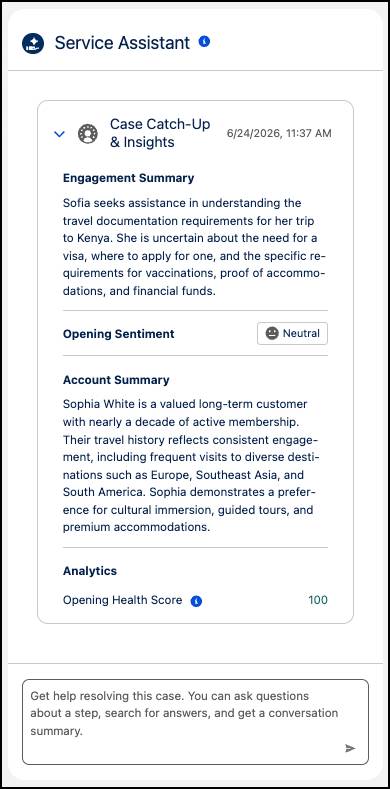
When a rep picks up a long-running or complex case, getting up to speed fast matters. Case Catch-Up generates an AI-powered summary of the case history and surfaces key insights like customer sentiment and case health score, so reps have the full picture before taking their next step. Case Catch-Up & Insights is available for Case only.
Service Replies
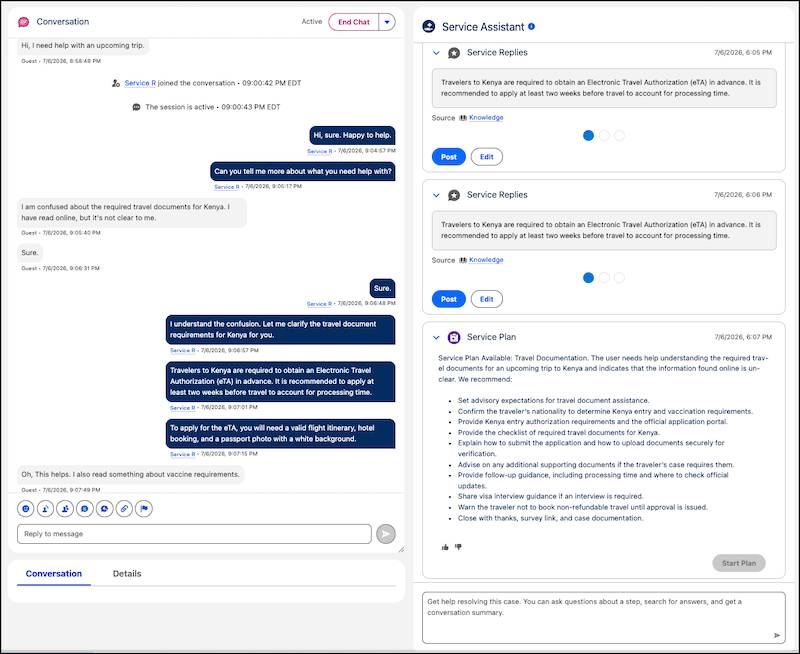
Service Replies surfaces AI-drafted response suggestions directly in the Service Assistant panel for reps working messaging conversations. Reps can review and send suggested replies without switching between tools. Service Replies operate independently from the service plan and don’t influence plan steps.
Wrap It Up
You’ve explored the Service Assistant dynamic experience, which transforms resolution planning from static checklists into real-time, conversational workflows. By using Agentforce to monitor conversations, ground steps in live record data, and proactively suggest actions, you can empower your reps to resolve complex issues across Case and Messaging with greater speed and precision.
Your existing grounding, instructions, and data libraries work seamlessly with the new dynamic capabilities, so you can get started immediately. Head to your Salesforce org to see dynamic plans in action!