Create a Promotion and a Gift Certificate
Learning Objectives
After completing this unit, you’ll be able to:
- Create a promotion for the participants to use for items on the new menu.
- Create a gift certificate to the Basil & Thyme Cafe for the winning team.
A Baked-in Surprise!
Astro, Codey, and Ruth discuss more details about the Trailheadathon menu as they prepare for the event. The manager at Upper Crust IT, who is working with Astro, wants to provide a promotion for event participants to use.
“He buttered me up by telling me all about how much they loaf us and how much business we’ll be getting. He’s right, so let’s roll with it! It’ll save them some dough,” Astro tells Codey and Ruth. “They want to buy a gift certificate for the winners, too.”
“They’re some of our best customers,” Codey says. “We knead them.” Then he adds, “I think I can help you make the promotion and gift certificate. Just challah when you’re bready to do that.”

Create a Promotion for the Trailheadathon Menu
Upper Crust IT will let each participant expense $50.00 from Basil & Thyme Cafe over the course of the Trailheadathon, and a discount will help them get the most snacks for their bread. Codey and Astro sit down to create a promotion for the event menu.
- Click
 to open the Merchant Management agent.
- Copy and paste this text into the text field, then press Enter or Return on your keyboard:
Create a promotion called TRAILBREAD2026 to discount the Trailheadathon Event Menu at the Basil & Thyme Cafe by 25% starting next Thursday at 8AM through next Friday at 11:30PM.
Note: If your agent doesn’t return a response, refresh your browser and try entering the text again.
The agent responds, showing you the new promotion record number and details you requested.
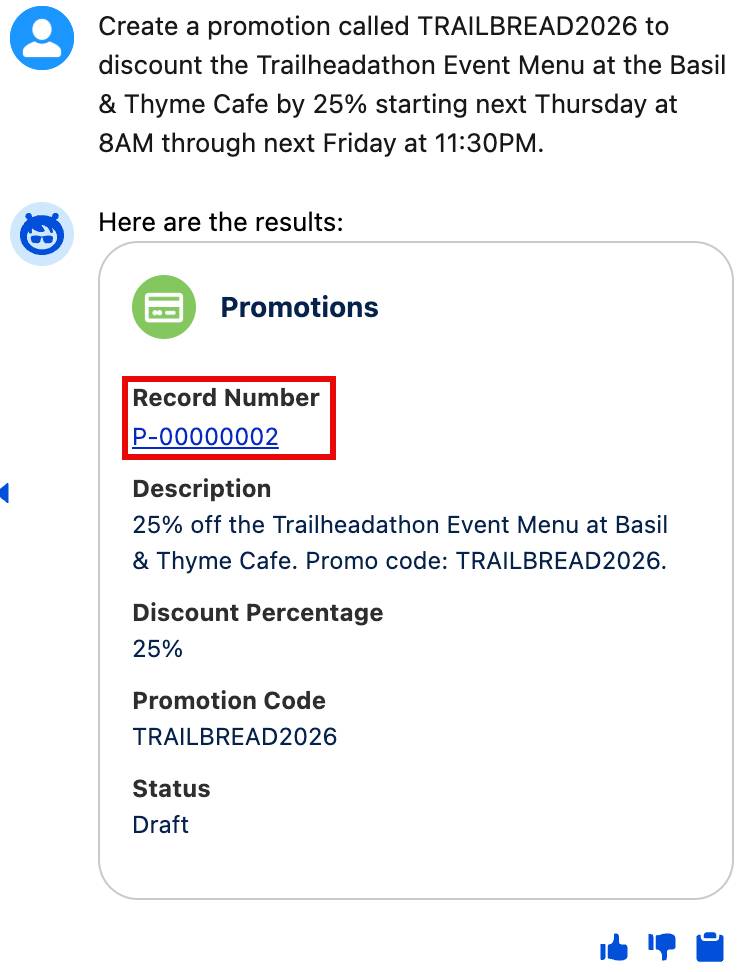
- Click the Record Number link to open the promotion record and review it. The record contains the description of the promotion as you requested it, the percentage amount, the promotion code, and the start and end dates of the promotion. The promotion is currently in Draft state. Astro will activate it at the start of the event.
Note: If the agent didn’t return a Record Number with a link to the promotion in the response, don’t worry, you can still view the promotion. Click the dropdown arrow next to Storefronts, then select the Promotion tab. Click the arrow next to Recently Viewed, then click All. Click Promotion P-00000002 to open the Promotion.

Great work! The promotion has been created and Trailheadathon participants can use the promotion code to discount their orders. Next, you help Astro create a gift certificate for the winning team.
Create a Gift Certificate for the Winning Team
In advance of the Trailheadathon, managers at Upper Crust IT made a list of Trailhead badges related to their team’s roles that their employees need to earn in order to win the event. A gift certificate to the Basil & Thyme Cafe will be awarded to the team that completes the most of their assigned badges. The winning team can use the gift certificate for a group meal or snacks at a later date. You need to ask the agent to create a gift certificate that the coordinator of the event, Craig Olligan, can award to the winners.
- The agent will likely still be open from the previous unit, but if not, in the Merchant Management app, click the Merchant Management agent, copy and paste:
Create a Gift Certificate to the Basil & Thyme Cafe for Craig Olligan in the amount of $250.00.Then press Enter or Return on your keyboard.
- The agent responds that the gift certificate has been created and is active and ready for use. It might include the record number in parentheses. Make note of this. It also asks if you’d like details about how to deliver the gift certificate.
- Astro will share the gift certificate with Craig closer to the event, so type
No, thank you.in the text field.
- If the agent returned a gift certificate Record Number link, click that to open the gift certificate record. If the agent didn’t return a Record Number with a link to the gift certificate in the response, click the dropdown arrow next to Storefronts, then select the Gift Certificates tab. Click the arrow next to Recently Viewed, then click All. Click the second Gift Certificate record number to open the gift certificate. Notice that it contains the details you asked the agent to include.

It’s a Wrap!
Congratulations! You helped Astro, Codey, and Ruth create a fun new menu and a promotion for an event, and a gift certificate for the winning team. It’s time to click Check Challenge to earn this badge.