Turn Recommendations into Action
Learning Objectives
After completing this unit, you'll be able to:
- Describe how a recommendation is generated.
- Act on or disposition a finding using a customer example.
- Explain how resolved findings are tracked over time.
How a Recommendation Comes About
Salesforce Health Insights scans are user-initiated and can be run once every 7 days. They’re cached between runs, with zero production performance impact. Each scan reads org telemetry, checks it against Salesforce Standards, and turns gaps into a specific, ranked recommendation with severity, affected item, and a recommended baseline attached.
A Sales Cloud Product Outcome
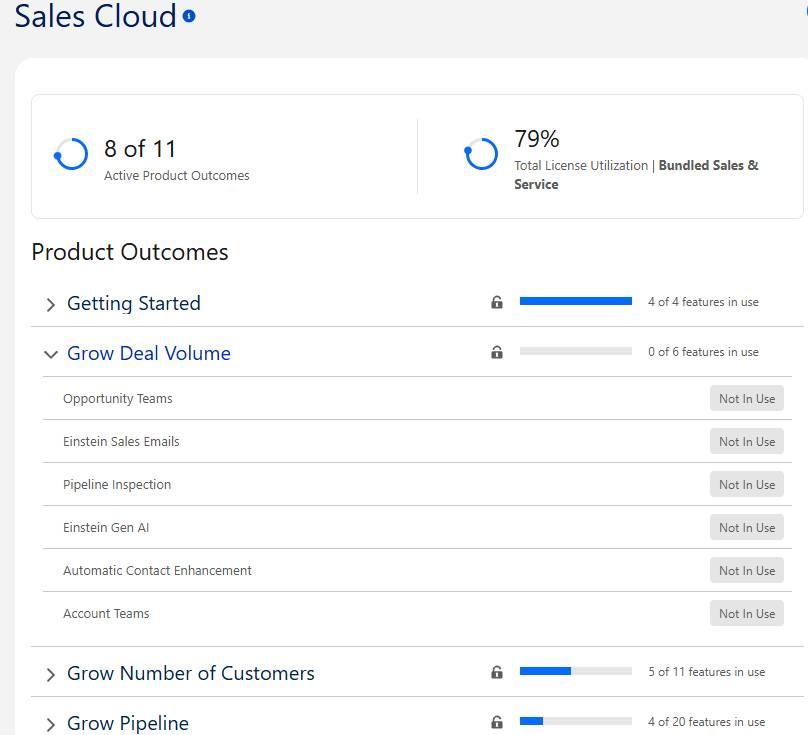
Meet Sarah, a Salesforce admin at Ursa Major Solar. She opens Salesforce Health Insights and goes to the Sales Cloud Product Adoption page. Her scan shows the Getting Started Product Outcomes are all activated. But Grow Deal Volume, a key business goal, has no features activated.
What You See
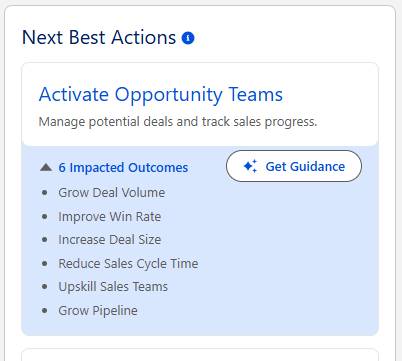
Grow Deal Volume is flagged as a risk because its contributing features are inactive. The Next Best Actions panel recommends “Activate Opportunity Teams.” Sarah expands it to see the impacted Product Outcomes, then selects “Get Guidance.” The Agentforce agent explains the feature and walks her through the setup.
The Signature Success plan includes a dedicated Customer Success Manager (CSM), a named Salesforce expert who knows your business and your org. The CSM has access to the same reports (with password protection) so they can also review your product utilization and technical foundation. Your CSM can review your Health Insights results with you and help you turn recommendations into a plan, so you get more value from your Salesforce investment.
Why Acting on It Helps
Sarah enables Opportunity Teams and rolls it out. Ten days later, she runs a new scan and Grow Deal Volume is no longer flagged as a risk. Activating the feature closes the gap between what Ursa Major Solar is licensed for and what it uses, so sellers get full value from it.
A Security Domain Outcome
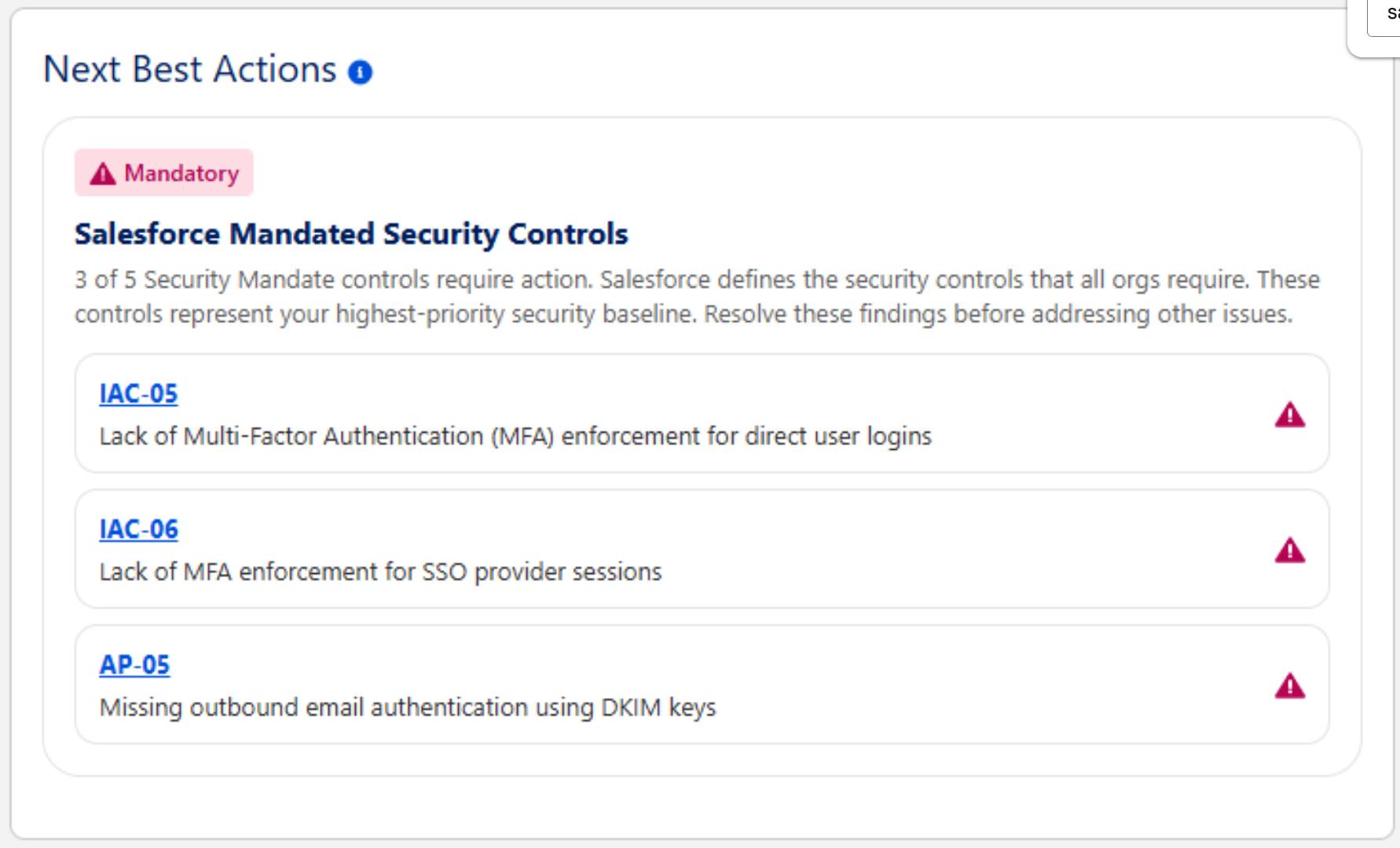
Consider a customer whose Health Insights scan surfaces findings in the Security domain of Implementation Health. The Next Best Actions panel shows the card titled “Salesforce Mandated Security Controls.” It explains that 3 of 5 Security Mandate controls require action, and that these controls are the org's highest-priority security baseline to resolve before other issues.
What the Customer Sees
The card lists three specific findings, each with a control ID the admin can open for details and further action.
-
IAC-05: Lack of Multi-Factor Authentication (MFA) enforcement for direct user logins.
-
IAC-06: Lack of MFA enforcement for SSO provider sessions.
-
AP-05: Missing outbound email authentication using DKIM keys.
The findings are marked as Mandatory and shown in plain language. They sit in one unified dashboard instead of scattered across separate tools or spreadsheets.
Why Acting on It Helps
These controls are the baseline Salesforce requires of every org. Enforcing MFA for direct and SSO logins reduces the risk of accounts being compromised. Signing outbound email with DKIM keys protects email deliverability and guards against spoofing. Resolving all three moves the org toward a compliant, secure baseline. It also lets the security team spend their time on the other issues in the dashboard.
Conclusion
Salesforce Health Insights turns scan results into clear, ranked recommendations, so you always know what to do next. Now you know how a recommendation comes about, how an admin acts on a finding in Product Adoption or Security, and how resolved items drop off after the next scan. Use these steps regularly to close gaps, protect your org, and get full value from your Salesforce investment.