Create Content with Agentforce Vibes
Learning Objectives
After completing this unit, you’ll be able to:
- Describe how MCP server tools can access, create, and manage content from Salesforce CMS.
- Identify AI skills that work with Salesforce CMS content.
Use Agentforce Vibes to Create Content
Let’s revisit the prompt from the end of Unit 1 to review how Agentforce Vibes helps create CMS content. Nigel, a digital experience manager for Real Good Rentals, a property management company, wants to know if there is any new content about the newly available rental unit in his Rentals CMS workspace. And if there isn’t any content in the workspace, he wants Agentforce Vibes to create some new content about the rental unit.
Nigel’s org is already set up with the Content Read-Only and Content Write MCP servers, and both the servers and his org are connected to the Agentforce Vibes VS Code Extension so he’s ready to get started. For details about what this setup looks like, review the CMS Developer Guide.
In the Agentforce Vibes chat, Nigel enters this prompt: “Tell me if I have content about the newly available rental unit in my Rentals CMS workspace. If there isn’t any content in that workspace, create something for me.”
Search for Content
Agentforce Vibes immediately calls a combination of AI skills and content MCP server tools to help accomplish the task. Parsing the first half of Nigel’s prompt, “Tell me if I have content about the newly available rental unit in my Rentals CMS workspace,” Agentforce Vibes identifies both a skill and a tool that can help find a match for the content.
-
experience-search-coordinate skill—This skill searches for and retrieves any existing content and media from Salesforce CMS or other connected sources. This skill can use a handful of tools from the Content Read-Only MCP server, such as search_content_cms_channels and search_electronic_media.
-
search_content_cms_workspaces from the Content Read-Only server—This MCP tool searches for content in enhanced CMS workspaces and folders by keyword.
Create a Custom Content Type
Upon finding that the workspace doesn’t contain any matching content, Agentforce Vibes pivots to the second half of the prompt: “If there isn’t any content in that workspace, create something for me.” To accomplish this task, Agentforce Vibes presents Nigel with a choice of what to do next, and it can call these skills.
-
experience-cms-content-generate skill—This skill creates, edits, and publishes Salesforce CMS content of any kind, in any domain, and for any topic. It can create a single item of content or many items of content.
-
experience-cms-content-type-generate skill—This skill creates a new ContentTypeBundle for a new custom content type.
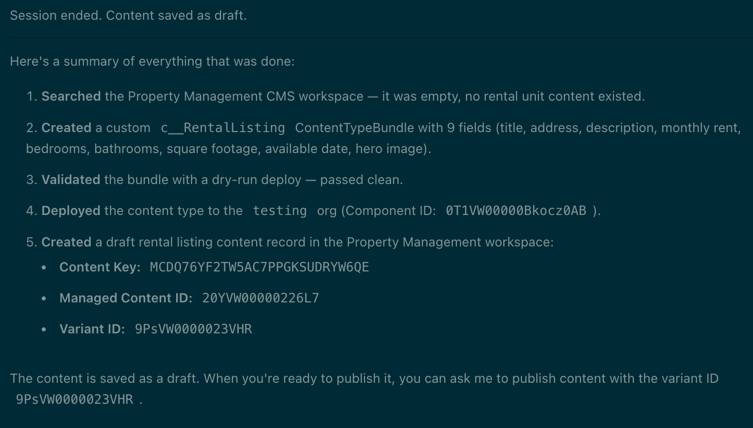
Nigel decides to create a custom content type for rental listings, so that it’s easier to manage and maintain rentals. Agentforce Vibes starts with the experience-cms-content-type-generate skill and creates the custom Rental Listing content type with fields to capture rent, square footage, and the number of bedrooms, and it even denotes which fields are required and which are optional. Agentforce Vibes asks Nigel to verify the new content type’s schema, and when Nigel confirms, Agentforce Vibes deploys the new content type directly to the CMS workspace in his org.
Create a Content Item
Agentforce Vibes uses the experience-cms-content-generate skill to create a content item for the available rental unit mentioned in Nigel’s prompt. Looking a bit deeper at this skill, it’s clear how the MCP tools play an integral part in how it functions.
To create an item of CMS content from scratch, this skill can trigger Agentforce Vibes to call tools from either the Content Read-Only or Content Write MCP servers depending on the user’s request. From the Content Read-Only server, the skill can use get_content or get_content_variant. And from the Content Write server, it can use create_cms_content, update_cms_content_variant, publish_content, or get_or_create_cms_workspace_and_web_app_channel.
Nigel’s request was fairly simple, so Agentforce Vibes only used the create_cms_content tool from the skill. At the end of the session, Agentforce Vibes asks Nigel if he wants to publish the content, but he declines—he’d rather make additional edits in CMS first.
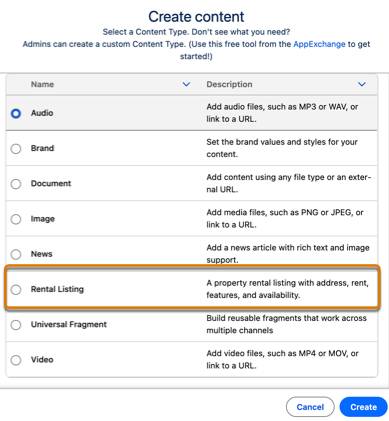
Back in his Rentals CMS Workspace, Nigel notices that his new custom content type is available in the workspace.
From the workspace, Nigel can also view, edit, and publish the content item about the new rental unit.

Next, you follow along as Nigel uses Salesforce CMS content with a React app.