Add Product Guidance
Learning Objectives
After completing this unit, you’ll be able to:
- Distinguish product messages from product objectives within the Product Guidance object.
- Explain where guidance attaches in the product hierarchy and how it reaches the field.
- Explain how message priority, grouping, and reactions shape the delivery and tracking of guidance.
Give the Field Approved Language
In the previous unit, you learned about building a structured catalog. Every product now sits in the hierarchy with its behavior set, ready for the strategy that shapes how the field uses it.
That strategy travels as language. When a representative discusses a product, the exact words carry weight. Only approved claims about safety or efficacy belong in the conversation, and wording that drifts past them risks non-compliant promotion. Product Guidance attaches the approved messages and objectives to the product model you built, so the field works from one vetted source.
In this unit, you learn about authoring that guidance and placing it where the field reps use it.
Learn About Product Guidance
Product Guidance holds a product's approved language. This diagram shows how it relates to Product2 and Life Science Marketable Product objects.
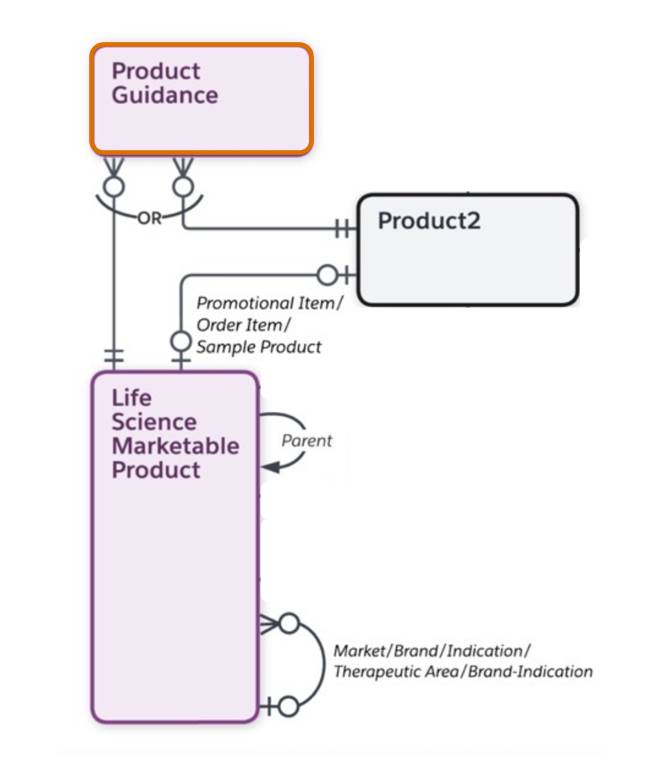
Product Guidance takes two forms, set apart by a Type field.
- A Product Message carries an approved point of emphasis about the product, such as a safety profile, an efficacy result, or a dosage limit.
- A Product Objective carries an engagement goal, the action that a representative aims to complete, such as raising a new data point or confirming interest in a follow-up.
Guidance attaches to the concept records in the hierarchy, not to the physical ones. You add messages and objectives to a brand, therapeutic area, or brand indication, never to the tangible Product. That placement is deliberate. A therapeutic area or indication is never sold, yet it anchors the hierarchy. Guidance authored there reaches every conversation about the brands and products beneath it. Author a message once on the brand, and it applies wherever a representative discusses the brand, no matter which sample they carry.
Author Messages and Objectives
You author guidance on the same Product Hierarchy page where you built the catalog. Select a product in the tree, scroll to the Messages section, and add a message. Because the tree, product details, messages, and objectives share one workspace, you author each message and objective directly on the product it applies to.
For example, the Cumulus admin opens the Immunexis brand and enters a message on its safety profile. Effective start and end dates hold the message to the approved launch window.

The admin then adds a Product Objective that directs representatives to introduce the patient support program. Objectives and messages work together. The objective sets the goal for the conversation, and the message supplies the approved language to reach it.

With both in place, the Immunexis brand has its first message and objective.
Prioritize and Track the Messages
A launched brand rarely stops at one message. Efficacy claims, dosing reminders, and access notes stack up on a single brand, so the model gives you two levels of order. Message priority ranks individual messages, so the point that matters most comes first. Group name and group sequence work one level up. Bundle related messages into a group, then order the groups against each other. The field then moves through the set in a deliberate order, efficacy before access.
Guidance also captures the other side of the conversation. A message can record the provider's reaction, such as Agree, Disagree, or Interested. A delivered message becomes a data point that the brand team reads across the field, a signal of which claims providers accept and which claims raise questions. When a reaction isn’t valuable, Hide Reaction leaves it off.
For example, Cumulus sorts the Immunexis messages into an efficacy group and a safety group. The messages are sequenced so that efficacy leads, and turns on reactions to learn how providers respond to each point as the first visits happen.
What’s Next?
In this unit, you learned how to author product messages and objectives, and place them on the concept records that carry them through the hierarchy. You also learned how to order the message set so the field delivers it the way the brand team intends.
Your guidance now lives on the products, ready for the field. The next step decides who receives it. In the next unit, you explore how to align products and guidance to territories, so each team gets the products and messages meant for its work.