Turn Account Strategy into Execution
Learning Objectives
After completing this unit, you’ll be able to:
- Describe how a key account manager imports a strategic blueprint into a live account plan.
- Explain why structured stakeholder profiling supports prioritization and reporting.
- Describe how participant roles and stakeholder assignments coordinate the cross-functional team.
- Explain how sprint-based execution and automatic roll-up keep account progress visible.
From Blueprint to Action
In the previous unit, you assembled a governed blueprint with approved goals, a published template, and the assignment that binds them. A blueprint is potential, not progress. It proves out only on a real account, where the framework meets one customer's politics, evidence demands, and timing.
That account is rarely tidy. A formulary decision at a single health system depends on a pharmacy and therapeutics (P&T) committee, a clinical chair, and an economic reviewer who each read the evidence differently. The blueprint defines good preparation, and the live plan is where a key account manager adapts it to the people and pressures in play.
The Account Plan is that live plan, where strategy becomes stakeholder intelligence, team coordination, and tracked execution for one customer. In this unit, you follow a key account manager building and running an account plan for a single high-value account.
Import the Strategic Blueprint
The Account Plan is the strategic home for one customer account. Rather than build from a blank record, a key account manager imports the blueprint, which lands an approved, structured starting point to adapt to the account in front of them.
To create the plan, open Account Plans and select New, then name the plan, link the account, set the planning period, and capture contextual analysis. The SWOT (strengths, weaknesses, opportunities, threats) and PESTEL (political, economic, social, technological, environmental, and legal factors) fields do the real work. They pull the account's strengths, risks, and external pressures, such as payer scrutiny, tighter budgets, and biosimilar competition, into the plan, shaping which objectives and stakeholders take priority. Strategy grounded in the account's real environment beats strategy built on assumptions.
At Cumulus, a key account manager creates a plan for a regional health system weighing the new therapy for its formulary.

With the plan saved, open the Account Plan Objectives tab and select Import Template. The modal lists every approved Goal Definition, filterable by product, and the key account manager imports only the ones that fit this account. Selecting the formulary goal pulls in its linked action plan and assessment tasks; an objective that doesn't apply to this health organization stays unchecked.
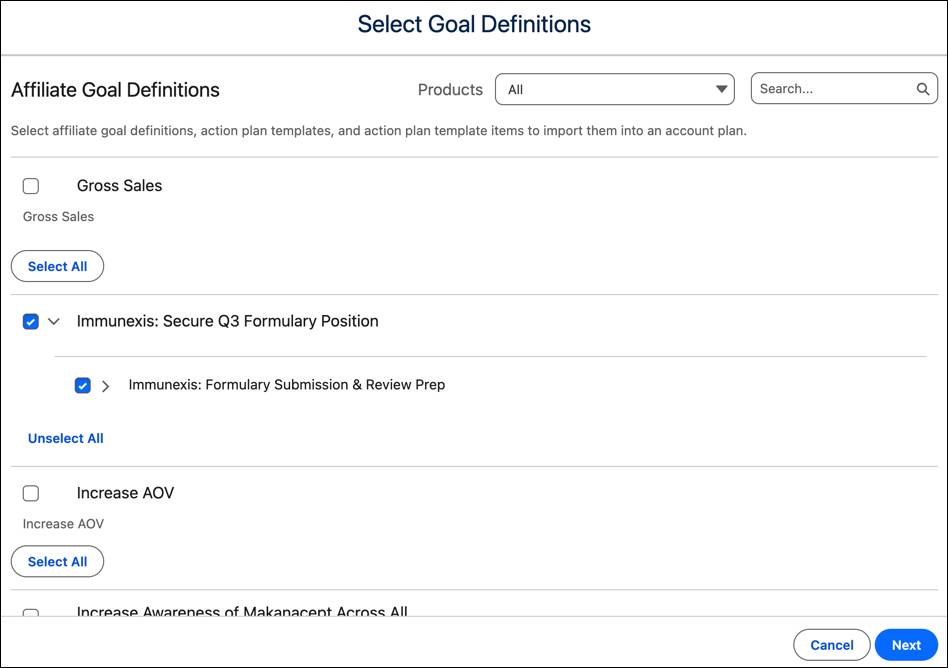
After the import confirms, the system creates an Account Plan Objective for that goal in the context of the health organization, populated with the linked action plan and assessment tasks.

In a single action, the plan that would otherwise take hours to assemble, is ready. This is where the blueprint layer pays off. The import converts the administrator’s design into a connected and structured plan, eliminating the trade-off between speed and efficiency.
The working plan isn’t locked. The key account manager can add an assessment task the standard blueprint didn't anticipate, or create a one-off objective by selecting New beside the imported set to add account-specific touches.
Profile the Key Stakeholders
A key account manager usually knows who shapes an access decision and how much weight each person carries. The problem is where that knowledge exists. Held in memory or private notes, it can't be prioritized, segmented, or compared across accounts, and it gets lost the moment a rep changes territory.
The Account Plan Stakeholder object turns that tacit knowledge into structured data. Structured fields, including Role Type, Influence Level, and Strength make a stakeholder map something the team can sort, filter, and report on, instead of a paragraph that only its author understands.
At Cumulus, administrators configured those profiling picklists and added the Import Stakeholder button to the Account Plan layout. The team profiles people directly on the plan, creating an Account Plan Stakeholder record for each decision-maker, and uses Import Stakeholder to pull in stakeholders from a related account plan when one exists.

The key account manager profiles a key P&T committee prescriber, ranking the prescriber's influence and strength, and uses the Comment field to note an advocacy for rapid-onset therapies.
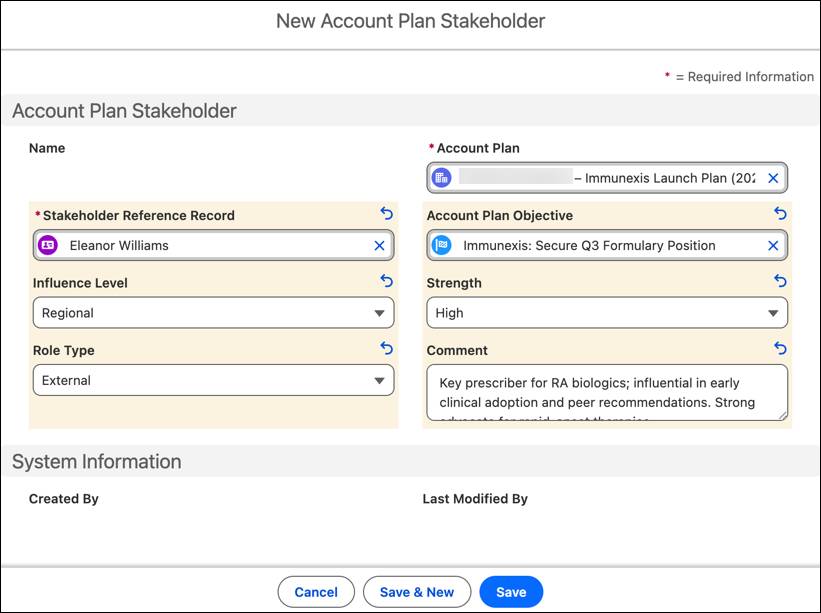
The manager profiles the rest of the committee the same way, so the plan holds a ranked influence map rather than a contact list. That structure does double duty. It tells the team where to spend its attention, and it gives Agentforce the context to generate sharper account summaries and next-best-action recommendations. Reps keep the map current from the field, profiling and bulk-adding stakeholders from the mobile interface.
Align the Internal Team
Securing access is a team effort. A key account manager coordinates with Medical Science Liaisons (MSLs), Market Access Managers, and Health Economics and Outcomes Research (HEOR) Analysts, each owning a distinct piece of the account strategy. That coordination becomes dependable only when the system records who owns what.
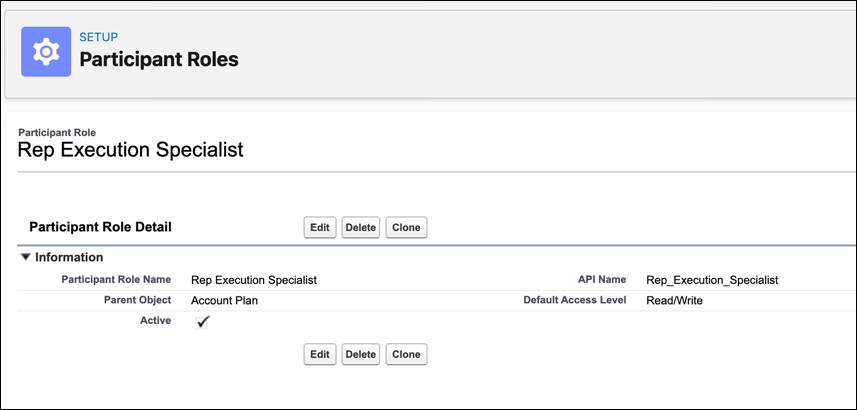
The Account Plan Participant object represents the internal team on the plan. Each participant carries a Participant Role, which defines both the member's function and their default access to the plan. To configure roles, an administrator opens Setup, searches Participant Roles, and specifies a name, the parent object, and a default access level.
Cumulus adds a Rep Execution Specialist role this way.
With roles in place, the team adds participants from the Participants tab. The Assign or Unassign Participant quick action links specific team members to the external stakeholders they engage with, creating an Account Plan Participant Stakeholder record that makes the relationship ownership explicit.

On this plan, the key account manager joins as the lead and adds a colleague in the Rep Execution Specialist role. From the prescriber's stakeholder record, both participants are then assigned to that relationship.

Now the team knows exactly who engages whom. A handoff in a hallway conversation now becomes a record leadership can view and hold accountable.
Organize Execution with Sprints
The plan now holds strategy, people, and tactical work. The open question is sequence. Action plans and assessment tasks define what happens; Sprints define when.
A sprint is a time-bound execution window that groups action plans into a focused period of work. Instead of staring at an undifferentiated task list, a key account manager assigns work to dated sprints, building a cadence that makes near-term priorities obvious and progress legible. Admins configure the sprint status values and map a completion value in Sprint Settings, so a sprint's status rolls up into the plan.
The key account manager creates a two-week sprint for the P&T prep work.

Back on the action plan, the key account manager attaches the new sprint.

A deadline now binds the period's work instead of an open-ended list, which keeps the near-term priorities visible and easy to act on.
Run the Plan and Track Progress
With the plan structured and sequenced, the work moves into the field, and the plan becomes the space where the team works daily. The key account manager records each engagement on the plan itself, not in a separate system. From the action plan's items, they create visits, tasks, and follow-ups in context, and mark assessment tasks complete as work gets done. Linking an action plan or assessment task to a visit record ties that field engagement to the plan and marks the work complete.
None of that progress has to be compiled by hand. Because the administrator mapped completion statuses and activated the trigger handlers in the previous unit, finishing one task recalculates the numbers above it. When the key account manager closes the HEOR evidence task, the action plan, the Account Plan Objective, and the Account Plan each advance in turn.
That live calculation makes two reporting views worth opening. The Account Plan Hierarchy shows the whole plan on one screen, from the top formulary objective down to each task, with status filters and completion percentages that move as work closes. A manager reads exactly how far the formulary strategy has progressed, without calling a status meeting. The Stakeholder Timeline shows the sequence and status of every engagement, so a colleague stepping in sees how the relationship with the P&T chair developed.
The plan now reports reality instead of recording good intentions, and it does so in the same place the team works and leadership decides.
What’s Next?
In this unit, you learned about building and running a complete Account Plan. You imported the blueprint, profiled stakeholders, aligned the team, sequenced the work in sprints, and watched progress roll up on its own. That's one customer relationship, captured in full.
A single account is one relationship inside a much larger region. In the next unit, you zoom out to the territory, where a regional leader applies the same model and blueprint to coordinate strategy across many accounts at once.