Explore the Informatica Data Management Cloud Ecosystem
Learning Objectives
After completing this unit, you’ll be able to:
- Describe the Informatica Data Management Cloud (IDMC) architecture and its role as an iPaaS solution.
- Identify the key services available within IDMC.
- Navigate the IDMC interface.
- Describe core platform terminology.
Meet Cassie
Cassie Evans (she/her) is a developer at AW Computing, a mid-sized technology company. Her team manages data across a dozen systems: a Salesforce org, an on-premise SQL Server database, a handful of flat files on an SFTP server, and several cloud applications. Every morning, someone manually exports a CSV, transforms it, and imports it somewhere else. It works—barely—and Cassie knows it won’t scale. Her manager just gave her access to Informatica Intelligent Data Management Cloud (IDMC). It’s her job to figure out how to use it.
Learn About Informatica Data Management Cloud
IDMC is a cloud-native data management platform. It acts as an Integration Platform as a Service (iPaaS), meaning it provides a hosted, centrally managed environment for connecting, transforming, and governing data across systems. You do not need to manage integration infrastructure yourself.
IDMC is built around a unified architecture. Instead of deploying separate tools for each integration use case, developers work from a single platform that hosts multiple services. Each service focuses on a specific data capability.
Explore Core Services in IDMC
When Cassie logs in to IDMC for the first time, she sees a service menu. Each service is a distinct capability within the platform. As a developer, she uses three services most often.
Service |
Purpose |
|---|---|
Data Integration |
Design and run mappings, mapplets, and mapping tasks—the core of CDI development. |
Administrator |
Manage Secure Agents, connections, runtime environments, and user settings. |
Monitor |
Track the status, logs, and run histories of all your jobs and tasks. |
These three services form a complete development and operations loop: You configure infrastructure in the Administrator service, build integrations in Data Integration, and track output in the Monitor service.
IDMC also includes Data Quality, Data Governance and Catalog, and Mass Ingestion. For the badges in the Integrate Hybrid Data with Informatica Cloud Data Integration trail, Data Integration, Administrator, and Monitor are your primary tools.

Navigate the IDMC Interface
IDMC’s interface is organized around a persistent service menu.

From any page, you can:
- Switch between services using the Navigation menu in the top-left corner.
- Access your Home page, which surfaces recent assets, pinned items, and quick links.
- Search across all assets using the global search bar.
- Manage your workspace and project folders from within each service.
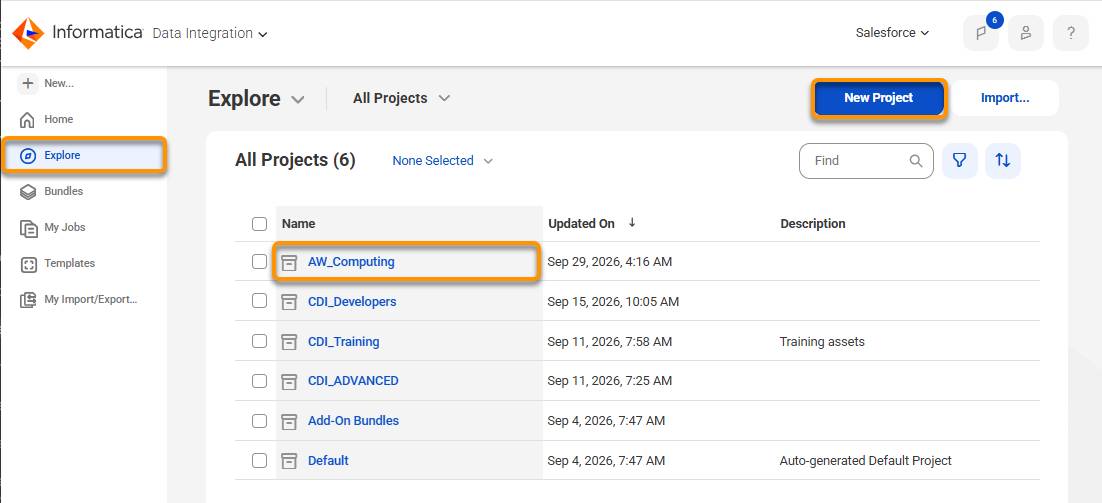
When Cassie opens the Data Integration Explore tab for the first time, she sees a project folder structure—similar to a file system—where all mappings, mapplets, and tasks are organized. She creates a new folder called AW_Computing and uses it to keep her assets organized from the start.
Key Terminology
Before building anything, Cassie needs to know the language of the platform. There are some core CDI terms she encounters right away.
Term |
Definition |
|---|---|
Mapping |
A visual data flow design that defines how data moves from a source to a target, including any transformations applied along the way. |
Mapplet |
A reusable, self-contained transformation component that can be embedded into multiple mappings. |
Task |
A configured, executable job that runs a mapping or a specific operation (such as synchronization or transfer). |
Taskflow |
A workflow that automates end-to-end data processes by arranging tasks into logical sequences, supporting sequential, parallel, and conditional execution. |
Project/Folder |
The organizational container for all CDI assets within IDMC. |
Connection |
A configured link to a data source or target such as a Salesforce org, a SQL Server database, or an S3 bucket. |
Secure Agent |
A locally installed software component that enables IDMC to communicate with on-premise or private network data sources. |
How the Services Work Together
While the three core services—Administrator, Data Integration, and Monitor—are independent services, they form a continuous development loop that Cassie follows for every integration she builds.
She starts in Administrator, where either Cassie or an Administrator can configure the Secure Agent for the org. Here she can configure connections to AW Computing’s data sources. Without a connection, no mapping can read from or write to an external system. Connections can be used by all members in the org. Any connections that Cassie defines can be applied by her team in mappings or tasks.
She then moves to Data Integration, where she designs mappings. Mappings are where the logic lives. She defines the source, applies transformations, and connects to the target. Mapping Tasks are also configured here for use in the production environment.
Finally, she opens My Jobs after every run to verify that data moved correctly, review row counts, and investigate any failures. If a task shows a warning or failed status, the session log tells her exactly where things went wrong. For mappings that are scheduled to run, the Monitor service can be used to locate the mapping run information for each job.
This three-step loop—configure, build, monitor—is repeated through project development and production at AW Computing.
The Role of Cloud Data Integration in IDMC
Cloud data integration (CDI) is one of several services within IDMC. It focuses specifically on data movement and transformation — reading data from sources, applying logic, and writing results to targets. Other IDMC services handle adjacent responsibilities.
- Data Quality: Profiles, standardizes, and cleanses data
- Data Governance and Catalog: Tracks data lineage and manages metadata
- Mass Ingestion: Handles high-volume bulk data loading
- Application Integration: Automates API-based integrations and event-driven processes
While CDI is your primary tool within IDMC, it’s important to understand that it sits within a broader platform. This arms you with the information to know when another IDMC service might be the better fit for a future use case.
With the knowledge of IDMC’s interface and services under her belt, Cassie is ready to explore the Administrator service and set up her Secure Agent.