Work with the Account Management Agent
Learning Objectives
After completing this unit, you’ll be able to:
- Describe the key use cases of Account Management.
- Research accounts using the sales agent.
From Setup to Sales
In the previous unit, you enabled Sales Account Management and added the agent to the account page. Now comes the part your sales team cares about: seeing it work. It’s time to experience the agent from a sales perspective.
One of your customer accounts is Ursa Major Solar, a growing solar panel and battery supplier. A rep managing this account has a meeting coming up and a stack of past interactions to review. Watch how the agent handles all three.
Research an Account in Seconds
A sales rep’s account record holds a lot of information: opportunities, contacts, cases, activity history, and notes from every past conversation. Reviewing it before a meeting means opening record after record and piecing the story together by hand. The agent now does that work for you.
Let’s see how.
- Click the App Launcher
 , then search for and select Accounts.
- You might see a popup that reads, “Say hello to Agentforce.” You can close this.
- Click the List View button at the top right corner to change the view.
- Click Recently Viewed and choose All Accounts.
- Click Ursa Major Solar. This opens up the account page for Ursa Major Solar.
- Click Agentforce
 at the top right corner. If you don’t see it, refresh the Account page.
- Click Got It on the Agentforce disclaimer and wait for the Agentforce chat window to load.
- Enter the following prompt:
Give me an account summary for Ursa Major Solar, including recent activity, open opportunities, and any risks I should know about before my next meeting.
- Press Send
 , and let the agent analyze.
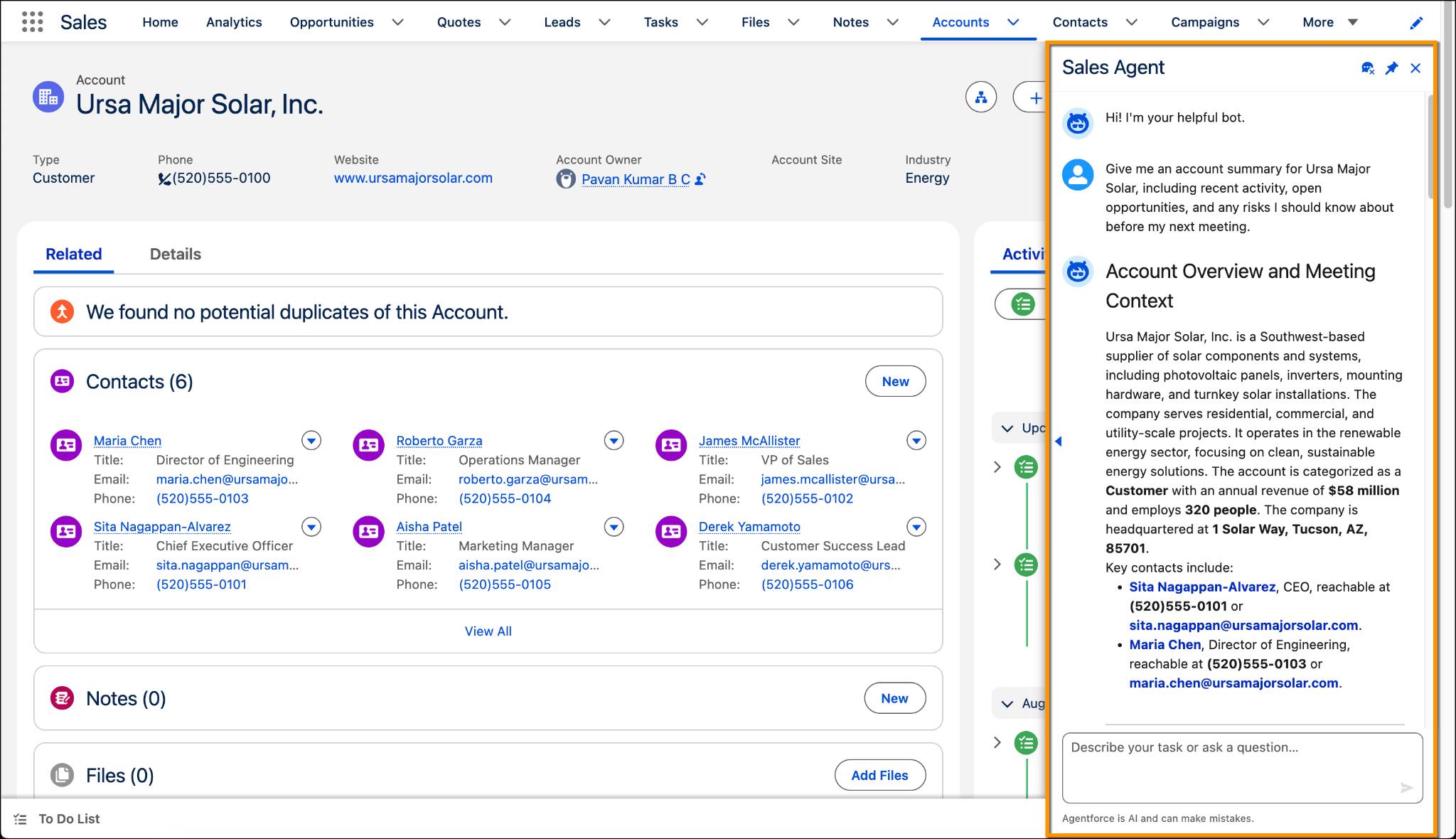
As you can see, the agent analyzes the account and all associated objects to create a detailed report, including an overview, meeting context, objectives, priorities, key stakeholders, risks, considerations, and more. This means your reps can walk into a meeting fully prepared in just a few minutes.
Here are a few more example prompts to try with the agent.
Summarize my recent calls and emails with Ursa Major Solar.What's a strategic point of view for growing this account?
Each prompt turns a research task into a talking point. The rep stays in the flow of work, and the agent handles the digging. After you’re done, close the Sales Agent chat window.
Wrap It Up!
Agentforce unifies end-to-end account management into a single workspace, eliminating prep-work drag for your sales team. Reps spend their time actually selling, and buyers meet with a team that is sharp, fully informed, and ready to drive results.