Get Started with the Account Management Agent
Learning Objectives
After completing this unit, you’ll be able to:
- Explain what Agentforce Account Management is and the business problem it solves.
- Describe the key capabilities of the Account Management agent.
The Hidden Cost of Getting Ready to Sell
Picture a typical day for one of your sales reps. Before a single customer conversation happens, there's work to do. They pull up the account, scan recent opportunities, hunt through email threads, skim call notes, and check for the latest company news. Then they do it again for the next account. It adds up.
Sales reps spend only about 2 hours a day actively selling while roughly an hour goes to administrative tasks like data entry and updates. On top of that, 45% of sales professionals say they’re overwhelmed by the number of tools in their tech stack. The context that reps need is real, but it’s scattered across systems. Every minute spent assembling it is a minute not spent building customer relationships. Sales reps have plenty of information across all their accounts, but they lack a fast, unified way to turn it into action. Sales Account Management tackles just that.
Sales Account Management
Sales Account Management is an AI-powered capability that helps sales reps grow and retain customers by automating deep account research and recommending strategic next steps. Instead of digging through multiple systems, your reps ask the agent in Salesforce or in Slack to research an account, summarize recent interactions, or draft a strategic point of view. The agent pulls together internal Salesforce data, such as opportunities, service cases, contacts, and account plans, with external web data like company news and industry trends. It then delivers a single, unified view of what matters about an account, plus recommendations to keep sellers on target. When reps spend less time on research, they can spend more time on moving deals forward and building strong customer relationships.
Account Management Agent Capabilities
The agent focuses on four core capabilities.
Capability |
What It Does |
|---|---|
Automated Research |
Searches recent news, financial results, and strategic priorities, along with internal CRM data, for a specific account. It then creates account briefs to prepare sales reps for meetings. |
Interaction Summarization |
Summarizes the account’s most recent calls, emails, and notes, and identifies key themes so sales reps stay current on the customer relationship. |
Unified Insights |
Surfaces information from disparate objects, such as opportunities and service cases, in a single conversational panel, reducing time spent navigating records. |
Together, these capabilities replace hours of manual prep with a conversation. A rep asks a question, and the agent does the research and strategizing, all grounded in your Salesforce data.
Sign Up for a Custom Playground with Sales Account Management Agent
To complete this badge, you need a special limited-time custom playground that contains prospecting agent capabilities and our sample data.
- Select Create Playground, then select Yes, Create Playground.
- Your new org is automatically attached to your Trailhead account.
- Make note of your org’s expiration date and complete this badge before then.
- Select Launch to open the playground.
Set Up Sales Account Management
Before sales reps can put the agent to work, the sales agent needs to be enabled in your org. The setup happens in Salesforce Go, where you turn on Agentforce and then turn on Account Management. Once enabled, the account research component is added so insights show up right where your reps work.
Follow these steps.
- Remember to sign up for a new custom playground with prospecting agent capabilities for the hands-on steps and challenges in this badge.
- Click Setup
 and select Salesforce Go.
- Close any open popup windows and wait until the feature status and progress are synced successfully.
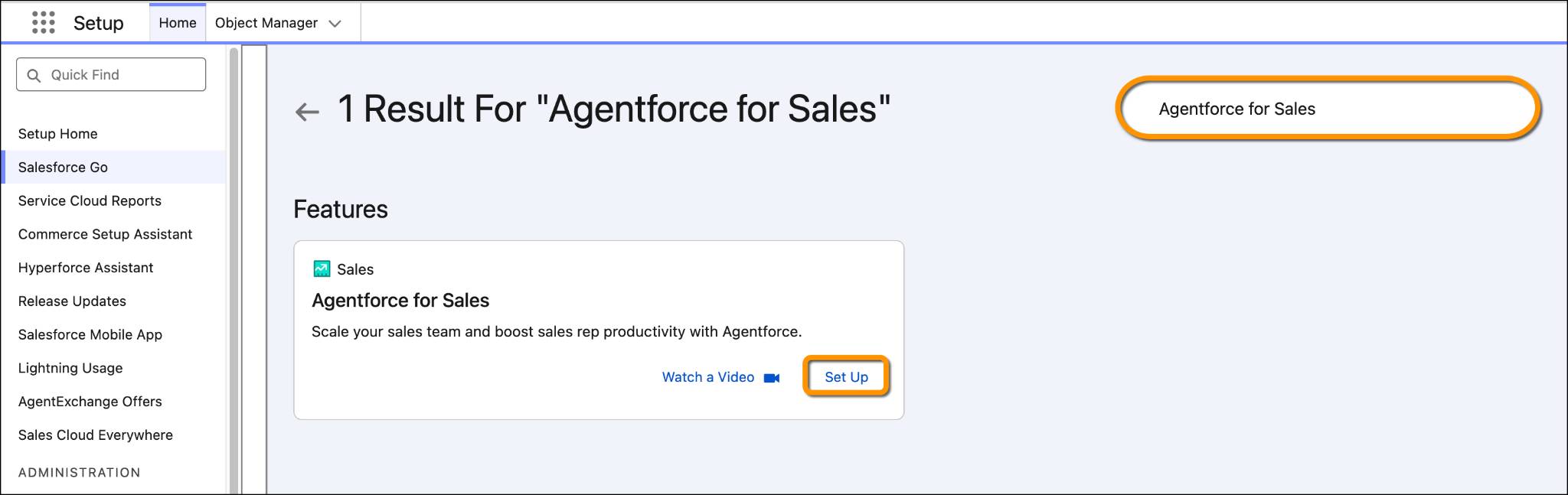
- In the Search features in your org field, enter
Agentforce for Salesand press Enter.
- On the Agentforce for Sales card, click Set Up. If one or more associated features are enabled by default, the card will say In Progress or Completed. If that’s the case, click Manage.
- Before enabling any agent, the first step is to make sure Agentforce is turned on. Click Turn On and turn the Agentforce capabilities on. If it’s already turned on, move to step 8.
- Click Turn On again in the disclaimer popup box. This may take a minute or two. Once it’s complete, you see a success banner: Agentforce for Sales was turned on and is ready to configure.
- Scroll down and use the toggle button to enable Account Management.
- Click Turn On in the popup window. Again, wait for a few moments until the agent gets turned on and you see the success banner.
- Make sure that Sales Account Research is turned on. If it’s not visible, expand the Account Management section. Refresh the browser.
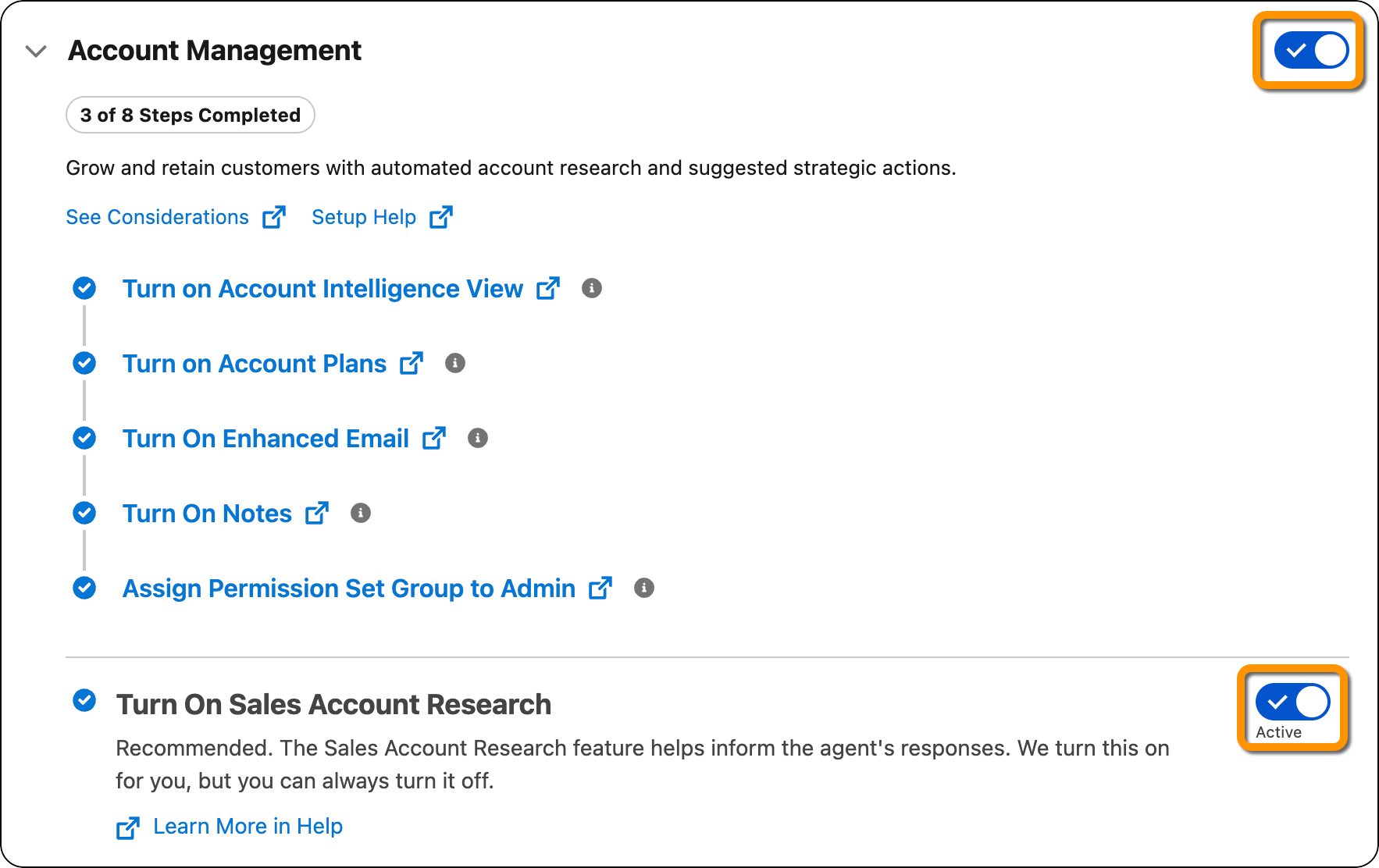
You’ve successfully turned on the agent and the account research capability.
Wrap It Up!
With Sales Account Management now enabled, you’ve given your sales team a faster way to prepare. The scattered context that used to eat into selling time now comes together in one place. In the next unit, you explore how sales reps put this agent to work.