Navigate Guest Experience Bookings
Learning Objectives
After completing this unit, you’ll be able to use an agent to:
- Locate a guest’s Experience bookings.
- Cancel an Experience booking.
- Book a new Experience session.
Time to Unwind
After dinner, you finally get to relax around a firepit with some of your new coworkers to watch a brilliant sunset, enjoy a mocktail, and tell stories about the day. You recalled how Ms. Todd thanked you and said she was very happy with her upgraded room. The diaper bag was found. It had been en route to the Lost and Found when the case was created and was quickly returned to the family who lost it. Your new friends also shared how the new employee agents made them more productive with their day-to-day tasks, which gave them the ability to pay more attention to the guests.
The activity around the resort has quieted to evening murmurs, windchimes, and clicking heels on the tile floors as guests make their way to the dessert bar and to the patios for music, movies, and dancing.
 .
.
Just as you swirl your paper umbrella toothpick around the bottom of your glass, Miko Mistumi, a guest in Room 324 approaches the table and holds out his phone to show you his reservation calendar. He explains that an experience that his wife booked, the Coral Bay Cruise, will make their eldest daughter really seasick and so they need to do something a little more landlocked instead. “She just adores the ocean and fish,” he explains. “So I’d like for her to be able to do more than just play on the beach. Is there an activity that you’d recommend where we can still enjoy the ocean together?”

“Let me take a look,” you tell him. “We certainly wouldn’t want your daughter to get seasick, or for any of you to feel like you’re missing out. Let’s find another fun experience for you and your family to go to tomorrow afternoon.”
Cancel Miko’s Coral Bay Cruise Experience Booking
You and Mr. Mistumi walk over to a nearby Concierge station to look at other activities his family might be interested in. You show him several other ocean-related experiences he can choose from and hand him a few brochures to look at while you cancel his Coral Bay Cruise booking.
- In the Coral Cloud Resorts app, click
 .
.
- Click the arrow next to the Customer Service Agent to expand the Select Agent menu. Select the General Agent from the menu, then click Select. Make sure the correct agent is selected.
- In the Agentforce panel, copy and paste:
Show me the experience bookings for Miko Mistumi.
- The agent shows you three experiences that Miko Mistumi has booked for his family during their stay. Note: Your bookings may appear in a different order.

- Click the Booking Record Number, B-00107923, for the 2:30 PM session of the Coral Bay Cruise. The Booking Details page opens on the left.
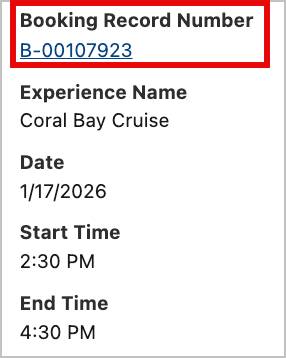
- Copy and paste:
Please cancel the booking tied to this session. - The agent responds to tell you that the booking has been successfully canceled. The Status field in the Agentforce panel and in Miko’s Booking Details updates to say Canceled, and the Is Canceled checkbox is checked.

Book a New Session for Miko’s Family
Now, you need to rebook Miko Mistumi’s family for something fun tomorrow afternoon. Miko holds up the brochure for the Magical Aquarium Tunnel Tour and tells you that his family would love that activity.
- In the Agentforce panel, copy and paste:
What is the next available Magical Aquarium Tunnel Tour session for 5 people? - The agent responds and shows you a session that is available at the same time as the session you just cancelled, and asks whether you’d like to book it.
- Copy and paste:
Yes, book it for Miko Mistumi’s family.
- The agent tells you that the booking has been successfully created.
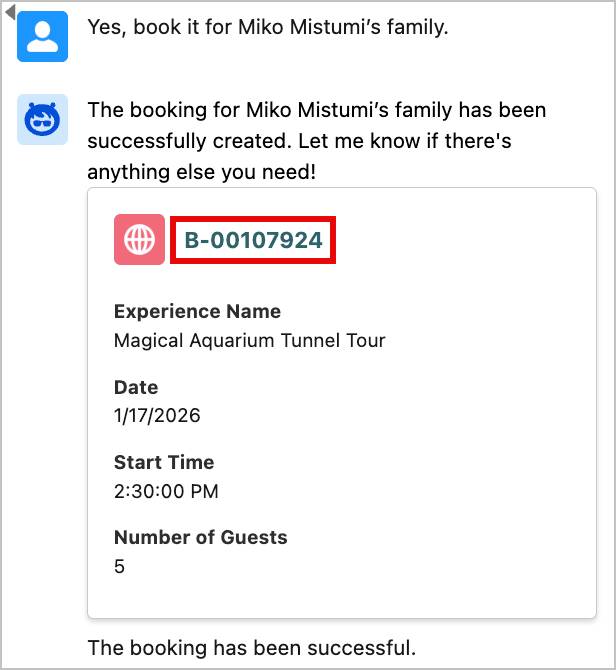
- In the Agentforce panel, click the new booking number, B-00107924, to view Miko’s new Booking Details for the Magical Aquarium Tunnel Tour.
Wrap Up
With Miko’s family happy with their new schedule, you head back to the firepit and rejoin your new friends. You had a wonderful first day, and the employee agents made it so easy for you to help guests. It’s as if you’ve been there for years! Tomorrow, you’ll explore the rest of the resort and become more acquainted with the staff.
Congratulations!
You just learned how using employee agents helps you accomplish routine tasks so you can spend more time focusing on the work that really matters. Before you go, don’t forget to check the challenge to earn this badge.