Streamline Data Collection with Data Capture
Learning Objectives
After completing this unit, you’ll be able to:
- Describe Data Capture and its features.
- Explain how Data Capture flows are built and accessed by mobile workers.
- List the key benefits of using Data Capture.
Say Hello to Data Capture
Field service teams collect enormous amounts of information on-site, from readings to signatures and customer feedback. For years, that meant juggling paper forms or bouncing between apps, with data entry happening long after the work was done. This left records incomplete, inconsistent, or simply misplaced. Misplaced data leads to compliance gaps, compliance gaps lead to risk, and manual reentry is slow and prone to error.
Data Capture is built to close this gap. It gives mobile workers a single intake form built natively within the Field Service Mobile app. So the right data gets captured at the right time, every time. Admins can create adaptable forms that mobile workers access and complete directly within the app, without the need for online connectivity. And because Data Capture is built directly on top of Flow Builder—the native, low-code, Salesforce tool that admins already use across the platform for automation—they can start creating Data Capture forms right away.
Mobile workers can use Data Capture forms to collect:
-
Inspection results: Asset conditions, safety checks, equipment status
-
Compliance documentation: Signatures, certifications, regulatory checklists
-
Maintenance records: Service notes, parts used, work completed
-
Customer information: Feedback, approvals, contact updates
-
Media inputs: Photos, annotations, image grids
How Data Capture Helps
No two organizations are exactly alike, but field workers everywhere tend to run into the same kinds of roadblocks. Whether your team is struggling with incomplete records, slow processes, or communication gaps, Data Capture is built to help. Here are some of the most common challenges it can solve.
Issue |
How Data Capture Solves It |
|---|---|
Mobile workers use separate apps, so data must be manually reentered into Salesforce |
Forms are native to the Field Service Mobile app; data flows directly into Salesforce records |
Multi-screen, multi-step processes increase errors and slow workers down |
Single-screen experience with multiple input fields reduces clicks and streamlines capture |
Forms can only be submitted when online, workers in remote areas lose data |
Offline-first architecture with a dedicated offline engine ensures work is never lost |
Compliance teams need documented proof of work completed in the field |
Forms can be tied to work orders, service appointments, and work order line items for full traceability |
Building custom mobile form solutions is expensive and time-consuming |
Built on top of Salesforce Flows, no custom development needed |
Workers leave forms incomplete and data is lost when the app closes |
Auto-save captures every entry so forms can be closed and resumed without data loss |
How Data Capture Works
Admins build Data Capture flows in Flow Builder, using standard components and fields like signature capture, text fields, lookup fields, and checkboxes. These components operate on Data Capture’s conditional visibility, or the ability to show or hide fields based on what a worker has already entered. For example, if a technician marks an asset as Damaged, a follow-up section for damage documentation automatically appears. If they mark it OK, that section stays hidden.
The logic behind this is powered by real-time reactivity, which instantly updates the form’s user interface as the input changes. Moreover, automation capabilities trigger backend processes based on worker responses, ensuring data is actionable the moment it’s entered. The end result is an intelligent, branching form that adapts to the situation without overwhelming workers with irrelevant questions. And because Data Capture forms are structured and native to the app, they also connect directly to field service records like service appointments, work orders, and work order line items. This lets them serve as the foundation for Voice-to-Form, an AI-powered capability that lets mobile workers complete the same forms hands-free using their voice.
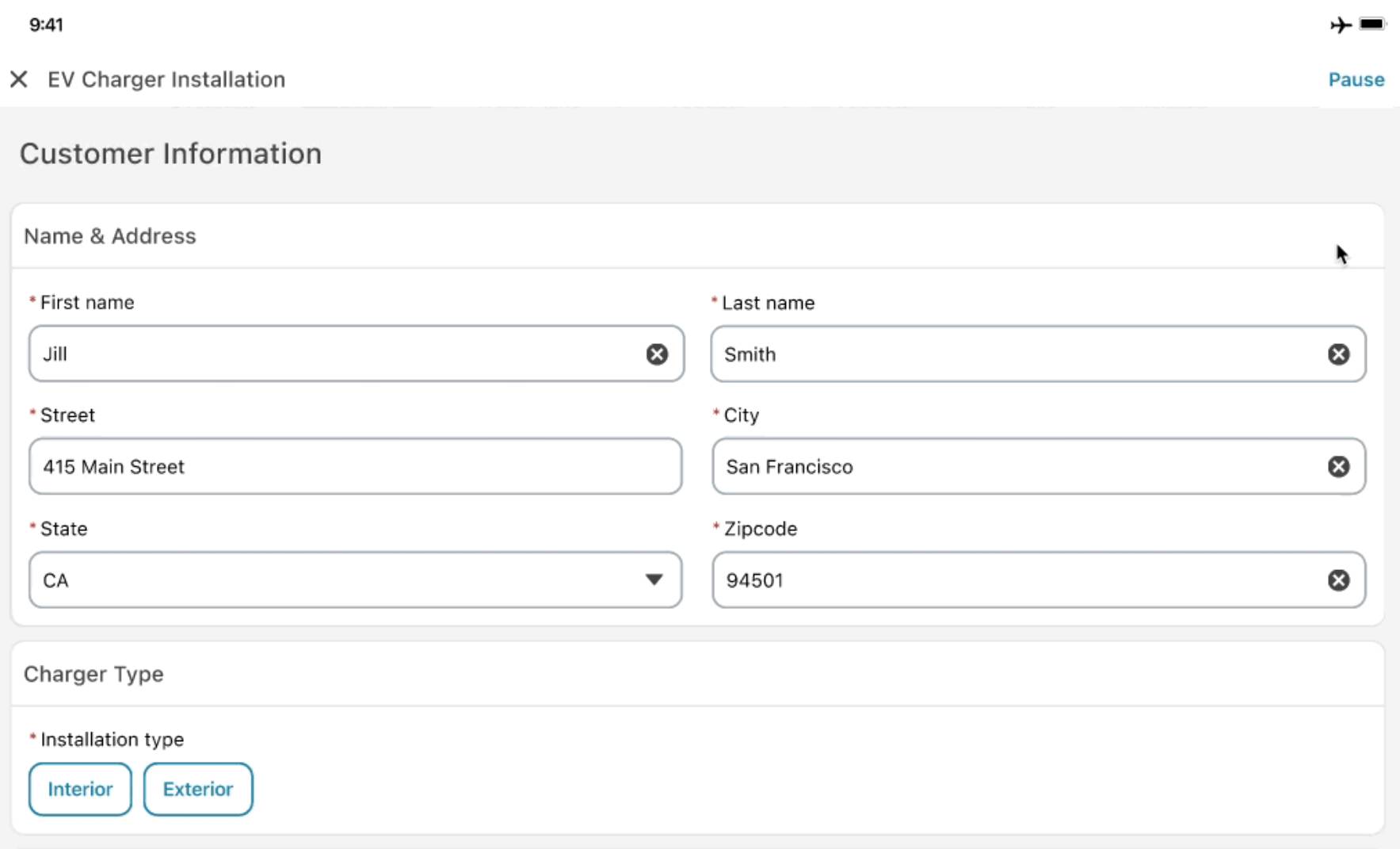
But what happens when your technician heads into the field and loses signal? That’s where Briefcase Builder comes in. Briefcase Builder is a powerful Field Service tool that lets admins create personalized “briefcases” filled with the exact records that should be available offline for each worker. When a worker’s device syncs, it automatically pre-downloads those records, so the full form is ready and waiting, even with no connection in sight.
What Changes for Your Team
Moving to a native, adaptable data tool eliminates daily friction for your field teams, and replaces messy paperwork and disjointed apps to allow your business to function with much higher precision. Here’s what this means in the long term.
-
Increased workforce capacity: When technicians spend less time on paperwork, they can spend more time on the job. Standardized forms streamline field admin so your existing team can handle more service calls each day without burning out.
-
Operational traceability: Every form submission is logged automatically, online or offline, with consistent and reliable data. That means fewer errors, less rework, and an org that’s always audit-ready.
-
Enhanced customer trust: A structured, professional on-site experience, from guided form completion to instant record updates, shows customers that your team has everything under control. That consistency builds confidence and strengthens relationships.
-
Adaptability in every situation: Whether a technician is working hands-free on a job site or deep in a no-signal zone, the experience stays consistent. Voice-to-Form lets workers capture data by simply speaking, while Briefcase Builder ensures the right records are always pre-loaded and ready offline.
Ultimately, Data Capture synchronizes field activities with administrative operations, transforming disconnected manual processes into a unified, efficient workflow that ensures information is reliably captured at the source.