Get Started with Momentum
Learning Objectives
After completing this unit, you'll be able to:
- Explain what Momentum is and the business problems it solves.
- Describe how Momentum captures, analyzes, and acts on your customer conversations.
- Identify how different revenue team roles benefit from using Momentum.
The Scattered-Data Problem
It's 4:45 PM and you just wrapped your sixth discovery call of the day. Buried in those conversations are a budget, a competitor, and two decision-makers named right before the call cut out. Some of it makes it into Salesforce tonight. Some of it won’t.
And that’s the problem. A single deal plays out over weeks, sometimes months. You run discovery calls, go back and forth on terms, work through objections, and meet new stakeholders who show up halfway in. Now multiply that across every deal you’re running. The detail that moves a deal forward is in there somewhere, but it’s scattered. It's agreed to on one call, confirmed in an email, mentioned in passing on Slack. Pulling it together by hand every time you need to make a decision isn't sustainable. What you need is a system that proactively surfaces insight from your conversations and puts it in front of you when it matters.
This is exactly what Momentum solves.
Meet Momentum
Momentum is the Salesforce AI-powered conversation data tool. Its Conversation Intelligence capability automatically captures, transcribes, and analyzes every customer interaction, then turns those conversations into structured, usable data right inside Salesforce. Think of Momentum as a unified memory system for your revenue team. Instead of manually logging interactions, it acts as a silent partner that captures, understands, and links every call, email, and meeting directly to the relevant CRM record, so your team can focus on the conversation, not the data entry.
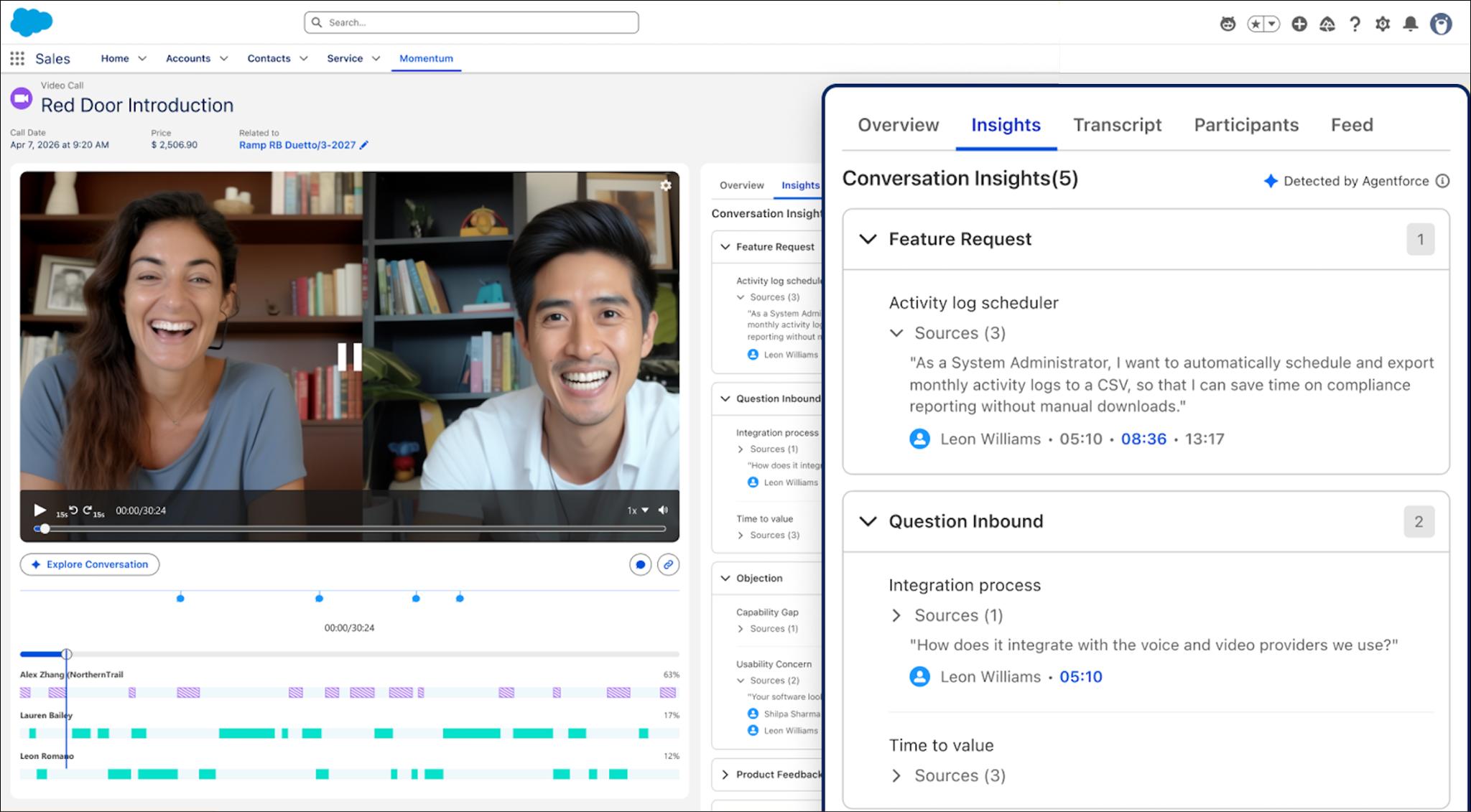
Here’s what makes it different: It’s native to Salesforce. Rather than sitting in a separate tool, it keeps the videos and transcripts of your calls right in the CRM, next to the account, opportunity, and contact they belong to. Then it fills in the fields you’d normally update yourself. The payoff is a more complete Customer 360 and a solid foundation for Agentforce, which can only act intelligently on data it can see.
The Problems Momentum Solves
If that late-afternoon scramble feels familiar, you already know the pain. Revenue teams everywhere wrestle with the same friction.
-
Scattered, disconnected data: Conversations live in silos across calls, email, and meetings, so no one has a single, chronological view of the customer journey.
-
Manual CRM entry: You spend hours logging notes, yet critical fields like next steps and competitors stay stale, incomplete, or just plain wrong.
-
Lost information across teams: With sales, product, service, and marketing all working complex deals, critical details get lost in translation between handoffs.
-
Pipeline blind spots: Your leaders rely on optimistic guesses instead of evidence from actual conversations.
The common thread? Your most valuable customer insights are trapped in conversations that no system was reliably capturing. Until now.
How Momentum Works
Momentum follows a simple model: capture, analyze, and act.
-
Capture: It lands every call, email, and meeting in Salesforce as trustworthy data, with consent and privacy controls built in, so nothing gets missed.
-
Analyze: It turns that raw conversation into structure and judgment, pulling out the signals that matter and writing them to the right CRM records.
-
Act: It helps you move deals forward by updating fields, surfacing key moments in Slack, and giving Agentforce the context it needs to act.
This model comes to life through four pillars, the outcomes you feel day to day.
Pillar |
What It Does for You |
|---|---|
|
Forecasting
|
Builds forecasts from what was actually said in your deals, so pipeline numbers reflect real conversations, not estimates. |
Coaching |
Bases coaching on real calls, so feedback points to specific moments instead of secondhand notes. |
Executive Briefs |
Pulls themes from conversations across many deals, so leaders can see the big picture, like product feedback or competitive trends. |
Account Growth |
Connects insight across your interactions with an account to show where there's room to expand. |

User Roles
Momentum helps more than just reps. Everyone who touches a deal, from managers to executives, works from the same shared source of truth.
-
Sales professionals spend less time on data entry and more time selling, because calls log themselves.
-
Managers and enablement leads get to coach from real conversations instead of secondhand summaries.
-
RevOps gets cleaner pipeline data and forecasts grounded in evidence.
-
Customer success gains full context on every account, so nothing gets lost in the handoff.
-
Product and marketing hear direct signal from the field about what customers actually ask for.
-
Executives see what's really happening across the business, not just the optimistic version.
Wrap Up
After looking at how scattered conversations quietly cost you deals, now you know how Momentum’s Conversation Intelligence captures, analyzes, and acts on those conversations to turn talk into trusted CRM data. You also understand the problems it solves, the capture-analyze-act model, the four pillars, and how every revenue role benefits.
And this is just the starting point. Once every conversation becomes structured data, your agents, reports, and workflows can all draw on it. They work from what actually happened in your deals, not a partial picture.