Explore Data Marketplace and MDM SaaS
Learning Objectives
After completing this unit, you’ll be able to:
- Use CLAIRE GPT to browse categories, collections, and orders in the Data Marketplace.
- Discover and explore business entities, match rules, and records in MDM SaaS.
- Download filtered data results to CSV for further analysis.
Discover More Data Sources
Not all of Cloud Kicks’s data lives in a catalog table. Some data is packaged and shared through Data Marketplace, and some of it lives in MDM SaaS as governed business entities like customers or products. The Discovery Agent works across both, and this unit covers how Ana uses it in each.
Follow Ana as she uses CLAIRE GPT to track down a sales data collection in the Data Marketplace, explores customer records in MDM SaaS, and exports her results to continue to analyze data outside of CLAIRE GPT.
Browse the Data Marketplace
Data Marketplace organizes data into categories and collections, and consumers can place orders to gain access to a collection. Ana asks CLAIRE GPT to search for categories related to a topic, such as sales, and it returns a summary of matching categories she can explore further.
For example, when Ana needs data for a quarterly regional sales report, she asks CLAIRE GPT to find categories related to sales. It returns a list of matching categories. After Ana picks the one relevant to her region, CLAIRE GPT lists the data collections inside it. From there, she identifies the exact collection she needs and opens it in Data Marketplace to place an order for access.
Example prompt:Find Data Marketplace categories related to sales.
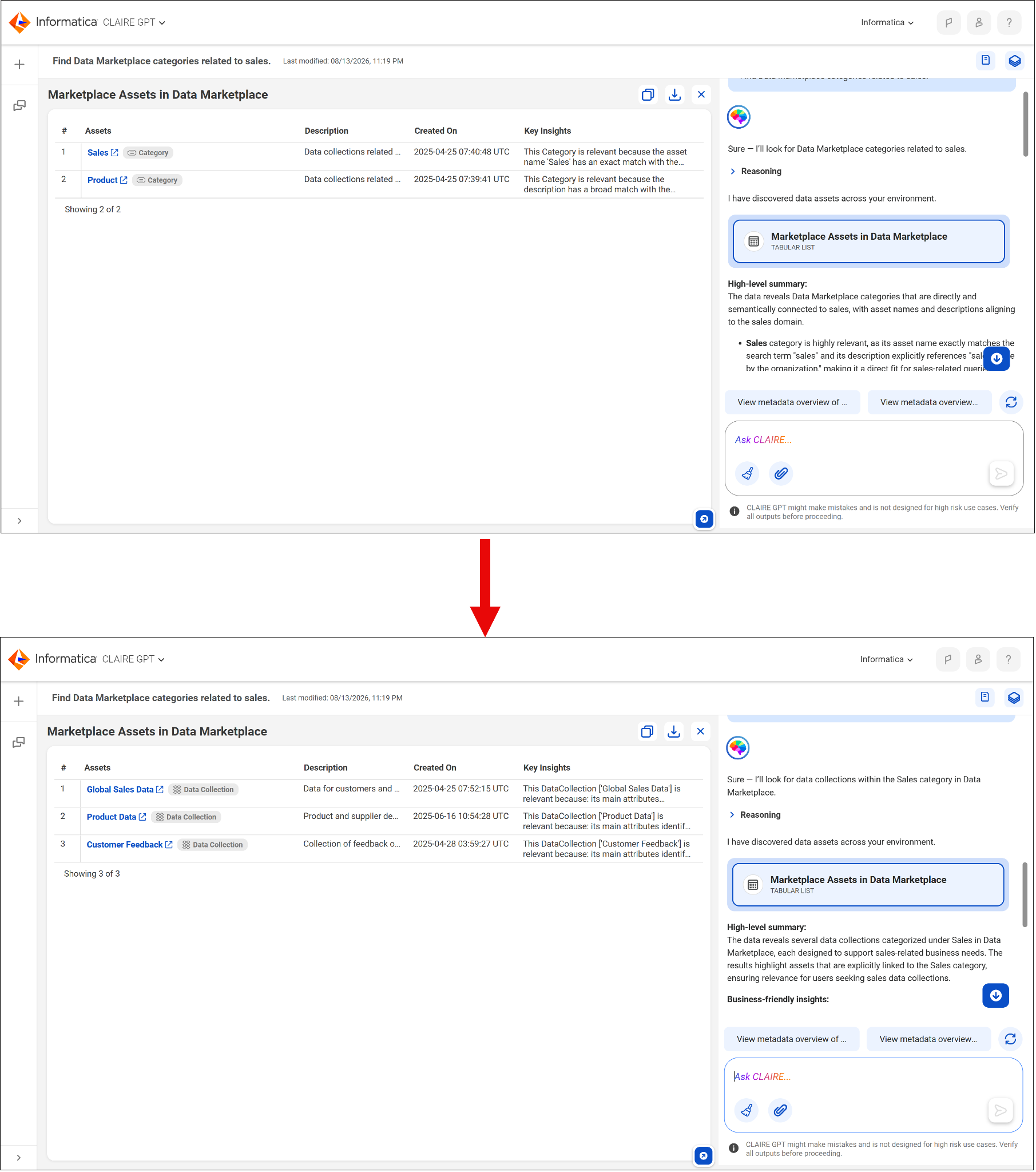
Ana needs data for Cloud Kicks’s quarterly sales report but doesn’t know Data Marketplace holds it. She asks CLAIRE GPT to show categories related to sales, narrows in on the regional sales category, and finds the specific quarterly data collection she needs—without leaving the conversation to browse the Data Marketplace catalog manually.
Explore Business Entities, Match Rules, and Records in MDM SaaS
MDM SaaS stores governed records for business entities like customers, products, and suppliers, spread across applications such as Customer 360 SaaS, Product 360 SaaS, and Supplier 360 SaaS. Ana asks CLAIRE GPT to discover all business entities available. She then explores the metadata of a specific one, including its searchable attributes, match rules, survivorship rules, and data quality rules.
Match rules determine how MDM SaaS identifies duplicate or related records for the same real-world entity, and survivorship rules determine which values win when records are merged. Ana doesn’t need to configure these rules herself, but since she understands that they exist, she can interpret why certain records appear or are consolidated the way they are when she explores them.
Example prompt:Show me all business entities available in MDM SaaS, and the match rules for the Person entity.
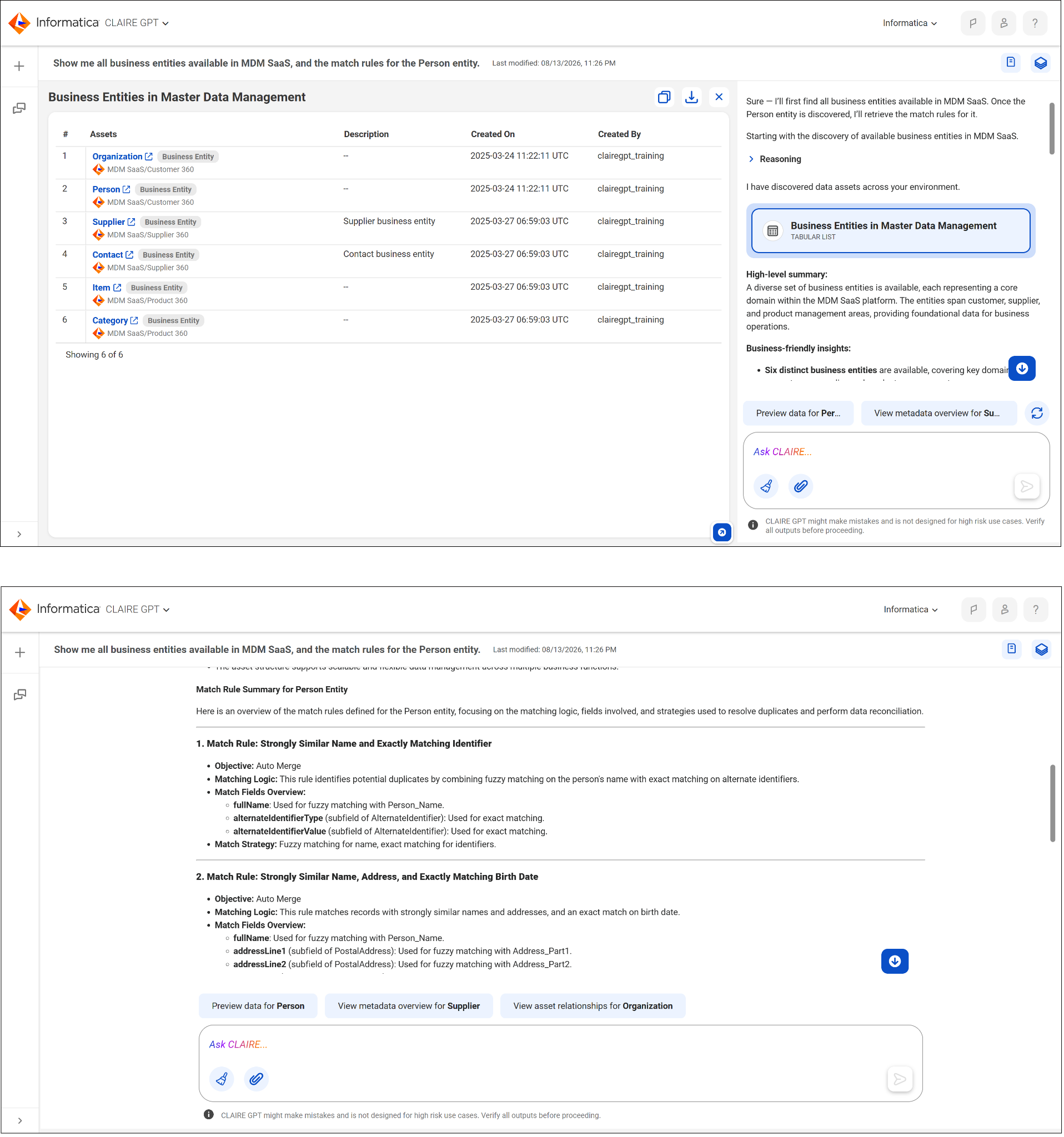
Once Ana understands a business entity’s metadata, she explores its actual records using field values as search criteria, for example, asking for customer records located in California. CLAIRE GPT returns a sample of matching records in a table.
Example prompt:Show me customer records in the Person entity located in California.
Ana wants to understand why two customer records for what appears to be the same person have merged into one in a recent report. When she explores the Person business entity’s metadata, she finds the match rule linked the two records based on a shared email address, which explains the merge.
Download Results to CSV
Once Ana has a set of records or a filtered result she’s happy with, she doesn’t have to continue to work in CLAIRE GPT. She can copy the sample data directly to a CSV file, or select Download to export it, which makes it easy to bring her results into a spreadsheet or another analysis tool for the next step of her work.
This is important because CLAIRE GPT is a starting point for analysis, not necessarily the place Ana finishes it. A clean export lets her hand off a filtered, already-vetted dataset to the tool she uses for deeper modeling or reporting.

Check out this video to learn how the Discovery Agent helps you find data assets.
After Ana filters California customer records by loyalty segment, she clicks Download to export the results as a CSV and then brings that file into her usual reporting tool to build the final chart for her presentation to Cloud Kicks’s leadership.
Wrap-Up
With Data Marketplace and MDM SaaS now part of your toolkit, you can find a dataset, trust its lineage and match rules, and export the exact data you need for further analysis. This completes the full discovery-to-analysis journey with CLAIRE GPT.