Simplify Meetings with Meeting Concierge
Learning Objectives
After completing this unit, you’ll be able to:
- Describe Meeting Concierge and how it reduces administrative burdens for wealth advisors.
- Identify the three stages of the Meeting Concierge lifecycle and what happens in each stage.
- Explain how Meeting Concierge connects with Run My Day and Client Detail Pages to support the full advisor workflow.
Overcoming the Burden of Meetings
So far, you learned how Run My Day gives advisors a prioritized list of their work. You also learned how Enhanced Client Detail Pages show aggregated client information to give advisors a quick understanding of their clients and their households. But advisors do their best work when they interact with clients, and that’s where Meeting Concierge comes in.
Meeting Concierge helps advisors plan, conduct, and follow up on meetings.
For example, financial advisor Ryan plans to meet with an at-risk client to build the relationship. In the past, his meeting prep alone took at least an hour. He manually pulled financial data, reviewed portfolio performance in a custodian portal, sorted through old emails, and typed out an agenda.
Now, he uses Meeting Concierge to get ready with AI-driven summaries, then runs the meeting and quickly follows up.
In this unit, explore the basics of Meeting Concierge and follow along with Ryan through the meeting lifecycle.
Meeting Concierge Basics
Meeting Concierge uses Agentforce to transform the meeting lifecycle, turning hours of manual work into minutes. It gives your firm tools to create a repeatable, AI-assisted workflow for meeting prep, note taking, and follow up. You open Meeting Concierge through a dedicated homepage or by selecting a meeting on the Run My Day page.
Each meeting has its own meeting playbook record. With simple Salesforce admin configuration, the system automatically creates these records when a client meeting appears on an advisor’s calendar, so there’s no need for manual record creation.
The system generates meeting playbooks from role- and task-specific meeting playbook definitions. Salesforce admins configure these definitions with the appropriate prompts, action plans, and Agentforce actions for each specific meeting type. Setup is simple, with included templates and a low-code playbook builder that guides admins through the steps to configure meeting stages and assign the meeting playbook definition to specific permission sets. This unit doesn’t go deep into setup, so check out the Meeting Concierge badge on Trailhead for more details.
Each meeting playbook organizes an advisor’s work into three stages or tabs: Pre Meeting, In Session, and Post Meeting.
To better understand what Meeting Concierge does, explore it in action as Ryan moves through each stage.
Pre-Meeting Preparation
A flow automatically created Ryan’s meeting playbook when he created the client meeting event, so he finds it on the Run My Day home page. Ryan first checks the preparation stage of the playbook, which includes an AI-generated Client Summary covering the client’s financial health, goals, portfolio performance, past interactions, and life events. Agentforce assembles this summary from Salesforce and Data 360 data in seconds.
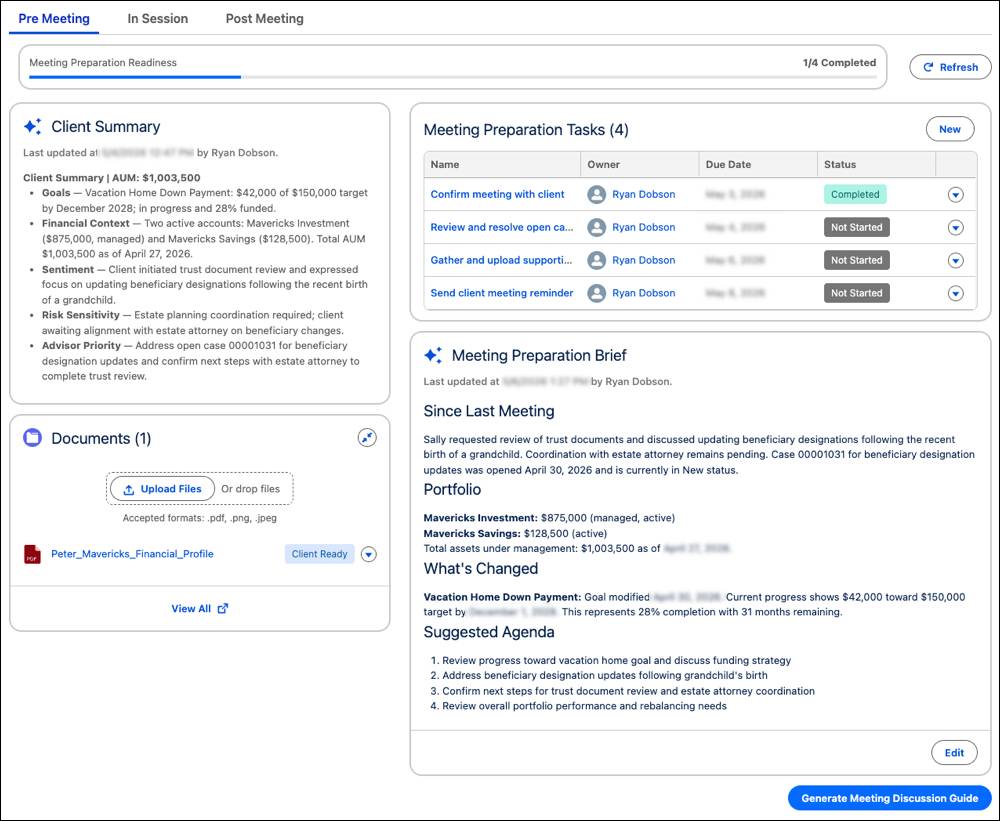
Ryan also reviews an Agentforce-generated Meeting Preparation Brief with a suggested agenda.
To change either the Client Summary or the Meeting Preparation Brief, Ryan can select Edit and then make changes, or direct Agentforce to revise the brief by describing what he wants to change.
Ryan works through a few meeting preparation tasks that his admin defined through an Action Plan. He also uploads a few relevant documents. When he uploads the documents, he selects the option for Agentforce to summarize them and add the new information to his pre-meeting summaries.
When Ryan’s ready to meet with the client, he clicks Generate Meeting Discussion Guide. Agentforce creates a summary and agenda for him to follow during the meeting.
In-Meeting Facilitation
When it’s time to meet, Ryan moves to the In Session tab in the meeting playbook. There, he uses the AI-generated Meeting Discussion Guide to stay focused on the agenda and critical client decisions. As with the other AI-generated summaries and briefs, he edits the guide before the meeting by making changes or asking Agentforce to revise the output.
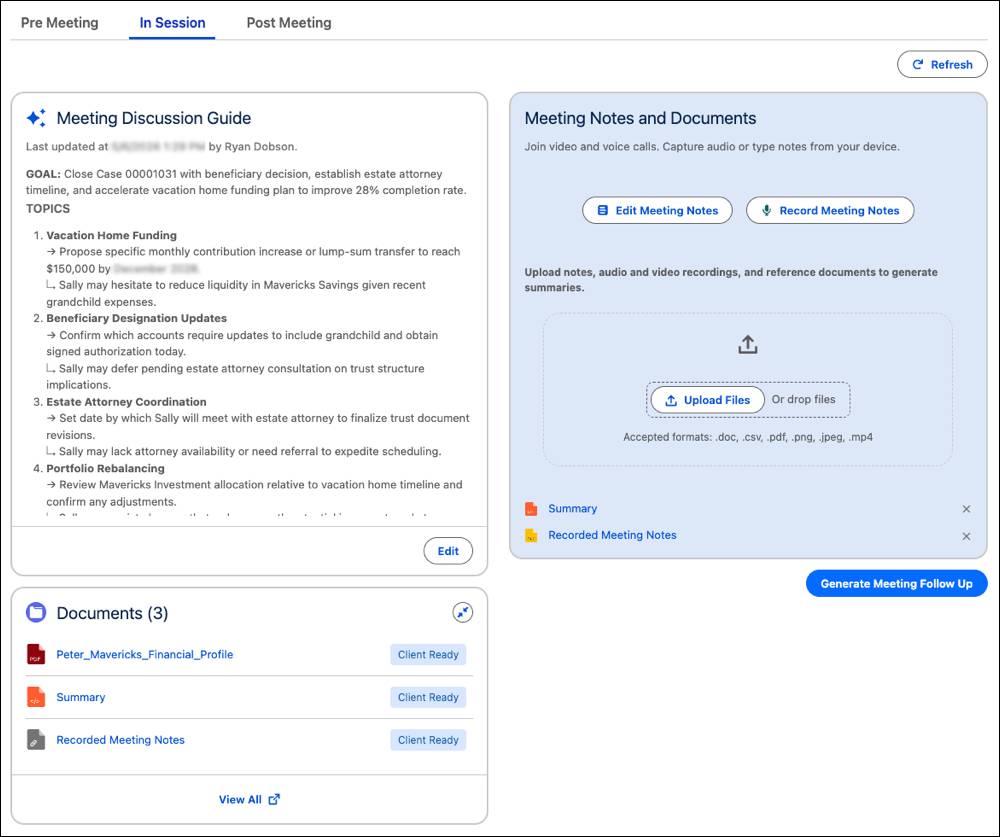
Ryan captures audio of the meeting with his client’s consent, types notes directly into the meeting session, and uploads reference documents. He also uploads any handwritten notes from the session. The system captures the conversation’s full context—written notes, audio summaries, and uploaded materials—in the meeting playbook.

As the meeting ends, Ryan knows that he captured every important client detail. He selects Generate Meeting Follow-Up to move to the Post Meeting tab and generate follow-up notes.
Post-Meeting Follow-Up
As Ryan moves to the Post Meeting stage, Agentforce combines meeting notes with the client’s Salesforce and Data 360 data to generate a structured follow-up summary covering the topics discussed, decisions made, and next steps.
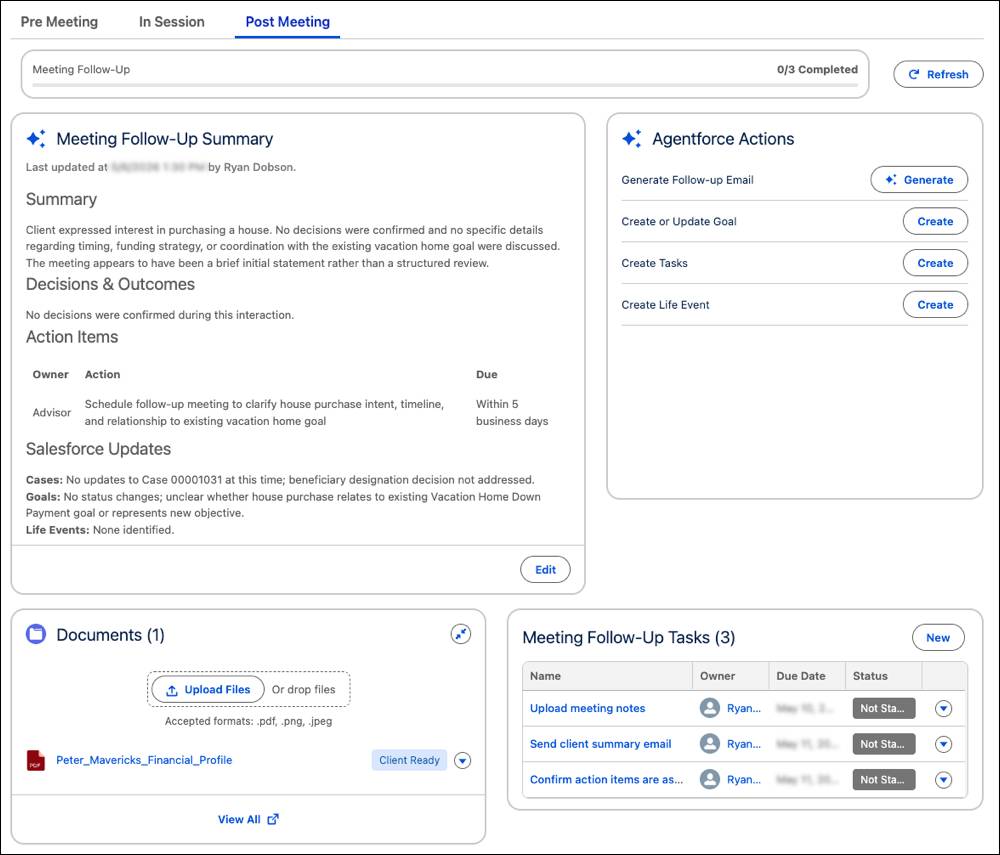
Ryan reviews, refines, and saves the Meeting Follow-Up Summary to the record. The generated summary becomes part of Salesforce records only after Ryan accepts and saves it, so he stays in control of what’s tracked in his firm’s single source of truth.
For follow-up tasks, Ryan uses post-meeting Agentforce actions, such as:
- Drafting a follow-up email
- Updating financial goals
- Creating follow-up tasks
- Updating household members
- Creating referrals
Agentforce ranks actions relevant to the meeting summary. He also works through a list of meeting follow-up tasks so nothing slips through the cracks.
As Ryan completes his final follow-up task, he’s confident that the client is no longer at risk of taking their business to another firm. With the combined features of the Agentic Advisor Experience suite, Ryan built the relationship and found another opportunity to grow the client’s business with his firm.
What’s Next?
In this unit, you learned how Meeting Concierge transforms the full meeting lifecycle, from pre-meeting preparation to in-meeting facilitation and post-meeting follow-up.
In the next unit, dive into another tool to help your team grow revenue: Intelligent Referral Management.