Get to Know Release Management
Learning Objectives
After completing this unit, you’ll be able to:
- Describe the release process and related challenges.
- Explain how Agentforce IT Service helps IT teams schedule and manage releases.
Before You Start
Before you start this module, consider completing this recommended content.
Manage Releases in IT
The release process is the grand finale that caps off all of an IT team’s efforts to maintain and improve the systems they oversee. Each release involves planning, testing, and deploying approved changes. Careful planning and implementation is essential to avoid disruptions that can affect business operations. Along with system maintenance, releases can also encompass hardware and infrastructure upgrades, or development of documentation and training materials.
Releases are often a balancing act between speed and stability. For example, emergency changes require that teams work quickly to fix one or more critical issues affecting business operations. At the same time, they must exercise caution to avoid conflicting work or errors that could potentially make things worse.
As you learned in Change Management in Agentforce IT Service, your org includes objects, tools, and automation for systematically processing changes and measuring their impact on system stability. In that badge, you also explored the full lifecycle of a change request, from creation and classification to resolution and knowledge capture. However, you left off at the final, crucial step: deploying the change.
In this badge, you cross the finish line by learning how to plan and organize your system fixes and updates in Agentforce IT Service. With Release Management, you can be sure that your teams schedule and carry out each change with precision and expediency, no matter its size or scope.
Release Management in Agentforce IT Service
Release Management helps IT teams coordinate as they deploy all types of system or hardware modifications. Its data model integrates with many of the other processes and elements in the Agentforce IT Service suite.

If you haven’t already, make sure to check out Agentforce IT Service Basics to learn more about what’s included with Agentforce IT Service.
With connected data, your team can track all of the underlying details of each release, including the historical context and the involved risk level. Release Management also simplifies release scheduling and task assignments, and helps you measure the impact and success of your release work.
Let’s explore the included features and benefits of this solution.
Consolidated Data
The release record is your primary source of truth for tracking the scope and impact of a release. This record connects to all associated incidents, problems, change requests, and even other releases to give you a full view of the scope of the involved work.

Release Management also centralizes asset data within the configuration management database (CMDB). This way, you can associate the configuration items (CIs) with the release in which they’re implemented. With a consolidated view, release managers can easily visualize dependencies. This helps them to accurately assess the potential risk and impact of a deployment on related systems and services before taking action.
IT Service Calendar
The IT Service Calendar is the ideal tool for scheduling your releases. Release managers can use the calendar to coordinate schedules, track both regularly scheduled and emergency deployments, and avoid conflicts with maintenance windows or business moratoriums. Users can view details about a release by opening records directly from event blocks on the calendar. To focus on only the most relevant deployments, you can filter the calendar view by release type, status, or priority.
Action Plans
To standardize your release activities, create action plans from templates and attach them to release records. The release action plan contains a set of assigned tasks for each stage of deployment to help you manage granular steps and ensure consistent, orderly execution.
For example, create an action plan template for an emergency release. This template includes common tasks, such as initiation and assessment, communication and monitoring, and post-incident and recovery.
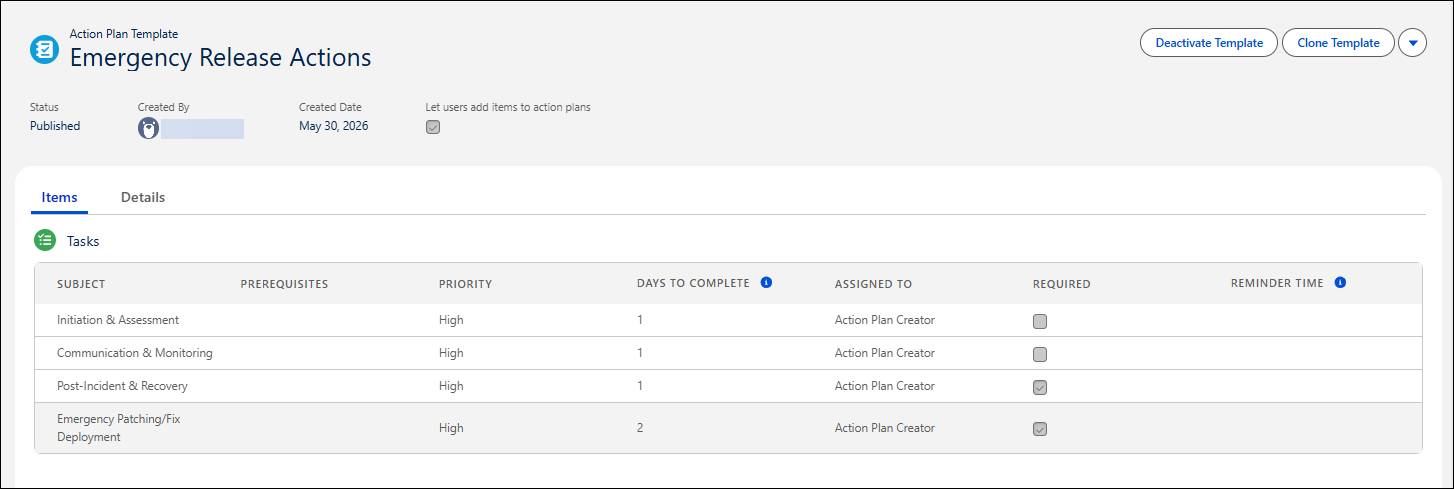
Then, quickly create an action plan from the template, associate it with a specific release, and assign the individual tasks to the appropriate team members who are best fit to complete the work.
Analytics and Tracking
Using the Release Dashboard, release managers get a centralized view of upcoming releases, associated risks, and any deviations from planned dates. They can also view the approval status of changes connected to the release, and the volume of associated incidents or problems.
Wrap It Up
Releases can be complex and more than a little stressful. Luckily, Agentforce IT Service gives you all the tools you need to break down even the most intricate projects into manageable tasks, ensuring affected systems and infrastructure remain reliable at every step.
In this unit, you explored the basics of Release Management. Next, you discover the workflows, objects, tools, and dashboards for making your next release a smooth, incident-free experience.