Discover the Metadata and Data Deployment Feature
Learning Objectives
After completing this unit, you’ll be able to:
- List the benefits and use cases for using the metadata and data deployment feature.
- Explain the differences between change sets and the metadata and data deployment feature.
- Describe the process for deploying metadata and data to a target org.
Move Metadata and Data Changes Without the Stress
You’ve built a new feature or a product catalog in a sandbox, and now it’s time to deploy the changes to production. Typically, this means moving metadata with change sets and then using a separate tool, such as Salesforce Data Loader, for configuration data.
Enter the metadata and data deployment feature in DX Inspector—your deployment express lane. This feature moves metadata and configuration data from your current org to a target org in one go. It’s the perfect deployment solution for smaller changes, where setting up a full DevOps pipeline creates unnecessary overhead.
Why Choose Metadata and Data Deployment Over Change Sets?
Change sets are a go-to for Salesforce admins deploying customizations, but they come with limitations. In comparison, metadata and data deployment offers greater flexibility.
Here’s a side-by-side comparison of change sets and the metadata and data deployment feature.
|
Change Sets |
Metadata and Data Deployment |
|---|---|---|
Data migration |
Metadata-only deployment. Requires tools like Data Loader to migrate configuration data. |
Moves metadata and data together. Supports up to 1,000 records per data object and 10,000 data records in total. |
Deployment connection |
Limited to orgs that are affiliated with the same production environment. For example, a production org and its sandbox, or two sandboxes from the same org. |
Connect to any sandbox, scratch org, or production environment and authenticate directly. |
Editing |
After you upload, the package is locked. If you forget one field, you must clone the package, create a new version, and start the upload process all over again. |
Dynamic selection and filtering right up until deployment. |
User experience |
Manual selection across many pages if you have thousands of changes. Also, you can’t add different metadata types simultaneously. |
View changes in a unified Change Management page and add different metadata types in one go. Select data dependencies up to 10 levels and metadata dependencies up to 50 levels. |
Real-Life Scenario: Deploying a Survey System
Imagine you’re a solo admin at a growing company. You just spent a week building a survey configuration system in a sandbox. It includes:
-
Metadata: A custom object called Survey Configuration and 10 custom fields
-
Data: 50 records that define how surveys behave
Deploy with Change Sets
You create an outbound change set and spend considerable time manually checking for dependencies so you don't miss any fields. You upload it, wait for the email, and then deploy the change set to production.
Wait, you’re only half done…
Then, you export the 50 records from the sandbox, map the IDs in a CSV, and use Data Loader to load them to production, hoping you don’t break the deployment or spend hours debugging.
How to Deploy with DX Inspector
But there’s a better way. You can use the metadata and data deployment feature in DX Inspector to run the deployment process from the Change Management page in one go. This feature is available in your sandbox, scratch orgs, and development environments. It takes just a few clicks.
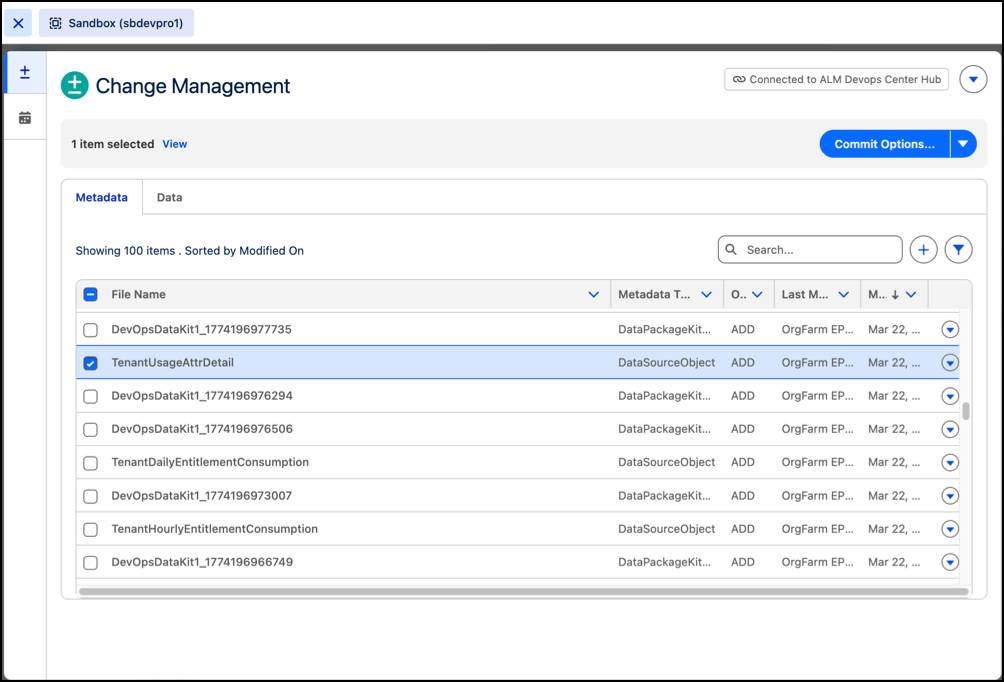
- From the DX Inspector panel, select the Change Management tab.
- On the Metadata tab, select the metadata changes and dependencies that you want to deploy.
- On the Data tab, select the objects and dependent objects, and then add filters to move only the records you need.
- Select your target org, authenticate, and click Deploy.
It’s as easy as it gets!
When you need more governance in your deployment process, use DevOps Center to move changes through a structured, compliant workflow.