Les superbadges vous permettent d'appliquer les compétences que vous avez acquises à des problèmes professionnels complexes et concrets. Ces évaluations exigent un niveau plus élevé de compétences et de connaissances. Il ne s'agit pas de défis à relever étape par étape et leur réalisation nécessite souvent plus de temps.
Get Ready for the Superbadge: Object Relationships
Introduction to Superbadges
Heads-up! A superbadge is different from other learning on Trailhead. It's a hands-on technical skills assessment where you take business requirements and apply your skills to build something amazing, without the step-by-step guidance. We have provided recommended learning and Help articles filled with resources to aid you along your journey. The estimated completion time assumes prior experience with the superbadge concepts and completion of the recommended learning. Your hard work will pay off!
Assessment Objectives
In this superbadge, you’ll:
- Determine the appropriate data model for standard and custom objects.
- Configure object relationships with standard and custom objects.
- Explain unique relationships of standard objects.
- Build an app in App Builder.
Recommended Learning
Before you start this superbadge, consider completing the recommended content. This provides a knowledge base to help you complete the technical skills assessment.
Content |
Description |
|---|---|
|
|
Set up a Lightning app to streamline the travel approval process. |
|
|
Use picklists, filters, formulas, and other tools to customize an object in your org. |
|
|
Give your data structure with objects, fields, and relationships. |



Prework and Notes
Sign Up for a Developer Edition Org with Special Configuration
To complete this superbadge, you need a special Developer Edition org that contains specific configuration and sample data designed to work with the challenges in this superbadge.

Connect Your New Developer Edition Org to Trailhead
- Make sure you’re logged in to your Trailhead account.
- Select Connect org from the Choose a hands-on org screen.
- On the login screen, enter the username and password for the Developer Edition org you just set up.
- On the Allow Access? page, click Allow.
- On the Want to connect this org for hands-on challenges? page, click Yes! Save it. You are redirected back to the Get Ready for Superbadge page and ready to use your new Developer Edition org to earn this superbadge.
- Now that you have a Salesforce org with special configuration for this superbadge, you’re good to go.
Review the Data Model Optimization Superbadges: Trailhead Challenge Help Article
Tips
- Make sure you save your work before running the challenge check.
- We recommend following best practices and always including descriptions for configurations. However, we’re not checking for descriptions in this superbadge.
Use Case
Art Tenor has managed some of the most successful bands over the last 25 years, including Run SFMC, the Feed Fighters, and Metadatallica. His newest band, Flow & the Low Codes, dropped their first album, “A Momentary Lapse of Memory” four months ago. The album and their hit song “No More Mr. Wi-Fi” has risen to number one on the alt-rock charts, and the team at Tenor Management is putting together the band’s first world tour.
As the Salesforce admin for Tenor Management, you are responsible for uploading and tracking all of the band’s songs, album information, tour data, and more, in one single World Tour Manager app that you will be creating. Get ready because you will be asked to make regular changes, updates, and reports for the management team, the band, and other parties as requested.
Standard Objects
The World Tour Manager app will use these standard objects.
-
Account: Venues for shows, vendors, streaming services, studios, and fans.
-
Contact: Fans, venue personnel, agents, producer, or manager.
-
Campaign: Tours (or groups of performances) by a particular band or a combination of bands (such as a music festival). Examples: World Tour, Errors Tour, and the Trailblazer Tour.
-
Campaign member: These are contact records related to a campaign.
Custom Objects
As the Salesforce admin, you are responsible for maintaining the custom objects that interact with standard objects to keep track of all the elements that go into a tour. These custom objects represent details such as new songs, track lists, and even guest performers that can be updated and shared with stakeholders. The custom objects include:
-
Song: Includes fields such as Written by, Duration, Album, and so on.
-
Album: A collection of songs released together with band and production information, artwork, and bonus tracks.
-
Track list: A list of songs for a live show.
-
Artist: These are the singers, writers, and performers involved with the songs, albums, and even tours if it’s a guest artist performing with the band on a particular night.
-
Performs On: This object is used to connect Artists to Songs, in the future Art wants to be able to connect Artists to Albums too, however, that is out of scope for right now.
Entity Relationship Diagram (ERD)
Review the current model in Schema Builder and the diagram to understand how the band is using standard and custom objects. The entity relationship diagram illustrates these relationships.
- The Account object has a master-detail relationship from the Contact object.
- The Play Tracker object has required lookups with the Account and Song objects.
- The Campaign object has a many-to-many relationship with the Campaign and Contact objects through the Campaign Member object.
- The Campaign and Song objects have a many-to-many relationship with the Track List object.
- The Song and Artist objects have many-to-many relationships with the Performs On object.
- The Account object has a lookup relationship from the Campaign object.
- The Account object has a lookup relationship from the Contact object.
- The Album object has a lookup relationship to the Song object.
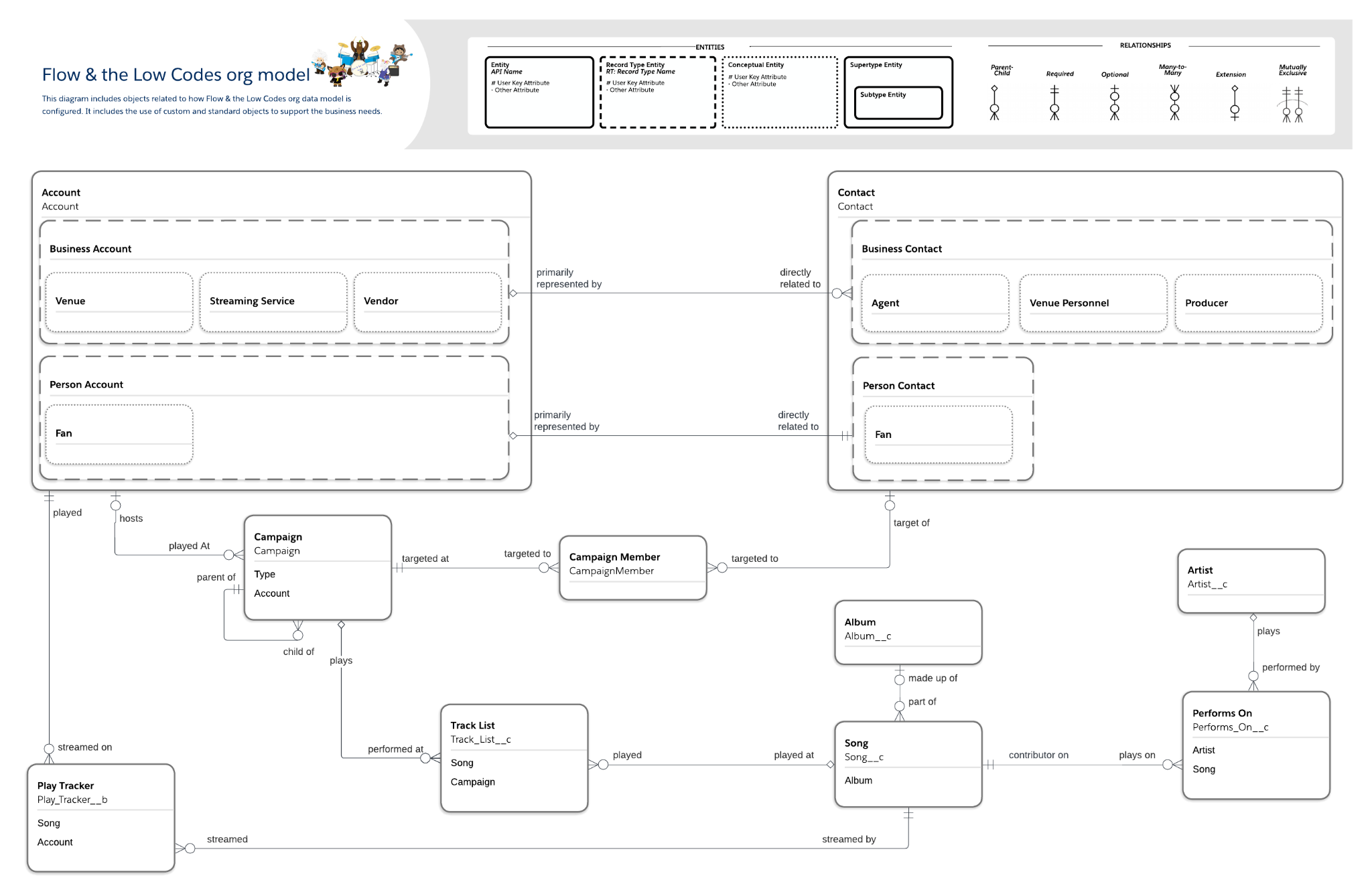
Downloadable PDF of the Entity Relationship Diagram (ERD).