Review Best Practices and Discover Analytics Tools
Learning Objectives
After completing this unit, you’ll be able to:
- Summarize the best practices for setting up your learning data model.
- Explain how reporting and analytics work alongside the Learning Data Model.
- List the steps for developing your own learning data model.
- Review frequently asked questions about the Learning Data Model.
Your tour of the Learning Data Model in Agentforce Education is almost complete! In this unit, you discover the best practices for configuring your data and explore helpful reporting and analytics features to keep tabs on your academic operations. You also round out your data model knowledge by reviewing responses to questions that customers often have about the various objects and relationships.
Learning Data Model Best Practices
While Agentforce Education gives you great flexibility in how you structure your academic offerings, there are a few best practices we recommend you consider before and during configuration.
Data Governance and Quality
As with setting up any system, some brainstorming is necessary to identify the best approach for structuring your data to meet the needs of your institution and ensure scalability. This planning might entail using the objects you’ve learned about throughout this badge as a guide to sketch out sample academic offerings and program plans. It’s also helpful to decide on consistent naming conventions for each type of record as well as your version control methods. This continuity will help you down the line during audits and curriculum reviews and also helps students to understand and visualize requirements during registration.
Data Integration
Extend the capabilities of your model by integrating data from external systems. Using Agentforce Education APIs, you can connect, organize, and unify data from various sources, such as your learning management system, student information system, or enterprise resource planning system, without needing to manage the underlying data model directly. The Agentforce Education API model simplifies the data structure, making integrations easier and more consistent.
By mapping data from your LMS, you can gain critical insights about your course catalog and track course participation, attendance, grades, and other granular information to enhance and personalize your academic operations. When integrating LMS data, you map course information to the Learning Course and Course Offering objects.
By using Agentforce Education alongside Data 360, you gain additional benefits, including automated creation and mapping of Agentforce Education data into Data 360 for deeper analytics and activation.
For more details on connecting your data with Agentforce Education APIs, refer to the links in the Resources section.
Compliance and Security
Another important step is determining what data should be accessible to your staff and other users. Set up role-based permission sets and permission set groups to limit access to sensitive information. For example, to maintain student privacy, make sure that only advisors, registrars, and other dedicated staff can access a learner’s final grades. With a well-planned security model, you can protect your data, maintain privacy for students, and comply with local laws and regulations.
Your centralized learning data helps you manage your academic offerings and student journeys, but it also serves another valuable purpose: providing the basis for reporting and analytics.
Reporting and Analytics
In Agentforce Education, you can use prebuilt CRM Analytics dashboards to monitor your academic operations. Because these dashboards connect to information captured in your data model, including prerequisites, courses, outcomes, and achievements, you can compare and predict course enrollments across terms and academic years. You can also quickly view the number of students who have completed specific program requirements, track the uptake of new elective courses, and identify the courses or programs where learners most often struggle.
The Home screen of the Academic Operations app provides insights across learning programs and courses, including active courses and course enrollments across terms.
For example, here’s a dashboard component showing the number of applications over time and the overall application pipeline.
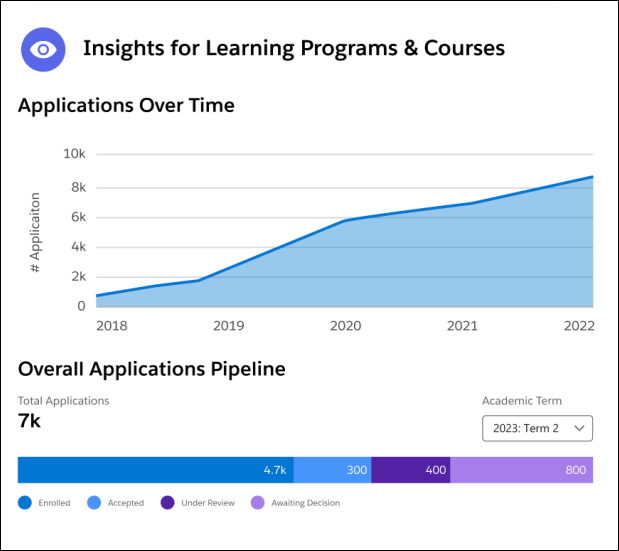
With these insights at your fingertips, you can measure the efficiency of your institution’s learning programs, application processes, and faculty management.
Curriculum Modeling Steps
Now that you understand the basics of modeling your academic catalog, we recommend taking these steps as you adopt the Learning Data Model.
-
Pilot a small program: Start small by configuring one or two learning programs to test out how your model supports common workflows and tasks, and develop a plan for scaling the curriculum structure to accommodate your currently available and planned offerings.
-
Train stakeholders: After you’ve arrived at a consistent approach for your data model, decide who should have the ability to create programs and courses, such as registrars or other staff, and provide guidance on how to set up programs, courses, and requirements. Then, train your academic advisors and other staff on using Agentforce Education apps and tools alongside the data.
-
Expand incrementally: Slowly grow your catalog by incorporating additional programs into your defined structure.
-
Review and optimize: Keep track of what’s working and areas for improvement in your academic operations, and refine your curriculum model as needed to improve efficiency.
By following these steps, you can ensure that your curriculum structure works for everyone at your institution, including your faculty, staff, and students.
Frequently Asked Questions
The Learning Data Model is purpose-built for supporting all types of academic curriculums, but there are a lot of intricacies that lead to confusion. Understandably so! Hence, before we wrap up, here are some frequently asked questions regarding the data model.
Question |
Answer |
|---|---|
What is the purpose of the Learning entity? |
It stores important information and relationships to important data about your courses and programs, such as accreditation details and learning outcomes. |
Is a Learning record the same thing as a Learning Program or Learning Course? |
No. Learning records are not the same as Learning Programs and Learning Courses. The Learning record captures essential details of a learning opportunity, such as its name, type, and provider, which remains consistent regardless of how it’s delivered. The connected Learning Program or Learning Course defines further details about the delivery. |
Instead of using Learning records, can’t I just add some custom fields to the Learning Program and Learning Course objects? |
No. The Learning record provides a parent record for your Learning Programs and Learning Courses. It also connects essential components, including Learning Outcome Items and Learning Foundation Items. |
Can I have multiple Learning Programs or Learning Courses roll up to one Learning record? |
No. The Learning record provides a one-to-one relationship with either a Learning Program or Learning Course record. Agentforce Education validates this relationship to prevent additional records from referencing a paired Learning record. |
What’s the difference between a Learning Achievement and a Learning Outcome Item, and why are they separate entities? |
A Learning Achievement represents the credential a student earns, including details such as achievement type and award date. A Learning Outcome connects this achievement to a Learning record and represents requirements or milestones. By using this separation, you can link a single achievement to multiple programs or courses, ensuring consistency and scalability. You can also link a course to broader requirements without altering the core course or achievement. |
What if I need to add an entire catalog of Learning Programs or Learning Courses? Do I need to add each one separately? |
While the Learning Wizard is great for creating and managing programs and courses, you can use Extract, Transform, Load (ETL) or other data loading tools to quickly create several programs and courses in bulk. Agentforce Education provides APIs that you can leverage to manage large inputs of information using graphs. With this approach, you can create and parse information without the need for multiple data loading operations. |
Wrap Up
In this badge, you discovered how Agentforce Education provides a flexible framework for structuring your academic offerings. You also explored the tools for building out your curriculum and integrating external data, as well as a few best practices and examples to guide your data modeling. Now that you’re equipped with the basics, you’re ready to begin building your own academic information structure that will best serve your students and staff.