Classify and Rate Assets
Learning Objectives
After completing this unit, you’ll be able to:
- Explain the purpose of classification labels applied to assets.
- Describe how data classification supports governance and compliance.
- Filter assets by classification in search.
- Rate an asset and explain how community ratings help surface trusted data.
What Is Data Classification?
Data classification is the process of identifying and organizing data into relevant categories based on the functional meaning of its contents. It helps organizations manage risk, meet compliance requirements, and protect sensitive information.
When a catalog source job runs in Cloud Data Governance and Catalog (CDGC), it automatically searches your data and adds a label to each column. It tells you what kind of information that column holds. You don't have to do anything. The system figures it out.
Angela opens the Customer_Details file and selects the Contains tab. She immediately reviews classification labels on several columns—Email, Phone, and Country. Without needing to inspect the raw data, she and Arif can review exactly what kind of information each column holds.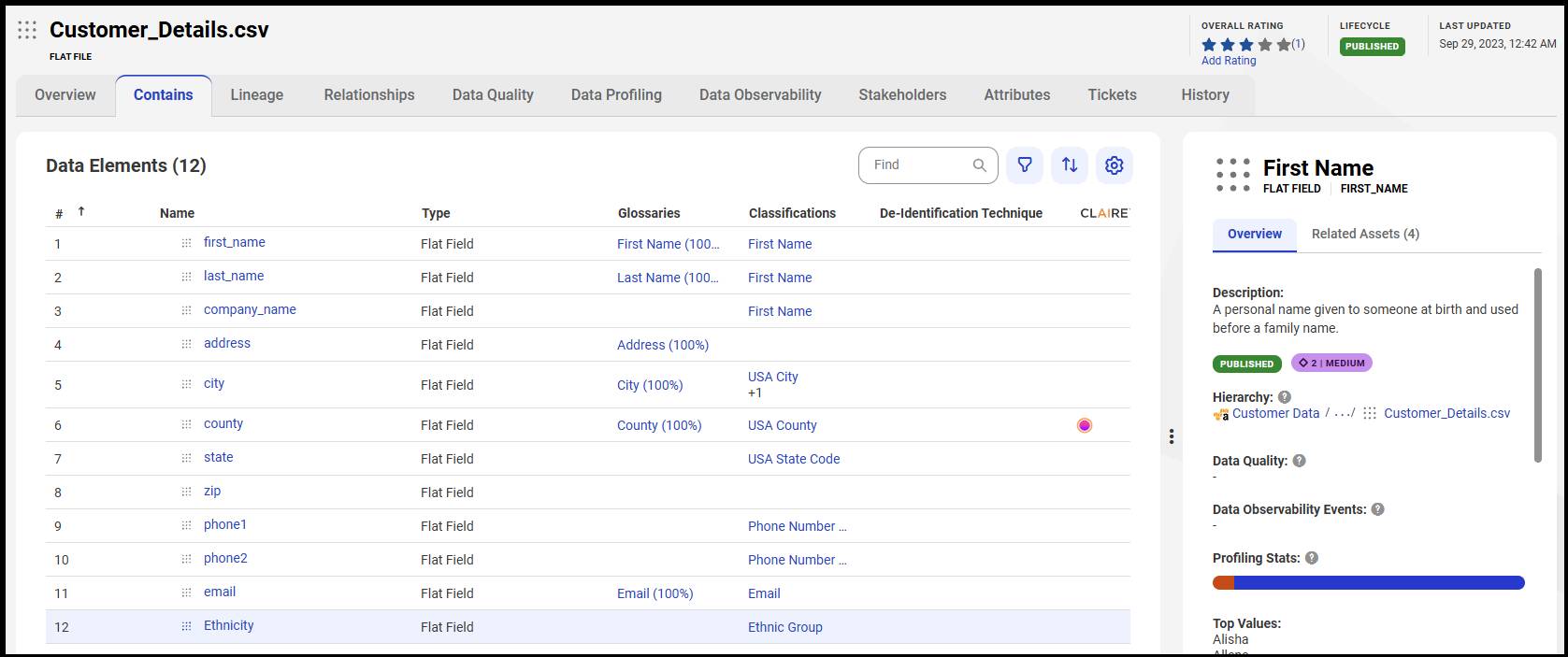
CDGC supports three types of data classifications.
-
Data element classification: This classification is applied to individual columns or fields—the most granular level. For example, a column might be classified as Credit Card or Email.
-
Data entity classification: This classification is applied to a whole table or file when a group of columns together represents a recognizable entity, such as a person or customer.
-
CLAIRE-generated classification: This classification is applied by CLAIRE, which analyzes column names and metadata and automatically suggests classification labels, even without predefined rules.
Each classification also carries a sensitivity level. By default, CDGC supports three levels.
-
High: Confidential data such as credit card numbers, customer emails, or financial records
-
Medium: Moderately sensitive data such as employee IDs or internal contact details
-
Low: Non-sensitive, public information such as geographic region names
Angela notices that the Credit Card column has a High sensitivity label. She mentions this to Arif—this column has the strictest access controls applied to it, and the governance team has policies in place to protect it.
Why Classification Supports Governance and Compliance
For Arif, reviewing those labels is immediately useful. He now knows his campaign should avoid pulling credit card data and that email data is subject to access controls.
For the organization as a whole, classification enables:
-
Risk management: Teams can identify where sensitive data lives and take steps to secure it.
-
Compliance: Regulatory requirements often demand that organizations know exactly where confidential data is stored. Classification makes that visible at a glance.
-
Data stewardship: Stewards can filter the catalog for high-sensitivity assets and prioritize which ones need governance attention.
-
User confidence: When Arif notices that a column is classified and sensitivity-labeled, he knows the data has been reviewed and that he can proceed with confidence.
Filter Assets by Classification in Search
Angela helps Arif find all assets with a specific classification label using search filters in CDGC. In the search results, she opens the Filters panel and selects a classification category such as Email or Credit Card. She can also write search queries using classification attributes to find all assets associated with a particular type of sensitive data across the catalog.
Arif checks whether any other datasets tagged with the Email classification are available for his campaign. He finds two additional tables, both with Medium sensitivity labels, which are a better fit for his outreach use case.
Rate Assets
Classification tells Angela and Arif what a dataset contains. Ratings tell them how much their colleagues trust it.
CDGC lets any user rate a published asset on a scale of 1 to 5 stars. Ratings are community-sourced—each user rates an asset once, and CDGC displays the average rating and the total number of raters.
To rate an asset:
- Open the asset.
- In the Overall Rating section, select Add.
- Select the stars that represent the rating.
- Optionally, add a comment to explain the rating.
- Select Add.
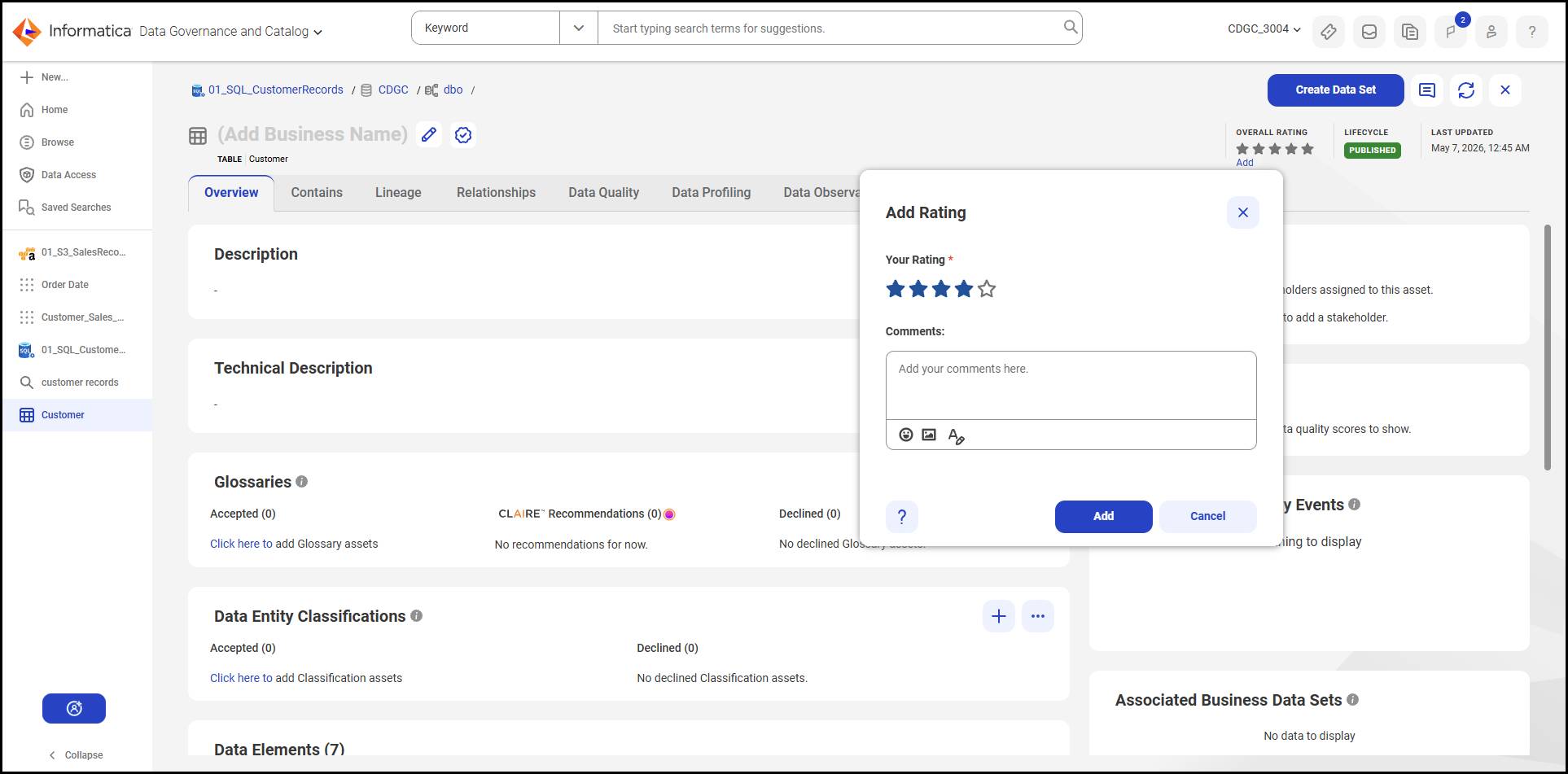
Angela gives the table 4 stars and adds a comment that the email and postal code columns are complete and consistently formatted. Arif reads the existing ratings from other colleagues and notices that the asset has a strong average—enough for him to feel confident using it for his campaign.
Community ratings work alongside classification labels to help teams make better data decisions. A well-classified, highly rated asset is a reliable starting point for any analysis or outreach project.
Arif now has everything he needs to use the Customer_Details dataset with confidence. Profiling revealed its structure and completeness, data quality scores showed whether it meets governance standards, and classification labels told him exactly what kind of information it contains—and how sensitive it is. A strong community rating from colleagues confirmed it's a trusted source.
In this badge, you learned how to profile a data asset, interpret quality scores, identify classification labels, filter assets by classification, and rate an asset to help your team make better data decisions.
Resources
- Informatica Documentation: Data Classifications (login required)
- Informatica Documentation: Rating an Asset (login required)