Structure Accounts for Compliant Engagement
Learning Objectives
After completing this unit, you’ll be able to:
- Describe how Agentforce Life Sciences models healthcare professionals and organizations.
- Identify key objects used to track provider specialties, licenses, and identifiers.
- Explain how to map relationships and influence networks using affiliations.
- Describe how contact points and preferences are structured to support compliant engagement.
Know Who You’re Engaging
Every compliant interaction in life sciences, whether it’s a field visit, digital message, or medical inquiry, starts with a clear understanding of who the organization is engaging. That question is deceptively complex. Healthcare professionals (HCPs) and healthcare organizations (HCOs) often work across multiple locations, hold several credentials, and participate in extensive networks of influence.
Without a structured account foundation, teams risk misaligned outreach, eligibility errors, or compliance gaps. Agentforce Life Sciences addresses this by extending Salesforce’s standard Account model with healthcare-specific objects that represent credentials, specialties, affiliations, and communication preferences. Together, these components create an accurate, reliable profile for every provider.
In this unit, you see how each part contributes to a complete picture of an HCP or HCO. We begin with the core identity layer.
Set the Foundation with Accounts and Healthcare Providers
Every provider record in Agentforce Life Sciences starts with two linked objects: Account and Healthcare Provider. The Account object represents either a person (HCP) or an organization (HCO). The Healthcare Provider object adds life-sciences-specific metadata such as classification, provider type, and regulatory attributes.

For example, Cumulus Pharma models a provider like Dr. Aaron Morita, a pulmonologist affiliated with Metro Medical Hospital, using these two objects as the foundation of his profile.
The table below breaks down the role of each object and shows how each one supports this structure.
Object |
Description |
Example |
|---|---|---|
Account (1) |
Represents individuals or organizations. Person accounts model HCPs; business accounts model HCOs. |
Cumulus Pharma creates a person account for Dr. Aaron Morita and a business account for Metro Medical Hospital. |
Healthcare Provider (2) |
Extends the Account record with life-sciences-specific details such as provider type, classification, and regulatory information. |
Dr. Morita's healthcare provider record captures his professional designation and more. |
With Account and Healthcare Provider linked 1:1, the HCP record becomes a single workspace for planning and compliant execution. The Insights tab gives field teams a fast read on what’s happening with this provider, plus quick actions to move from prep to outreach.

Insights are only as trustworthy as the structured data behind them. The surrounding tabs (like Details, Affiliations, Ratings, and Consent) are where Agentforce Life Sciences captures the regulated facts that make engagement precise—who the provider is, what they’re qualified to do, and what restrictions apply.
Next, you explore the credential layer.
Define Credentials with Specialties, Licenses, and Identifiers
Once a provider’s identity is defined, the next step is capturing their clinical scope, legal eligibility, and regulated identifiers. Agentforce Life Sciences models these elements as independent records, not as simple fields. This structured approach enables automation, segmentation, and compliance checks across the system.
There are four key identifier objects layered onto the account foundation.
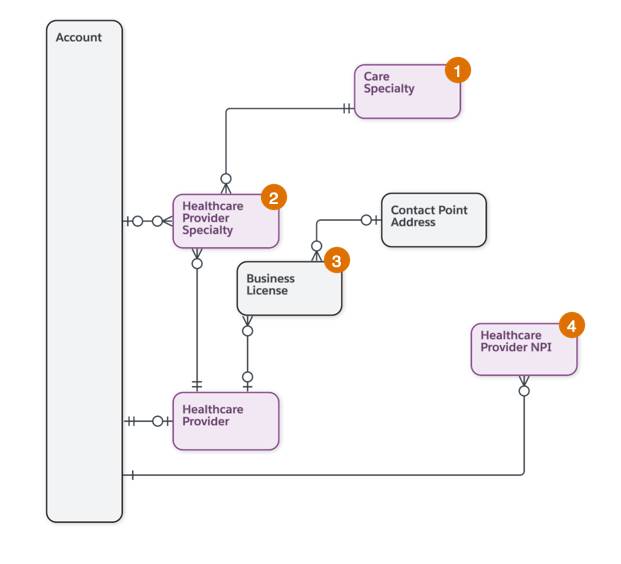
Building on the account foundation, Cumulus Pharma models specialties, licenses, and identifiers as structured records to capture the clinical and regulatory context for providers like Dr. Aaron Morita.
The table below breaks down the role of each object.
Object |
Description |
Example |
|---|---|---|
Care Specialty (1) |
Represents a clinical specialty category. |
Cumulus maintains a master list that includes specialties like Pulmonology and Internal Medicine. |
Healthcare Provider Specialty (2) |
Junction object linking a provider to a Care Specialty. |
Dr. Morita is linked to Pulmonology, his specialty. |
Business License (3) |
Represents a professional license with number, issuing authority, and expiration. |
Dr. Morita’s active California medical license. |
Healthcare Provider NPI (4) |
Stores the provider’s National Provider Identifier. |
Dr. Morita’s NPI number. |
Modeling credentials this way supports precise, scalable workflows. Teams can segment providers (for example, “licensed pulmonologists in California”), automate credential imports from external sources, and enforce guardrails that prevent sampling or messaging when a license is expired or an identifier is missing. Each object adds regulated context the system can interpret and validate, so every engagement starts from accurate credential data.
Next, let’s explore provider affiliations.
Map Influence with Provider Affiliations
Providers rarely operate in isolation. They admit at hospitals, consult with peers, and shape treatment decisions through informal networks. The Provider Affiliation object captures those connections by linking one Account to another, so you can understand not just who a provider is, but who they’re connected to.
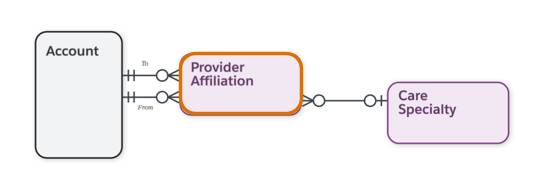
For example, Dr. Aaron Morita’s connections to Metro Medical Hospital and other specialists are represented explicitly in the data model.
Affiliations are directional: Each record explicitly stores a From account and a To account. That makes the relationship easier to interpret in context—for example, an HCP connected to a hospital, or a collaboration between two specialists. You can also associate a Care Specialty to clarify what clinical context the affiliation relates to.
With affiliations, you analyze referral patterns, identify key stakeholders around an HCP, and trace influence pathways for planning and compliant engagement. Depending on the job at hand, users review affiliations in a table view for quick scanning, as shown here, or switch to a network view to visualize the broader web of relationships.
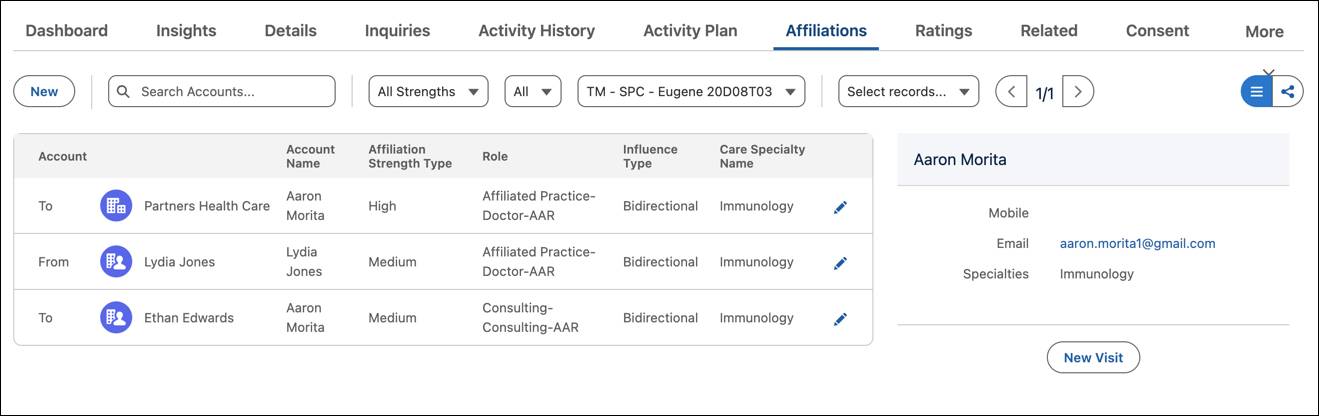
Affiliations help field teams spot relationship type, strength, and influence in seconds, and decide who else matters around the account. They can then schedule a visit directly from the profile, and record details about their engagement.
Capture Engagement Details with Contact Points and Preferences
The next layer defines how to accurately and compliantly reach a provider. Instead of storing a single phone number or address directly on the Account, Agentforce Life Sciences uses Contact Point objects to represent each address, phone, email, or digital channel as its own record. That structure makes it easier to support multi-location providers, keep contact data current, and apply consent and preferences at the channel level.
.

To support compliant outreach, Cumulus Pharma models how providers can be contacted across locations and channels. For example, Dr. Aaron Morita may have multiple practice addresses, phone numbers, and communication preferences, each captured as structured records in the system.
The table below identifies the contact point objects that define where, when, and how a provider can be reached.
Object |
Description |
Example |
|---|---|---|
Contact Point Address (1) |
Represents a physical practice location linked to an Account. |
Dr. Morita has two Contact Point Address records—one for Metro Medical General Hospital and one for his private clinic. |
Contact Point Social (2) |
Represents professional social platforms. |
Dr. Morita engages on LinkedIn for peer exchange. |
Contact Point Email (3) |
Stores a distinct professional email address. |
His clinic email is used for routine communications. |
Contact Point Phone (4) |
Stores mobile, office, or fax numbers as separate records. |
His mobile is flagged for urgent matters only. |
Contact Point Best Time (5) |
Indicates preferred times for visits or calls, linked to a specific address. |
Tuesdays and Thursdays, 8 a.m.–11 a.m., at his primary office. |
Because each channel is modeled independently, teams can plan outreach with more precision by choosing the right location, the right time, and the right channel for the situation. The model also supports more granular compliance: Consent and preferences can be tied to specific Contact Point records instead of being applied to the provider as one undifferentiated “contact.”
For field users, these details are especially valuable on mobile. The Provider Card surfaces key contact points and preferences alongside location and credential context, so reps can plan and execute compliant engagement while they’re in the field.
From Foundations to Activation
At this point, you’ve seen how Agentforce Life Sciences uses structured data to represent the “who” of engagement:
-
Account and Healthcare Provider establish identity and regulated metadata.
-
Specialties, Licenses, and Identifiers define clinical scope and legal eligibility.
-
Affiliations map influence and organizational context.
-
Contact Points and Preferences capture how and when to connect.
Together, these objects create a unified, accurate provider profile that supports consistent, compliant activity across commercial, medical, and support teams.
With this “who” in place, Cumulus can now turn to the “what” and “where” by defining Products and Territories to determine which offerings apply to each provider and which users are authorized to engage them.