Quote and Manage Policies
Learning Objectives
After completing this unit, you’ll be able to:
- Explain how a unified platform connects product design to policy administration.
- Describe the main stages of the policy lifecycle.
- Explain the journey from quote to serviceable policy.
- Describe how policy changes, such as endorsements and renewals, are managed.
Turn Product Models into Executable Policies
In insurance, quoting and policy administration aren’t just operational steps. They’re how your product is offered to a customer, bound into a contract, and adjusted over time. These moments test whether your systems are aligned.
Too often, quoting logic and policy systems drift apart. Teams reenter data. Ratings differ across channels. A simple coverage change creates complexity and risk. The result? Slow service, increased cost, and inconsistent outcomes.
Salesforce Digital Insurance eliminates these gaps by connecting every stage of the policy lifecycle, from first quote to final renewal, on a single platform.
This unified model means that the product definition you formulated during product modeling informs every quoting experience and every policy transaction, whether handled by a producer in a Digital Insurance app or a customer in a self-service portal. Every decision flows from the same source of truth.
In this unit, let’s look at how the policy lifecycle plays out.
Follow the Policy Lifecycle
Digital Insurance supports the lifecycle of a policy as a structured sequence of connected events. Each stage runs through governed services that ensure accuracy, traceability, and compliance.
Here’s how the lifecycle is structured and how Digital Insurance supports each step.
Stage |
What Happens |
Digital Insurance Capabilities |
|---|---|---|
Quote |
Collect risk and coverage details to generate a compliant price. |
Use the Quote Configurator to guide producers through product selection, structure, and pricing. Expose the same logic via APIs for self-service and partner channels. |
Underwrite |
Evaluate risk and apply rules to approve or escalate. |
Auto-approve standard submissions or route exceptions to underwriters based on configurable rules. |
Issue |
Convert an approved quote into a policy and activate coverage. |
Use issuance services—reusable platform actions called from Flows or APIs—to convert quote records into structured policies, calculate fees, and connect the policy to billing. |
Endorse |
Apply mid-term changes to the policy structure or coverage. |
Handle real-time endorsements and manage complex updates, such as out-of-sequence changes. |
Renew |
Extend or adjust coverage at the end of the policy term. |
Support automated renewals or bulk updates at scale. |
Cancel |
Terminate coverage and manage financial outcomes. |
Calculate refunds, track cancellation reasons, and manage reinstatements if needed. |
Each policy event creates a versioned snapshot, so every change is captured with complete historical context. This way, teams always know what changed, when, and why.
Now that you have seen the stages, let’s follow a producer and a customer through this journey.
Quote the Policy
Quoting is where a product model becomes an offer. The system gathers risk information, applies eligibility and configuration rules, and prices the selected coverages, so the quote reflects the same structure and logic the insurer intends to service later.
In the last unit, Justus Pardo, a product administrator at Cumulus Insurance, built Auto Gold, a personal auto product designed to support real-world complexity. In this unit, Riley Zhang, a licensed producer at Cumulus, helps a new customer purchase an Auto Gold policy.
Riley opens the Insurance app and starts a quote from the customer’s account page. She selects Browse Catalogs from the newly created quote record to review the product catalog. Qualification rules filter the catalog based on the customer’s location and risk profile, so only relevant products appear. The customer is interested in and eligible for Auto Gold, so Riley selects it and launches the Quote Configurator from the Lines tab of the new quote record.
The Quote Configurator renders the Auto Gold product model as a guided UI for configuration, using its structure, attributes, and rules to drive what the broker sees and can select.
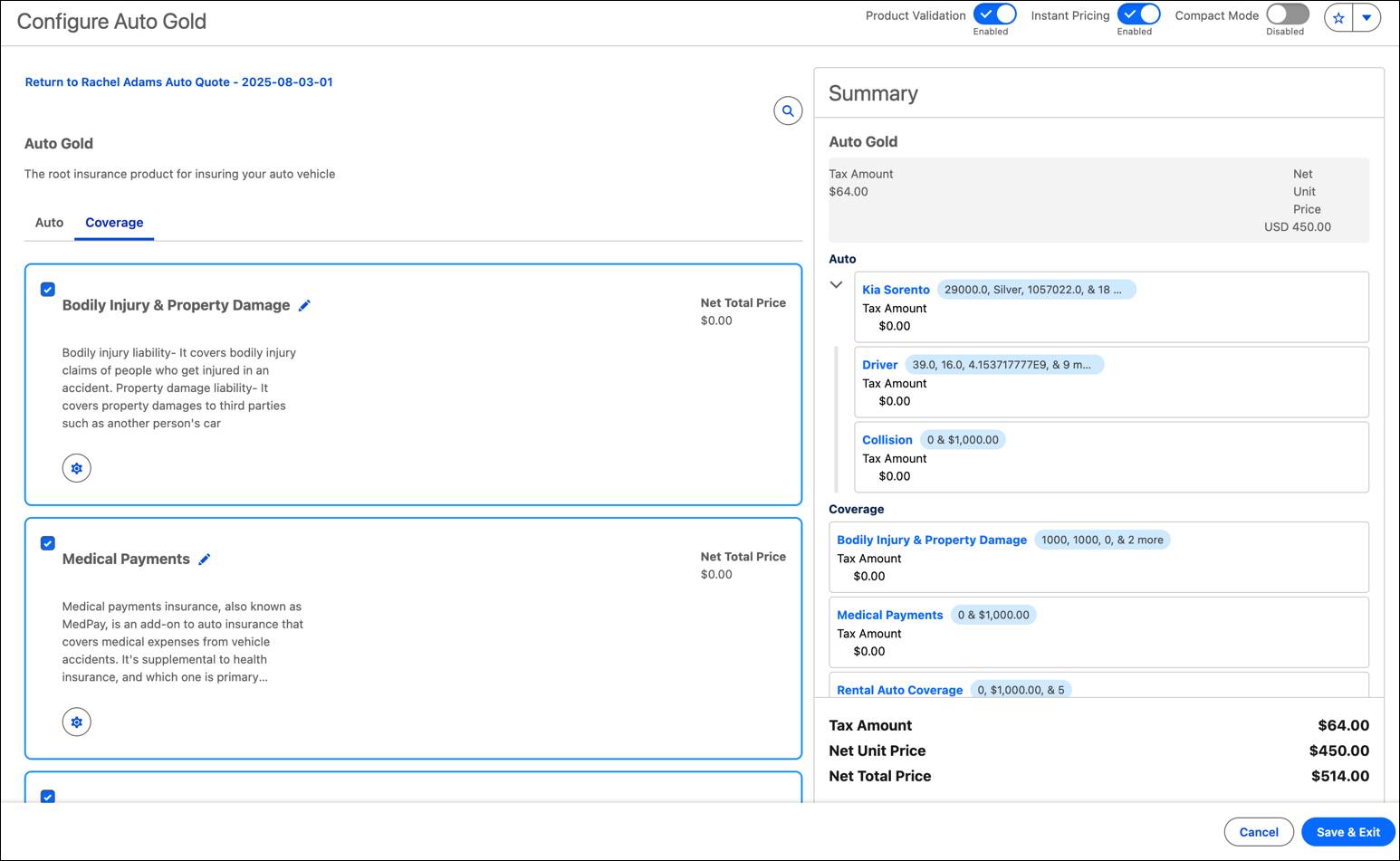
Riley works through the quote by:
- Selecting and configuring policy-level coverages
- Adding vehicles and choosing vehicle-level coverages and options for each
- Confirming driver information that will serve as input for rating
As she goes, product rules guide the experience. Some options are automatically included based on vehicle characteristics. Others are hidden or unavailable based on jurisdiction, eligibility, or valid deductible and limit combinations.
This is also where dynamic attributes matter. Certain inputs can be pulled from related records, such as information already stored on the account record, so the quote stays consistent with system data and doesn’t require duplicate entry.
As Riley builds the quote, the premium is updated in real time. The summary panel shows how the total is derived, including rating factors and any applicable surcharges.
When she finishes, the quote reflects the full Auto Gold structure and is ready for underwriting and issuance. The same product-driven logic can support quoting across channels, whether a producer, broker, or customer in a portal.
Underwrite and Approve
Underwriting determines whether a quote can be issued as-is or needs review. This step evaluates risk and applies underwriting rules to approve standard cases automatically while routing exceptions to the correct level of oversight.
Underwriting rules are defined as part of the product model. They evaluate factors such as driver history, selected coverage limits, and location. Quotes within standard risk parameters can be approved automatically. Quotes that exceed thresholds, such as recent violations or unusually high coverage limits, are flagged for human review.
In this case, the customer’s clean driving record and typical coverage selections meet Cumulus guidelines for automatic approval. When Riley submits the quote, the underwriting rules run and return an approved status, so the quote is ready to issue.
Whether automated or manual, underwriting decisions follow the same logic. That consistency supports fast turnaround for routine risks and controlled handling for higher-risk quotes.
Issue the Policy
Issuance turns an approved quote into an active contract. It’s a structured transaction that converts quote selections into policy records, applies taxes and fees, and creates a versioned baseline for everything that follows.
After receiving an emailed copy of the quote, the customer approves it, and Riley issues the policy directly from the quote record.
Issuance services convert each part of the quote into the corresponding policy structure. The same coverages, deductibles, limits, and term details are carried over automatically. Taxes and fees are calculated using the configured surcharge logic. The platform then creates the first versioned snapshot of the policy, establishing the starting point for future changes.
On the new policy record, the Policy Structure tab displays each coverage selection, insured vehicle, and driver selection.
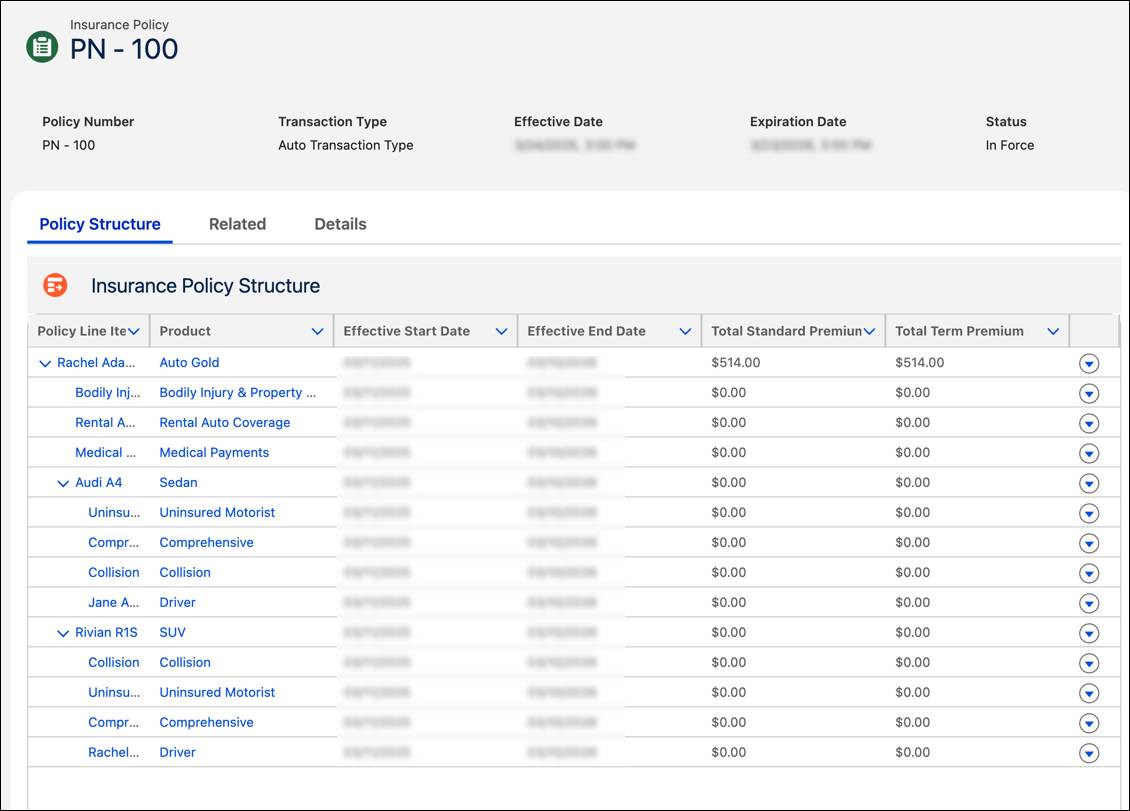
The policy is now in force.
Manage Mid-Term Changes with Endorsements
Very few policies stay entirely static. Customers add vehicles, update addresses, and modify coverage during the term. Digital Insurance supports these updates through endorsements, which are structured transactions that create new policy versions while preserving a complete history.
To start an endorsement, Riley launches the configurator from the policy. The configurator opens in endorsement mode, displaying the current policy structure so she can make changes without overwriting prior versions.
If a customer buys a second car, Riley adds the new vehicle. The platform recalculates premium for the remaining term and saves the result as a new policy version, leaving the prior version intact.
A week later, the customer reports she moved houses three weeks earlier. Riley starts another endorsement and enters the correct effective date. Because the change belongs in an earlier point in the policy timeline, the platform processes it as an out-of-sequence endorsement. The endorsement applies the address update to the appropriate past version, then rolls the recalculation forward through later versions, including the one with the second car.
Riley doesn’t have to rebuild policy history manually. The platform keeps the sequence consistent and traceable, even when changes arrive out of order.
Manage Renewals and Cancellations
Renewal extends coverage into a new term while carrying forward a clear policy history. Depending on insurer strategy, renewals can be automated at scale or handled interactively when coverage needs adjustment.
As the customer’s 12-month term approaches its end, the system generates a renewal opportunity. For standard policies such as Auto Gold, Cumulus uses automated bulk renewals. The job applies current product logic and pricing to create a renewal quote, and the renewal can be issued automatically after the payment is confirmed.
If the customer wants to adjust coverage, such as removing collision for an older vehicle, Riley can open the renewal quote in the configurator, make updates, and issue the renewed policy.
Each renewal becomes a new policy term–a fresh coverage period saved as its own version–preserving continuity across the lifecycle. And if coverage ends instead, through a customer- or carrier-initiated cancellation, that transaction is also captured with effective dates, reasons, and any required return-premium calculations, so the policy record remains accurate regardless of how the policy ends.
What’s Next
You’ve now followed a policy from initial quote through issuance, servicing, and renewal, with each stage powered by the same product logic, clean workflows, and interconnected data model. That continuity means producers move faster, policy records stay clean, and downstream systems always have the correct information.
In the next unit, you shift focus from individual policies to group coverage and see how the platform handles enrollment, eligibility, and ongoing plan administration at scale.